manuals.online logo
Brands
  1. Home
  2. •
  3. Brands
  4. •
  5. Albion Chairs
  6. •
  7. Indoor Furnishing
  8. •
  9. Albion Chairs Uni Bespoke User manual

Albion Chairs Uni Bespoke User manual

Other Albion Chairs Indoor Furnishing manuals

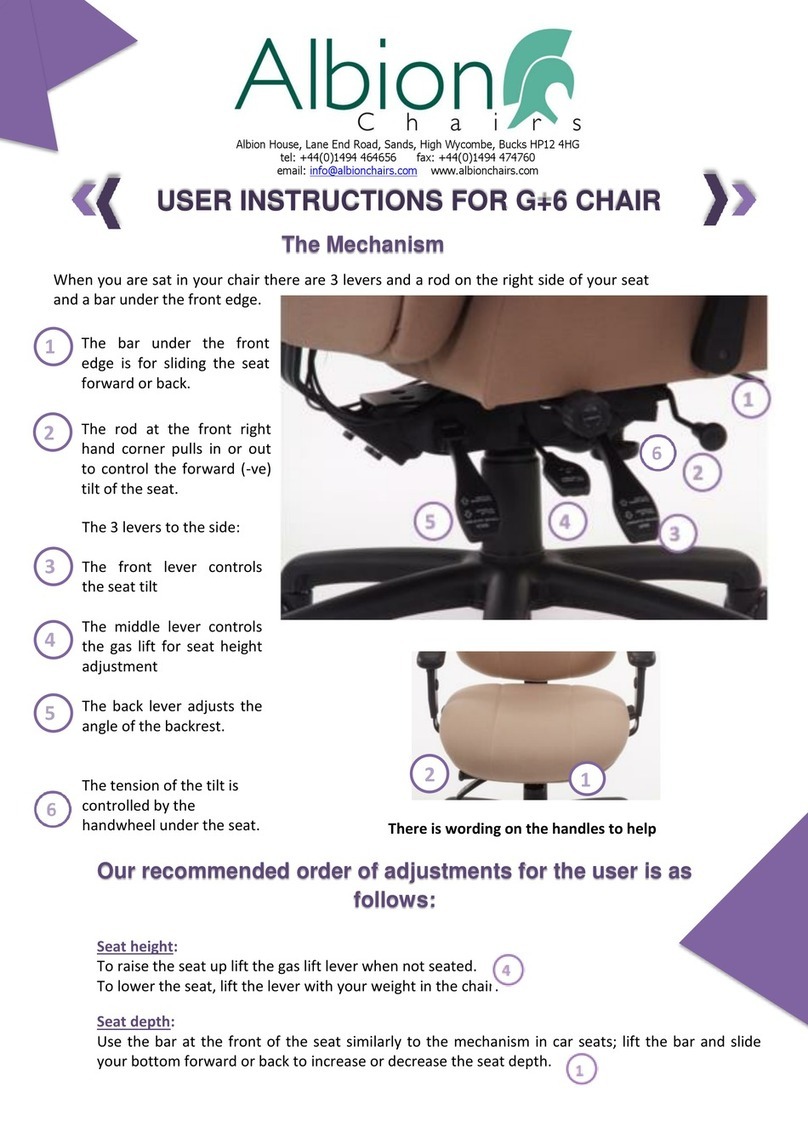
Albion Chairs G+6 User manual

Albion Chairs

Albion Chairs G+6 User manual

Albion Chairs SD12 User manual

Albion Chairs

Albion Chairs SD12 User manual

Albion Chairs Grande User manual

Albion Chairs

Albion Chairs Grande User manual

Popular Indoor Furnishing manuals by other brands

Regency LWMS3015 Assembly instructions

Regency

Regency LWMS3015 Assembly instructions

Furniture of America CM7751C Assembly instructions

Furniture of America

Furniture of America CM7751C Assembly instructions

Safavieh Furniture Estella CNS5731 manual

Safavieh Furniture

Safavieh Furniture Estella CNS5731 manual

PLACES OF STYLE Ovalfuss Assembly instruction

PLACES OF STYLE

PLACES OF STYLE Ovalfuss Assembly instruction

Trasman 1138 Bo1 Assembly manual

Trasman

Trasman 1138 Bo1 Assembly manual

Costway JV10856 manual

Costway

Costway JV10856 manual

moss DESIGN Caisson Credenza Assembly instructions

moss DESIGN

moss DESIGN Caisson Credenza Assembly instructions

Aquaglide FULL DECK 15.0 owner's manual

Aquaglide

Aquaglide FULL DECK 15.0 owner's manual

AREBOS AR-HE-SW30 user manual

AREBOS

AREBOS AR-HE-SW30 user manual

Till-Hilft Fulda 87005.330 Assembly instructions

Till-Hilft

Till-Hilft Fulda 87005.330 Assembly instructions

Twoey Outside 2010 quick start guide

Twoey Outside

Twoey Outside 2010 quick start guide

Hettich Easys 200 operating instructions

Hettich

Hettich Easys 200 operating instructions

The bedboss RELAX 404 Series owner's manual

The bedboss

The bedboss RELAX 404 Series owner's manual

Oeseder Möbelindustrie Bern 991 720 Assembly instructions

Oeseder Möbelindustrie

Oeseder Möbelindustrie Bern 991 720 Assembly instructions

Costway HW68469 user manual

Costway

Costway HW68469 user manual

Next ALIX A27743 Assembly instructions

Next

Next ALIX A27743 Assembly instructions

BROSA Hans Assembly guide

BROSA

BROSA Hans Assembly guide

Prodigg MINIKA PBA015T-FUR installation manual

Prodigg

Prodigg MINIKA PBA015T-FUR installation manual

manuals.online logo
manuals.online logoBrands
  • About & Mission
  • Contact us
  • Privacy Policy
  • Terms and Conditions

Copyright 2025 Manuals.Online. All Rights Reserved.

Uni Bespoke
User Instructions
The mechanism
We use the 5-way adjustable, heavy-duty mechanism for the Uni Bespoke chairs because it has the added advantage
that both the seat and back tilts can be locked independently in any position and has been rated up to 150kgs.
It comes with seat slide as standard as well as a ratchet backrest height mechanism and seat tilt tension controller.
1. Seat Slide Lever
On the left hand side of the seat is the lever to slide the seat
forwards and backwards and allows the seat to be adjusted
by up to 50mm
2. The Seat Height Adjustment Lever
Controls the gas lift for the seat height adjustment. Contrary to
popular belief, the rst consideration is to ensure your elbows/
forearms are at the correct height. Raise or lower your seat so
your desk height is at elbow height. If you can’t reach the oor
after this adjustment, then you need a footrest. The nal seat
height will depend on the nal seat angle you set.
3. Seat Posture Lever
Controls the seat tilt. When you lift this lever, the seat is free to
move. Push the lever down to lock. The best position is tilting
forward slightly as a tilting forward angle means your hips should
be a little higher than your knees; i.e. your thighs should slope
downwards as much as you nd comfortable.
This promotes better posture. Also, the further back you sit into
your chair, the easier you will nd it to control the seat tilt angle.
If you nd the seat tilt too difcult to control, then you will need
to slacken the spring by turning knob (5) anti clockwise. If you
nd it too easy to tilt, you need to tighten the knob (5) by
turning clockwise.
4. The Back Posture Lever
Controls the back tilt. Lift the lever to unlock. Push the
lever down to lock. This can be locked in any position. It is
recommended to set the backrest in an upright position to
ensure your spine is as straight as possible.
The backrest height works using an easy lift ratchet mechanism.
To raise the backrest simply lift the back with both hands one click
at a time. There are 8 clicks (locks) before you reach the top of the
ratchet and it will disengage. Drop the back down to the bottom
to re-engage.
5. Seat Tilt Tension Control
The tension of the tilt is controlled by turning the handle clockwise
(to increase) or anti clockwise (to decrease) the internal spring.
Order of setting posture: 2, 3, 4, 1, 5
Backrest tilt (16 degrees)
and height (ratchet)
adjustable (70mm)
4
Independent seat tilt adjustment
(23 degrees back angle and -ve 3
degree through to +ve 10 degrees)
3
Seat tilt tension control
5
Seat height adjustment
(average 465-600mm)
2
Seat slide
1
Our chairs enable different areas of your spine to receive personalisable levels of support; whether
by mechanical or pneumatic mechanisms. They can be tted as standard or prescribed as a result of a
workstation assessment. The benets of these applicators are felt in the backrest, the activators are located
around the seat pad as shown. Not all the pumps and handles shown will be found on all Uni Bespoke
chairs, but this will guide you through your particular version.
Headrest
We have 2 headrest options; the 2 pronged car seat design, HR and the single bar
double knuckled, HR2. Whether you need the support to act as cervical (top of
your spine) support, or in the nape of your neck or behind your head, you can raise,
lower and tilt the memory foamed support from your seated position to meet
whatever your needs. HR HR2
If your chair has a pump here, it is
our thoracic pump and will give you
additional support in the thoracic
(shoulder) part of your spine.
Increase the air in the support by
squeezing the bulb, release the
air by squeezing the valve.
If you have a round
handle on the left hand
side here, this handle will enable you
to adjust the height of the lumbar up
or down your spine. No chairs offer
this amount of adjustability.
If your chair has a round handle, it
is our lumbar adjuster and will give
you adjustable support in the lumbar
(kidney) part of your spine. Increase
the curve in the support by turning
the handle clockwise in the direction
of the + sign; decrease the curve by
turning the handle anti clockwise in
the direction of the - sign.
If your chair has
a pump here,
it is our lumbar
pump and will give
you adjustable
support in the
lumbar (kidney)
part of your spine.
Increase the air
in the support by
squeezing the bulb;
release the air by
squeezing the valve
If you have both the lumbar pump and
the round handle, you have 2 ways of
manipulating the lumbar area and hence the
ability to get the exact amount of you lumbar
you want but also to raise or lower this up or
down your spine to suit. See left hand side.
The pumps
If your chair has a pump here, it is
our sacral pump and will give you
adjustable support in the lowest
(sacral) part of your spine. Increase
the air in the support by squeezing
the bulb; release the air by
squeezing the valve
Uni Bespoke Instructions
The standard arm on Uni Bespoke models is our A5X; coded as such because it has 5 functions and
comes with a chrome nish (X).
A5X Arm Functions
Height adjustable
arm
Adjustable slide Adjustable swivel Adjustable
armpad width
Adjustable seat
width
To increase the height, simply lift the arm through
its 9 clicks until you reach the right height to support
your elbow/forearm. It is designed to match the
working height of your desk and keyboard so that
you can keep your arms at 90 degrees. This will
ensure you reach and hunch less over your desk
and enable you to sit upright in your chair more
easily more often. If you need to reset the height,
you need to lift the arm to the top of its travel and
drop down to the bottom and then lift it one click
at a time to the desired height. If you need to move
the arm closer to or further away from the desk,
you simply slide the armpad one way or the other
to meet your needs. Sometimes you might like to
swivel the armrest one way or the other; for better
positioning for the mouse arm for instance or if you
are briey using your laptop. To do this, there is
a little button on the inside of the arm just below
the armpad, which allows you to swivel the armpad
round by 20 degrees. If the width of the arms needs
to be changed there are two ways to adjust this:
rst with the quick release bracket on the underside
of the chair seat and second by moving the actual
armpad. It requires a bit of pressure to push the
arm pad out or pull the armpad in. If you have an
upholstered armpad, the functionality is the same.
Alternative arms
If you need to fold the arm out of the way from time to time, we offer an alternative arm we call the FA6
because it has 6 functions and folds away.
FA6 Arm Functions
Height adjustable
arm
Adjustable slide Adjustable swivel Adjustable
armpad width
Adjustable seat
width
Foldaway
arm
It has exactly the same functions as described above:
height (controlled with an outer arm trigger), forward
and back slide, swivel (with inner arm trigger), width
in the underseat quick release bracket and in the
armpad and Folds Away with a button at the bottom
of the arm frame. If you have an upholstered armpad,
the functionality is the same. If you don’t want the
arm to swivel at all, we have another multifunctional
arm called the A3B arm; so called because it has 3
functions and a black nish.
Height adjustable
arm
A3B Arm Functions
Adjustable slide Adjustable
armpad width
The height is operated by a trigger on the outside of
the arm. Inside the armpad there is a button. If you
press this button in, it will allow you to move the arm
pad forward or sideways to move closer or further
away from you or the desk
The arms
Uni Bespoke Instructions
Upholstery
option
Upholstery
option

4
Albion Chairs Limited,
Albion House, Lane End Road, Sands, High Wycombe HP12 4HG
Tel 01494 464656 Fax 01494 474760
E-mail [email protected] www.albionchairs.com
Footrests
Use a footrest if you feel pressure under your thighs
from the front edge of your seat or if your feet can’t
reach the oor properly when your arms are in line with
your keyboard/desk. A footrest can help address lower
back fatigue when you are sitting for long periods by
helping to push your back into the backrest of the chair.
It is key, however, that you don’t allow your knees to be
higher than your hips for any length of time.The height
adjustable,TS100, footrest helps with higher workstation
set ups.
We can also manufacture an upholstered box to suit
special requirements such as Dictaphone foot pedals
or special sizes.
Document holder
It is always better to not place documents between
the keyboard and the front edge of your desk as this
may cause excessive bending of the neck when look-
ing at the documents and excessive reaching will be
felt in the neck and top of the shoulders. If possible,
use a document holder such as the one shown which
allows you to organise your desk layout so frequently
used objects are closer to you in the normal working
area or zone of convenient reach.
Monitor arms
Position your screen, after positioning your chair
and desk, so that it is in front of you, not to one
side. Position your screen so the top is level with or
slightly lower than your eyes when sitting upright;
raise or lower the screen to achieve this.Your
monitor should be at least an arm’s length away
from your seated position.A word of advice, if
wearing varifocals interferes with looking at the
computer screen, you will be better advised to get
single focus lenses so you can look straight on
naturally without tilting your head one way or
another.
Uni Bespoke Instructions