manuals.online logo
Brands
  1. Home
  2. •
  3. Brands
  4. •
  5. DAN
  6. •
  7. Enclosure
  8. •
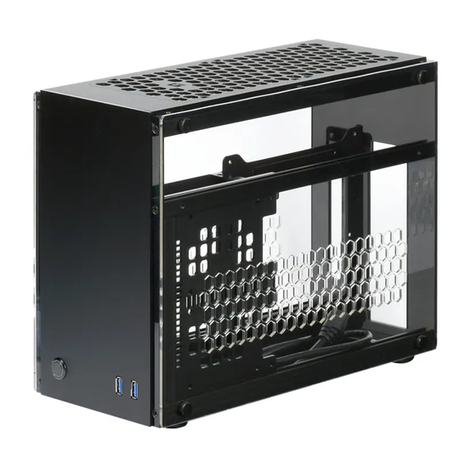
  9. DAN A4-SFX User manual

DAN A4-SFX User manual

Popular Enclosure manuals by other brands

Antec Veris Fusion Remote Max Specification sheet

Antec

Antec Veris Fusion Remote Max Specification sheet

ENERMAX iVektor.Q ECA 3371 Series user manual

ENERMAX

ENERMAX iVektor.Q ECA 3371 Series user manual

Lindy 43095 user manual

Lindy

Lindy 43095 user manual

SICK C4000 Select operating instructions

SICK

SICK C4000 Select operating instructions

Geeek A60 PLUS installation guide

Geeek

Geeek A60 PLUS installation guide

OVE SYDNEY 48 installation manual

OVE

OVE SYDNEY 48 installation manual

SilentiumPC Armis AR5 Hardware installation

SilentiumPC

SilentiumPC Armis AR5 Hardware installation

Pulsar 17/TRP80/DSPR Assembly instructions

Pulsar

Pulsar 17/TRP80/DSPR Assembly instructions

MSI MPG SEKIRA 500X quick start guide

MSI

MSI MPG SEKIRA 500X quick start guide

Antec Dark fleet DF-10 user manual

Antec

Antec Dark fleet DF-10 user manual

Peavey DS 1502 Specifications

Peavey

Peavey DS 1502 Specifications

D-Link ShareCenter Pro DNS-1550-04 user manual

D-Link

D-Link ShareCenter Pro DNS-1550-04 user manual

Rosewill RX82-U(JBOD) user manual

Rosewill

Rosewill RX82-U(JBOD) user manual

QNAP SAS JBOD CLI 1.0 user guide

QNAP

QNAP SAS JBOD CLI 1.0 user guide

GAMDIAS Talos P1 Quick installation guide

GAMDIAS

GAMDIAS Talos P1 Quick installation guide

Auvs KR615 user manual

Auvs

Auvs KR615 user manual

Antec AR300 user manual

Antec

Antec AR300 user manual

CommScope FDH 3000 user manual

CommScope

CommScope FDH 3000 user manual

manuals.online logo
manuals.online logoBrands
  • About & Mission
  • Contact us
  • Privacy Policy
  • Terms and Conditions

Copyright 2025 Manuals.Online. All Rights Reserved.

DAN
A4-SFX
User Manual
v1.0
1
table of contents
2 - 3
warranty [Gewährleistung]
4 - 5
advice [Hinweise]
6 - 23
assembly [Zusammenbau]
24
support [Support]
Thank you for purchasing the A4-SFX. Please read the following instructions.
If you are missing any parts or have other issues with the case, please contact
me.
Vielen Dank für den Kauf des A4-SFX. Bitte lesen Sie die folgenden Seiten
aufmerksam. Wenn Sie Probleme mit fehlenden Teilen oder der Verarbeitungs-
qualität haben, dann kontaktieren Sie mich bitte.
2
warranty
Operating Guidelines
Both side panels and the top air vents of the case should not be covered by other objects. To ensure
adequate cooling performance, the case must be placed free-standing. Utilization in enclosed spaces is
not supported. The case must have a minimum distance of 15 cm between it and surrounding objects.
For safety, do not remove the plastic shield inside the case.
WEEE:
In European countries where the WEEE directive applies, do not dispose of the case or any contained
components as household waste. Please only dispose the case at designated electronic waste
collection points, or return it to DAN Cases.
Warranty:
Any modications to the case or its parts will void your warranty. This also applies to the incorrect or
negligent handling of the product. Any manipulation or removal of the serial number or damages from
Force Majeure shall also void the warranty.
Responsibility:
DAN-Cases is not liable for damage to the built-in hardware due to improper handling. Please visit
www.dan-cases.com to conrm that your components are compatible with the case.
Packing:
This box (packaging) is recyclable. Please recycle according to local regulations.
3
Gewährleistung
Betriebserlaubnis
Der Nutzer muss sicherstellen, dass sowohl die Seitenteile als auch die Oberseite nicht durch andere
Objekte verdeckt werden. Für die Gewährleistung einer ausreichenden Kühlleistung muss das Gehäuse
freistehend aufgestellt werden und darf nicht in einer Einhausung betrieben werden. Das Gehäuse muss
mit einem Mindestabstand von 15 cm zu umliegenden Objekten aufgestellt werden. Aus Sicherheits-
gründen darf der Plastikschutz im inneren des Gehäuses nicht entfernt werden.
WEEE:
Das Gehäuse und die darin enthaltenen Komponenten dürfen in europäischen Ländern, in denen die
Richtlinie für das WEEE gilt, nicht im Hausmüll entsorgt werden. Bitte entwerten Sie das Gehäuse in den
dafür vorgesehenen Elektroschrott-Annahmestellen oder schicken Sie es an DAN Cases zurück.
Garantie:
Für die Aufrechterhaltung der Garantie seitens DAN-Cases dürfen keine Modikationen am Gehäuse
und den enthaltenen Teilen durchgeführt werden. Selbiges gilt für die falsche oder fahrlässige Hand-
habung des Produktes. Das Manipulieren oder Entfernen der Seriennummer sowie der äußere Einuss
von höherer Gewalt führt zum Erlöschen der Garantie.
Haftung:
DAN-Cases haftet nicht für Schäden an der verbauten Hardware durch unsachgemäße Handhabung.
Bitte informieren Sie sich vor dem Einbau der Komponenten, ob diese mit dem Gehäuse kompatibel
sind. Die dafür nötigen Informationen nden Sie auf www.dan-cases.com.
Verpackung:
Der Karton (Umverpackung) ist recyclebar und kann daher im Papiermüll entsorgt werden.
4
advice
Take all the time you need for your build.
Lassen Sie sich genügend Zeit, für den Zusammenbau aller Komponenten.
Make sure that every component is free of electricity before working inside the case.
Stellen Sie sicher, dass jede Komponente frei von elektrischer Spannung ist, bevor Sie im Gehäuse
arbeiten.
Make sure that you ground yourself to avoid damaging a component with electrostatic discharge.
Stellen Sie sicher, dass Sie geerdet sind, um die Komponenten vor einer elektrostatischen Entladung zu
schützen.
Use a magnetic Phillips cross-head screwdriver for all screws inside the case.
Verwenden Sie einen magnetischen Phillips Kreuzschlitz-Schraubendreher für alle Schrauben im Ge-
häuse.
To prevent damaging components and screw threads, use a minimum of force for mounting com-
ponents and tightening screws.
Verwenden Sie nur ein Minimum an Kraft beim Einbau von Komponenten und Anziehen von Schrauben,
um eine Beschädigung von Komponenten und Gewinde zu vermeiden.
Make sure that while you are tightening a screw, it is aligned at a right angle towards the screw
thread to prevent damaging the thread.
Stellen Sie sicher, dass beim Einschrauben einer Schraube diese im rechten Winkel zum Gewinde steht,
um das Gewinde vor Schäden zu bewahren.

5
advice
C6-32 Power Supply Screw
4 x included in the screw bag
C6-32 Netzteil-Schraube
4 x in der Schraubentüte enthalten
M3 Trusshead Screw
8x included in the screw bag
M3 Linsenkopf-Schraube
8 x in der Schraubentüte enthalten
M3 Hard Drive Bay Screw
pre-installed at the case
M3 Festplattenschacht-Schraube
Vormontiert am Gehäuse
M3 Countersunk Screw
8 x included in the screw bag
M3 Senkkopf-Schraube
8 x in der Schraubentüte enthalten
screw types
Schraubentypen
6
4x
assembly
7
assembly
81.
2.
6x
assembly