manuals.online logo
Brands
  1. Home
  2. •
  3. Brands
  4. •
  5. OCB
  6. •
  7. GPS
  8. •
  9. OCB OCB-GT-03i User manual

OCB OCB-GT-03i User manual

Other manuals for OCB-GT-03i

1

Other OCB GPS manuals

OCB OCB-VT-013 User manual

OCB

OCB OCB-VT-013 User manual

OCB OCB-GT-06 User manual

OCB

OCB OCB-GT-06 User manual

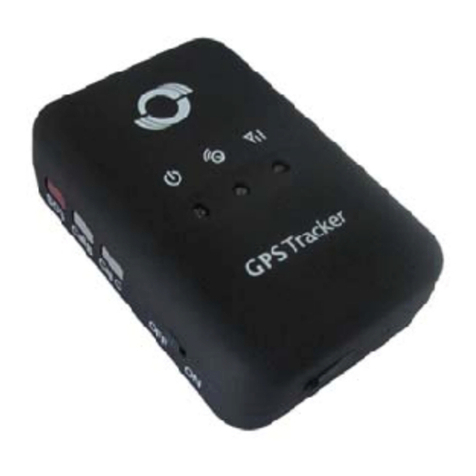
OCB OCB-GT-03i User manual

OCB

OCB OCB-GT-03i User manual

Popular GPS manuals by other brands

Polar Electro RCX3 Getting started guide

Polar Electro

Polar Electro RCX3 Getting started guide

Tobii Pro Spectrum user manual

Tobii Pro

Tobii Pro Spectrum user manual

Gosafe G91I user manual

Gosafe

Gosafe G91I user manual

Fisher TW-8800 operating manual

Fisher

Fisher TW-8800 operating manual

LG LN740 Series Specifications

LG

LG LN740 Series Specifications

Prestigio GeoVision 430 user manual

Prestigio

Prestigio GeoVision 430 user manual

JVC KW-NT3HDT instructions

JVC

JVC KW-NT3HDT instructions

Yoctopuce Yocto-GPS user guide

Yoctopuce

Yoctopuce Yocto-GPS user guide

RightWay GPS Navigator RW 200 user manual

RightWay

RightWay GPS Navigator RW 200 user manual

TomTom VIA user guide

TomTom

TomTom VIA user guide

Garmin ECHOMAP PLUS owner's manual

Garmin

Garmin ECHOMAP PLUS owner's manual

Telit Wireless Solutions GM862GPS Series Hardware user's guide

Telit Wireless Solutions

Telit Wireless Solutions GM862GPS Series Hardware user's guide

Hama 53118 Operating	 instruction

Hama

Hama 53118 Operating instruction

Garmin DEZL 580 owner's manual

Garmin

Garmin DEZL 580 owner's manual

Jigabot EX quick start guide

Jigabot

Jigabot EX quick start guide

Pointer Cellocator CelloTrack XT LTE overview

Pointer

Pointer Cellocator CelloTrack XT LTE overview

Queclink GV55LITE user manual

Queclink

Queclink GV55LITE user manual

Starcom Systems Kylos Compact user guide

Starcom Systems

Starcom Systems Kylos Compact user guide

manuals.online logo
manuals.online logoBrands
  • About & Mission
  • Contact us
  • Privacy Policy
  • Terms and Conditions

Copyright 2025 Manuals.Online. All Rights Reserved.

- 2 -
USER’ S MANUAL
OCB-GT-03i
GPS Personal Tracker
V6.3
- 3 -
Contents
1 Product Overview ...................................................................................................................................................................................... - 3 -
2 For Your Safety........................................................................................................................................................................................... - 3 -
3 OCB-GT-03i Characteristics.......................................................................................................................................................................- 4 -
4 Getting Started........................................................................................................................................................................................... - 4 -
4.1 Hardware and Accessories ............................................................................................................................................................- 5 -
4.2 View ................................................................................................................................................................................................- 5 -
4.3 Functional Parts.............................................................................................................................................................................. - 5 -
4.4 First Use ..........................................................................................................................................................................................- 6 -
5. Change Password...................................................................................................................................................................................... - 7 -
6. Time Zone ................................................................................................................................................................................................. - 7 -
7. Track...........................................................................................................................................................................................................- 7 -
7.1 Track by SMS...................................................................................................................................................................................- 8 -
7.2 Track by Calling...............................................................................................................................................................................- 8 -
7.3 Track by Preset Interval.................................................................................................................................................................. - 8 -
7.4 Google Earth and Google Map......................................................................................................................................................- 9 -
7.5 Track by OCB-GPS-SERVER-01/OCB-GPS-SERVER-02......................................................................................................................- 9 -
7.6 Track by GPRS (Meiligao Protocol) between Server and Tracker..............................................................................................- 10 -
7.6.1 Set Tracker ’s GPRS ID........................................................................................................................................................- 10 -
7.6.2 Set APN..............................................................................................................................................................................- 10 -
7.6.3 Set IP and Port ..................................................................................................................................................................- 10 -
7.6.4 Set DNS Server IP (optional) ............................................................................................................................................- 10 -
7.6.5 Enable GPRS Tracking .......................................................................................................................................................- 10 -
7.6.6 Set GPRS Interval ..............................................................................................................................................................- 11 -
7.7 Track by GpsGate..........................................................................................................................................................................- 11 -
8. Authorization ..........................................................................................................................................................................................- 11 -
9. Call Function ...........................................................................................................................................................................................- 12 -
9.1 Receiving Phone Call....................................................................................................................................................................- 12 -
9.2 Making Phone Call .......................................................................................................................................................................- 12 -
9.3 Volume Adjustment .....................................................................................................................................................................- 12 -
10. Low Battery Alarm................................................................................................................................................................................- 12 -
11. Speeding Alarm.....................................................................................................................................................................................- 12 -
12. Movement/Geo-fence..........................................................................................................................................................................- 13 -
12.1 Movement Alarm .......................................................................................................................................................................- 13 -
12.2 Geo-fence Alarm ........................................................................................................................................................................- 13 -
13. Heartbeat ..............................................................................................................................................................................................- 14 -
14. Track Log................................................................................................................................................................................................- 14 -
14.1 Log by Interval............................................................................................................................................................................- 14 -
14.2 Auto Log when no GPRS ............................................................................................................................................................- 14 -
15. Power Down..........................................................................................................................................................................................- 15 -
16. Initialization ..........................................................................................................................................................................................- 15 -
17. Password Initialization..........................................................................................................................................................................- 15 -
18. Parameter Editor ..................................................................................................................................................................................- 15 -
19. Copyright and Disclaimer.....................................................................................................................................................................- 16 -
Annex 1. SMS Command List .....................................................................................................................................................................- 16 -
Annex 2. Troubleshooting ..........................................................................................................................................................................- 21 -
Contacts.......................................................................................................................................................................................................- 22 -

- 4 -
1 Product Overview
The OCB-GT-03i is a GPS/GPRS based personal tracking device, which is compact and easy
to use.
OCB-GT-03i has inbuilt GPS module to obtain accurate position data and utilizes its GSM capability to
send the position data to a specified mobile phone or server base to allow users to monitor people or pets
using the tracker.
OCB-GT-03i supports two way voice communications and can be activated either by the guardian calling
the tracker or the tracker holder activating the SOS button. The tracker can be configured to report its
location to the server base or mobile phone at preset intervals.
With internal memory, OCB-GT-03i can store GPS coordinates when there is no GPRS connection or at a
specified interval requested by the user.
OCB-GT-03i has the following functions and
features:
SMS and GPRS TCP/UDP Communication (Nodac Protocol)
Track on Demand
Show Location Directly on Mobile Phone
Track by Time Interval
Two-way Audio
GSM Blind Area Memory
Internal Memory for Logging
Inbuilt Motion Sensor for Power Saving
SOS Panic Button
Movement Alarm
Geo-fencing Control
Low Battery Alarm
Speeding Alarm
GPS Blind Area Alarm (in/out)
Three Buttons for Making Phone Call and/or Sending Message
Built-in Super Magnet (optional)
2 For Your Safety
Read these simple guidelines. Not following them may be dangerous or illegal.
Switch on safely Do not switch on OCB-GT-03i when wireless phone use is prohibited or when
it may cause interference or danger.
Switch off in hospitals Follow any restrictions. Switch OCB-GT-03i off near medical
equipment.
- 5 -
Switch off in aircraft Follow any restrictions. Wireless dezvices can cause interference in aircraft.
Switch off when refueling Do not use OCB-GT-03i when at a refueling point. Do not use near
fuels or chemicals.
Switch off near blasting Follow any restrictions. Do not use OCB-GT-03i when blasting is in progress.
Qualified service Only qualified personnel can repair OCB-GT-03i.
Water resistance OCB-GT-03i is not fully water resistant. Keep it dry. Use waterproof
bag if necessary.
3 OCB-GT-03i Characteristics
Items
Specification
Charging Voltage
DC 4.2-5.5V/400mA (Mini USB port)
Internal Battery
Rechargeable and replaceable 1350 mAh battery (3.7V),
Dimension
77 mm × 51 mm × 25 mm
Weight
80g (with battery)
Operating temperature
-20° to 55° C
Humidity
5% to 95% Non-condensing
GSM module
Quad Band GSM 850/900/1800/1900Mhz
GPS Chipset
latest GPS SIRF-Star III chipset
GPS Sensitivity
-158Db
GPS Frequency
L1, 1575.42 MHz
C/A Code
1.023 MHz chip rate
Channels
20 channel all-in-view tracking
Position Accuracy
10 meters, 2D RMS
Velocity Accuracy
0.1 m/s
Time Accuracy
1 us synchronized to GPS time
Default datum
WGS-84
Reacquisition
0.1 sec., average
Hot start
1 sec., average
Warm start
38 sec., average
Cold start
42 sec., average
Altitude Limit
18,000 meters (60,000 feet) max.
Velocity Limit
515 meters/second (1000 knots) max.
Acceleration Limit
Less than 4g
Jerk Limit
20 m/sec
Work time
55 hours in power-saving mode and 12 hours in normal mode
Memory
4MB flash memory
LED
3 LED lights to show power, GPS, GSM and other status.
Button
3 buttons(SOS/B/C) for making phone calls and sending SMS
- 6 -
4 Getting Started
This section will describe how to set up your OCB-GT-03i.
4.1 Hardware and Accessories
OCB-GT-03i is supplied in a box which includes:
OCB-GT-03i with Battery Earphone with Mic Wall Charger Car Charger USB Data Cable
CD
4.2 View
Front View Side View Back View
4.3 Functional Parts
Your OCB-GT-03i has four buttons and three LEDs with three different colors to indicate the status of the
unit.
- 7 -
Red LED - indicating battery status
Off
Power is off or charging is complete
Flashing (every 0.1 second)
Low battery
On
Charging
Flashing (1 second on and 2 seconds off)
Working
Blue LED - indicating GPS status
On
One button is being pressed
Flashing ( every 0.1 second)
The unit is being initialized
Flashing (0.1 second on and 2.9 seconds off)
OCB-GT-03i has a GPS fix
Flashing (1 second on and 2 seconds off)
OCB-GT-03i has no GPS fix
Green LED - indicating GSM status
On
One call is coming in / one call is being made
Flashing ( every 0.1 second)
The unit is being initialized
Flashing (0.1 second on and 2.9 seconds off)
OCB-GT-03i is connected to the GSM network
Flashing (1 second on and 2 seconds off)
OCB-GT-03i is not connected to the GSM network
Buttons
Power On/Off Button
To turn on/off OCB-GT-03i
SOS Button
To make a phone call and/or send an SMS to the preauthorized phone
number.
Press it to receive an incoming call.
Press it to increase volume during conversation.
Call B
To make a phone call and/or send an SMS to the preauthorized phone
number.
Press it to reject a call, cancel calling or complete a conversation.
Call C
To make a phone call and/or send an SMS to the preauthorized phone
number.
Press it to decrease volume during conversation.
Other Connectors
Mini USB
Used for charging, firmware update, configuration on PC and exporting
stored data. (USB Data Cable or USB-to-Serial Adaptor is required for
firmware update, configuration and exporting stored data)
SIM Card
To insert SIM card here
- 8 -
Earphone Plug
For connecting earphone
Lanyard Loop
For connecting lanyard.
4.4 First Use
Please read this manual before using your OCB-GT-03i.
4.4.1 Ensure that your OCB-GT-03i has a working SIM
installed.
- Check that the SIM has not run out of credit (Test the SIM in a
phone to make sure it can send and receive SMS)
- Check that the SIM Lock code is turned off
- If you require the function of sending an SMS location report to
the authorized phone number when it makes a call to the OCB-
GT-03i, please make sure the SIM installed supports displaying
caller ID.
4.4.2 Charge the battery for at least 3 hours in power-off status
using the wall charger or car charger. Or you can connect the
tracker directly to computer by USB for charging. Red light is on
during charging and off when charging is complete.
4.4.3 Push the Power On/Off button to the ON side and wait for
about 20 seconds. It will then enter standby mode. It is suggested
that you be in an outer place where it can receive better GPS when
you turn on the device.
Check that the Red LED (Battery) is flashing 1 second on and 2
seconds off.
Check that the Green LED (GSM) is flashing 0.1 second on and 2.9
seconds off.
Check that the Blue LED (GPS) is flashing 0.1 second on and for
2.9 seconds off.
5. Change Password
Command: W******,001,######
Description: Change user’s password.
Note:
1. ****** is user’s password and the default password is 000000. The tracker will only accept commands
from a user with the correct password. Commands with wrong password will be ignored.
2. ###### is the new password. Password should be 6 digits.
Example:
W000000,001,123456
W123456,001,999999
- 9 -
6. Time Zone
Command: W******,032,T
Description: Correct time into your local time
Note:
1. Default time of the tracker is GMT
2. This correction is applied to location reports by SMS and SMS alarms.
T=0, to turn off this function.
T=[-32768,32767] to set time difference in minute to GMT.
For those ahead of GMT, just input the time difference in minute directly. For example, GMT+8,
W000000,032,480
‘-‘is required for those behind GMT. For example, W000000,032,-120.
Example:
W000000,032,480
W000000,032,-120
7. Track
7.1 Track by SMS
- Track on Demand - Reply with longitude, latitude, speed and date
Command: W******,000
Description: Get the current location of the tracker, send this SMS or make a telephone call directly to the
tracker and it will report its longitude and latitude by SMS with format as follows:-
Latitude = 22 32 36.63N Longitude = 114 04 57.37E, Speed = 2.6854Km/h, 2008-12-24,01:50
Example:
W000000,000
- Track on Demand - Reply with a link to Google Map
Command: W******,100
Description: Send this command to the tracker and then you receive an SMS with an http link. Click on the
link then the location can be shown directly on Google Map on your mobile phone. For example:
http://maps.google.com/maps?f=q&hl=en&q=22.540103,114.082329&ie=UTF8&z=16&iwloc=addr&om=1
Note: Only smart phones and PDA support this function.
Example:
W000000,100
- 10 -
7.2 Track by Calling
Make a missed call to the tracker and it will report its longitude and latitude by SMS with format as follows:-
Latitude = 22 32 36.63N Longitude = 114 04 57.37E, Speed = 2.6854Km/h, 2008-12-24,01:50
7.3 Track by Preset Interval
Command: W******,002,XXX
Description: Set an interval for the tracker to continuously return its location by SMS
Note:
1. XXX is the interval in minute.
2. If XXX=000 to turn off tracking by time
Example:
W000000,002,030
The tracker will send location data back to your mobile phone every 30 minutes.
- 11 -
7.4 Google Earth and Google Map
Download Google Earth from http://earth.google.com/.
Start Google Earth (For more information about Google Earth please refer to http://earth.google.com/) or
go to http://maps.google.com in your Internet Explorer
Input the latitude and longitude that you receive from the tracker by SMS and click the search button.
Google Earth or Google Maps will display the location for you.
Example:
When you receive: Latitude = 22 32 40.05N Longitude = 114 04 57.74E
Type as the following picture shows:
(Note: you should input the latitude and longitude as: 22 32 40.05N 114 04 57.74E)
And then you can find the location of your tracker:
Or you can use local map software on PDA or car navigation device to input the coordinates.
7.5 Track by OCB-GPS-SERVER-01/OCB-GPS-SERVER-02
If you have bought our GPS Tracking Software OCB-GPS-SERVER-01 or OCB-GPS-SERVER-02, after proper
configuration, you can do tracking on OCB-GPS-SERVER-02/OCB-GPS-SERVER-02.
Please refer to OCB-GPS-SERVER-01/OCB-GPS-SERVER-02User Guide for more information.