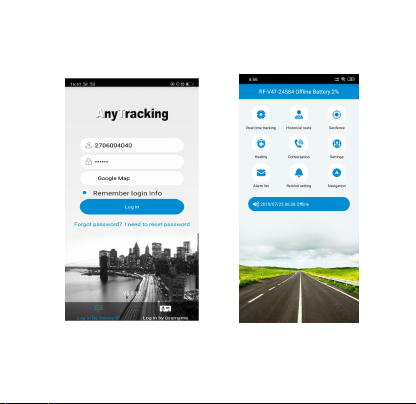
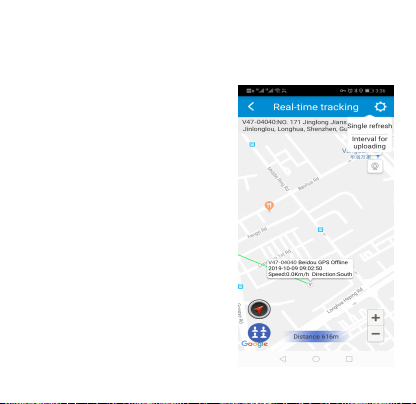
last location of GPS tracker. For the latest location, press the
“Single-refresh” button on map right top. Press the “interval
for uploading” and choose different interval times. Please be
noted, the shorter interval time, the faster battery consumption.
Historical route: Display the
historical route of any day in
choose whether to filter out
LBS location data. (note: LBS
indoors, error is larger)
Geo-fence: Add, check or
GPS-fence area, when the
device gets into or out of
will get alert. (note: we
GPS-fence over 300 meters
Health:Check the wearer’s
health status, including steps
Call to tracker: To call your
Voice monitoring: To request a
one-way call from tracker to the
number you type and hear the
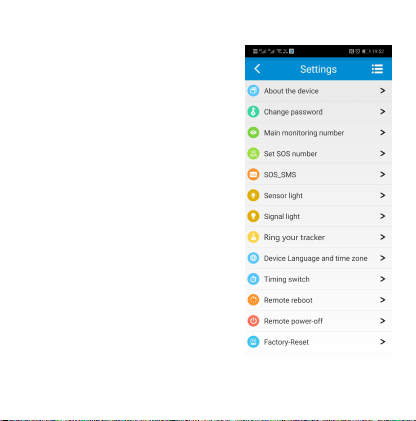
Settings:All settings need to work
when App shows device online
(Moving/ Stationary) with the sim
About the device:Check and edit
Change password:Change APP
and Web platform’s password.
Main monitoring number:The
sending and SMS alerts receiving.
Set SOS number:Preset SOS
numbers to enable them call to
tracker and get SOS calls from tracker. (Note: For privacy
of tracker user, non-SOS numbers couldn’t call the tracker.)
SMS alert switch:Turn on or
off the SMS alerts function.
Sensor light: Turn on or off
the sensor lights on tracker, to
automatically on in darkness
surroundings, which makes
the tracker easier to be found.
Signal light: Turn on or off
the signal indicator lights on
activate this function, the
tracker will send out ringtone
Device Language and time
zone: Set tracker SMS alerts’
Remote reboot: To reboot the tracker from this setting.
Remote power-off: To power-off the tracker remotely.
Factory-Reset: To default the device back to factory
Alarm list: To list all alerts sent by tracker.
Remind setting:To turn on or off App notifications and
Logout: Log off from the App, and no more notification from
the tracking App.
For more functions of the App and web platform, please login
our PC tracking platform: www.gps123.org.
Matters need attention:
Please use this tracker in the area of good network signal.
For a better performance, please charge the new device for 4
Standby time: When location uploading time is every 10
minutes, the standby time is 96 hours, talking time is 8 hours
(Actual test); When turn off APP and web platform function,
the standby time is about 15 days. Note: Above test data is
under the status of strong GSM network.
To extend battery life, please recharge and discharge the tracker
fully at least one time in 3 months.
To get a good waterproof effect, please fasten the screws after
inserting a SIM card and cover the SIM slot rubber with right
direction.
The tracker is waterproof IP67, but we don’t suggest to dip it
into water for too long time or swim with it.
Please don’t open the tracker case by yourself, as it may affect
the waterproof and lose the warranty right.
The tracker uses Cell tower signal (LBS/GSM) when indoors,
the locating accuracy depends on tracker distance to signal
tower and other facts, like metal and surroundings. Due to the
restrictions and influences of the use environment, the civil
equipment has deviations in positioning which is not a quality
problem, and is not subject to quality problems for after-sales
processing.
FAQ:
Q: After inserting a SIM card, it can get SMS reply, but it displays
“Not enabled” on the platform and APP.
A: Please check the tracker SIM Card has GPRS data plan.
Q: Device show online, but it shows “wait for the device
responses” when you make settings with APP.
A:a. Device SIM signal is not good with poor GPRS data;
b. Device is busy in other process. Please wait a minute and try
again.
Q: The SIM card has GPRS data plan, but the device still shows
“Not enabled “or “offline”.
A: It needs to configure APN data, since we have pre-programmed
most SIM cards’ APN, but hasn’t. Please set main monitoring
number first by sending below command from your own phone to
the tracker SIM number.
pw,123456,center,your own phone number#
After a reply, send below command to set APN into the tracker.
The command is: apn,apndata,user,password,MCC MNC code#
(Note: The yellow parts are different according to different SIM
providers. If user and password are blank, delete them from the
command. There is no space between them and all letters shall be
in lowercase style.)
Scan QR code for install App
search Anytracking in App
store