Atrie BUB-204B User manual

Bluetooth USB Module
BUB-204B
Operation Manual
Date : 12/07/2006
Version : V1.2

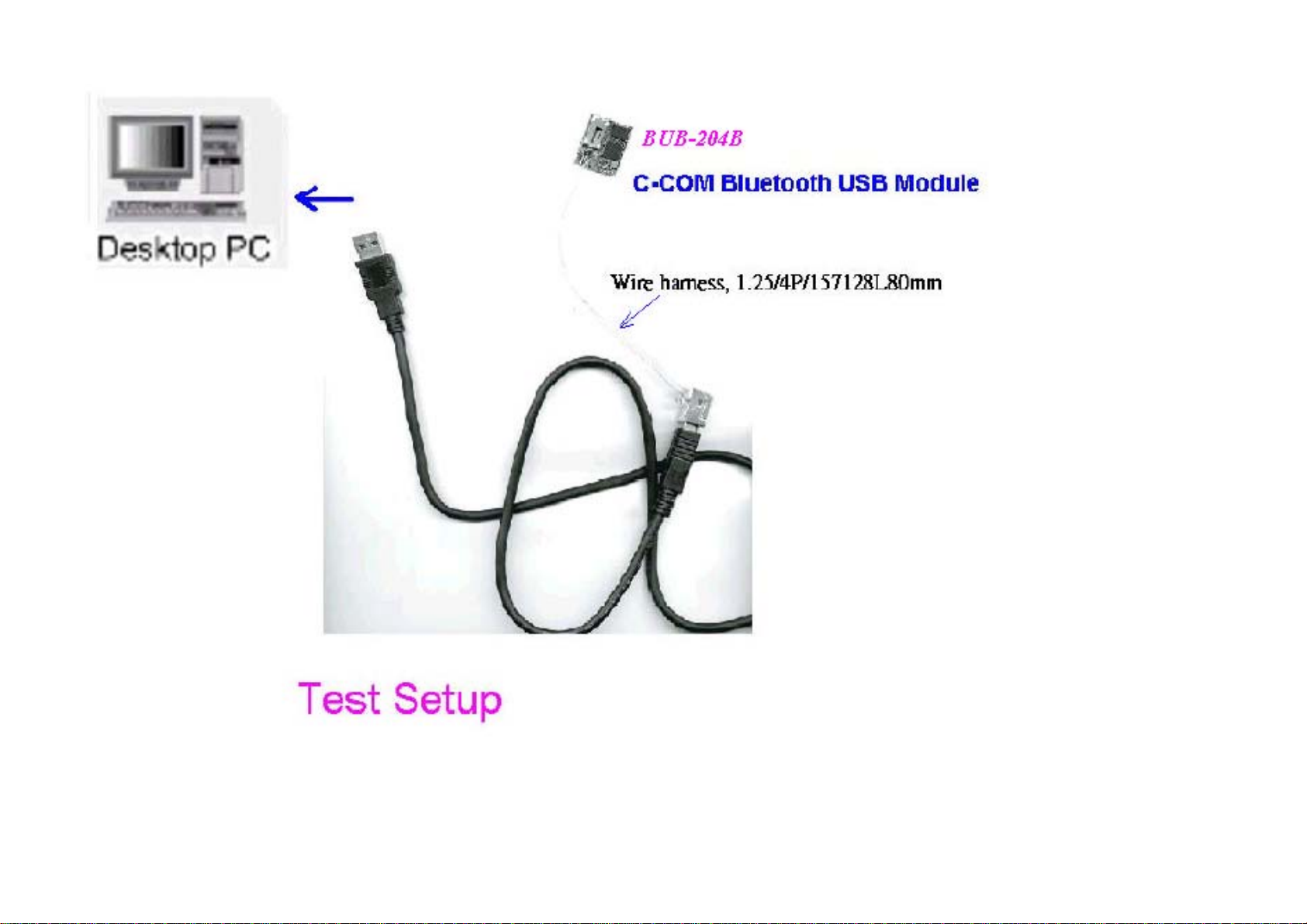

Table of Contents
1. Overview...............................................................................................................5
2.System Requirements and Operating System Platforms ......................................5
3. Installing BlueSuite & Widcomm Software...........................................................5
4.Utilities in BlueSuite .................................................................................................6
4.1 BlueFlash........................................................................................................6
4.1.1 BlueFlash User interface ....................................................................7
4.1.2 BlueFlash Firmware ...........................................................................9
4.2 PSTools..........................................................................................................10
4.2.1 Access Levels.....................................................................................10
4.2.2 PSTools Transport Interface ...........................................................11
4.2.3 Changing Transport Interface.........................................................12
4.2.4 PSTools User interface .....................................................................14
4.3 BlueChat2 .....................................................................................................15
4.3.1 BlueChat2 User Interface.................................................................16
5 .Technical Support..................................................................................................20

1. Overview
The unit features the following:
lTest Board containing host I/O and man-machine interface elements including RS232
and USB drivers and external connector, audio codec and external audio socket for a
headset, plus internal connectors for PIO lines, audio PCM stream and synchronous
serial interfaces.
lModule, which includes the following items:
lBlueCore chip (an advanced single-chip Bluetooth device)including Flash memory
device (which stores BlueCore’s firmware and Persistent Store)
lRF SMA connector (which allows communication with other Bluetooth devices)
2.System Requirements and Operating System Platforms
Minimum system requirements for the Casira utilities are:
lPentium processor-based personal computer
l64MB of RAM is recommended
l10MB of available hard disk space
Utilities can be used on the following operating systems:
lMicrosoft Windows 98(1)
lMicrosoft Windows Me(1)
lMicrosoft Windows 2000
lMicrosoft Windows NT v4.0 (Service Pack 3 or later)
lMicrosoft Windows XP
AC Adaptor :
Output +5V, DC, 300mA
3. Installing BlueSuite & Widcomm Software
Run the installer supplied on the accompanying CD ROM, pls contact sales.

4.Utilities in BlueSuite
lBlueFlash upgrades the BlueCore firmware.
lPSTools edits the PS Keys.
lBlueChat2 creates simple ACL and SCO connections (HCI firmware only).
lBlueTest exercises the radio for test purposes.
4.1 BlueFlash
BlueFlash is a utility that allows you to download and upload firmware to and from the flash memory on
the Bluetooth modules .From Fig(2), we can insert SPI cable to connector , then link to parallel port of
Host terminals (like Desktop PC , Notebook or Pocket PC)
4.1.1 BlueFlash User interface
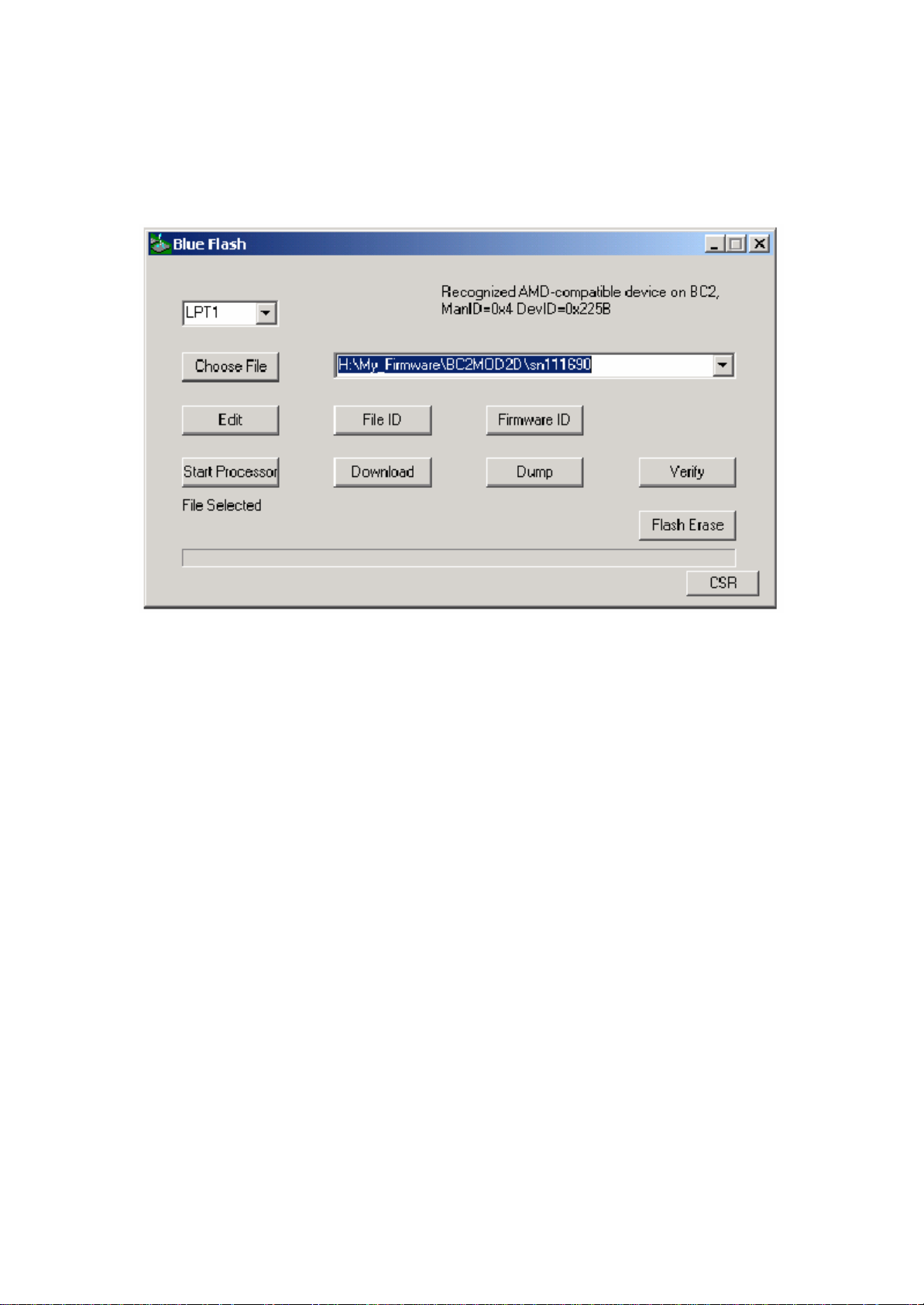
BlueFlah opens with a user interface windows as Figure 4.1 indicates .
Figure 4.1: BlueFlash User Interface
The function of each button or area is described as follows:
Choose File: Opens a dialogue box for selection of the *.xpv file to download to the flash on the
BlueCore Module.
(Note:The .xdv file must be present in the same folderas the .xpv file. Edit: Opens a
hexadecimal-editing window. CSR recommends that you do not edit the *.xpv
file in any way. If the code is edited, the Bluetooth protocol stack may behave
erratically and it may no longer be Bluetooth qualified.)
Download:Downloads the selected file to the flash on the BlueCore module. This process will
update each flashblock as required and verify them in turn.
Verify:Compares the selected file with the code programmed into the flash on the BlueCore
module. Anydifferences will be reported in the status area.
Status:Provides a text report of the status of the current download, upload or verify.
Activity Bar: Displays a visual indication of progress for the current download, upload or
verification.
Start Processor: Changes depending on the status of the processor. If it saysStop Processor, the
processor is running. It should be stopped before attempting to download code.Once
the new code has been loaded, the processor can be restarted by clicking onStart

Processor.
Firmware ID: Identifies which version of firmware is currently loaded on the module. BlueFlash
does not identifyfirmware created before Beta 10 release. If BlueFlash is unable to
identify the firmware version, you will still able to upgrade the firmware using this
utility.
Dump:Allows the user to download the contents of the flash to a file on the PC hard drive.
The data can bestored either as BlueCore .xpv/.xdv files or as a binary file. The file
also contains all of the Persistent Store settings, allowing youto restore to a known
firmware build and Persistent Store settings.
Flash Erase:Provides options for erasing some or all of the flash memory including the Persistent
Store area.
File ID:Displays the name and version of firmware of the file selected for download on the
module.
File Selection:This area displays the name and location of the file selected for download.
FlashType:This area displays the type of flash memory that has been identified on the BlueCore
module. Flash type is identified when the processor is stopped. Different types of flash
memory may have different memoryblock structures that require adjustments to
BlueCore’s memory map. If the flash type indicates
Unrecognised Flash assuming SST, either the flash on the BlueCore module
is not supported, or there is a problem with the SPI connection. See section 5.1.3,
Troubleshooting BlueFlash, for further information.
LPT Selection: This pull-down menu allows the user to select the LPT port to which the SPI cable is
connected.
CSR: This indicates the version of the BlueFlash application in use.

4.1.2 BlueFlash Firmware
There are four possible components in a firmware file:
lStack: This is the main runtime code for BlueCore. There are two versions of stack, one
contains allstack layers up to HCI, plus an HCI version of the Virtual Machine (VM); the other
containsstacklayers up to HCI, plus L2CAP, RFCOMM, SDP and the Virtual Machine (an
RFCOMM version). Both stack versions uses both program and data space.
lDFU Driver: Device Firmware Upgrade allows for updating the stack, Persistent Store and VM
application over the HCI transport. You cannot use a DFU operation to upgrade the DFU driver.
lPersistent Store: The Persistent Store holds all the setup and calibration information for
module .Most settings are design-specific, but some are module specific.
BlueFlash firmware is held in *.xpv files (which correspond to the program space) and *.xdv files (which
correspond to the data space). There is a single *.dfu file for DFU. Not all files contain all firmware
components.
Downloading a firmware file only to flash memory overwrites the components contained in the file; all
others remain intact. This affects only the calibration information in the Persistent Store. Downloading to
flash memoryensures that you can return the module to a known calibrated state if the Persistent Store
becomes corrupted beyond repair.
If firmware with no Persistent Store component is downloaded onto a blank flash, the stack code will
create a new Persistent Store using default values suitable for use on a Casira module. However, some
keys will require calibration per module for optimal performance.
The Verify function compares the contents of a firmware file to the contents of flash memory and reports
anydifferences (comparing only components contained in the file).

4.2 PSTools
PSTools is an editing suite that allows you to read and modify the Persistent Store. The Persistent Store
consists of configuration keys that modify the operation of the firmware. BlueCore is a very flexible device
with many setup options. PS Keys must be set correctly for BlueCore to work in a particular design.
Some PS Keys must be calibrated for each module.
Important Notes:
Do not modify Persistent Store values unlessyou have a clear understanding of what they do. Careless
changes to the Persistent Store could prevent the firmware from executing correctly or can stopmodule
from communicating with the PC.
4.2.1 Access Levels
PSTools has two customer access levels.At the higher access level, there are more PS Keys available
for editing. The customer levels are:
lUser: A minimum number of frequently used keys, e.g., UART baud rate
lDeveloper: All the keys that a developer may need to modify
Table of contents