manuals.online logo
Brands
  1. Home
  2. •
  3. Brands
  4. •
  5. Crosley
  6. •
  7. Air Conditioner
  8. •
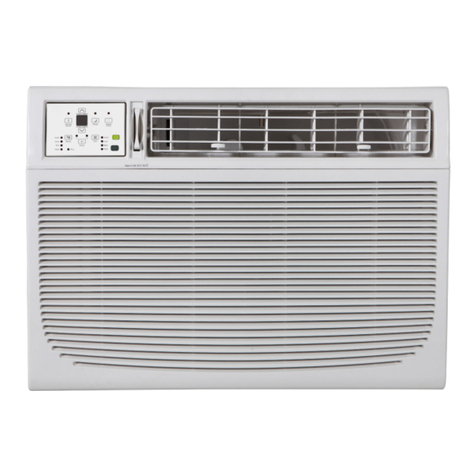
  9. Crosley CA15WYR1 User manual

Crosley CA15WYR1 User manual

Other Crosley Air Conditioner manuals

Crosley CAMHE08B1 User manual

Crosley

Crosley CAMHE08B1 User manual

Crosley CAE15ESR1 User manual

Crosley

Crosley CAE15ESR1 User manual

Crosley CA18WCK0 User manual

Crosley

Crosley CA18WCK0 User manual

Crosley 66121416 User manual

Crosley

Crosley 66121416 User manual

Crosley 2020213A0871 User manual

Crosley

Crosley 2020213A0871 User manual

Crosley CAE8ESRR410A16 User manual

Crosley

Crosley CAE8ESRR410A16 User manual

Crosley CAE25ESRR410A12 User manual

Crosley

Crosley CAE25ESRR410A12 User manual

Crosley CAE5M0 User manual

Crosley

Crosley CAE5M0 User manual

Crosley 2020215A0585 User manual

Crosley

Crosley 2020215A0585 User manual

Crosley MEDIAN Series User manual

Crosley

Crosley MEDIAN Series User manual

Crosley 66129901158 User manual

Crosley

Crosley 66129901158 User manual

Crosley CAE08EHQ12 User manual

Crosley

Crosley CAE08EHQ12 User manual

Crosley CAE12ESRB User manual

Crosley

Crosley CAE12ESRB User manual

Crosley 2020213A0870 User manual

Crosley

Crosley 2020213A0870 User manual

Crosley 66129901155 User manual

Crosley

Crosley 66129901155 User manual

Crosley CAWE12ERR410A10 User manual

Crosley

Crosley CAWE12ERR410A10 User manual

Crosley CAMHE18C2 User manual

Crosley

Crosley CAMHE18C2 User manual

Crosley CAHE25ER12 User manual

Crosley

Crosley CAHE25ER12 User manual

Crosley 2020217A2269 User manual

Crosley

Crosley 2020217A2269 User manual

Crosley CATHE18A2 User manual

Crosley

Crosley CATHE18A2 User manual

Crosley CAE10M0 User manual

Crosley

Crosley CAE10M0 User manual

Crosley CTWMS10A1 User manual

Crosley

Crosley CTWMS10A1 User manual

Crosley CAE25ESRB User manual

Crosley

Crosley CAE25ESRB User manual

Crosley CTWMHE12B2 User manual

Crosley

Crosley CTWMHE12B2 User manual

Popular Air Conditioner manuals by other brands

Fujitsu ASYG 09 LLCA installation manual

Fujitsu

Fujitsu ASYG 09 LLCA installation manual

York HVHC 07-12DS Installation & owner's manual

York

York HVHC 07-12DS Installation & owner's manual

Carrier Fan Coil 42B Installation, operation and maintenance manual

Carrier

Carrier Fan Coil 42B Installation, operation and maintenance manual

intensity IDUFCI60KC-3 installation manual

intensity

intensity IDUFCI60KC-3 installation manual

Frigidaire FAC064K7A2 Factory parts catalog

Frigidaire

Frigidaire FAC064K7A2 Factory parts catalog

Sanyo KS2432 instruction manual

Sanyo

Sanyo KS2432 instruction manual

LG MultiV Series installation manual

LG

LG MultiV Series installation manual

CLIMAVENETA a-CHD U-2T 606+2209 OPERATING AND INSTALLATION Manual

CLIMAVENETA

CLIMAVENETA a-CHD U-2T 606+2209 OPERATING AND INSTALLATION Manual

Midea EWK06CW5 user manual

Midea

Midea EWK06CW5 user manual

Pioneer FAB Series installation manual

Pioneer

Pioneer FAB Series installation manual

SPT WA-1511S user manual

SPT

SPT WA-1511S user manual

Mitsubishi Electric Mr.Slim MSZ-A24NA operating instructions

Mitsubishi Electric

Mitsubishi Electric Mr.Slim MSZ-A24NA operating instructions

Mitsubishi Electric PUHZ-RP50VHA4 Service manual

Mitsubishi Electric

Mitsubishi Electric PUHZ-RP50VHA4 Service manual

Panasonic CS-S18HKQ Service manual

Panasonic

Panasonic CS-S18HKQ Service manual

Panasonic CS-E15NKE3 operating instructions

Panasonic

Panasonic CS-E15NKE3 operating instructions

Gree GWH18TC-K3DNA1B/I Service manual

Gree

Gree GWH18TC-K3DNA1B/I Service manual

Friedrich ZoneAire Compact P08SA owner's manual

Friedrich

Friedrich ZoneAire Compact P08SA owner's manual

Daikin R32 Split Series installation manual

Daikin

Daikin R32 Split Series installation manual

manuals.online logo
manuals.online logoBrands
  • About & Mission
  • Contact us
  • Privacy Policy
  • Terms and Conditions

Copyright 2025 Manuals.Online. All Rights Reserved.

AIRCONDITIONER
For questions about features, operation/performance, par[s,
accessories or service call: 1-800-253-1301
Table of Contents ................................................ 2
1188226
TABLEOF CONTENTS
AIR CONDITIONER SAFETY ......................................................... 2
INSTALLATION REQUIREMENTS ................................................ 3
Tools and Parts ............................................................................ 3
Location Requirements ................................................................ 3
Electrical Requirements ............................................................... 4
INSTALLATION INSTRUCTIONS .................................................. 5
Unpack the Air Conditioner .......................................................... 5
Window Installation ...................................................................... 6
SMART-MOUNT TM Tray Assembly ................................................ 6
Prepare Air Conditioner for Window Installation ......................... 8
Position the Air Conditioner in Window ....................................... 9
Complete Installation ................................................................. 10
Through-the-Wall Installation ..................................................... 11
SMART-MOUNT TM Tray Assembly .............................................. 12
Position the Air Conditioner Through the Wall ............................
Complete Installation.................................................................. 16
AIR CONDITIONER USE .............................................................. 16
Starting Your Air Conditioner--Digital Control .......................... 16
Starting Your Air Conditioner-- Rotary Control .......................... 19
Changing Air Direction ............................................................... 20
Normal Sounds ........................................................................... 20
AIR CONDITIONER CARE ........................................................... 21
Cleaning the Air Filter ................................................................. 21
Cleaning the Front Panel ............................................................ 21
Repairing Paint Damage ............................................................ 21
Annual Maintenance ................................................................... 21
TROUBLESHOOTING .................................................................. 22
ASSISTANCE OR SERVICE ......................................................... 23
In the U.S.A................................................................................ 23
Accessories ................................................................................ 23
AIRCONDITIONERSAFETY
Your safety and the safety of others are very important.
We have provided many important safety messages in this manual and on your appliance. Always read and obey all
safety messages.
This is the safety alert symbol.
This symbol alerts you to potential hazards that can kill or hurt you and others.
All safety messages will follow the safety alert symbol and either the word "DANGER" or
"WARNING." These words mean:
You can be killed or seriously injured if you don't
immediately follow instructions.
You can be killed or seriously injured if you don't
follow instructions.
All safety messages will tell you what the potential hazard is, tell you how to reduce the chance of injury, and tell you
what can happen if the instructions are not followed.
iMPORTANT SAFETY iNSTRUCTiONS
WARNING: To reduce the risk of fire, electrical shock or injury when using your air conditioner, follow these basic precautions:
[] P(ug into a grounded 3 prong outlet. [] Do not use an extension cord.
[] Do not remove ground prong. [] Unp(ug air conditioner before servicing.
[] Do not use an adapter. [] Use two or more people to move and install air conditioner.
SAVE THESE iNSTRUCTiONS

INSTALLATIONREQUIREMENTS
Gather the required tools and parts before starting installation.
Read and follow the instructions provided with any tools listed
here.
Tools needed
• Flat-blade and Phillips
screwdrivers
• 1/4"nut driver
• 7/16" wrench
• Scissors
• Pencil
• Tape measure
• Level
• Drill
• %2" or smaller drill bit
Through-the-Wall Installation
In addition to the tools listed above, the following tools are
needed for through-the-wall installation.
• Saw • Caulk
• Wood preservative • 1" (2.5 cm) or thicker
lumber
Parts supplied
Check that all parts are included in parts package.
Air conditioner installation
IMPORTANT: Observe all governing codes and ordinances.
Check the location where the air conditioner will be installed.
Proper installation is your responsibility. Make sure you have
everything necessary for correct installation.
The location should provide:
• Grounded electrical outlet within 4 ft (122 cm) of where the
power cord exits the air conditioner.
NOTE: Do not use an extension cord.
• Free movement of air in room to be cooled.
• A large enough opening for the air conditioner. Installation
parts are supplied for double-hung windows.
• Adequate wall support for weight of air conditioner. Air
conditioner weighs 80 Ibs (36.3 kg) to 125 Ibs (56.7 kg).
NOTE: Cabinet louvers must not be obstructed. Air must be able
to pass freely through the cabinet louvers.
A_
G
H
A. Window-lock bracket
B. #8 x_" pan-head screws (6)
C. #8 x¾" round-head screws (3)
D. #10 x_" pan-head screws (3)
E.Side curtains (2)
F. Top channel
G. Foam seal
H. Side curtain frames (2)
SMART-MOUNT" tray assembly installation
D
E F G H I J
A. Tray back
B. Tray center
C. Tray sides (2)
D. Support legs (2)
E.#8- 18x _"hex- H. Hexnuts(4)
head screws (4) L Carriage bolts (4)
F. Flatwashers(4) J.#10-12x1½"slot-
G. Lock washers (4) head wood screws (2)
A. Cabinet louvers
Window Installation
Window opening measurements:
• 27" (68.6 cm) minimum to 40" (101.6 cm) maximum opening
width.
• 19" (48.3 cm) minimum opening height.
At_
B
( (_
LL r
A.27" (68.6cm) minimum, 40" (101.6cm) maximum
B. 19" (48.3cm) minimum
Through-the-Wall Installation
The wall opening measurements should be:
• Height: 18" (45.7 cm) plus twice the thickness of wood used
to build frame.
• Width: 26" (66 cm) plus twice the thickness of wood used to
build frame.
• Depth: 2" (5 cm) minimum to 8" (20.3 cm) maximum.
tC
A. 18" (45.7 cm) C. Wood thickness
B. 26" (66 cm) D. 2" (5 cm) minimum to 8" (20.3 cm) maximum
E_ectricaJ Shock Hazard
Plug into a grounded 3prong outJet.
Do not remove ground prong.
Do not use an adapter.
Do not use an extension cord.
Failure to follow these instructions can result in
death, fire, or electrical shock.
The electrical ratings for your air conditioner are listed on the
model and serial number label. The model and serial number
label is located on the right-hand side of the cabinet.
Specific electrical requirements are listed in the chart below.
Follow the requirements for the type of plug on the power supply
cord.
Power supply cord Wiring requirements
• 115 volt (103.5 min. -
126.5 max.)
• 0-12 amps
• 15-amp time-delay fuse or
circuit breaker
• Use on single outlet circuit
only.
• 230 volt (207 min. -
IA,, 253 max.)
(0.6 cm)
_ • 0-12 amps
• 15-amp time-delay fuse or
circuit breaker
• Use on single outlet circuit
only.
Recommended ground method
For your personal safety, this air conditioner must be grounded.
This air conditioner is equipped with a power supply cord having
a grounded 3 prong plug. To minimize possible shock hazard, the
cord must be plugged into a mating, grounded 3 prong outlet,
grounded in accordance with all local codes and ordinances. If a
mating outlet is not available, it is the customer's responsibility to
have a properly grounded 3 prong outlet installed by a qualified
electrical installer.
It is the customer's responsibility:
• To contact a qualified electrical installer.
• To assure that the electrical installation is adequate and in
conformance with National Electrical Code, ANSI/NFPA 70 -
latest edition, and all local codes and ordinances.
Copies of the standards listed may be obtained from:
National Fire Protection Association
One Batterymarch Park
Quincy, Massachusetts 02269
Power Supply Cord
NOTE: Your unit's device may differ from the one shown.
B
A. Reset button
B. Test button
This room air conditioner is equipped with a power supply cord
required by UL. This power supply cord contains state-of-the-art
electronics that sense leakage current. If the cord is crushed, the
electronics detect leakage current and power will be
disconnected in a fraction of a second.
ElectricaJShockHazard
Pluginto a grounded 3prong outlet.
Do not remove ground prong.
Do not use an adapter.
Do not use an extension cord.
Failure to follow these instructions can result in
death, fire, or eJectrical shock.
2. Press RESET.
3. Press TEST (listen for click; Reset button will trip and pop
out).
4. Press and release RESET (listen for click; Reset button will
latch and remain in). The power supply cord is ready for
operation.
NOTES:
•The Reset button must be pushed in for proper operation.
• The power supply cord must be replaced if it fails to trip when
the test button is pressed or fails to reset.
• Do not use the power supply cord as an off/on switch. The
power supply cord is designed as a protective device.
• A damaged power supply cord must be replaced with a new
power supply cord obtained from the product manufacturer
and must not be repaired.
• The power supply cord contains no user serviceable parts.
Opening the tamper-resistant case voids all warranty and
performance claims.
To test your power supply cord:
1. Plug power supply cord into a grounded 3 prong outlet,
INSTALLATIONINSTRUCTIONS
Excessive Weight Hazard
Use two or more people to move and install
air conditioner.
Failure to do so can result in back or other injury.
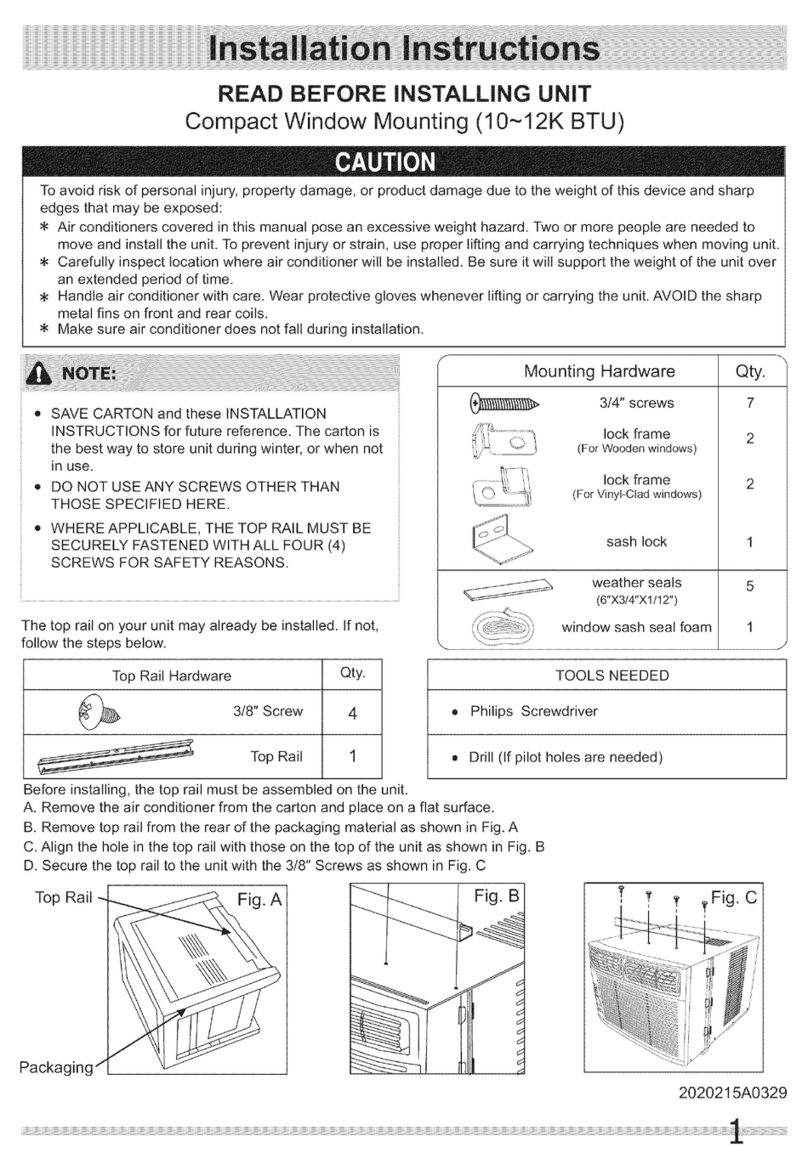
1. Locate provided bag of pan-head screws.
2. Place the top channel on top of the air conditioner, lining up
the holes in top channel with the holes on top of air
conditioner.
3. Using 3 - #10 x %" pan-head screws, attach top channel to
air conditioner.
B A B
i
Remove packaging materials
• Remove and properly dispose of packaging materials.
Remove tape and glue residue from surfaces before turning
on the air conditioner. Rub a small amount of liquid dish soap
over the adhesive with your fingers. Wipe with warm water
and dry.
• Do not use sharp instruments, rubbing alcohol, flammable
fluids, or abrasive cleaners to remove tape or glue. These
products can damage the surface of your air conditioner.
• Handle air conditioner with care.
A. Topchannel
3
B.#10 x_" pan-head screw
2.
Using the tray back as a template, center in windowsill
against outside edge of stool.
C
A. Tray back
B. Windowsill
C. Outside edge of stool
Using the 2 inside screw holes in tray back, mark
screw locations on windowsill for mounting the
SMART-MOUNT TM tray.
1. To assemble the tray frame, insert tab on tray back into slot
on tray side. Check to see that the tab is engaged and the
2 pieces are aligned. Insert 2 - #8 - 18 x 1/4"hex-head screws
to secure.
2. Repeat with other tray side.
C
A
3. Remove tray back. Using these marks, drill %2" pilot holes in
the windowsill approximately 11/2"(3.8 cm) deep. A. Tray back
B. #8 - 18x _" hex-head screws
C. Tray side
Attach support legs
1. Determine the correct slots on the tray side from the type of
exterior construction of the building.
Thin wall construction (vinyl, wood, etc.)
A
3. Place one end of tray center over carriage bolt.
A.First andsecond slots
Thick wall construction (brick}
A
2,
A. Second and third slots
Insert carriage bolt up through slot on tray-frame side and
support leg.
4. Then place flat washer, lock washer and hex nut.
NOTE: Do not tighten. The leg must be able to move freely to
adjust angle when installed.
5,
6,
...........A
.......i%11........
A. Hex nut D. Tray center
B. Lock washer E.Carriage bolt
C. Flat washer
Insert second carriage bolt through tray side and attach other
end of support leg.
NOTE: Do not tighten. The leg must be able to move freely to
adjust angle when installed.
,, c
D
A.Hox nut C.Flat washer
B.Lock washer D.Carriagebolt
Install support leg on other side.
Install SMART-MOUNT '_Tray Assembly in window
1. From inside, place SMART-MOUNT TM tray, support legs facing
down, in the window. Match the holes in tray side with the
predrilled holes in windowsill.
2. Using 2 - #10 - 12 x 11/2"slot-head wood screws, secure the
tray frame to the window.
Install side curtains
NOTE: Attach curtains to unit before placing unit in window.
1. Insert curtain into curtain frame. Make sure curtain end locks
into curtain frame.
A. #10 - 12x 1_" slot-head wood screws
NOTE: If the exterior of building can be damaged by support
legs, place a board between the wall and support legs.
3. With tray center pushed away from the windowsill, place a
level on the angled edge of tray side. Be sure level is against
notch on tray side. Adjust SMART-MOUNT TM tray until bubble
indicates the tray is level.
2. Push curtain in all the way.
3. Pull curtain toward open end of curtain frame.
A. Place level on angled edge against notch on tray side.
4. Tighten the hex nut just enough to hold tray center in place.
5. Repeat with other side.
6. Tighten hex nuts securely with 7_6"wrench. 4= Insert top and then bottom of right-hand curtain frame in top
and bottom curtain guides on air conditioner.
Topview 6. While the right-hand curtain is still extended, insert screws
into top and bottom slots of curtain. Using #8 x %" pan-head
screws, screw curtain to the top and bottom holes in air
conditioner cabinet.
7. Slide curtain housing into guides as far as it will go.
8. Repeat above steps for left-hand curtain.
• Handle air conditioner with care.
• Be sure your air conditioner does not fall out of the opening
during installation or removal.
• Do not block the louvers on the front panel.
• Do not block the louvers on the outside of the air conditioner.
Bottom view
Excessive Weight Hazard
Use two or more people to move and install
air conditioner.
Failure to do so can result in back or other injury.
1. Put air conditioner on SMART-MOUNT TM tray. Check that feet
on bottom of air conditioner are behind and against back side
of windowsill. Lower window sash.
5. Extend right-hand curtain outward so you may insert the first
screw through the middle hole of the curtain. Using a #8 x %"
pan-head screw, screw curtain to middle hole in air
conditioner cabinet.
NOTE: This screw is required to correctly attach curtain (top
to bottom) to the air conditioner cabinet.
I
m
A
A.#8 x_" pan-head screw
A¸¸¸
2.
A. Window sash
B. Feet on bottom of air conditioner
behind back side of windowsill
If window sash does not close flush against rear
surface of top channel, remove air conditioner and
adjust SMART-MOUNT TM tray until window sash closes
flush against rear surface of top channel.
Correct installation
m
B
m _ i ¸'_¸_'¸¸¸¸ C
A. Window sash
B.Topchannel
C.Air conditioner
If your air conditioner looks like either of the illustrations in the
"Incorrect installation" graphic, SMART-MOUNT _ tray needs
adjustment.
Incorrect installation
3=
A. Window sash
B. Top channel
C. Air conditioner
If the bottom of the air conditioner does not sit against the
bottom of the SMART-MOUNT TM tray, remove air conditioner
and adjust angle of tray until air conditioner sits against the
bottom of the tray.
0
A. Air conditioner sitting on SMART-MOUNT" tray
B. SMART-MOUNT" tray
Attach side curtains to window
1. Pull left-hand curtain frame out until it fits into the window
channel. Repeat with right-hand curtain frame.
2. Insert one of the #8 x %" round-head screws through left-
hand curtain frame and into the window channel to fasten the
curtain frame to the window.
3. Repeat for right-hand curtain frame.
Front view
A. Hole for #8 x_" round-head screw
B. Side curtain
Topview
A. Side curtain against window channel
B. Window channel
C. #8 x_" round-head screw
Insert foam seal behind the top of the lower window sash and
against the glass of the upper window.
A. Lower window sash
B. Foam seal
2. Place window-lock bracket on top of lower window and
against upper window sash.
3. Use a ¾2" drill bit to drill a starter hole through the hole in the
bracket into the window sash.
10