1. Installation
1 3 7 8
Quick Guide FS180629-2
5
4 6
3. Install the Ap p
Dow nload t he App ‘ ’ fro m ‘Goog le Pla y Store ’ or ‘App Store ’,
and i nstal l on smar t phone .
Sma rt Life
Not e: If u ser can ’t setu p devic e in abov e way, user c an try be low AP set up.
Not e: Sle ep win d is eve ry hal f hour drops 1 speed from r ecent speed until drops t o the
low est spe ed.
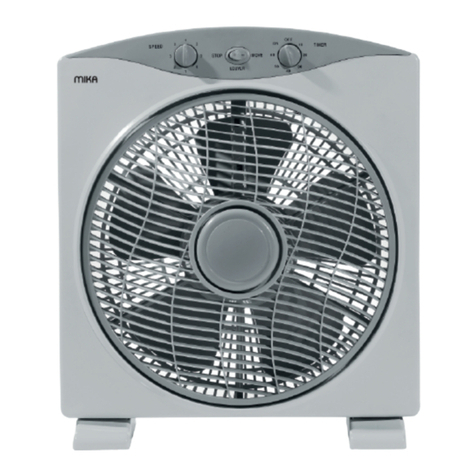
2. Introduction
Timer i ndica tor lig ht
Spee d Indic ator li ght
Osci llati ng Indi cator
Osci llati ng Butt on
Spe ed butto n, L ong
pres s 5 se conds to s witch
betw een slee p m ode and
norm al mode
Timer b utton
On/O ff butt on, Lon g
pres s to setu p Wi-Fi
Slee p mode in dicat or ligh t.
Ligh t on is sle ep wind
Ligh t off is no rmal wi nd.
Wi-F i Indic ator li ght.
Ligh t alway s on is Wi- Fi set up succ eed
and conn ected to rout er.Lig ht of f is
Wi Fi s et up su c ce ed bu t l o os e
conn ectio n of rou ter.Li ght ra pidly blink
twic e per s econd is in ‘Sma rtcon fig’
setu p mode . Light slow ly bli nk onc e
per 2 se conds i s in AP setu p mode.
1, Open S mart
Li fe AP P a nd
cli ck ‘Reg ister ’.
2. C hoose you r
r eg i on , i n pu t
Mo bile Nu mber
o r e ma i l a n d
cli ck ‘Nex t’.
5. AP P control
4. Ad d de vi ce t o sm ar t ph on e
2
3. Input you r log in
p a ss w o r d a n d
cli ck Conf irm.
4. A PP wi ll a uto
l o g i n a f t e r
reg ist rat io n.
1. Cl ick ‘+’ bu tton. 2. Ch oose ‘F an’
3. A ft er p ow er on t he
dev ice, lon g pr ess W i-Fi
but ton for 5 sec onds un til
dev ice Bee p and rel ease.
4. W i-Fi i ndi cato r l igh t wi ll
rap idly b links twic e per seco nd
to e nte r ‘ Sm art con fig ’se tup
mode.
1. Cl ick ‘+’ bu tton. 2. Ch oose ‘F an’
3. A ft er p ow er on t he
dev ice, lon g pr ess W i-Fi
but ton for 5 sec onds un til
dev ice Bee p and rel ease.
4. Wi-F i in dicat or light wil l
ra pidl y b lin ks tw ice p er
sec ond to r eady t o conn ect
net wor k.
7. Wai t until c onnec tion
fin ished .
5 . C l i c k ‘ C o n fi r m
ind icato r rapid ly blin k’.
8. In put dev ice
nam e and cli ck
‘Do ne’ butt on. 9. En ter dev ice
con trol in terfa ce.
5. W hen Wi -Fi in dicat or ligh t
rap idly bl inks, long pr ess Wi- Fi
but ton for 5 sec onds a gain
unt il devi ce Beep a nd rele ase.
6. Wi-F i in dicat or light wil l
slo wly bl inks o nce pe r 2
se co nds a nd en te r A P
set up mode . 7. Cl ick AP Mode .
8 . C li c k ‘ C on f ir m
ind icato r slowl y blink ’.
1 2 . W a i t u n t i l
c o n n e c t i o n
fin ish ed.
10. C lick ‘C onnec t
Now ’.
11. Choo se Wi-Fi ho tspot
‘S ma rtL if e_x xx x’ . A fte r
co nne cte d to th e W iF i
hot spot, r eturn t o the APP.
1 3 . I n p u t
de vic e n ame
a n d c l i c k
‘Do ne’ butt on.
14. E nter de vice
con trol in terfa ce.
6. Am az on Al ex a Voi ce c on tr ol
Bac k
On/ OFF
Bef ore con troll ing our s mart de vice by Am azon Ale xa, use r shoul d prepa re Echo
dev ice like Ech o o r E cho Tap o r E cho Dot or Echo Sh ow, A mazon Ale xa A PP a nd
Ama zon Alex a accou nt.
Ena ble our s kill in Al exa APP.
Mor e: Modi fy dev ice
n am e, C he ck t he
n et w o r k, D ev i c e
sha ring, Dev ice Info,
Che ck for fi rmwa re
upd ate and s o on.
Win d Type
Time r
Spe ed
Time r: set on o r
off sc hedul e.
Cou ntdow n: To
s et t ur n o f f
d ev i ce a f te r
1/2 /3/4 ho urs.
1, O pen A lex a
AP P a nd l og in
A m a z o n
acc ount. Cho ose
‘Sk ill s’.
2, Sear ch ‘Smar t
Lif e’ and ch oose
‘Sm art L ife’ sk ill
i n t he s e ar c h
r e s u l t. C l i c k
‘EN ABLE’ bu tton
to en able Sk ill.
3, Ch oose yo ur
c o u n t r y a n d
inp ut you r ‘Sma rt
L i f e ’ A P P
a c c o u n t a n d
pas sword .
4 , C li ck ‘ Li n k
No w’ bu tto n t o
lin k you r ‘S mart
Lif e’ a ccoun t to
you r echo. Cl ick
✘ b o t to m t o
ret urn t o A lexa
APP.
Fir stly us er shou ld say t o your E cho: ‘A lexa, d iscov er dev ices’ . Ale xa will s tart t o find
dev ices be en add ed in ‘ Smart L ife’ APP. I t will t ake ab out 20 s econd s to sho w resu lt.
Use r can als o click ‘ DISCO VER’ bu tton in Al exa APP’ s ‘Smar t Home’ i nterf ace, fo und
dev ice wil l be show n in the li st.
Dis cover d evice i n Alexa APP
Not e: Ever y time u ser cha nge de vice na me in Sm art Lif e APP, Echo s hould r e-dis cover
dev ice aga in, oth erwis e Ale xa can no t contr ol devi ce.
Voice c ontro l Smart F an by Ama zon Alex a
➢Ale xa, dis cover d evice s
➢Ale xa, tur n on/off ‘ Smart F an’.
➢Ale xa, set ‘ Smart F an’ to one /two/ three
Not e: ‘S mart Fa n’ is the de vice na me user a dd to ‘Sm art Lif e’ APP.
7. Google Home Voi ce C on tr ol
Lin k Smart L ife acc ount in H ome Con trol
Mak e sure Go ogle Ho me is con necte d to netw ork.
Bef ore cont rolli ng our smar t devic e b y G oogle Ho me, use r s hould pr epare Go ogle
Hom e dev ice like Googl e Ho me or Goo gle H ome M ini, Goog le Ho me AP P or Googl e
APP fo r Androi d and Goo gle acc ount.
Voice c ontro l Smart F an by Goo gle Hom e
➢Ok Go ogle, s ync new d evice s
➢ Ok Go ogle, t urn on/ off ‘Sma rt Fan’ .
➢Ok Go ogle, s et ‘Sma rt Fan’ to 3 0/60/ 100 per cent
1.Cl ick thi s butto n
2. Ch oose ‘H ome
3.C lick ‘+ ’ button
4. F ind ‘S mart Life’ i n
t he sk i ll l is t a nd
sel ect to op en it.
5 . C h o o s e y o u r
co un tr y a nd i np ut
you r ‘Sm art Life’ A PP
a c c o u n t a n d
pas swo rd.
6. Cl ick ‘Li nk Now’ .
7. A fter c lick ‘ Link
Now ’ if it sh ows thi s
int erfac e, user shoul d
cho ose ‘Sm art Lif e’.
9. Dev ice list c an be
con troll ed by Goo gle
Hom e, s ay t o Go ogle
Hom e: ‘OK Go ogle ,
syn c n ew devic es’ to
fi nd a nd a dd n ew
dev ices.
8. Cl ick ‘Do ne
Not e: Aft er ad d new devic e in t he APP, sa y to t he Goo gle H ome:’ sync n ew de vices ’
to v oice contr ol ne w devi ces. If it can’t find new d evice , user can find Ac tion ‘Smar t
Lif e’ in Goog le Home AP P to disa ble and L ink aga in to voi ce cont rol new d evice s.
Not e: ‘S mart Fa n’ is the de vice na me user a dd to ‘Sm art Lif e’ APP.
3 spe eds, sp eed 1=9 60rpm , speed 2 =1100rp m, spee d 3=120 0rpm
1ho ur/2h our/3 hour/ 4hour /netw ork tim er
AC110V ~130V o r AC 220V~ 240V
60W
Specification
Win d Speed :
Time r:
Volt age :
Pow er rati ng:
9 . E n t e r W i - Fi
Pas sword and click
‘Co nfi rm’ bu tto n.
Osc ill ati ng
6 . E n t e r W i - Fi
pas sword and cli ck
‘Co nfirm ’ button .
Not e: 30 p ercen t is spee d 1, 60 per cent is s peed 2, 1 00 perc ent is sp eed 3.