manuals.online logo
Brands
  1. Home
  2. •
  3. Brands
  4. •
  5. Iradish
  6. •
  7. Watch
  8. •
  9. Iradish I6 User manual

Iradish I6 User manual

Popular Watch manuals by other brands

Casio QW 5513 Operation guide

Casio

Casio QW 5513 Operation guide

Piaget 560P Instructions for use

Piaget

Piaget 560P Instructions for use

Armitron pro sport MD0346 instruction manual

Armitron

Armitron pro sport MD0346 instruction manual

West Marine BlackTip 13411293 Instruction Booklet and Care Guide

West Marine

West Marine BlackTip 13411293 Instruction Booklet and Care Guide

Jaeger-leCoultre HYBRIS MECHANICA CALIBRE 184 manual

Jaeger-leCoultre

Jaeger-leCoultre HYBRIS MECHANICA CALIBRE 184 manual

FOREVER iGO PRO JW-200 user manual

FOREVER

FOREVER iGO PRO JW-200 user manual

Relic OS10 quick start guide

Relic

Relic OS10 quick start guide

MyKronoz ZeClock manual

MyKronoz

MyKronoz ZeClock manual

Casio QW-782 General guide

Casio

Casio QW-782 General guide

Strikes and Spares SASM80 E-manual

Strikes and Spares

Strikes and Spares SASM80 E-manual

Christopher Ward C1000 Owner's handbook

Christopher Ward

Christopher Ward C1000 Owner's handbook

Lotus ILMFS01 instruction manual

Lotus

Lotus ILMFS01 instruction manual

Chronos Manufactures Chrono Diamond Thyrso 10400 instruction manual

Chronos Manufactures

Chronos Manufactures Chrono Diamond Thyrso 10400 instruction manual

Pandora WATCH2 quick guide

Pandora

Pandora WATCH2 quick guide

Suunto X6 user guide

Suunto

Suunto X6 user guide

Seiko N830 instruction manual

Seiko

Seiko N830 instruction manual

MotionX 365 user guide

MotionX

MotionX 365 user guide

Aplus GV18 user guide

Aplus

Aplus GV18 user guide

manuals.online logo
manuals.online logoBrands
  • About & Mission
  • Contact us
  • Privacy Policy
  • Terms and Conditions

Copyright 2025 Manuals.Online. All Rights Reserved.

i6 user manual
Safety notices
Safe warning and attentions:
Before using, please read below attentions carefully for
tEing accurately.
Please shut down the watch when in the plane. hospital
and other places which is not allowed to use, or it will affect
the elecfonic equipments and medical instruments work.
Plee mply with he policy of ihis places if using in there.
Plea* obserye the law and legislation and relate marks
wfEn tle watd dGe to the places which storage fuel,
dEfi icals or explosives.
Please don't use this watch near the poor signal oI high
precision electronic equipment. Radio wave disturbance will
affect the eror operation and oiher problems of this
electronic equipment. Especially in the vicinity of the
following devices: Hearing aid, pacemakers and other
medical electronic equipment, fire detector, automatic doors
and other automatic control devices and son on. Please
inquiry the effect of the devic€s from ihe manufacturer or
local retailers.
1. Productitrtroductiotr
1: Speaker 2: Camera 3: Microphone 4: Retum button 5: USB
port/earphone 6: Power on/olT
nain interface slide left to menu
phone No. Interface
3 nenu ffi
ffi
2 Icon function
At clock lnierface slide left to nain interface,
slide right to make phone ca11, slide up to
cdi.Lldror, .l idp dorr to play rLS c
4 Tm on/offShort kev
?
slide dou to shortcuts key
5. Connect with PC
7. Battery removal and installation
Warning , Make sure to turn off your phone before you
removing the batlery.
Do noi take out the battery when the watch in the boot or
have other external power supply connection. otheruise may
damage the Sll\,4 card and watch.
lnstall and remove, follow lhese steps:
l Let the baitery cover two clasp align at ihe clasp of the
body of watch : Press the battery until the battery
completely lock into the battery compartment (as
shown)
2 Sideways unplug the back cover ihen remove it.(as
shown)
Cbm$ sningie\ elop-USB debugging
6. \etx ork S€tting
tm on wifi. Bluetooth and so on
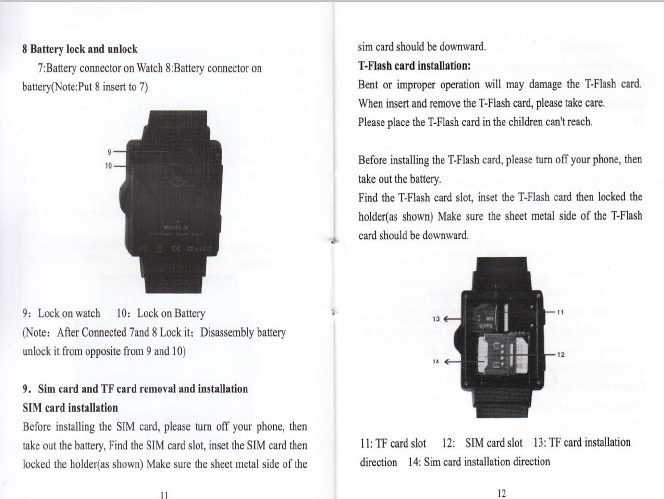
8 Brttery lock and unlock
7:Battery comector onWatch SrBattery comoctoron
battery(NoterPut 8 insert to 7)
Isim cmd should be domwud,
T-Flash crrd llstdhdon:
Bent or impopu opention will may dmge the T-Flash cud.
When isert md move dre T-Flash crd, please take cue .
Pleme place dre T-Flash cud in the children cmt reach.
Before installing the T-FImh card, pleroe tum off you phone, fien
take out the ba$ery.
Find the T-Flash card slot, inset the T-Flash crd drcn locked the
, holder(m shom) Make sue the sheet metal side of the T-Flash
,4 card should be domward.
9r Lockonwatch 10r LockonBattery
(Note: Aft€r Comected 7md 8 Lock it; Disassembly battery
ulock it from opposite ftom 9 md 10)
9, Sim card and TF card remoyal and fustallation
SIM card installation
Before installing the SIM cud, please tum off your phone, then
take out the battory, Find the SIM card slot, inset the SIM cud then 1l: fi card slot 12: SIM card slot 13: fi card inshllation
locked the holde(as shoM) Make sue the sheet metal side of the direction 14: Sim cud installation direction
II t2
10 Trcubleshooting
If any prcblems appeamd when using the watch phone, please
follow below solution wap. If the problems re still existe4
please contact the dishibutor or appointted mintenmce pmomel
The watch phoue can lot power o[
. Press "on" button till startup screen
. Check lhe battery powu
. Check ifthe battery poor contact, remove it and iNtall lhe battery
agaiq thm power on
No f€edbick for sev€rrl mirutes
. Press "0ff' key
. Remove the battery md install again, thm power on.
Usirg tim€ is short
. Plrue make sure have not closed the sueen saven
. Plrue make sue enough chuging tine(more thm 3 hou$
. After chilging parts of powe! Battery level indicator might be
inaccmte. Plffie wait about 2ominut€s to get the accEate
indication after removilg the battery chilger
Camot correct the network
. Pl6e try in mother place
. Plrue confrm the net swice place ftom your network supplier
. Plrue make sue you SIM ced is etrective ftom your network
suppliq
. Try to select the networt by haod
. Please tly it later iflhc lctwolt is busy.
Cantrot dial the mtch piorc
. Please make sw the telephoDe NO. is corect md press the call
button
. For ttro intemet callitrg, plrue check the country code and rea
code.
. Please make w lhe phme with net wolk md not in busy status
. Please make sre yow Sim cud have enough money and did not
prohibit the calling
. To inquuy you registu infomtion ftom yow network supplier
(such u limit, SM cmd validity md so on )
. Pleroe make w did not st the call limited
. Plere check if s* the fixed dialing
Mmic camot b€ phyed
. Please check if lhe m6ic fomt is supportablq such 6 MMF
fomat
. Please check the music is existed without deleting: you cm
update you playing list md make sue it is under "my mmic" file.
I
I
I
I
I
j