manuals.online logo
Brands
  1. Home
  2. •
  3. Brands
  4. •
  5. Keelin
  6. •
  7. GPS
  8. •
  9. Keelin GPT15 User manual

Keelin GPT15 User manual

Other Keelin GPS manuals

Keelin Eelink GPT12 User manual

Keelin

Keelin Eelink GPT12 User manual

Keelin Little elfin TK121-S User manual

Keelin

Keelin Little elfin TK121-S User manual

Keelin GPT06-3G User manual

Keelin

Keelin GPT06-3G User manual

Popular GPS manuals by other brands

Polar Electro RCX3 Getting started guide

Polar Electro

Polar Electro RCX3 Getting started guide

Tobii Pro Spectrum user manual

Tobii Pro

Tobii Pro Spectrum user manual

Gosafe G91I user manual

Gosafe

Gosafe G91I user manual

Fisher TW-8800 operating manual

Fisher

Fisher TW-8800 operating manual

LG LN740 Series Specifications

LG

LG LN740 Series Specifications

Prestigio GeoVision 430 user manual

Prestigio

Prestigio GeoVision 430 user manual

JVC KW-NT3HDT instructions

JVC

JVC KW-NT3HDT instructions

Yoctopuce Yocto-GPS user guide

Yoctopuce

Yoctopuce Yocto-GPS user guide

RightWay GPS Navigator RW 200 user manual

RightWay

RightWay GPS Navigator RW 200 user manual

TomTom VIA user guide

TomTom

TomTom VIA user guide

Garmin ECHOMAP PLUS owner's manual

Garmin

Garmin ECHOMAP PLUS owner's manual

Telit Wireless Solutions GM862GPS Series Hardware user's guide

Telit Wireless Solutions

Telit Wireless Solutions GM862GPS Series Hardware user's guide

Hama 53118 Operating	 instruction

Hama

Hama 53118 Operating instruction

Garmin DEZL 580 owner's manual

Garmin

Garmin DEZL 580 owner's manual

Jigabot EX quick start guide

Jigabot

Jigabot EX quick start guide

Pointer Cellocator CelloTrack XT LTE overview

Pointer

Pointer Cellocator CelloTrack XT LTE overview

Queclink GV55LITE user manual

Queclink

Queclink GV55LITE user manual

Starcom Systems Kylos Compact user guide

Starcom Systems

Starcom Systems Kylos Compact user guide

manuals.online logo
manuals.online logoBrands
  • About & Mission
  • Contact us
  • Privacy Policy
  • Terms and Conditions

Copyright 2025 Manuals.Online. All Rights Reserved.

Luggage Tracker
GPT15 Quick Start Guide
®
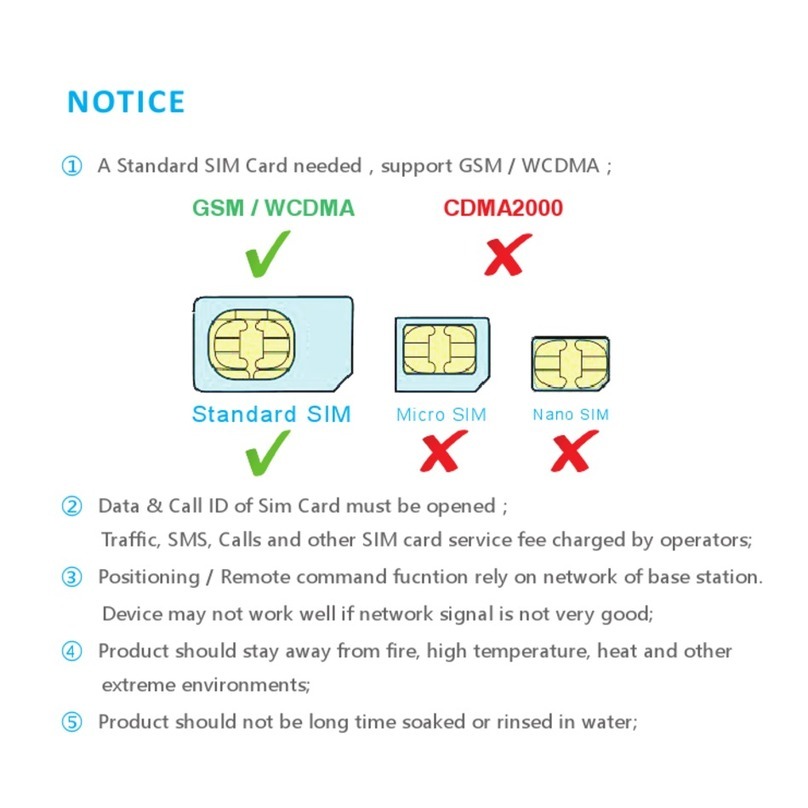
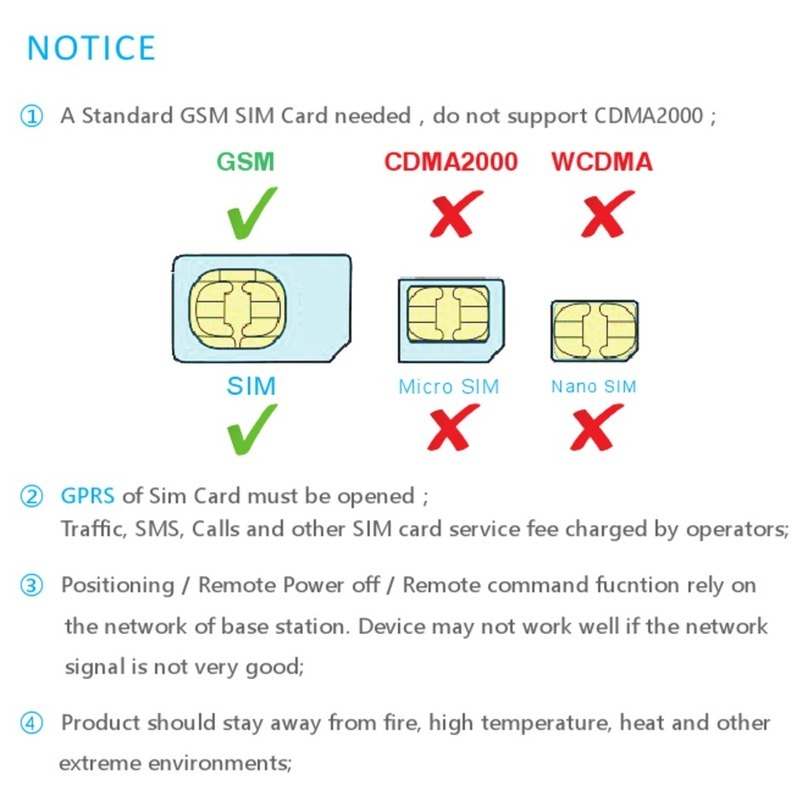
① A Standard GSM SIM Card needed,do not support
CDMA2000
;
NOTICE
② GPRS of Sim Card must be opened;
Traffic, SMS, Calls and other SIM card service fee charged by operators;
③ Positioning / Remote Power off / Remote command fucntion rely on
the network of base station. Device may not work well if the network
signal is not very good;
④ Product should stay away from fire, high temperature, heat and other
extreme environments;
SIM
Micro SIM
Nano SIM
CDMA2000 WCDMAGSM
Battery
Light Sensor
USB Charge / LED
Power On
SIM Slot
GPS Antenna
INTRODUCTION
GSM LED ( LBS / Base signal, Red )
Quick flash: Searching for base signals
( Not connect yet) ;
Slow flash: Found base signals ;
( Base Connected and LBS start )
Red LED Long light when charging.
GPT15 General View
GPS (GPS Satellite signal,Blue)
Quick flash: Searching for GPS
Satellite signals (Not positioned);
Slow flash: Found GPS/WiFi signals ;
( Positioned by GPS/WiFi )
Blue LED Long light after charging.
Supports quad bands, universal in the world
GPS/WiFi/LBS triple-Positioning mode, support A-GPS
1800mAh Battery , repeated charging
High-sensitivity light sensor data uploading in real time
Device link with cellphone by bluetooth, Anti-lost Alarm
Transfer 3rd party terminal data get through by bluetooth(customization)
Keelin Platform/ Keelin APP/ SMS inqury and configuration
Support EELINK 1.9/2.0, OTA Firmware upgrade
GSM/LBS GSM Band:850/900/1800/1900MHz
LBS Accuracy:>200m
GPS Sensitivity:-160 dBm
GPS GPS Band:1575 Mhz
Search time:<60s
Accuracy:5-15m
WiFi 2.4GHz 802.11 b/g/n MAC/BB/RF
Accuracy:5-50m
Current <50 mA(GPS on)
<10 mA(GPS off)
Light Sensor 0-2047 LUX
Bluetooth 4.0
Protocol EELINK 2.0 / UDP
Standby About 10 days
Temperature -20 ℃~ +65℃
Battery 1800mAh
Demension 96(L) X 50(W) X 11.2(H)
Weight 65 g
Func�on/Parameter
Q & A
Q:Positioned by GPS / WiFi / LBS ?
A:GPS called“Global Positioning System”,GPS device can be positioned by GPS
satellite outdoor. Device with Wifi module positioned by WiFi hot spot nearby
for assistance indoor-positioning. Device also can be positioned by base station
of operator which call LBS ,mainly for assistance positioning.
Q:Location is not accurate?
A:If need accurate positioning, use device outdoor where GPS signal is good and
start GPS tracking mode.
Device indoor mainly positioned by LBS & WiFi, the accuracy lower than GPS
Q:Standby time can be longer?
A:Device need Internet connection. Standby time will be different by different
using environment and working mode.
Q:Device offline?
A:The conditions below results in offline.
① No balance or No SIM ② No GSM or GSM signal is weak ③ Battery runs out

Insert SIM, Power on
Begin Experience of GPS tracker
1
Open cover and insert SIM to device, notice direction.
Lift SIM Slot to remove SIM card.
Put it into bag or luggage
Press power on button, observe GSM / GPS LED untill it works
fine(See LED explaination), Close cover.
Install KEELIN APP, Acvate Device
2
可依恋
®
Scan QR below to download Keelin APP
Launch APP , Scan QR on Label to register & activate device
Begin Experience of Keelin APP
IMEI:15 digits IMEI SN:6 digits KEY
Luggage GPS Tracker
GPT15
Luggage GPS Tracker
EELINK Communication Technology CO.LTD
Address: 3 Floor, Yu yang mansion, 2nd Road of Langshan,
Science and Technology Park, Nanshan District, ShenZhen, CHINA
TEL : 0755-86278376 / 86278370
Mail : [email protected]
Link
e
2