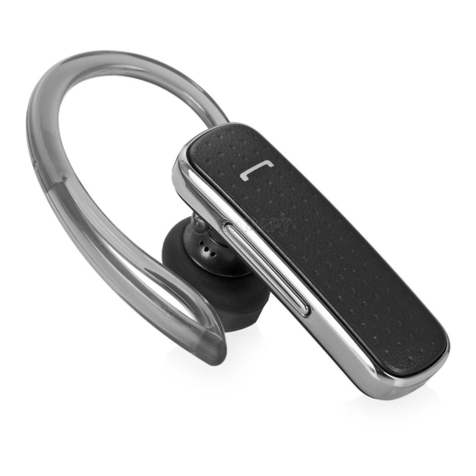
LG TONE Active User manual

ENGLISH ESPAÑOL
User Manual
Bluetooth®Wireless Stereo Headset
LG TONE Active™
Please read the Important Safety Information for the proper use of this product.
After reading, store this User’s Guide in an easily accessible place for all users.
NOTE: Please read all information carefully prior to using the HBS-A80 in order to enjoy the best
performance and prevent damage to the product.
WARNING: This product contains chemicals known to the State of California to cause cancer and
birth defects or other reproductive harm. Call (800) 243-0000 for more information.
Wash hands after handling.
HBS-A80 www.lg.com
Rev 1.0 US
All rights reserved.
© 2016 LG Electronics Inc.

Contents
Safety Cautions........................................................................................................................1
Precautions When Using the Product..........................................................................2
HD Speaker.................................................................................................................................2
Qualcomm® aptX™ Audio...................................................................................................3
Product Components............................................................................................................3
Product Description ..............................................................................................................4
HBS-A80 Pairing and Connecting..................................................................................5
Indicator Lamp ..........................................................................................................................6
Mobile Calling Functions......................................................................................................7
Playing Music.............................................................................................................................8
Battery Charging and Alerts .............................................................................................9
Vibration Alert Settings.......................................................................................................9
Out of Range..............................................................................................................................9
LG Tone & Talk™ .......................................................................................................................10
Troubleshooting........................................................................................................................11
Specications and Features...............................................................................................11
Declaration of Conrmation..............................................................................................12
Additional Information..........................................................................................................13
Limited Warranty.....................................................................................................................15
Important Safety Information ..........................................................................................16
ENGLISH

1
ENGLISH
The LG TONE Active (HBS-A80) is a lightweight wireless stereo headset that uses Bluetooth technology.
This product can be used as an audio accessory for devices supporting either the A2DP or Hands-Free
Bluetooth prole.
Safety Cautions
!CAUTION
Do not disassemble, adjust, or repair the product arbitrarily.
Do not place the product near excessive heat or ammable material.
Do not arbitrarily replace the battery as it may explode.
The product may be damaged if an incompatible recharger is used.
Make sure that an infant or child does not swallow a magnet or a small component of the product.
Make sure that foreign objects do not enter the charger’s connectors (charging port and power plug).
Failing to do so may result in re or electric shock.
If you have a medical device implanted, contact your doctor before use.
For your safety, do not remove the battery incorporated in the product.
The Lithium-ion polymer battery is a hazardous component which can cause injury.
Battery replacement by a nonqualied professional can cause damage to your device.
!WARNING
Do not drop the product from a high place.
Make sure there is no alcohol or benzene in contact with the product.
Do not store the product in a wet or dusty place.
Do not place heavy objects on the product.
Product is sweat and water resistant (IPx5). It is not waterproof and should not be submerged in water.
2
ENGLISH
Precautions When Using the Product
Refer to the following to use the product for its normal lifespan.
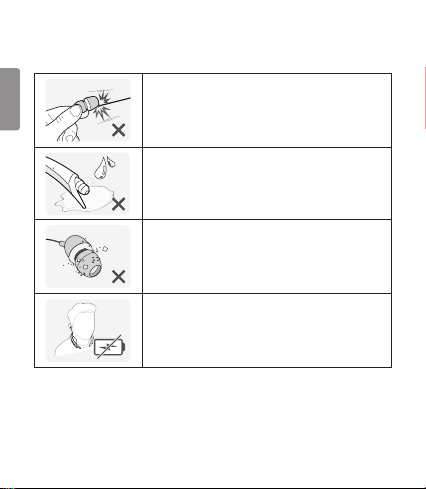
Do not pull the earphone cable with excessive force.
If the product is exposed to excessive sweat, clean the product.
Keep the earbud of the earphone always clean.
For your safety, do not wear the product while it is being charged.
HD Speaker
If the communication network of the device you are connecting to supports HD Voice Calling,
you can enjoy making voice calls and listening to music in high denition.

3
ENGLISH
Qualcomm® aptX™ Audio
LG HBS-A80 is powered by Qualcomm aptX audio. Qualcomm aptX audio is Bluetooth wireless
technology that provides clearer audio for listening to music and watching movies.
Qualcomm aptX audio is automatically enabled when a mobile phone or audio device supports it.
Product Components
LG TONE Active HBS-A80
(Medium ear gels &
stabilizer tips installed)
Extra Ear Gels
(small & large)
Micro USB Charging Cable
User Manual Warranty Card
NOTE: Actual product design may differ from images shown in manual.
Make sure authentic LG Electronics components are used. Using a non-authentic component
may damage the product and thus void the warranty.
!CAUTION
The complete manual is available for download from the LG Electronics website.
www.lg.com > Support > Manuals & Documents > Mobile Devices > LG Bluetooth Devices
NOTE

4
ENGLISH
Product Description
NOTE: When you control the volume (level 15), you will hear a control sound two times or as a long
sound from volume level 10 and higher.
Indicator lamp
Power button
Volume button
Previous/Next
button
Play/Pause/Stop
button
Retractable earbud (left)
Retractable earbud (right)
Stabilizer tip (left)
Stabilizer tip (right)
Charging port
Call button
Microphone
Microphone

5
ENGLISH
HBS-A80 Pairing and Connecting
If you start the process after putting in your earbuds, you can easily pair
and connect following the voice prompts.
If you hear that the battery is insufcient, recharge the battery before
proceeding with pairing.
If pairing is not completed within 3 minutes, the power automatically turns off.
If the power turned off automatically, press and hold the Power button for 2 seconds to turn the
power on.
Connecting Quickly
LG HBSA80
1
4
2
3
1 From the mobile phone’s Settings menu, turn on Bluetooth.
2 On the HBS-A80, press and hold the Power button for 2 seconds to turn the power on.
3 The blue Indicator lamp turns on and the HBS-A80 switches to Search mode.
4 From the mobile phone, select LG HBSA80 to connect.
5 A voice message will indicate that the connection is completed.
Connecting Manually (pairing with another phone or re-pairing)
1 From the mobile phone’s Settings menu, turn on Bluetooth.
2 With the HBS-A80’s power off, simultaneously press and hold
the Power button and the Call button for 2 seconds to turn
the power on.
3 The blue Indicator lamp turns on and the HBS-A80 switches
to Search mode.
4 From the mobile phone, select LG HBSA80 to connect.
5 A voice message will indicate that the connection is completed.

6
ENGLISH
Multiple Connections
The HBS-A80 can be connected to a mobile phone and a PC simultaneously.
The HBS-A80 can be connected to an additional device while it is already connected to a device.
1 With the HBS-A80’s power off, simultaneously press and hold the Power button and
the Call button for 2 seconds to turn the power on.
2 The blue Indicator lamp turns on and the HBS-A80 switches to Search mode.
3 From the mobile phone or device list, select LG HBSA80 to connect.
4 A voice message will indicate that the connection is completed. This device becomes the
“Main Connected Device.”
5 Try to connect to HBS-A80 using a previously connected device. This device becomes the
“Sub Connected Device.”
NOTE: If simultaneously connected to two devices, the device that was connected most recently
(or in the example above, a new connection verses a previous connection) is the “Main
Connected Device.” The main functions work based on the “Main Connected Device.”
Automatic Reconnection
If you turn on HBS-A80, it will automatically connect to the most recent (Main or Sub Connected
Device) device it was connected to. (If a device cannot be found, Search mode will be activated.)
If the product does not automatically connect to the device you want, search for your product on the
device you want to connect to and connect it manually.
Indicator Lamp
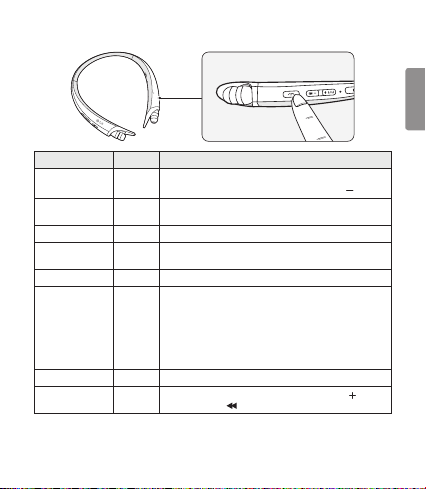
HBS-A80 Status Description
Power On The blue Indicator lamp ashes four times.
Power Off The blue Indicator lamp ashes four times.
Search Mode The blue Indicator lamp is on.
Connected to a Device The Indicator lamp will ash blue once every 5 seconds.
Call Connected or Playing Music The Indicator lamp will ash blue once every 5 seconds.
7
ENGLISH
Mobile Calling Functions
Function Status Description
Answering Call Ringing Briey press the Call button.
To turn off the vibration alert, briey press the Volume ( ) button.
Making a Call Idle If you make a call using a mobile phone, the call is automatically
connected to the HBS-A80.
Switching Calls Talking Briey press the Play/Pause/Stop button twice.
Redial Idle Press and hold the Call button for more than 1 second to place a call
to the last number dialed.
Voice Dial Idle Briey press the Call button to active your headset’s voice.
Receiving a Call
While on the Phone Talking
You can receive another call while on the phone by pressing and
holding the Call button for 1 second.
The existing call switches to a call waiting status. Press and hold the
Call button again for 1 second to switch back to the previous call.
Briey press the Call button to hang up in the middle of a call or to
hang up both calls.
(It works differently depending on the mobile phone settings.)
Rejecting a Call Ringing Press and hold the Call button for 2 seconds.
Enabling/Disabling
Mute Talking During a call, simultaneously press and hold the Volume ( ) button
and the Previous ( ) button for 1 second.
CAUTION: Do not disable/enable the mute while driving, as you need to use both hands.
NOTE: The Voice Dial and Redial functions work on the Main Connected Device or on the device
on which you made the last call. (The Voice Dial and Redial functions may work differently
depending on the mobile phone being used.)

8
ENGLISH
Playing Music
Function Status Description
Play Idle Briey press the Play/Pause/Stop button.
Pause Music on Briey press the Play/Pause/Stop button.
Stop Music on Briey press and hold the Play/Pause/Stop button for 1 second.
Play Previous/Next Song Music on Briey press the Previous ( ) button or the Next ( )
button.
Rewind/Fast-Forward Music on Press and hold the Previous ( ) button or the Next ( )
button until you reach the desired part.
Equalizer Music on Briey press the Play/Pause/Stop button twice to switch
between Bass Boost (Default), Normal, and Treble Boost.
Switching Music Players
To switch to a different music playback device when multiple devices are connected, stop the
currently playing music and then play music from the device of your choice. The HBS-A80’s music
playback and control changes to that device.
Table of contents
Languages:
Other LG Bluetooth Headset manuals