www.linarie.com.au 8
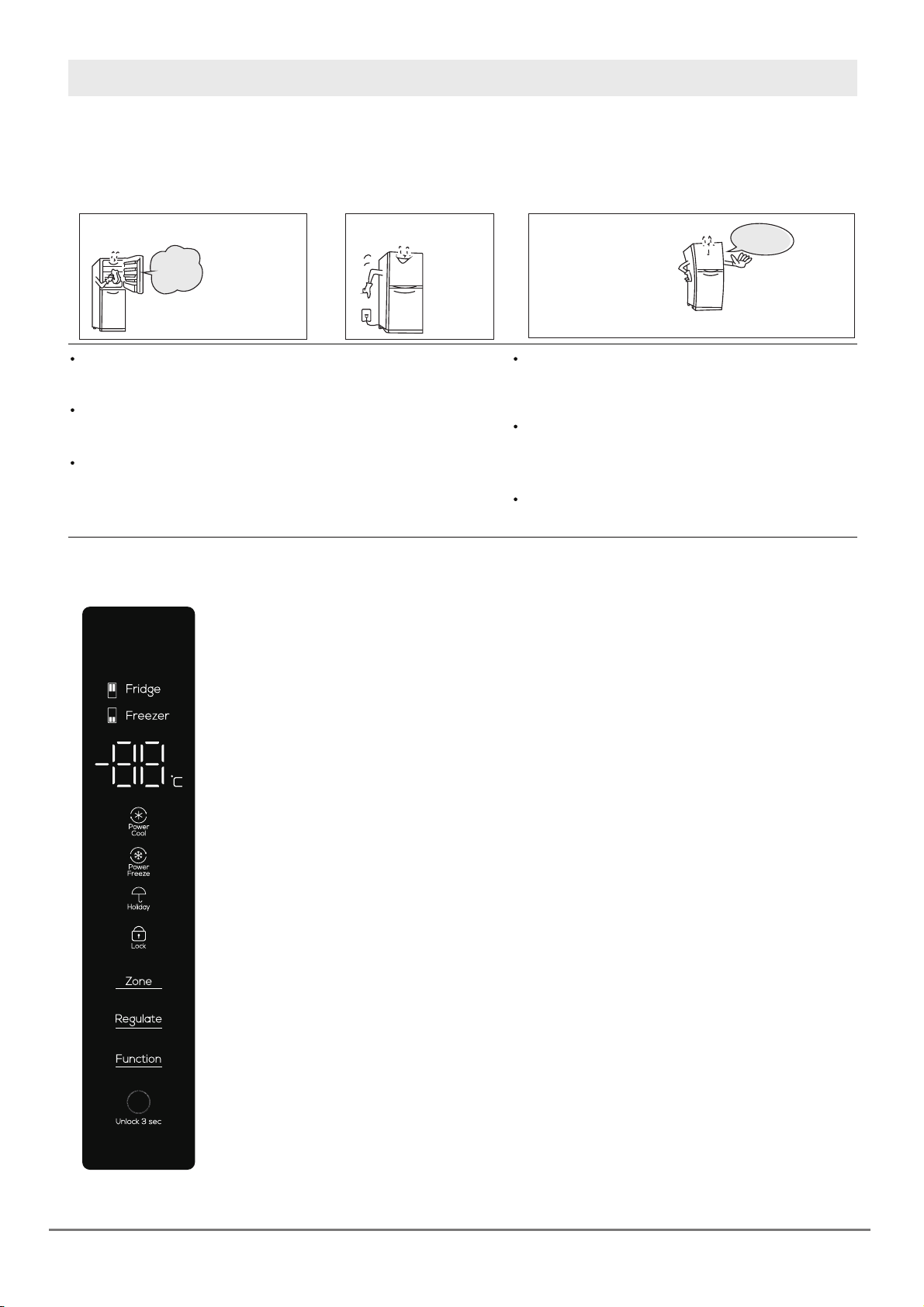
Under the unlocking mode, repeatedly press the “Function”
button until the “Power Cool” icon flashes. The refrigerator
compartment Power Cool function is activated 3s. after you
stop button operation. Use the similar operation to manually
exit the Power Cool function. The Power Cool function, when
being activated to operate for 2h, will be automatically
deactivated.
Under the unlocking mode, repeatedly press the “Function”
button until the “Power Freeze” icon flashes. The freezer
compartment Power Freeze function is activated 3s. After you
stop button operation. Use the similar operation to manually
exit the Power Freeze function. The Power Freeze function,
when being activated to operate for 4h, will be automatically
deactivated.
Under the unlocking mode, repeatedly press the “Function”
button until the “Intelligent” icon flashes. The intelligent
function is activated 3s. after you stop button operation.
Use the similar operation to exit the intelligent function.
Under the “Intelligent” function mode, the refrigerator is
configured to monitor the operating status of each com-
partment by itself to ensure operation at the most efficient
manner. Under the “Intelligent” function mode, the
refrigerator may automatically activate the “Power Cool”
or “Power Freeze” function based on the temperature rise
in the refrigerator compartment and freezer compartment.
(Under the “Intelligent” function mode, it is possible to
automatically exit the intelligent function when you carry out
setting of other function.)
Under the“Power Freeze” mode, the freezer compartment
temperature is set at -32 until the function is deactivated.
Under the “Power Freeze” mode, regulate the setting
temperature in the freezer compartment to exit the Power
Freeze function. Under the “Power Freeze” mode, auto-
matically exit the Power Freeze function when the freezer
compartment door is kept opening for more than 3min.
(Under the “Power Freeze” mode, it is possible to
automatically exit the Power Freeze function when you
carry out setting of other function.)
cont. operation
7.2.4 Power Cool function
7.2.5 Intelligent function
The instantaneous operating mode at the time of power
outage is locked to facilitate resumed operation at the
same mode after power-on again.
7.2.7 Power-off memory
If the refrigerator compartment door or freezer compartment
door is not tightly closed or kept opening for more than
1 minute, the “tick” buzzer alarm will be heard. Press any
key to temporarily stop the alarm, followed by alarm again
1 minute later; Close the refrigerator compartment door t
ightly to stop the alarm.
7.2.8 Door alarm
When the refrigerator is switched on, the freezer compartment
has a temperature of higher than -12 , the temperature zone
box for the freezer compartment is On and the digital zone
flashes. Press any button to gain the temperature of the freezer
compartment at the time of power-on. Press the button again
or wait for 10s to resume the normal display mode.
7.2.9 Freezer compartment over-temp. warning
Given no button operation within 30s, the refrigerator’s screen
protection function will be activated, and the keypad is locked
automatically. Under the screen protection mode, press any
button to exit the screenprotection function.
7.2.10 Screen protection function
Under the unlocking mode, repeatedly press the “Zone”
button until the refrigerating zone is lit up, and then press the
“Regulate” button for temperature regulation in the refrigerator
compartment. With the refrigerator compartment being placed
at “OF”, stop button operation to access to the refrigerating
deactivation function. When the setting temperature in the
refrigerator compartment is not placed at “OF”, exit the
refrigerating deactivation function. (Under the refrigerating
deactivation function mode, it is possible to automatically exit
the refrigerating deactivation function when you carry out
setting of other function. Note: Prior to access to the refrige-
rating deactivation function, empty the refrigerator compart-
ment.) Under the “Refrigerating deactivation” function mode,
the refrigerator compartment is placed at the non-use state.
7.2.6 Refrigerating deactivation function
Power Freeze function
Cool” mode, the refrigerator compartment temperature is
set at 2 until the function is deactivated. Under the
“Power Cool” mode, regulate the setting temperature in the
refrigerator compartment to exit the Power Cool function.
Under the “Power Cool” mode, automatically exit the Power
Cool function when the refrigerator compartment door is
kept opening for more than 3min. (Under the “Power Cool”
mode, it is possible to automatically exit the Power Cool
function when you carry out setting of other function.)