manuals.online logo
Brands
  1. Home
  2. •
  3. Brands
  4. •
  5. Panasonic
  6. •
  7. HDTV
  8. •
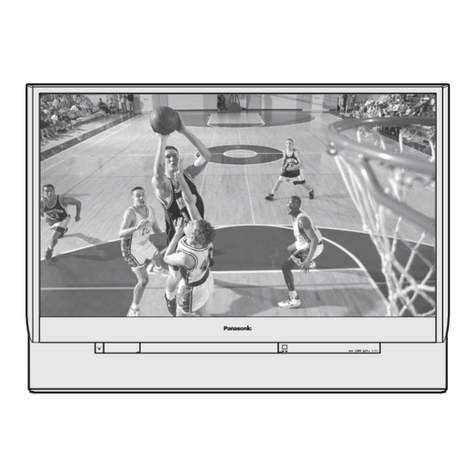
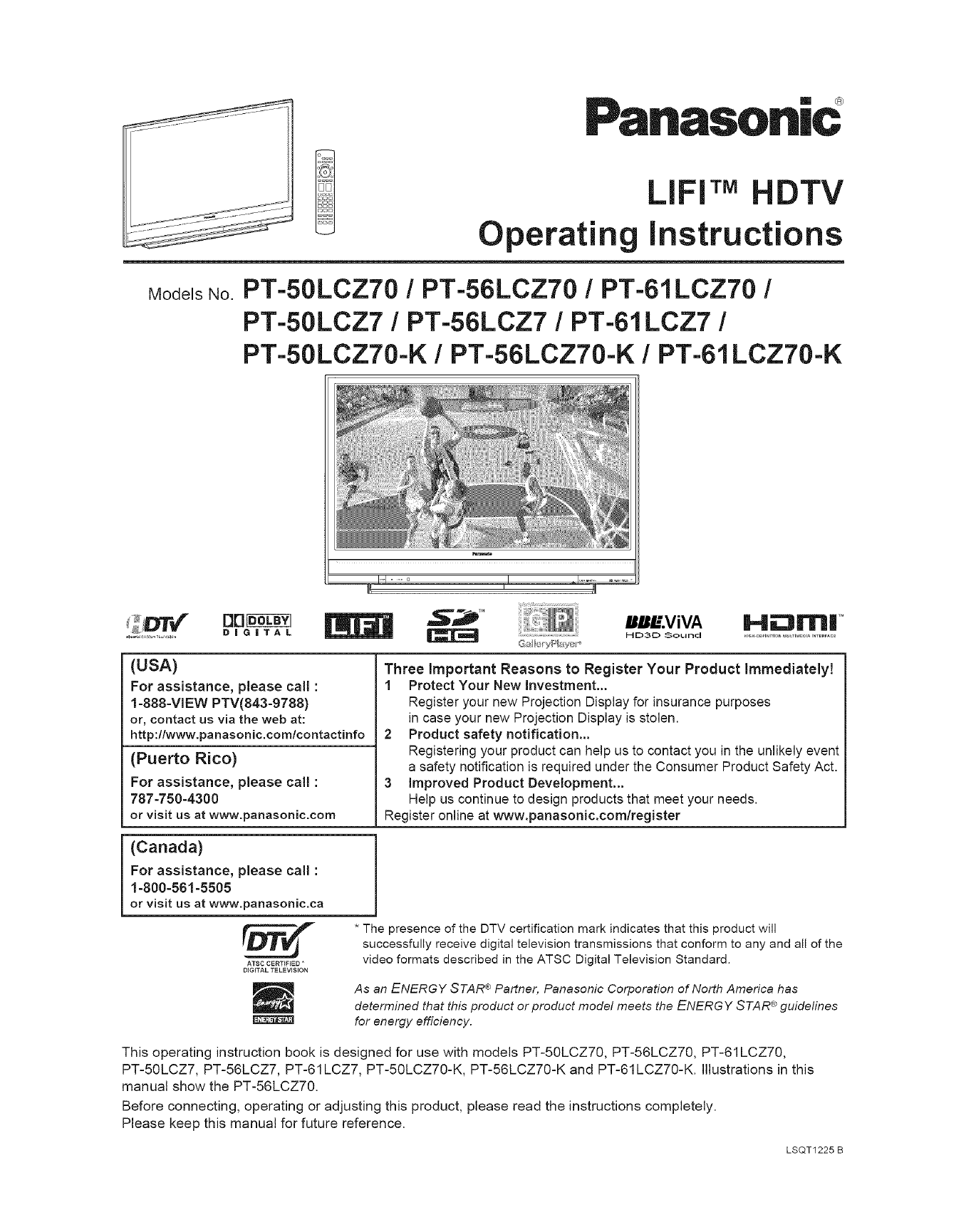
  9. Panasonic LIFI PT-50LCZT0 User manual

Panasonic LIFI PT-50LCZT0 User manual

This manual suits for next models

8

Other Panasonic HDTV manuals

Panasonic TC-L60DT60W User manual

Panasonic

Panasonic TC-L60DT60W User manual

Panasonic PT52LCX15B - MULTI MEDIA DISP User manual

Panasonic

Panasonic PT52LCX15B - MULTI MEDIA DISP User manual

Panasonic P54V10 - TC - 54.1" Plasma TV User manual

Panasonic

Panasonic P54V10 - TC - 54.1" Plasma TV User manual

Panasonic TC-58EX750X User manual

Panasonic

Panasonic TC-58EX750X User manual

Panasonic TC-P42G10 User manual

Panasonic

Panasonic TC-P42G10 User manual

Panasonic TH-65PV500E User manual

Panasonic

Panasonic TH-65PV500E User manual

Panasonic Viera TC-L42E60 User manual

Panasonic

Panasonic Viera TC-L42E60 User manual

Panasonic Viera TC-P42X1 Quick start guide

Panasonic

Panasonic Viera TC-P42X1 Quick start guide

Panasonic TX-58DXW804 Assembly instructions

Panasonic

Panasonic TX-58DXW804 Assembly instructions

Panasonic TC-P58V10 User manual

Panasonic

Panasonic TC-P58V10 User manual
Panasonic TC-55FZ950C User manual

Panasonic

Panasonic TC-55FZ950C User manual

Panasonic PT47WX54 - 47" PROJECTION TV User manual

Panasonic

Panasonic PT47WX54 - 47" PROJECTION TV User manual

Panasonic Viera TC-L65WT600 User manual

Panasonic

Panasonic Viera TC-L65WT600 User manual

Panasonic TC-42U12 User manual

Panasonic

Panasonic TC-42U12 User manual

Panasonic Viera TC-L65WT600 User manual

Panasonic

Panasonic Viera TC-L65WT600 User manual

Panasonic TH-C50HD18 User manual

Panasonic

Panasonic TH-C50HD18 User manual

Panasonic TC-L47E50-1 Instructions for use

Panasonic

Panasonic TC-L47E50-1 Instructions for use

Panasonic Viera TC-L50ET60 Instruction Manual

Panasonic

Panasonic Viera TC-L50ET60 Instruction Manual

Panasonic TC-L37X1 - 37" LCD TV User manual

Panasonic

Panasonic TC-L37X1 - 37" LCD TV User manual

Panasonic Viera TC-P42X3L User manual

Panasonic

Panasonic Viera TC-P42X3L User manual

Panasonic Viera TC-P54Z1 User manual

Panasonic

Panasonic Viera TC-P54Z1 User manual

Panasonic Viera TC-P50U50 User manual

Panasonic

Panasonic Viera TC-P50U50 User manual

Panasonic VIERA TH-42PZ85U User manual

Panasonic

Panasonic VIERA TH-42PZ85U User manual

Panasonic TH-32LRH30U User manual

Panasonic

Panasonic TH-32LRH30U User manual

Popular HDTV manuals by other brands

Vizio M602i-B3 user manual

Vizio

Vizio M602i-B3 user manual
JVC LT-40C750 quick start guide

JVC

JVC LT-40C750 quick start guide

Sharp LC60LE830UN brochure

Sharp

Sharp LC60LE830UN brochure

LEECO uMax85 user manual

LEECO

LEECO uMax85 user manual

Pendo PNDLFHU55 quick start guide

Pendo

Pendo PNDLFHU55 quick start guide

Philips 32PFL9604H null

Philips

Philips 32PFL9604H null

Philips 32PFL8404H null

Philips

Philips 32PFL8404H null

RCA RTU7575-B manual

RCA

RCA RTU7575-B manual

Sceptre X23 user manual

Sceptre

Sceptre X23 user manual

Medion LIFE P13901 user manual

Medion

Medion LIFE P13901 user manual

Vizio D32h-C0 user manual

Vizio

Vizio D32h-C0 user manual

JVC EM39T Specifications

JVC

JVC EM39T Specifications

LG 50PC1DRA Specifications

LG

LG 50PC1DRA Specifications

Samsung Tantus HCJ555W instruction manual

Samsung

Samsung Tantus HCJ555W instruction manual

Sceptre X460BV-FHD Specifications

Sceptre

Sceptre X460BV-FHD Specifications

BEA 49B4KUHD user manual

BEA

BEA 49B4KUHD user manual

EQD Auria EQ3288 Specifications

EQD

EQD Auria EQ3288 Specifications

Medion LIFE P14334 user manual

Medion

Medion LIFE P14334 user manual

manuals.online logo
manuals.online logoBrands
  • About & Mission
  • Contact us
  • Privacy Policy
  • Terms and Conditions

Copyright 2025 Manuals.Online. All Rights Reserved.

Panasonic
Operating L IrM HDTV
instructions
ModelsNo.PT-50LCZT0 /PT-56LCZT0 /PT-61LCZ70 /
PT-50LCZ7 /PT-56LCZ7 /PT-61LCZ7 /
PT-50LCZ70-K /PT-56LCZ70-K /PT-61LCZ70-K
'_ DIG|TAL
(USA)
For assistance, please call :
1-888-VIEW PTV(843-9788)
or, contact us via the web at:
http:llwww.panasonic.comlcontactinfo
(Puerto Rico)
For assistance, please call :
787-750-4300
or visit us at www.panasonic.com
w.viw Hum, TM
G_I t;'rY__I_Y _!r'_ HD3D Sound
Three Important Reasons to Register Your Product Immediatelyt
1 Protect Your New investment...
Register your new Projection Display for insurance purposes
in case your new Projection Display isstolen.
2 Product safety notification...
Registering your product can help us to contact you in the unlikely event
a safety notification is required under the Consumer Product Safety Act.
3 improved Product Development...
Help us continue to design products that meet your needs.
Register online at www.panasonic.com/register
(Canada)
For assistance, please call :
1-800-561-5505
or visit us at www.panasonic.ca
ATSC CERTIFIED "
DiGiTAL TELEVISION
* The presence of the DTV certification mark indicates that this product will
successfully receive digital television transmissions that conform to any and all of the
video formats described in the ATSC Digital Television Standard.
As an ENERGY STAR ®Partner, Panasonic Corporation of North America has
®
determined that this product or product model meets the ENERGY STAR guidelines
for energy efficiency.
This operating instruction book is designed for use with models PT-50LCZ70, PT-56LCZ70, PT-61LCZ70,
PT-50LCZ7, PT-56LCZ7, PT-61LCZ7, PT-50LCZ70-K, PT-56LCZ70-K and PT-61LCZ70-K. Illustrations in this
manual show the PT-56LCZ70.
Before connecting, operating or adjusting this product, please read the instructions completely.
Please keep this manual for future reference.
LSQT1225 B
CAUTION
WARNING: To reduce the risk of electric shock, do not remove cover or back. No
user-serviceable parts inside. Refer servicing to qualified service personnel.
This symbol warns the
user that uninsulated
voltage within the unit may
have sufficient magnitude
to cause electric shock.
Therefore, it is dangerous
to make any kind of
contact with any inside part
of this unit.
Note to CATV System Installer:
This symbol alerts the user
that important literature
concerning the operation
and maintenance of this
unit has been included.
Therefore, it should be read
carefully in order to avoid
any problems.
A he pictorial
representation of a hot
surface within a triangle
__ is intended to tell the
user that parts inside the
product are a risk of burns
to persons.
This reminder is provided to call the CATV system installer's attention to Article 820-40 of the NEC that provides
guidelines for proper grounding and, in particular, specifies that the cable ground shall be connected to the grounding
system of the building, as close to the point of cable entry as practical.
To reduce the risk of electric shock, fire, injury to persons or damage to this product:
1) Read these instructions before using, connecting or adjusting this product.
2) Keep these instructions for future reference.
3) Heed all warnings on the product and in this Operating Instructions manual.
4) Follow all instructions carefully.
5) Do not use this apparatus near water. For example, near a bathtub, washbowl, kitchen sink, or laundry tub, in a
wet basement or near a swimming pool, and the like. Do not place objects filled with water, such as a vase or the
like, on top of this unit.
6) Clean only with a dry cloth. Do not use liquid cleaners or aerosol cleaners.
7) Do not block any ventilation openings. Install in accordance with the manufacturer's instructions. Openings
in the cabinet are provided for ventilation to ensure reliable operation and to protect it from overheating. Never block
openings by placing the product on a bed, sofa or similar surfaces.
8) Do not install near any heat source such as radiators, heat registers, stoves, or other apparatus (including
amplifiers) that produces heat. Do not install in a built-in installation such as a bookcase or rack, unless proper
ventilation is provided or the manufacturer's instructions have been adhered to.
9) Do not defeat the safety purpose of the polarized or grounding-type plug. A polarized plug has two blades
with one wider than the other. A grounding type plug has two blades and a third grounding prong. The
wide blade or the third prong are provided for your safety. If the provided plug does not fit into your outlet,
consult an electrician for replacement of the obsolete outlet.
10) Protect the power cord from being walked on or pinched particularly at plugs, convenience receptacles, and
the point where they exit from the apparatus.
11) Only use attachmentslaccessories specified by the manufacturer.
12) Use only with the cart, stand, tripod, bracket, or table specified by the manufacturer, or
sold with the apparatus. When a cart is used, use caution when moving the cartlapparatus
combination to avoid injury from tip-over.
13) Unplug this apparatus during lightning storms or when unused for long periods of time.
14) Refer all servicing to qualified service personnel. Servicing is required when the apparatus has been
damaged in any way, such as power-supply cord or plug is damaged, liquid has been spilled or objects
have fallen into the apparatus, the apparatus has been exposed to rain or moisture, does not operate
normally, or has been dropped.
2
AS WITH ANY SMALL OBJECT, SD CARDS CAN BE SWALLOWED BY YOUNG CHILDREN. DO NOT ALLOW
CHILDREN TO HANDLE THE SD CARD.
TO REDUCE THE RISK OF FIRE OR ELECTRIC SHOCK, DO NOT EXPOSE THIS EQUIPMENT TO RAIN OR
MOISTURE. DO NOT PLACE OBJECTS FILLED WITH WATER, SUCH AS A VASE OR THE UKE, ON TOP OF THIS
APPARATUS.
(1) This Projection Display is intended to be used with the following "iV stand :
model TY-50LCT, TY-56LCT, TY-61LC7, TY-50LC70, TY-56LC70, or TY-61LC70 for the PT-50LCZT0,
PT-56LCZT0, PT-61 LCZT0, PT-50LCZ7, PT-56LCZT, PT-61LCZT, PT-50LCZ70-K, PT-56LCZ70-K, or
PT-61 LCZT0-K. Use with other stands may result in the Projection Display becoming unstable, possibly
causing injury.
(2) This Projection Display should not be exposed to direct sunlight, extreme temperatures or moisture, as this
can result in serious irreparable damage.
= For U.S.A. only -
(3) This Projection Display "iV has an Electrodeless Discharge Lamp that contains mercury.
Disposal may be regulated in your community due to environmental considerations.
For disposal or recycling information, please contact your local authorities, or the Electronic industries
Alliance: <http:llwww.eiae.orq>
Trademarks
• VGA and XGA are trademarks of international Business Machines Corporation.
° Macintosh is a registered trademark of Apple inc., USA.
° SVGA is a trademark of the Video Electronics Standard Association.
Even if no special notation has been made of company or product trademarks, these trademarks have been fully respected.
° Equipped with dbx_-TV Noise Reduction for true MTS reproduction, dbx_-TV Noise Reduction is required for good stereo separation
and audio fidelity, dbx_ is a registered trademark, and is licensed by dbx_ Technology Licensing.
° LIFI 7,Mis a trademark of LUXlM ® Corporation.
Hii:311rn|
HIGH-O_FmlTIONMULTIMEDIAINTERFACE
HDMI, the HDMI logo and
High-Definition Multimedia
Interface are trademarks or
registered trademarks of HDMI
Licensing LLC.
ABB£.ViVA
m E)3[C_ Sound
gJnL
High Definition Sound
Manufactured under license from BBE Sound, Inc.
Licensed by BBE Sound, Inc. under one or more of
the following US patents: 5510752, 5736897. BBE
and BBE symbol are registered trademarks of BBE
Sound, Inc.
SDHC Logo is a trademark. DiGiTAL
Manufactured under license from Dolby
Laboratories. Dolby and the double-D symbol are
trademarks of Dolby Laboratories.
LIFI TMis a trademark of
LUXIM ® Corporation. GalleryPlayer and the GalleryPlayer Logo are
trademarks of GalleryPlayer, inc.
GaHeryF_bye_
EZ Sync TM is a trademark of
Matsushita Electric Industrial
Co., Ltd.
i Licensed by Fergason under UPS5717422.
HDAV! Control TMHDAVI Control TMis a trademark of
Matsushita Electric Industrial Co., Ltd.
License description: To view the license information for software used in this product, press MENU button and select
"Setup"_"About"_"License". (p. 55)
• Do not allow a still picture to be displayed for an extended period, as this can cause a permanent afterimage to remain on this unit.
Examples of still pictures include Iogos, video games, computer images, teletext and images displayed in 4:3 mode.
3
Dear Panasonic Customer
Welcome to the PanasonicJbmily of customers. We hope that you will have many years of enjo_,mentJ?om your new
Projection Display.
To obtain maximum beneJitJ?om your set, please read these Instructions bq!bre making a_v adjustments, and retain
them Jbr fitmre reJbrenee.
Retain your purchase receipt also, and record the serial number o/_,our set in the _paee provided on the rear cover of
these instructions.
_Tsit our Panasonie Web SiteJbr USA : www.panasonie.eom /Jbr Canada : www.panasonie.ea
(USA) For assistance, please call : 1-888-VIEW PTV(843-9788)
or, contact us via the web at: http:llwww.panasonic.comlcontactinfo
(Puerto Rico) For assistance, please call : 787-750-4300
or visit us at www.panasonic.com
(Canada) For assistance, please call : 1-800-561-5505
or visit us at www.panasonic.ca
= For U.S.A. =
FCC STATEMENT:
NOTE:
This equipment has been tested and found to comply with the limits for a Class B digital device, pursuant to Part 15 of
the FCC Rules. These limits are designed to provide reasonable protection against harmful interference in a residential
installation. This equipment generates, uses and can radiate radio frequency energy and, if not installed and used
in accordance with the instructions, may cause harmful interference to radio communications. However, there is no
guarantee that interference will not occur in a particular installation. If this equipment does cause harmful interference to
radio or television reception, which can be determined by turning the equipment off and on, the user is encouraged to try
to correct the interference by one or more of the following measures:
• Reorient or relocate the receiving antenna.
• increase the separation between the equipment and receiver.
• Connect the equipment into an outlet on a circuit different from that to which the receiver is connected.
• Consult the dealer or an experienced radio /TV technician for help.
FCC Caution:
To assure continued compliance, follow the attached installation instructions and use only shielded interface cables
when connecting to computer or peripheral devices. Any changes or modifications not expressly approved by the party
responsible for compliance could void the user's authority to operate this equipment.
ANY CHANGES OR MODIFICATIONS TO THIS PTV RECEIVER NOT EXPRESSLY APPROVED BY PANASONIC
CORPORATION OF NORTH AMERICA COULD CAUSE HARMFUL INTERFERENCE, WHICH WOULD VOID THE
USER'S AUTHORITY TO OPERATE THIS EQUIPMENT.
[[-'_ The Class ]][ insulation symbol (square within a square) indicates that this product has been evaluated and
tested to comply with Class ]][ insulation requirements. J
Models Number:
Trade Name:
Responsible party:
Address:
Telephone number:
Declaration of Conformity
PT-50LCZT0/PT-56LCZ70/PT-61 LCZTOIPT-50LCZ71PT-56LCZTIPT-61 LCZ7
Panasonic
Panasonic Corporation of North America
One Panasonic Way, Secaucus, New Jersey 07094
1-888-VIEW PTV(843-9788)
This device complies with Part 15 of the FCC Rules. Operation is subject to the following two conditions: (1) This
device may not cause harmful interference, and (2) this device must accept any interference received, including
interference that may cause undesired operation.
CANADIAN NOTICE:
1. Cable Compatible Television Apparatus
2. This Class B digital apparatus complies with Canadian ICES-gO3.
4
To
Start!
,_ iMPORTANT SAFETY iNSTRUCTiONS ..................................... 2
Before Using ..................................................................................... 6
Location of Controls ........................................................................ 9
installation ....................................................................................... 12
Recommended AV Connections ................................................... 2t
Use
Now ! Power ON /OFF .............................................................................. 24
Tuning channels ............................................................................. 26
Projection Display Operation ........................................................ 29
ASPECT Controls ........................................................................... 33
Eni0v EZSy.c_"Feature 34
More Audio Adjustments._____;_ 38
Sleep Timer
Viewing from SD Card.,,,,,,,,,:,,,,,,,,,,,,i,,,,,,,,,,,,,,,,,,.,:,:i,,,::,,,:,:,,,,,,,,,46
Setup Features:L_._:_:_i:_:_:_:_:_:_::::_:_::_:_._ 49
Other operatingPeripheral Equipment 56
--" - Remote Control Operation/Code List.,,,,,,,,,,,,,:,,.;,,,,:,,,,:,,,,,.,,,,,,,
•f
information, warning indicators
Troubleshooting 62
Customer Services Directory (for U,S:A:)::::::::::::::::::::::::::::::::::::::
Limited Warranty (for U,S.A:),:,:,:,,,:,,,,',,,,':,,,,",i,,,',,',,,,,,,,.,,,,,':,,,, 65
Limited Warranty (for Canada):,,,i,,:::,:::,:,.,,::,:.:,::,:,:i,,:::,:.:,,.,:,,;,: 66
lnde× _:________________________:____________________________________________________________________67
5
This Projection Display is intended to be used with an
optional stand or entertainment center. Consult your
dealer for available options.
Situate for comfortable viewing. Avoid placing where
sunlight or other bright light (including reflections) will fall
on the screen.
Use of some types of fluorescent lighting can reduce
Remote Control transmitter range.
Adequate ventilation is essential to prevent internal
component failure. Keep away from areas of excessive
heat or moisture.
The Video /Audio connection between components can
be made with shielded video and audio cables. For best
performance, video cables should utilize 75 _ coaxial
shielded cables. Cables are available from your dealer or
electronics store.
Before you purchase any cables, be sure you know
what type of output and input connectors your various
components require. Also determine the length of cable
you'll need.
Please take safety precautions to prevent the unit from
falling over.
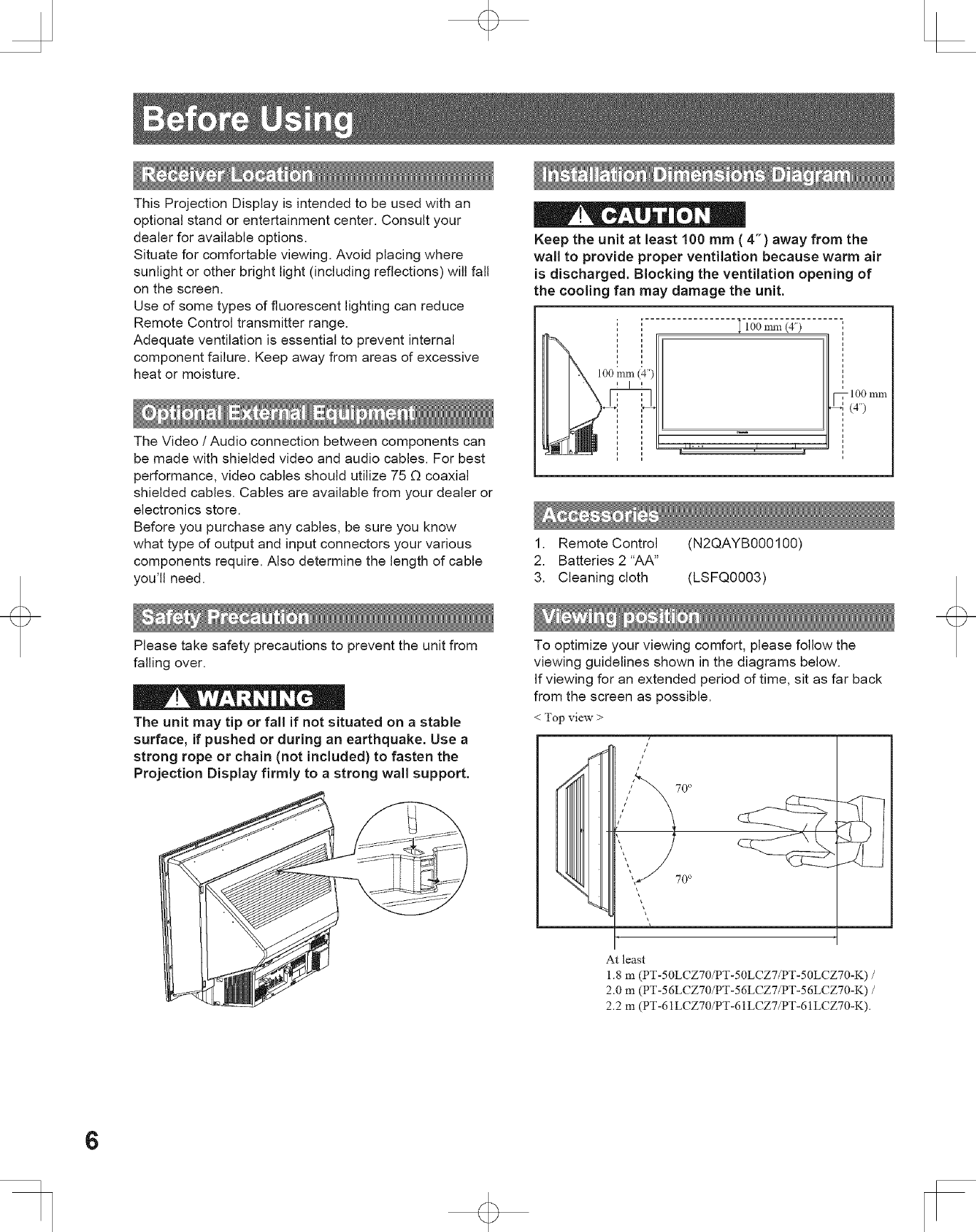
Keep the unit at least 100 mm (4-) away from the
wall to provide proper ventilation because warm air
is discharged. Blocking the ventilation opening of
the cooling fan may damage the unit.
100 mm (4")
1. Remote Control (N2QAYB000100)
2. Batteries 2"AA"
3. Cleaning cloth (LSFQ0003)
The unit may tip or fall if not situated on a stable
surface, if pushed or during an earthquake. Use a
strong rope or chain (not included) to fasten the
Projection Display firmly to a strong wall support.
To optimize your viewing comfort, please follow the
viewing guidelines shown in the diagrams below.
If viewing for an extended period of time, sit as far back
from the screen as possible.
< Topview >
i
At least
1.8 m (PT-50LCZ70/PT-50LCZ7/PT-50LCZ70-K) /
2.0 m (PT-56LCZ70/PT-56LCZ7/PT-56LCZ70-K) /
2.2 m (PT-61LCZ70/PT-61LCZ7/PT-61LCZ70-K).
6
< Side view >
At least
1.8 111(PT-50LCZ70/PT-50LCZ7/PT-50LCZ70-K) /
2.0 m (PT-56LCZ70/PT-56LCZ7/PT-56LCZ70-K) /
2.2 m (PT-61LCZ70/PT-61LCZ7/PT-61LCZ70-K).
Requires two AA batteries (supplied).
'1, While pressing in on the catch, open cover in
direction of arrow.
Incorrect battery installation can cause the batteries to
leak, leading to personal injury and/or damage to the
Remote Control.
Observe the following precautions:
1. Always replace batteries with a pair of new ones.
2. Do not combine a new battery with an old one.
3. Do not mix battery types (example: "Zinc Carbon"
with "Alkaline").
4. Do not attempt to charge, short-circuit, disassemble,
heat or burn used batteries.
5. Battery replacement is necessary when the Remote
Control acts sporadically or stops operating the
Projection Display set.
(1) Frequent Remote Control users choose
long-lasting Alkaline batteries as replacements.
(2) Whenever batteries are removed, you may need
to reset Remote Control infrared codes.
We suggest making a note of the codes on page 56
prior to setting up the remote.
.Install batteries in the battery compartment.
•Battery polarity (+) and (-) must match the markings
inside the compartment.
Use when moving unit to a new location, or when First
Time Setup needs to be done over.
Press together the VOL- button
on the unit and MENU button on
the Remote Control for more than
3 seconds.
=
Two AA size
Press cover until it snaps shut. After the above message indication
disappeared, unplug the unit then
plug it back in and turn power ON.
TM
•When using "EZ Sync TM"HDAVI Control ...., with the device
connected, set "EZ Sync" first to "Off" and then "On" using the
Setup Menu. (p. 52-53)
7
To ensure continued excellent performance from this
product, periodic cleaning is recommended.
Projection Display
ii. _ i i __
The unit contains many
plastic parts. For this reason
DO NOT use benzine,
thinner or other chemicals
to clean the unit.
DO NOT bring into contact
with insecticide or other
volatile substances. DO
NOT allow the unit to come
into contact for extended
periods with rubber or vinyl
products.
Remove dirt and soiling by
wiping with a light cloth.
Even if the unit is heavily
soiled, do not apply cleaner
directly to the unit. Soak a
cloth in a solution of neutral
cleanser diluted with water.
Then wring out the cloth,
wipe the unit clean, and
finish by wiping with a dry
cloth. Do not use any type
of cleansers on the picture
screen.
Picture Screen
Dust will accumulate on
the picture screen. Please
wipe with a soft cloth from
time to time. If you use a
chemically treated cloth,
please be careful to follow
the instructions that come
with the cloth.
8
2
3
4
5
6
7
19
20
21
22
23
9 24
10 25
ll
12 26
13 27
14 28
15 29
16
J
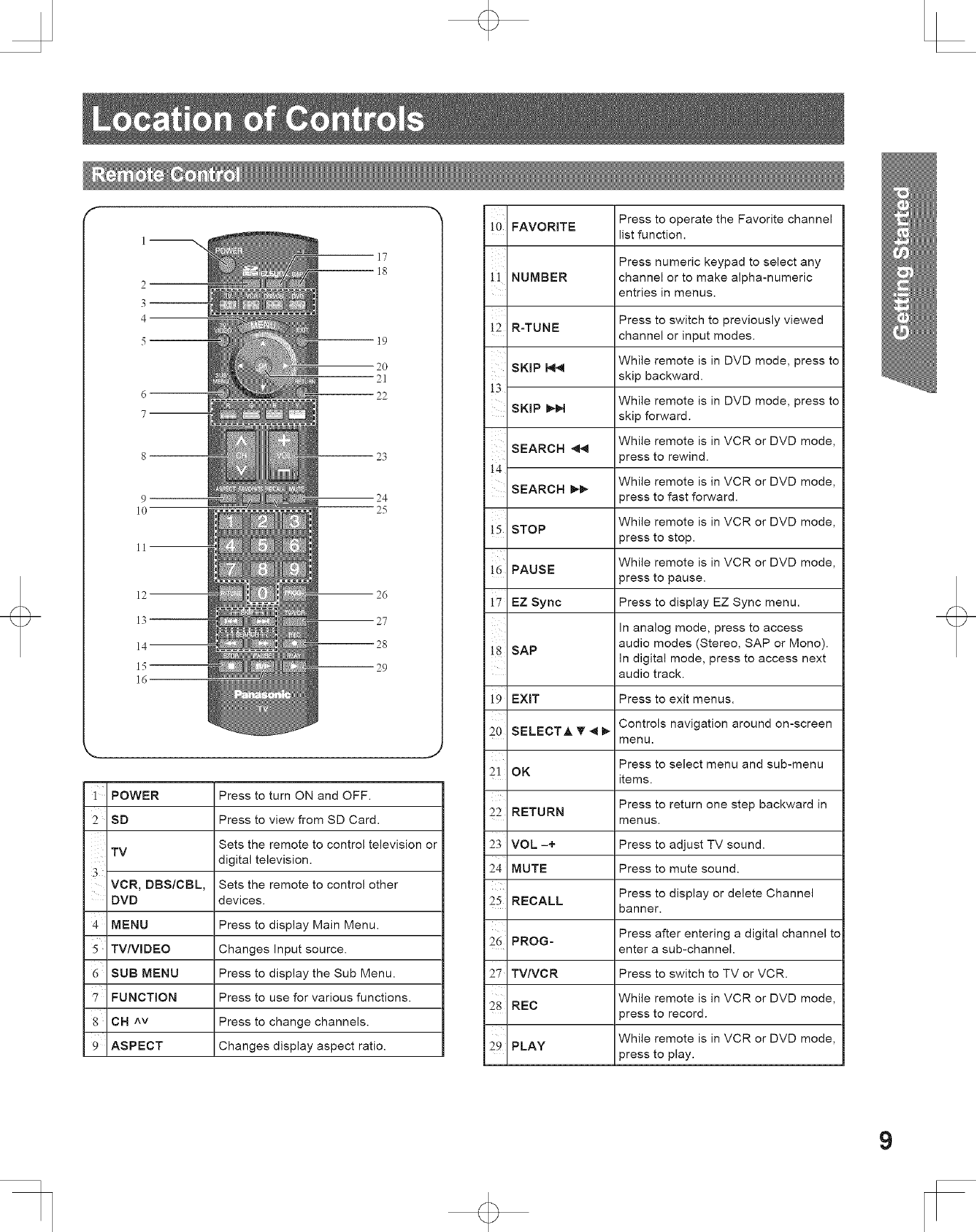
1 POWER Press to turn ON and OFF.
SD Press to view from SD Card.
Sets the remote to control television or
TV digital television.
3VCR, DBS/CBL, Sets the remote to control other
DVD devices.
4 MENU Press to display Main Menu.
TV/VlDEO Changes Input source.
6 SUB MENU Press to display the Sub Menu.
'7 FUNCTION Press to use for various functions.
8 CH ^v Press to change channels.
9 ASPECT Changes display aspect ratio.
Press to operate the Favorite channel
!0 FAVORITE list function.
Press numeric keypad to select any
!1 NUMBER channel or to make alpha-numeric
entries in menus.
!2 R-TUNE Press to switch to previously viewed
channel or input modes.
While remote is in DVD mode, press to
SKIP _skip backward.
!3 While remote is in DVD mode, press to
SKIP _lN skip forward.
While remote is in VCR or DVD mode,
SEARCH
i4 0ress to rewind.
While remote is in VCR or DVD mode,
SEARCH 0tess to fast forward.
While remote is in VCR or DVD mode,
!5 STOP 3ress to stop.
!6 PAUSE While remote is in VCR or DVD mode,
press to pause.
17 EZ Sync Press to display EZ Sync menu.
In analog mode, press to access
!8 SAP audio modes (Stereo, SAP or Mono).
In digital mode, press to access next
audio track.
i9 EXIT Press to exit menus.
Controls navigation around on-screen
20 SELECTA T _ menu.
Press to select menu and sub-menu
21 OK items.
Press to return one step backward in
22 RETURN menus.
23 VOL -+ Press to adjust TV sound.
24 MUTE Press to mute sound.
Press to display or delete Channel
25 RECALL banner.
26 PROG= Press after entering a digital channel to
enter a sub-channel.
27 TV/VCR Press to switch to TV or VCR.
28 REC While remote is in VCR or DVD mode,
3ress to record.
While remote is in VCR or DVD mode,
29 PLAY press to play.
9
] 2 3
POWER
button
POWER
indicator
LAMP
indicator
Press to turn ON and OFF.
(p. 24, 61,62)
Lights up green when power
is ON. (p. 24, 61,62)
Lights up or flashes when the
lamp unit is malfunctioning.
(p. 24, 61)
Open Door:
Press position O, and
slide Door open as
shown by arrow.
Close Door:
Press position O, and
slide Door closed as
shown by arrow.
m
Remote Control
Sensor
]2467
INPUT3 VIDEO=L=AUDI(
HDMI Input Connect from other
Terminal 3 component. (HDMI 3)
SD CARD Slot Insert SD Card.
TV/VlDEO* Changes Input source.
4 VOL =+* Press to adjust TV sound.
CH v^* Press to change channels.
Video Input Connect from other
Connector 3 component. (Video 3)
Audio Input Connect from other
Connector 3 component. (Video 3 /HDMI 3)
* Buttons listed above operate the same as Remote Control buttons of the same name.
10