PATCHWORK BlackBox air User manual

User Guide

2
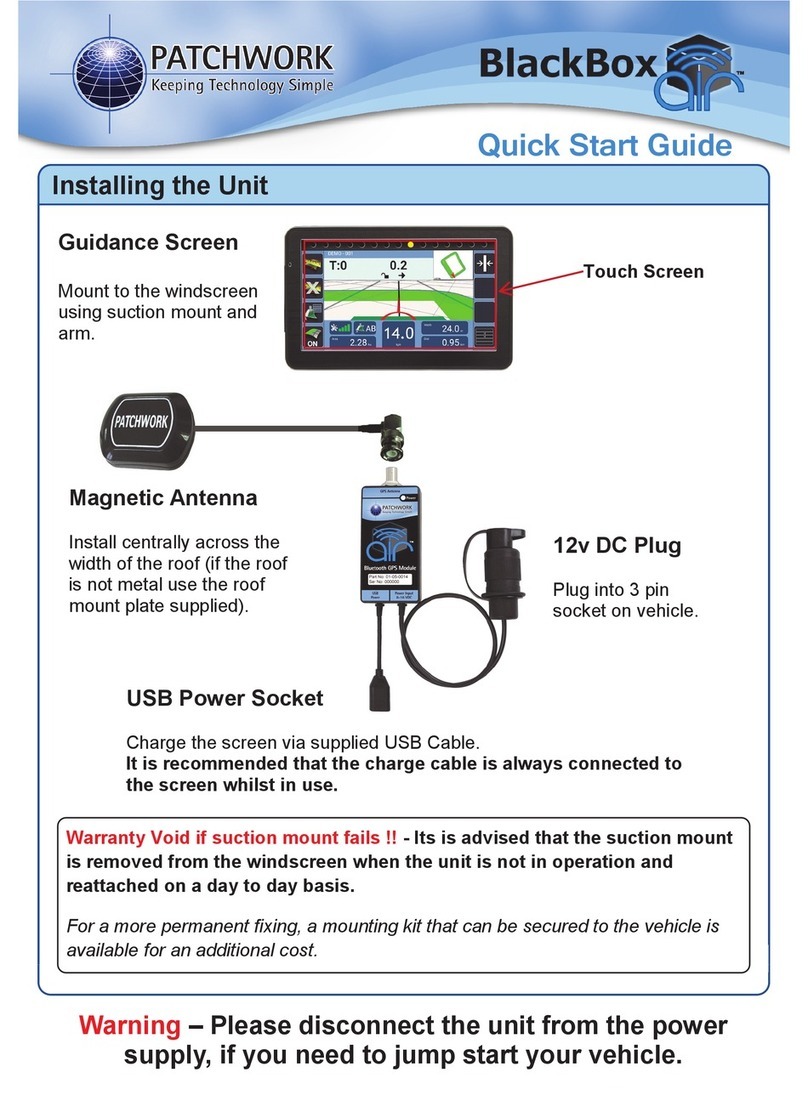
Display
Mount to the windscreen using supplied suction mount and arm.
Warranty Void if suction mount fails !! - It is advised that the suction mount is removed from
the windscreen when the unit is not in operation and reattached on a day to day basis.
For a more permanent xing, a mounting kit that can be secured to the vehicle is available for an
additional cost.
Touch Screen
On/Off button
Mini USB
Charge port

3
Installing the Unit
GPS Receiver and Tilt unit
If the tilt function is required, the unit needs to be securely mounted on a at surface with
the ‘Y’ pointing towards the direction of travel.
12v DC Plug
Plug into 3 pin socket on vehicle.
USB Power Socket
Charge the screen via supplied USB Cable.
It is recommended that the charge cable
is always connected to the screen whilst
in use.
Magnetic Antenna
Install centrally across the width of the
roof (if the roof is not metal use the
roof mount plate supplied).
Important!! Completely uncoil the
cable and route around the cab.
Warning - Please
disconnect the unit
from the power supply,
if you need to jump
start your vehicle.

4
Setup
When launching the BlackBox for the rst time the ‘Setup Wizard’ will guide through the
essential settings ready for guidance and area measurement.
Navigation Bar
Enable Tilt Correction (If required)
Previous Next Home Information Cancel Conrm
N.B. The wizard can be re-accessed via Setup > Unit Setup > Run Initial Setup Wizard.
1) Select Setup > Guidance
Setup > Tilt Compensator
2) Set Tilt to ‘On’, enter
Height, distance from the
ground to the antenna.
3) Position the vehicle on a
known level surface, press
Zero Tilt.

5
Starting a Job
N.B. Before starting a job it is important the correct Bluetooth device is selected and that
the GPS Quality level is within the green. This ensures the best GPS performance for use
with guidance and area measurement.
Guidance Modes
Straight - Sets a straight guidance line between set point A and point B, which is then replicated
both sides of the original line at equal intervals based on the entered width.
Curved - Creates a curved guidance line based on the path driven between set point A and
point B. The line is then replicated both sides of the original line at equal intervals based on the
entered width.
1) Press Start Job. 2) Enter the Farm/Field
name and Conrm.
3) Enter working Width,
select Guidance Mode and
press Conrm to begin job.

6
Guidance Screen Overview
Information Panel
Guidance Status
Start/Pause
Boundary
Close
Boundary
Guidance
Options
Recording
On/Off Menu
Recalibrate
Guidance Line
(Straight Mode
Only)
Mini Map
(Toggle
2D mode)
Working Width
Distance Travelled
Ground speed (Toggle Speedometer /Digital)
GPS Strength
Coverage Area

7
Measuring Field Area
1) After starting a new job, position your vehicle at the edge of the eld and press Start/
Pause Boundary.
2) Set Type to Boundary
3) Set the Offset to the distance from the
antenna to the edge of the eld.
4) Press Start and drive around the eld until
the start point is reached. The BlackBox will
automatically close and save the boundary map,
displaying the eld shape and size in the mini
map. If the boundary doesn’t close, press the
Close Boundary button.
N.B. During the boundary run the boundary recording can be paused and restarted using
the Start/Pause Boundary button, if there is a need to drive around obstacles.
To do a new boundary map redo steps 1) to 3).
Tip! Boundaries are saved to the system using the Farm/Field name entered when ‘Starting a Job’
and the next time the eld is entered the system will Automatically Detect the eld, displaying it
in the Home screen.

8
2) At the beginning of a straight run
press the Grid area to set point A.
3) Drive to the end of the run and press
the Grid area to set B. The guidance
line will appear ready for guidance.
N.B. The green coverage recording can be turned off and on using the ‘Recording On/Off’
button if ‘On Screen’ has been set.
1) Position the vehicle in the eld where the job will begin. (When using a curved line it is
important to use the longer edge of the eld to set a guide line).
Tip! Pressing the Grid area a third time allows the guidance line to be reset and if using the
‘Straight’ guidance mode, recalibrated to realign with current location.
Grid
area

9
Setting and Using a Guidance Line
4) If working the headland pass,
continue around then line up to the set
AB line and use the guidance to work
the inner areas of the eld.
5) When turning in the headland the
next AB line will appear.
To complete a eld boundary map or guidance job to start a new one, press the Menu
button and then Next Job to do a different job with the same settings or Finished Job to
return to the Home screen.
To power off the BlackBox press Shutdown, then press Yes and disconnect from power
supply.
Finishing a Job

10
Pause Job
The following setup instructions are exclusive to Air+ software users, the
Air+ software is a paid for upgrade which is available to all BlackBox Air
users and includes the following features :- Pause Job | Auto Record |
Headland Guidance | Headland Warning | Tracking | Boundary Printing
Resuming a Paused job
If a pause job is available, press Start Job an option box will appear with the option to
continue the paused job. Pressing Yes will resume the job with a red marker in the mini map
to show where the job was paused.
1) When in the Job screen, Press
Menu.
2) Press Pause Job, this will save the
coverage area and any guidance lines
that were set.
Other manuals for BlackBox air
2
Table of contents
Other PATCHWORK GPS manuals