manuals.online logo
Brands
  1. Home
  2. •
  3. Brands
  4. •
  5. Pyle
  6. •
  7. Watch
  8. •
  9. Pyle WEATHERSKIMASTER User manual

Pyle WEATHERSKIMASTER User manual

Other Pyle Watch manuals

Pyle PSWRM70 User manual

Pyle

Pyle PSWRM70 User manual

Pyle PPDM1 User manual

Pyle

Pyle PPDM1 User manual

Popular Watch manuals by other brands

Casio QW 5513 Operation guide

Casio

Casio QW 5513 Operation guide

Piaget 560P Instructions for use

Piaget

Piaget 560P Instructions for use

Armitron pro sport MD0346 instruction manual

Armitron

Armitron pro sport MD0346 instruction manual

West Marine BlackTip 13411293 Instruction Booklet and Care Guide

West Marine

West Marine BlackTip 13411293 Instruction Booklet and Care Guide

Jaeger-leCoultre HYBRIS MECHANICA CALIBRE 184 manual

Jaeger-leCoultre

Jaeger-leCoultre HYBRIS MECHANICA CALIBRE 184 manual

FOREVER iGO PRO JW-200 user manual

FOREVER

FOREVER iGO PRO JW-200 user manual

Relic OS10 quick start guide

Relic

Relic OS10 quick start guide

MyKronoz ZeClock manual

MyKronoz

MyKronoz ZeClock manual

Casio QW-782 General guide

Casio

Casio QW-782 General guide

Strikes and Spares SASM80 E-manual

Strikes and Spares

Strikes and Spares SASM80 E-manual

Christopher Ward C1000 Owner's handbook

Christopher Ward

Christopher Ward C1000 Owner's handbook

Lotus ILMFS01 instruction manual

Lotus

Lotus ILMFS01 instruction manual

Chronos Manufactures Chrono Diamond Thyrso 10400 instruction manual

Chronos Manufactures

Chronos Manufactures Chrono Diamond Thyrso 10400 instruction manual

Pandora WATCH2 quick guide

Pandora

Pandora WATCH2 quick guide

Suunto X6 user guide

Suunto

Suunto X6 user guide

Seiko N830 instruction manual

Seiko

Seiko N830 instruction manual

MotionX 365 user guide

MotionX

MotionX 365 user guide

Aplus GV18 user guide

Aplus

Aplus GV18 user guide

manuals.online logo
manuals.online logoBrands
  • About & Mission
  • Contact us
  • Privacy Policy
  • Terms and Conditions

Copyright 2025 Manuals.Online. All Rights Reserved.

Size:130 X 90mm
Type: book type
Cover: 4 pages
Color: 1C+0 (Black)
Paper: 100gms white wood free paper
Body Copy: 40 pages
Color: 1C+1C (Black)
Paper: 100 gms white wood free paper
Blinding: Saddle wire
Paper: Wood free paper
Paper weight: 100 gms
Language: English
folding line
saddle wire
90 mm
130 mm130 mm
WeatherSkiMaster : Instruction Manual
Project no: art05-054 Version: 1.0 File name: 05-054 Manual 002.CDR Prepared by: C.K Lau Copyright: Latitude Limited Date: 6 Jun 2005
Prepared by: Date:
Date:
Date:
Release for:
Project:
Checked by:
Approved by:
Front CoverBack Cover
Instruction Manual
WEATHERSKIMASTER
1.0 Introduction
2.0 Buttons and Its Functions - Part A
2.0 Buttons and Its Functions - Part B
3.0 Major Function Modes - Timekeeping Mode and Sensor Mode
Thank you for purchasing of this Watch. Your
Wa t c h f e a t ur e s e le c t r o n i c s e n s o r s w h i c h
measures and shows the outdoor conditions:
weather forecast, temperature, pressure, altitude
and compass directions.
You r W a t c h a l s o p r o v i d e s t h e e s s e n t i a l
information at the time during you are skiing, and
these data can be further logged into a logbook
for later .
also includes current time, daily
alarm, chronograph, timer and
review
Your Watch
dual time function.
To g e t t h e m o s t o f y o u r p u r c h as e , i t i s
advisable to use this stopwatch in conformity
with the below notes:
!Be sure to carefully read this manual and keep
it on hand for later reference when necessary.
!Av o i d e x po s i ng y ou r Wat c h t o e x t re m e
conditions for an unreasonable time.
!Avoid rough usages or severe impacts to your
Watch.
!Do not open the Watch's case unless a certified
service agency because your Watch contains
precise electronic sensors and components.
!Clean your Watch with a soft cloth occasionally
that working for a longer use life of your watch.
!Keep your Watch away from magnets or the
appliances which contains magnetic objects
such as mobile phones, speakers and motors.
!Store your Watch in a dry place when it is not
in use.
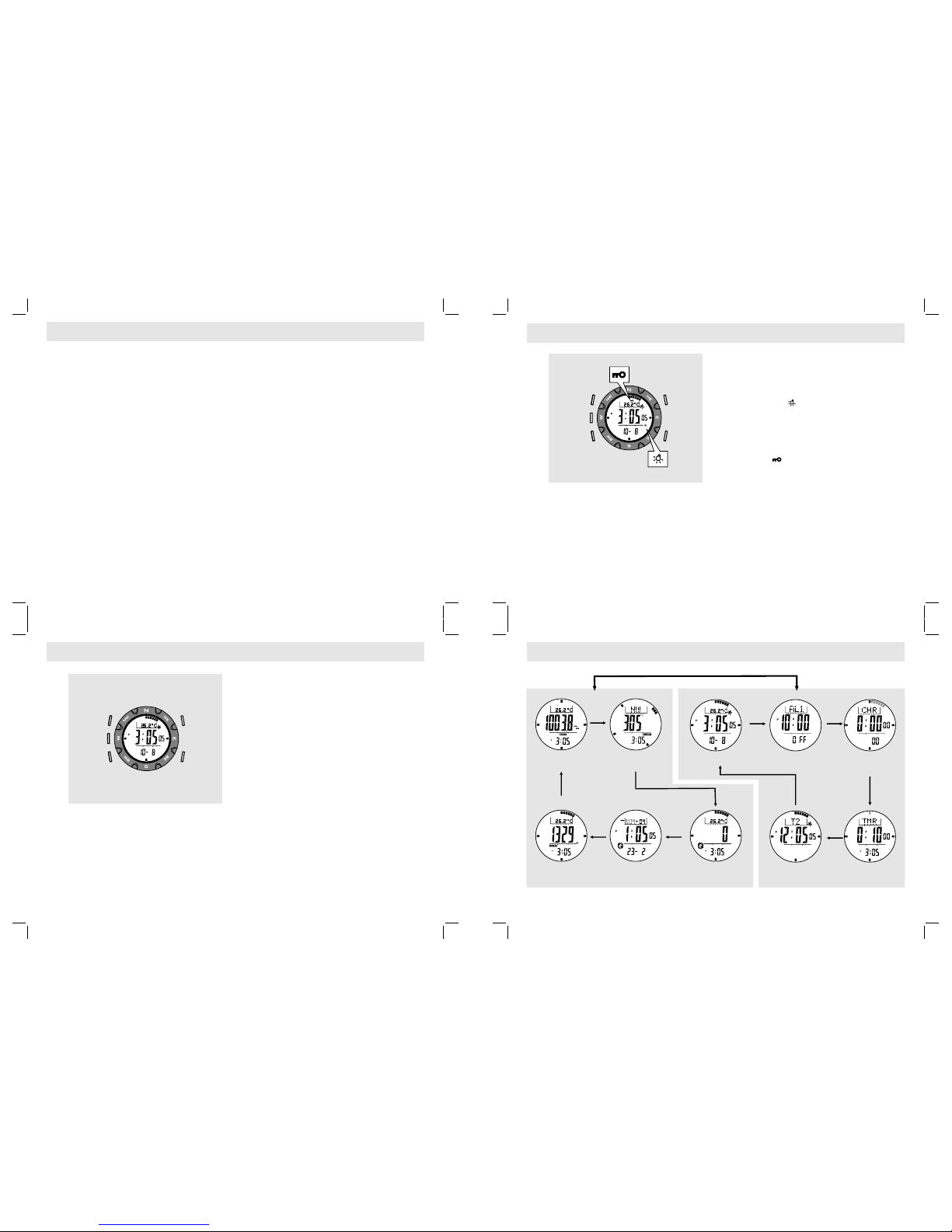
Mode Button [M]
!To sele c t among C urre n t Ti me, D a ily Alarm ,
Chronograph, Timer and Dual Time Mode.
!To select among S k i , S k i Recall, Altimeter,
Barometer and Compass Mode.
!To select among the setting items during setting
display.
Sensor Button [SR]
!To select between Sensor Mode and Timekeeping
Mode.
Start/Stop Button [S/S]
!To select between functional displays under the
same mode.
!To activate the 'start' or 'stop' chronograph function
during chronograph mode.
!To toggle Yes/No.
!To increase the digits during setting display.
Lap/Reset Button [L/R]
!To activate the 'lap' or 'reset' chronograph function
during chronograph and timer mode.
!To move the cursor to left by one during History
recalling display.
!To decrease the digits under setting display.
!To toggle Yes/No.
EL Button [EL]
!To turn on the EL back light for about 3 seconds.
! Auto-backlight function
!Hold down the [EL] button to turn ON or OFF
this function.
!When this function is ON, the auto-backlight
indicator ' ' will appear, pressing any
key will turn ONthe EL back light too.
Key Lock Function
!Hold down the [M] button and then hold down
the [S/S] button (keep holding the [M] button at
the same time) to turn ON or OFF this function.
!When t h i s f u n c t i o n i s ON, t h e key l o ck
indicator ' ' will appear, pressing any key
will NOT activate any function until key lock is
turned OFF.
[SR]
[M] [L/R]
[EL]
[S/S]
Current Time ModeBarometer Mode Compass Mode
Ski Mode
[SR]
Timekeeping ModeSensor Mode
Daily Alarm Mode
Ski Recall Mode*1
Chronograph Mode
Altimeter Mode Timer ModeDual Time Mode
[M]
[M]
[M]
[M]
[M]
[M]
[M]
[M]
[M]
[M]
m/h
[SR]
[M]
Auto-ba cklight ON
Key Lock ON
[L/R]
[EL]
[S/S]
Remark 1: Th If NO Ski Data was recorded.e Ski Recall Mode will be skipped
4.0 Current Time Mode - Functional Display
4.1 Current Time Mode - Weather Forecast Feature
4.2 Current Time Mode - Setting the Current Time
Functional Display
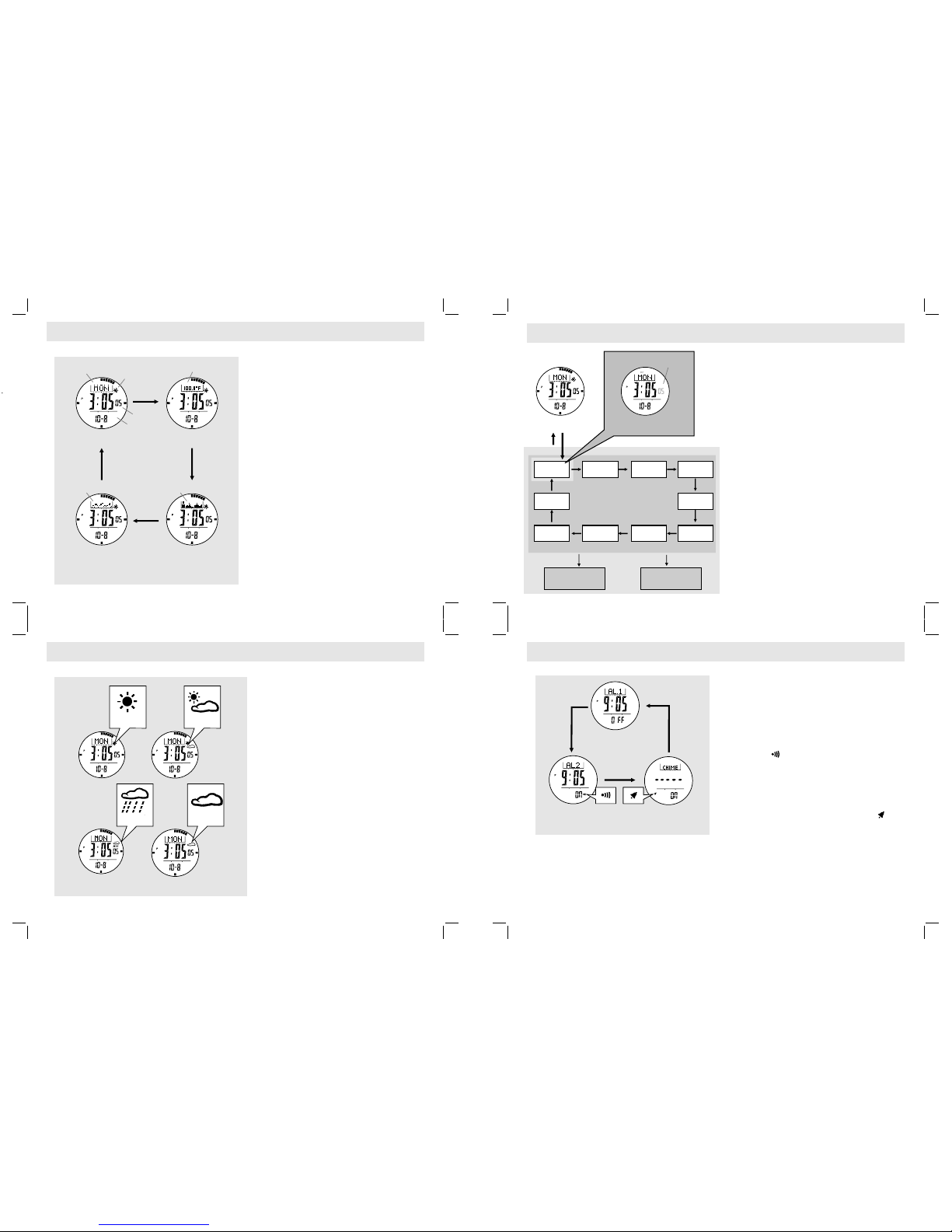
!T he Current M o de includes f our kinds o f
functional display:
!Day of Week Display,
!Temperature Display,
!Altitude Tendency Display and
!Sea Level Pressure Tendency Display.
!To select among different functional display, press
the [S/S] button following the adjacent diagram.
Automatic Display Switching
!To activate the automatic switching feature, hold
down the [S/S] button.
!As long as the button is hold, one of the four
functional displays will appear one by one.
IMPORTANT: If the user intends to get an
accurate reading of air temperature, the user
must taken off the watch from the wrist for 20 to
30 minutes before the actual measurement. It
allows n o b ody te mperature effec t o n t he
Watch.
Weather Forecast Feature
!A special feature of the Watch is the weather
predicting function. It works by analyzing the
changes of the past air pressure.
How to Indicate the Coming Weather
!The Watch provides four different symbols to
indicate the forecast weather, which includes:
!Sunny
!Partly Cloudy
!Cloudy
!Rain
!The weather forecast feature can be shown in the
Current Time Mode and Dual Time Mode only.
IMPORTANT: Since the Watch predicts the coming
weather by using the data of the changes in the air
pressure, it is highly recommended that staying at the
same altitude for at least 8 hours for a higher accuracy
predication.
IMPORTANT: The Watch predicts the weather by
adopting general weather prediction principles, it is
NOT capable to reflect a dramatic changing of weather
within a very short period of time.
How to Set Current Time
!To select the setting display, hold down the [M]
button for about 2 seconds in Current Time Mode.
In setting display, the flashing "SET" icon will
appear.
!In setting display, press the [M] button to change
the selection following the adjacent Current Time
Setting Sequence.
!When the second digits are flashing (selected),
press the [S/S] or [L/R] button to reset the digits
to "00".
!When the digits are flashing (selected), press the
[S/S] or [L/R] button to increase / decrease the
number. (Hold down the button change the number
at a higher speed).
!When month-day order setting is selected, press
the [S/S] or [L/R] button to select between month-
day and day-month format. When 12/24 hour
format setting is being selected, press the [S/S]
button to select between 12 and 24 hour format.
!When LCD contrast is selected, press the [S/S] or
[L/R] button to increase / decrease the contrast
level (1 to 10). When key beep setting is selected,
press the [S/S] or [L/R] button to select between
ON and OFF the beep.
!When the set is completed, hold down the [M]
button to exit the setting display. The Wat c h wil l
also exit the setting display if NO key-stoke has
been activated for 1 minute.
Current Time Display
Current Time Setting Sequence
Hold
[M]
Increas e/Decrease
the numbe r at
a higher sp eed
Increas e/Decrease
the numbe r
12/24
hour form at
minute ho ur
day
year
month
Current Time Setting Display
digits ha ve been
selecte d (flashing)
second
[S/S] / [L/ R]
Hold
[M]
[M]
Month/D ay
LCD
Contras t
Key
Beep
[M] [M]
[M]
[M][M][M][M][M]
[M]
Hold
[S/S] / [L/ R]
Current Time Mode
Weather Forecast Symbols
day of week
Sea Level
pressure
tendency
temperature
date
current time
weather forecast
altitude
tendency
[S/S]
[S/S]
[S/S]
[S/S]
Day of Week Display Temperature Display
Altitud e Tendency
Display
Sea Level P ressure
Tendency Display
5.0 Daily Alarm Mode - Daily Alarm 1, Daily Alarm 2 and Chime Display
Daily Alarm 1 and Daily Alarm 2
!The Watch includes two daily alarms: Daily Alarm
1 and Daily Alarm 2. The Daily Alarm 1 and Daily
Alarm 2 are working independently.
!Press the [S/S] button to switch among the Daily
Ala rm 1 , Daily Al arm 2 and Chi me D isp lay
following the adjacent diagram.
How to Turn ON/OFF the Daily Alarm
!To turn ON or OFF the Daily Alarm 1 (2), press
the [L/R] button in Daily Alarm 1 (2) Display.
!When the Daily Alarm 1 (2) is ON, the alarm
indicator ' ' will appear.
!If the alarm indicator is appeared, the Watch will
sound at the preset alarm time every day. When
the alarm sounds, press any button to stop the
beep.
How to Turn ON/OFF the Hourly Chime
!To turn ON/OFF the Hourly Chime, press the [L/R]
button in Chime Display.
!When the chime is ON, the chime indicator ' '
will appear. If the Chime indicator is appeared,
the Watch will beep once at the hour every hour
ie. 1:00, 2:00, 3:00 etc.
Daily Alarm 2 Display
Daily Alarm 1 Display
Hourly Ch ime Display
[S/S]
[S/S]
[S/S]
Daily Alarm Mode
Partly
Cloudy
Sunny
Cloudy
Rain
5.1 Daily Alarm Mode - Setting the Alarm
6.0 Chronograph Mode - Start/Stop the Chronograph
6.1 Chronograph Mode - Recording and Recalling Lap Time
7.0 Timer Mode - Countdown Timer and the Quick-Set-Values
How to Set the Alarm 1 and Alarm 2
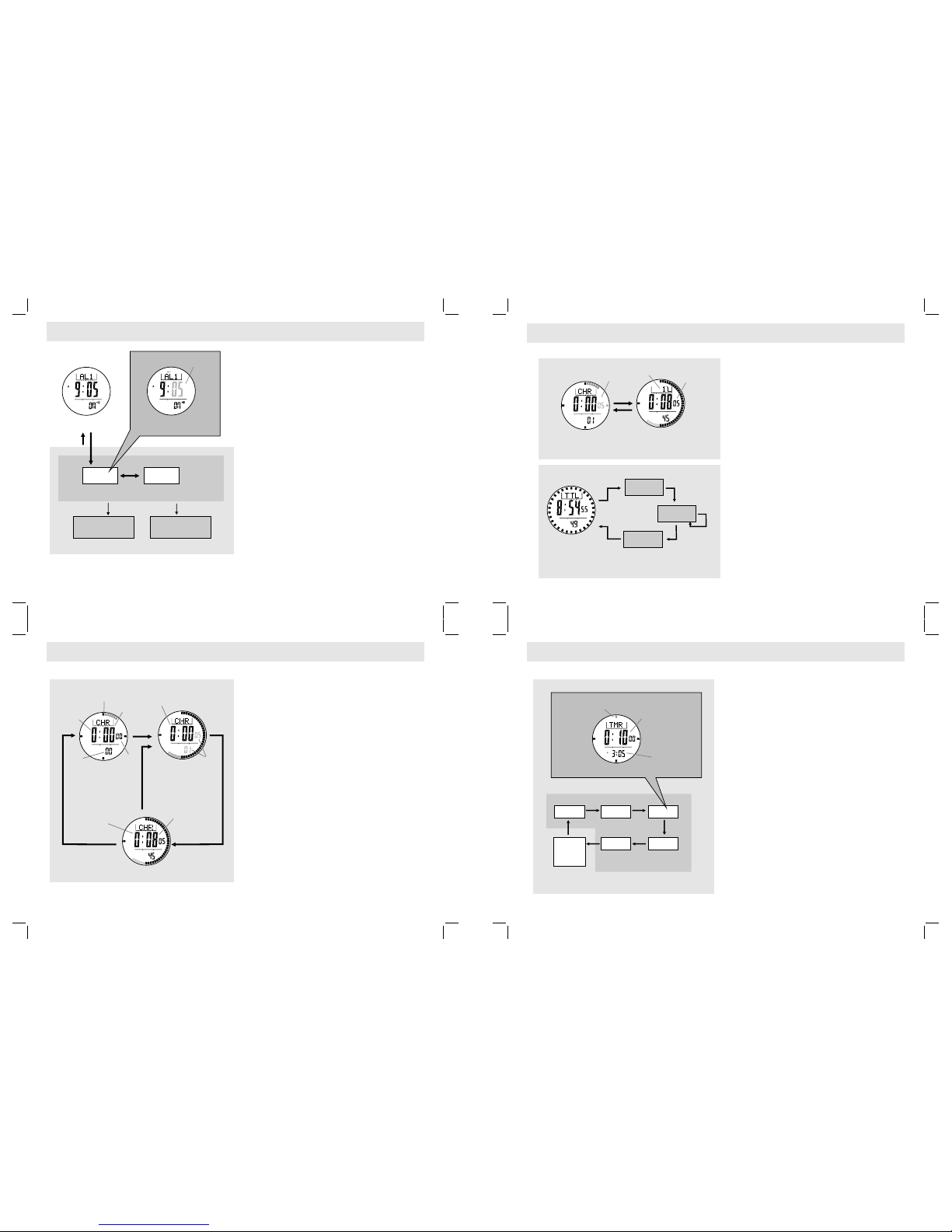
!To select the setting display, hold down the
[M] button for about 2 seconds in Alarm 1 (2)
Display, then the flashing "SET" icon will
appear.
!In setting display, press the [M] button to
change the selection between minute and
hour.
!When the digits are flashing (selected), press
the [S/S] or [ L/R] button to increa s e /
decrease the number. (Hold down the button
change the number at a higher speed).
!When the set is completed, hold down the [M]
button to exit the setting display. T h e W a t c h
will also exit the setting display if NO key-
stoke has been activated for 1 minute.
Chronograph Mode
!The Watch includes a function to measure
elapsed times, accumulative elapsed time and
lap times - Chronograph Mode.
!The display shows the 'All Zeros' display
when the chronograph is being selected the
first time or the chronograph has been reset.
How to Start/Stop the Chronograph
!When t h e c h r onograph is s t o p p ed ( n ot
counting), press the [S/S] button once to start
the chronograph (counting); press the [S/S]
button once again to stop the chronograph
(not counting).
!The elapsed time between the two keystrokes
will appear on the display.
!Repeat the above mentioned steps to get t h e
accumula tive ela psed t ime of w hich the
chronograph is running.
How to Reset the Chronograph
!To record a new set of elapsed time, hold
down the [L/R] button for 2 seconds to reset
the chronograph to 'All Zeros' display when
the chronograph was stopped.
NOTE: When the chronograph is reset, the
recorded lap time(s) will be deleted at the same
time.
Lap Time
!The chronograph can measure elapsed time
without stopping the counting - lap time.
!The Chronograph Mode allows recording lap
time up to 10 laps.
How to Record Lap Time
!When the chronograph is counting, press the
[L/R] button once to record a lap time (this
key operation will not affect the counting).
!The lap number and lap time will appear on
the display for 10 seconds, and it returns to
counting display automatically.
!Repeat the steps mentioned above to get
another lap time.
How to Recall Lap Times
!To recall lap times, hold down the [M] button
in the Chronograph Display.
!When the Total Time Display is appeared,
press the [S/S] or [L/R] button to check the
next / previous lap time.
!Hold down the [M] button any time to back to
the Chronograph Display.
How to Reset Lap Time
!To record a new set of lap time, hold down
the [L/R] button for 2 seconds to reset the
chronograph to 'All Zeros' display when the
chronograph was stopped.
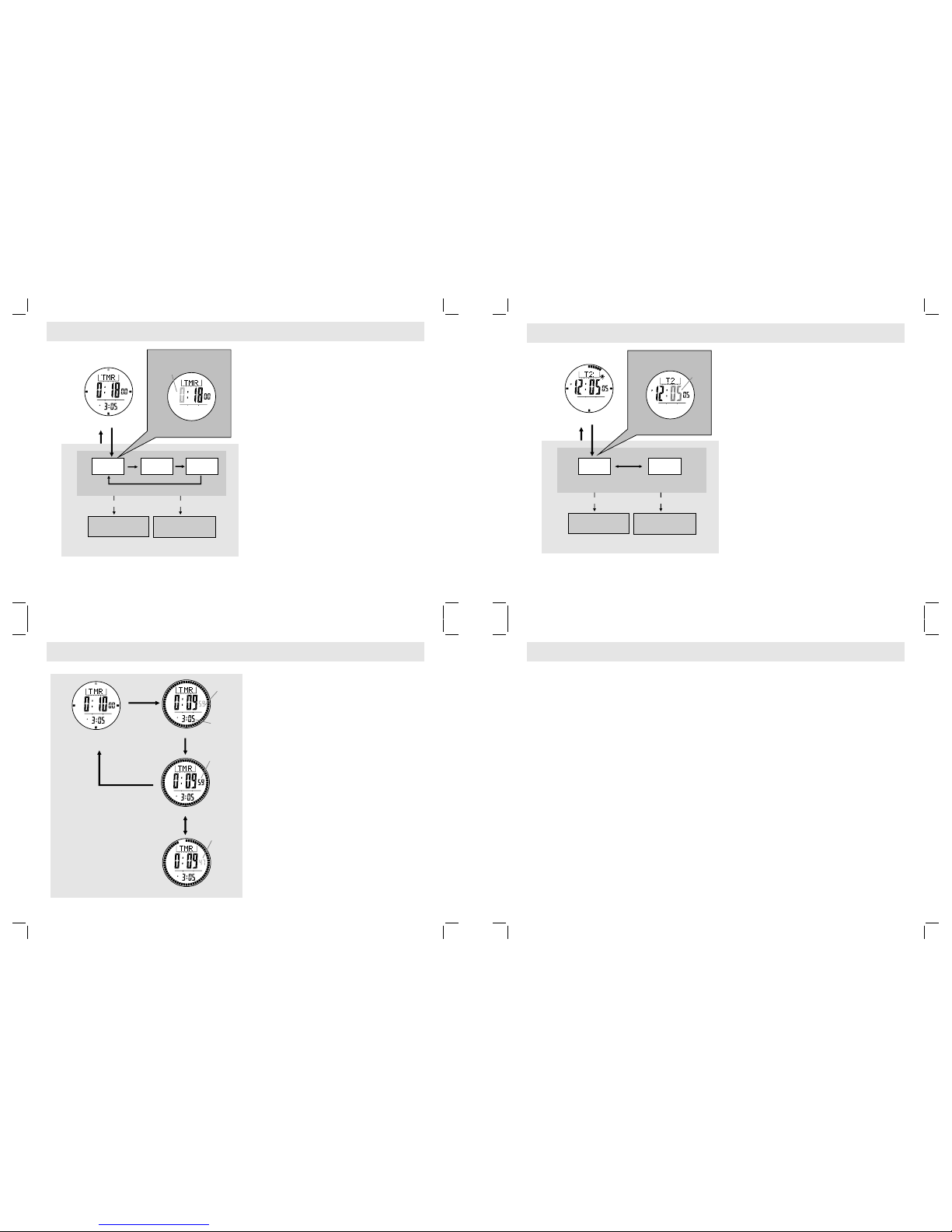
Countdown Timer
!The Watc h inc l u des a cou n t down timer
feature: the Timer Mode.
!The Timer starts down-counting f rom the
target time (hour, minute and second) to zero
and stops at zero.
!The target time can be set by the Quick-Set
Value and User-Preset Value.
The Quick-Set Value
!The Quick-Set-Value is a set of value which
CAN NOT be changed by the user.
!Five Quick-S et Values (3,5,10,15 and 45
minutes) was installed in the Watch for setting
the target time more easily.
The User-Preset Value
!The User-Preset Value is a target time value
which can be set by the user.
!The setting range is up to 99 hours 59
minutes 99 seconds.
!Once a User-Preset Value has been set, such
as 30 minutes, that value will be stored into
the Watch for setting the target time.
!To set the User-Preset Value check the
coming section "How to Set the User-Preset
Value" for more detail.
Chronog raph
Countin g Display
Chronog raph Stop Displa y
Chronog raph
'All Zero ' Display
hold
[L/R]
the digits
stop counting
Digits
running
1/100 sec
Total
Time
hours
minutes
seconds
[S/S]
Elapsed
time
[S/S]
[S/S]
1/10s
indicator
the next lap
memory
the 1st
lap memory
the last
lap memory
Lap Time Recall Seq uenc e
Chronograph
Lap Display
Chronograph
Counting Display
[L/ R]
the digits
is running
10
seconds
the lap
number
Lap Time Recording
the lap time
will freeze
for 10 seconds
[S/S]* [S/S]*
[S/S]*
[S/S]*
[S/S]*
Total Time
Display
Timer Display
3 min 5 min
45 min
10 min
15 min
Timer Setting Sequence
the indic ator
flashin g
the time wh ich the
timer wil l countdown from
(hour, min ute and second)
[L/R]
User
Preset
Value
(UPV) Qui ck-Set-Value (QSVs)
[L/R]
[L/R]
[L/R][L/R]
[L/R]
Current Ti me
Daily Alarm 1 Display
SET
Daily Alarm Time Setting Sequence
hold
[M]
Increas e/Decrease
the numbe r at
a higher sp eed
Increas e/Decrease
the numbe r
Hour
Setting D isplay
digits have been
selected (flashing)
Minute
[S/S] / [L/ R]
hold
[M]
[M]
Hold
[S/S] / [L/ R]
SET
*Pres s [L/R] butt on will move t he selecti on in the reve rse direct ion
7.1 Timer Mode - Setting the User Preset Value
7.2 Timer Mode - Using the Timer
8.0 Dual Time Mode - Dual Time and Setting the Dual Time
How to Set the User Preset Value
!To select setting display, hold the [M] button
for 2 seconds, and the flashing "SET" icon
will appear.
!In setting display, press the [M] button to
change the selection among hour, minute and
second.
!When the digits are flashing (selected), press
the [S/S] or [ L/R] button to increa s e /
decrease the number. (Hold down the button
change the number at a higher speed).
!When the set is completed, hold down the [M]
button to exit the setting display. T h e W a t c h
will also exit the setting display if NO key-
stoke has been activated for 1 minute.
How to Use the Timer
!When the Timer is set, press the [S/S] button
to start the timer. Press the [S/S] button once
again to stop the timer.
!The elapsed time will be continuously updated
to the display.
Timer Alarm Sound
!In the last 10 minutes, the Watch will beep for
every minute.
!In the last one minute, the Watch will beep for
every 10 seconds. In the last 5 seconds, the
Watch will beep for every second.
!At 0, a beep sound will last for 30 seconds.
Press any button in this period will terminate
the beep sound prematurely.
How to Reload the Timer
!T h e l a s t t a r g et t i me w ill be r elo a d e d
automatically at the end of the 30-second
beep sound.
!To start a new counting by using a new target
time, set the timer again by QSV or UPV.
Dual Time Mode
!The Watch includes a function to show the
current time for a second time zone - Dual
Time Mode.
!The second digits of the dual time will be
associated with the Current Time Mode.
How to Set the Dual Time
!To select setting display, hold down the [M]
button for 2 seconds in Dual Time Mode, and
the flashing "SET" icon will appear.
!In setting display, press the [M] button to
chan ge the sele ction b etwee n hour and
minute.
!When the digits are flashing (selected), press
the [S/S] / [L/R] button to increase / decrease
the number. (Hold down the button change
the number at a higher speed).
!When the set is completed, hold down the [M]
button to exit the setting display. T h e W a t c h
will also exit the setting display if NO key-
stoke has been activated for 1 minute.
Increas e/ decrease
the numbe r
Increas e/ decrease
the numbe r
Increas e/decrease
the numbe r at
a higher sp eed
Increas e/decrease
the numbe r at
a higher sp eed
hold [S/S ] / hold [L/R] hold [S/S ] / hold [L/R]
[S/S] / [L/ R] [S/S] / [L/ R]
User Pres et Value Setting Se quence User Pres et Value Setting Sequence
Timer Display
Timer Display
(Timer sets as 10 minutes)
Countin g Display
Stop Coun ting Display
Countin g Display
digits st art
countin g
digits st op
countin g
digits st art
countin g
again
[S/S]
[L/R]
hold
[M]
hold
[M]
digits have been
selected (flashing)
Setting D isplay Setting D isplay
minute mi nute
Second
hour hour
hold
[M]
hold
[M]
[M] [M]
[M]
[M]
Real Time
Clock
[S/S]
[S/S]
Dual Time Mo de
SET
digits ha ve been
selecte d (flashing)
SET
m/h
Ski Mode
Ski Function ON
Ski Mode
Once the Ski Function is turned ON, the 'Ski'
icon ' ' will start flashing. The Watch will:
!Exhibit the current ski data on display, and
!Log (the Ski Log Function) the ski data into
the Ski Logbook automatically or manually.
NOTE: The Watch will log ski data continuously
once the Ski Function is turned ON even if the
Watch i s switched to other funct ion mode
subsequently.
Ski Logbook
!The Logbook organizes the ski data as follows:
!The logged ski data can be reviewed from the
Ski Logbook in the Ski Recall Mode. Check
the coming chapter 10.0 for more detail.
!
!Ski Lap - The ski data which was stored
during the skier start/stop a ski run.
!Ski Record - The ski record which stored a
series of Ski Lap, and hence it provides the
summary on all Ski Lap.
Ski Recall Mode
How to Turn ON the Ski Function
How to Turn OFF the Ski Function
!Hold down the [M] button in Ski Mode to flash the
'ON' indicator.
!When the 'ON' indicator is flashing, hold down the
[S/S] button until the 'dONE' indicator is appeared.
!Then the Ski Function is turned ON, and the ski icon
will be flashing on the display.
NOT E: Th e Ski Fun ctio n wil l be t urne d OFF
automatically after it has been turned ON for 12 hours.
!Hold down the [M] button in Ski Mode to flash the
'OFF' indicator.
!Hold down the [S/S] button until the 'dONE' indicator
is appeared.
!Then the Ski Function is turned OFF, and the ski
icon will be stop flashing on the display.
9.0 Ski Mode - Ski Function Overview
9.1 Ski Mode - How to Turn ON/OFF the Ski Function
Current
Temperatu re
Accumul ative
Ascent Ac cumulative
Descent
Current
Ski Speed Ski Log
Functio n
Ski Mode Fu nction
Travel Time
Period
Current
Altitud e
SET
SET
m/h
m/h
Ski Mode
m/h
Ski Mode
Ski Function ON
Flashing
Ski Mode Display
IMPORTANT: If the user intends to get an
accurate reading of air temperature, the user
must taken off the watch from the wrist for 20 to
30 minutes before the actual measurement. It
allows n o b ody te mperature effec t o n t he
Watch.
Display
Display
!Once the Ski Mode is selected, performing the
below key operations to select the Ski Mode
sub-functional displays.
Change the Top Row Display
!Press the [S/S] button to change the top row
display between Current Altitude and Current
Temperature.
Change the Middle Row
!Press the [L/R] button to change the middle row
display among Ski Run's Current Descent
Speed, Total Elapsed Time, Ac cumul ative
Descent and Accumulative Ascent.
NOTE: This changing can be functioned only if
the Ski Function is turned ON.
Change the Bottom Row
!Hold down the [L/R] button to change the
bottom row display between Current Time and
Current Lap.
NOTE: This changing can be functioned only if
the Ski Function is turned ON.
9.2 Ski Mode - Ski Mode Display
Ski Mode
Flashing
Flashing
Not
Flashing
current temperature
current time
current
decent speed
total elapsed
time
current altitude
current lap no.
accumulative
descent
accumulative
ascent
[S/S]
hold
[L/R]
[L/R]
[L/R]
[L/R] [L/R]
Change the Top Row Display
Change the Middle Row Display
Change the Bottom Row Display
m/h
m/h
Change the Measurement Unit
!Hol d dow n the [S/S ] but t on t o cha nge t he
measurement unit as the adjacent diagram:
!Distance measurement unit interchange between
m (meter) and ft (feet).
!Temperat ure measu rem ent un it i nterc han ge
between 8C (Celsius) and 8 F (Fahrenheit).
!Speed measurement unit interchange between
m/h (mile per hour) and Km/h (kilometer per hour).
NOTE: These changings can be functioned even if
the Ski Function is turned OFF.
9.3 Ski Mode - Change the Measurement Unit
Ski Mode
Ski Function ON
hold
[S/S]
hold
[S/S]
hold
[S/S]
m (meter)
8C (Celsius)
m/h
(mile per hour)
Km/h
(Kilometer per hour)
ft (feet)
8F (Fahrenheit)
Change the Measurement Unit
Ski Logbook
Ski Record
Ski Lap
Lap 1
Record 1
Ski Function OFF
Ski Function ON
hold
[M]
hold
[M]
hold
[S/S]
hold
[S/S]
Flashing
Not
Flashing
SET
SET
Flashing
Flashing
Not
Flashing
m/h
Flashing
Ski Mode
Slope Setting
188
slope angle
188
Ski Function ON
Sensitivity Setting
Ascending Sensitivity Descending Sensitivity
Fast Fast
Normal Normal
Slow Slow
Ski Mode
Ski Function ON
Ski Function
ON/OFF
Slope
Setting
Ascending
Sensitive
Setting
Descending
Sensitive
Setting
[M]
[M]
[M]
[M]
Hold
[M]
Hold
[M]
Ski Mode Setting Sequence
Ski Lap 3
Ski Recor d 1
Ski Lap 2
Ski Lap 1
meter
meter
meter
meter
meter
meter
a
e
i
0
0
0
0
0
0
200
200
200
200
200
200
400
400
400
400
400
400
600
600
600
600
600
600
800
800
800
800
800
800
b
f
j
c
g
k
ski lap 1
d
h
lm
ski lap2
ski lap 3
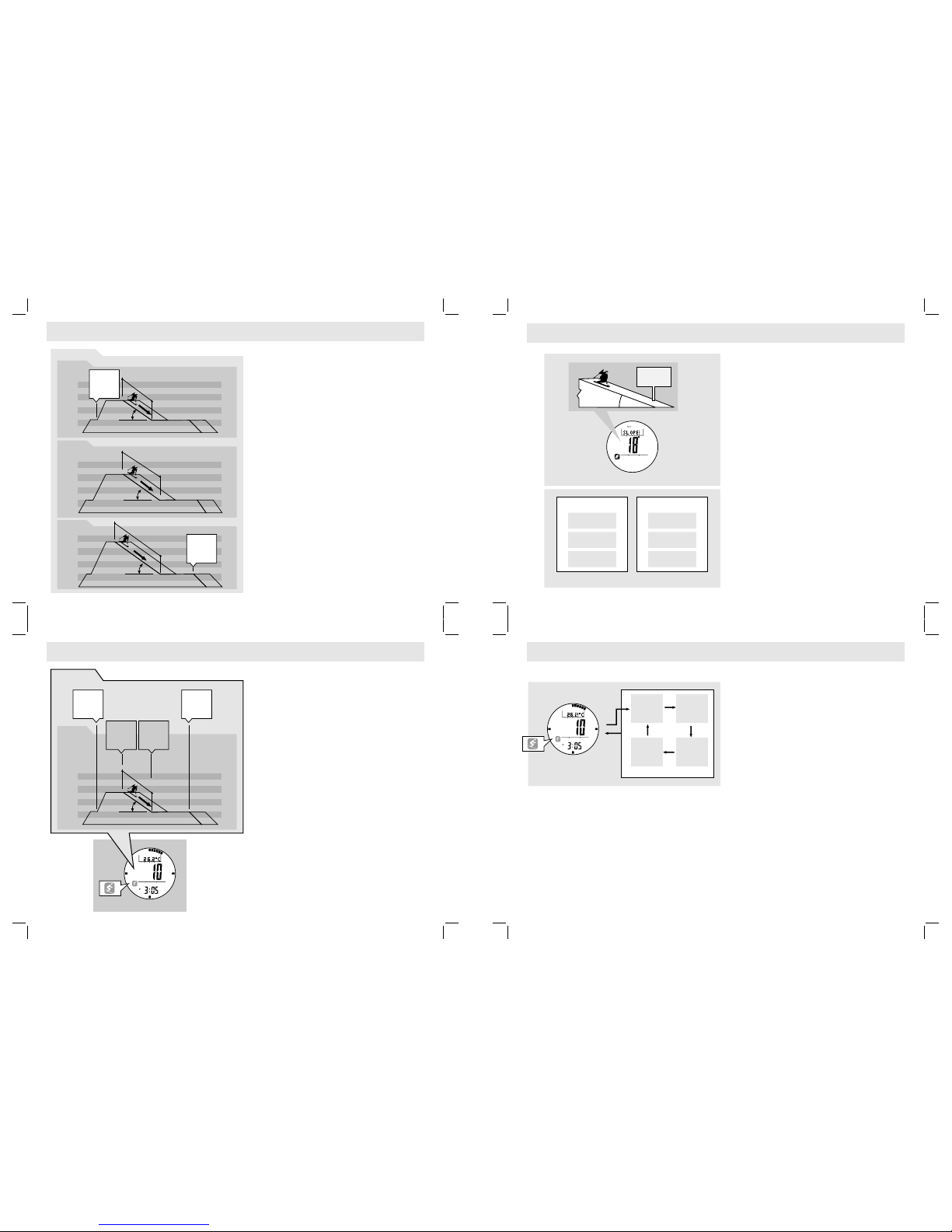
An Example to Illustrate Ski Log Function
!Assume a user enjoyed three ski runs within a day as it
is outlined by the adjacent diagram. To enjoy the Ski
Log function, the user needs to turn ON the Ski
Function before the ski runs.
!The Watch will log the below ski data into Ski Logbook
automatically, and these ski data can be reviewed in
Ski Recall Mode later.
Ski
Ski Lap (ski data)
NOTE:*These maximum speeds are dummy figures,
the maximum speed can be logged in a real case only.
Record (the info and summary of all ski laps)
!The record date = 11 June.
!The record started time = AM10:00 00.
!The total travel time = 5: 00 00.
!The total number of ski lap recorded = 3 ski laps.
!The total descent time = 0:15 00.
!The accumulative descent = 1200m.
!The accumulative ascent = 1200m.
!The maximum descent speed = 15 Km/h*.
!The highest altitude reached = 700 m.
!The lowest altitude reached = 200 m.
!The slope of the ski course = 358
!The lap started time = AM 11:00 00 (Lap 1), AM
12:00 00 (lap 2 ), PM 2:00 00 (Lap 3).
!The total descent time = 0:05 00 (Lap 1), 0:05 00
(Lap 2), 0:05 00 (Lap 3).
!The maximum descent speed = 9 Km/h* (Lap 1),
11 Km/h* (Lap 2), 15 Km/h* (Lap 3).
!The average descent speed = 6 Km/h (Lap 1), 8
Km/h (Lap 2), 10 Km/h (Lap 3).
!The highest altitude reached = 500 m (Lap 1), 600
m (Lap 2), 700 m (Lap 3).
!The lowest altitude reached = 200 m (Lap 1),
200 m (Lap 2), 200 m (Lap 3).
!The altitude change = 300 m (Lap 1), 400 m (Lap
2), 500 m (Lap 3).
!The descent altitude change graph for every lap.
9.4 Ski Mode - Ski Log Function
AM 11:00
AM 1 :2 00
PM :2 00
AM 1 :1 05
AM 1 :2 05
PM :2 05
358
358
358
Tur n ON th e
ski function
at point (a)
on 11 Jun,
AM 10:00
Tur n OFF
ski function
at point (m)
o
P 3
n 11 Jun,
M : 00
Ski Recor d 1
Ski Lap 1
meter
a
0 0
200 200
400 400
600 600
800 800
bc
de
ski lap 1
How to Log a Ski Lap
!When the Ski Function is turned ON:
!The Watch will create a Ski Record to log the
starting time and date into the Ski Logbook.
!When a ski run is started subsequently, the
Watch will create a Ski Lap automatically or
manually to log the ski data into the Ski
Logbook.
How to Activate a Ski Lap Automatically
!To start a Ski Run: When a ski run is started and a
significant altitude loss is detected, the decent
time timer will start counting automatically, and a
new ski lap is created .
!To stop a Ski Run: When a ski run is stopped and
the altitude loss is not significant, the decent time
timer will stop counting automatically, and the
current ski lap is saved.
How to Activate a Ski Lap Manually
!Press the [M] button once in the Ski Mode to
select 'MANUAL' Display, then the Watch is ready
for manual start/stop a ski lap.
!To start a Ski Run: Press the [S/S] button once
and start the ski run at the same time, then the
decent time timer will start counting from 0
seconds, and a new ski lap is created.
!To stop a Ski Run: Press the [S/S] button once
again when the ski run is stopped, then the decent
time timer will stop counting, and the current ski
lap is saved.
Slope Setting
!
!
The slope setting is the setting that inputs the
slope angle of the ski field into the Watch.
Most of the ski fields post that figure to skier on
the ski field.
Sensitivity Setting
!The Watch will activate the ski lap function
(start the descent timer and create a ski lap)
automatically when a ski run is started (a
significant altitude loss is detected).
!Sensitivity setting is the setting that adjusts the
accuracy for above auto-activation.
!Type of Sensitivity
!Asce ndin g s ensit ivit y s etti n g: A d just the
sensitivity for altitude ascend auto-activation.
!Desce nding sensiti vity setting: Adjus t the
sensitivity for altitude descend auto-activation.
!Level of Sensitivity
!Fast Sensitivity: If sometimes false auto-
activation is observed, select this setting to
improve the performance.
!Normal Sensitivity: If the auto-activation is
functioned normally, keep this setting.
!Slow Sensitivity: If the auto-activation can not
be functioned, select this setting to improve
the performance.
How to Set the Slop and Sensitivity
The Watch will
also exit the setting display if NO key-stoke has
been activated for 1 minute.
!To select the setting display, hold the [M] button
for about 2 seconds in Ski Mode, then the
flashing "SET" icon will appear.
!In setting display, press the [M] but ton to
change the selection following the adjacent
diagram.
!When the 'ON' or 'OFF' is flashing, hold
down the [S/S] button for about 2 seconds will
turn ON ('ON' is flashing) or OFF ('OFF' is
flashing) the Ski Function.
!When Slope angle is flashing, press the [S/S]
or [L/R] button to increase / decrease the
angle. (Hold down the button change the
angle at a higher speed).
!When the 'rAtE AS' (Ascending sensitive rate)
appear, press the [S/S] or [L/R] button to
change the s etting among 'FAST' (Fast),
'SLOW' (Slow) and 'NORM' (Normal).
!When the 'rAtE DS' (Descending sensitive
rate) appear, press the [S/S] or [L/R] button to
change the s etting among 'FAST' (Fast),
'SLOW' (Slow) and 'NORM' (Normal).
!When the set is completed, hold down the [M]
button to exit the setting display.
9.5 Ski Mode - How a Ski Lap is Logged
9.6 Ski Mode - What are Slope Setting and Sensitivity Setting
9.7 Ski Mode - Slope Setting and Sensitivity Setting
AM 11:00
AM 1 :1 05
358
Tur n ON th e
ski function,
the ski
record
is created.
Auto or
manual start
the ski lap,
the ski lap
is created
Auto or
manual stop
the ski lap,
the ski lap
is saved
Tur n OFF t he
ski function,
the ski
record
is saved.
m/h
Flashing

*Press [L/R] button will move the selection in the reverse direction
[S/S]*[S/S]*
[S/S]* [S/S]
[S/S]* [S/S]*[S/S]*
The Lap Data (the data summary of one ski lap) Selection Sequence
Ski Descent
Altitude Change Graph Total
Descent Time
Lowest Altitude
Reached
Altitude Change
Average
Descend Speed
Maximum
Descend Speed
Highest Altitude
Reached
Accumulative
Ascent
the
record
started
time
the
lap
starting
time
*Press [L/R] button will move the selection in the reverse direction
[S/S]*
[S/S]*
[S/S]*
[S/S] [S/S]*
[S/S]*
[S/S]
[S/S]* [S/S]*
[S/S]*
The Record Data (the data summary of all ski laps) Selection Sequence
Total
Travel Time
Slope
Review
[M]
[M]
hold [M]
[M]
10.2 Lap Selection Sequence
Record Data
Selection Sequence
Record Selection
Sequence
10.1 10.1
Total
Descent Time
Accumulative
Descent
Highest Altitude
Reached
Lower Altitude
Reached
Maximum
Descent Speed
Start Time -
Ski Recall Mode
Record 4
Lap Start
Time Display
current
record no.
(flashing)
the
recall
mode
indicator
the
recall
mode
indicator
the
record
date
the
lap no.
(flashing)
total
ecord
no.
of r
RUN
[L/R]
[L/R]
[L/R]
[L/R]
Record Selection Sequence
(Four Record was logged)
Start Time
Record 4
Start Time
Record 1
Start Time
Record 3
Start Time
Record 2
Start Time Lap 4 Start Time Lap 3
Start Time Lap 2
Start Time Lap 1
[L/R]
[L/R]
[L/R]
[L/R]
Lap Selection Sequence
(Four Laps were Logged)
RUNRUN
RUN RUN
Ski Recall Mode
'ONE'
Delete
the current
record
'ALL'
Delete
all record
[M]
Hold
[M]
Hold
[M]
Hold
[S/S]
Ski Record Deletion Sequence
Confirm
the deletion
hold [M] [M]
[S/S]*
10.0 Ski Recall Mode - Ski Logbook
10.3 Ski Recall Mode - Delete the Ski Record10.1 Ski Recall Mode - Ski Record Recall
10.2 Ski Recall Mode - Ski Lap Recall
Ski Recor d (the data summar y of all stored ski la p)
Record 1
Record 2
Record X
the
record da te
the total
descent t ime
the highe st
altitud e
reached
the lowes t
altitud e
reached
the recor d
started t ime
the
accumul ative
descent
the total
travel pe riod
the
accumul ative
ascent
the slope
of the ski
course
The total n o.
of ski lap
recorde d
the maxim um
descend
speed
Ski Lap (th e data summary of a pa rticular ski lap )
Lap 1
Lap 2
Lap X
the lap
started t ime the total
descent t ime
the desce nt
altitud e
change gr aph
the
altitud e
change
the maxim um
descent
speed
the avera ge
descent
speed
the highe st
altitud e
reached
the lowes t
altitud e
reached
Ski
Ski Lap
Record
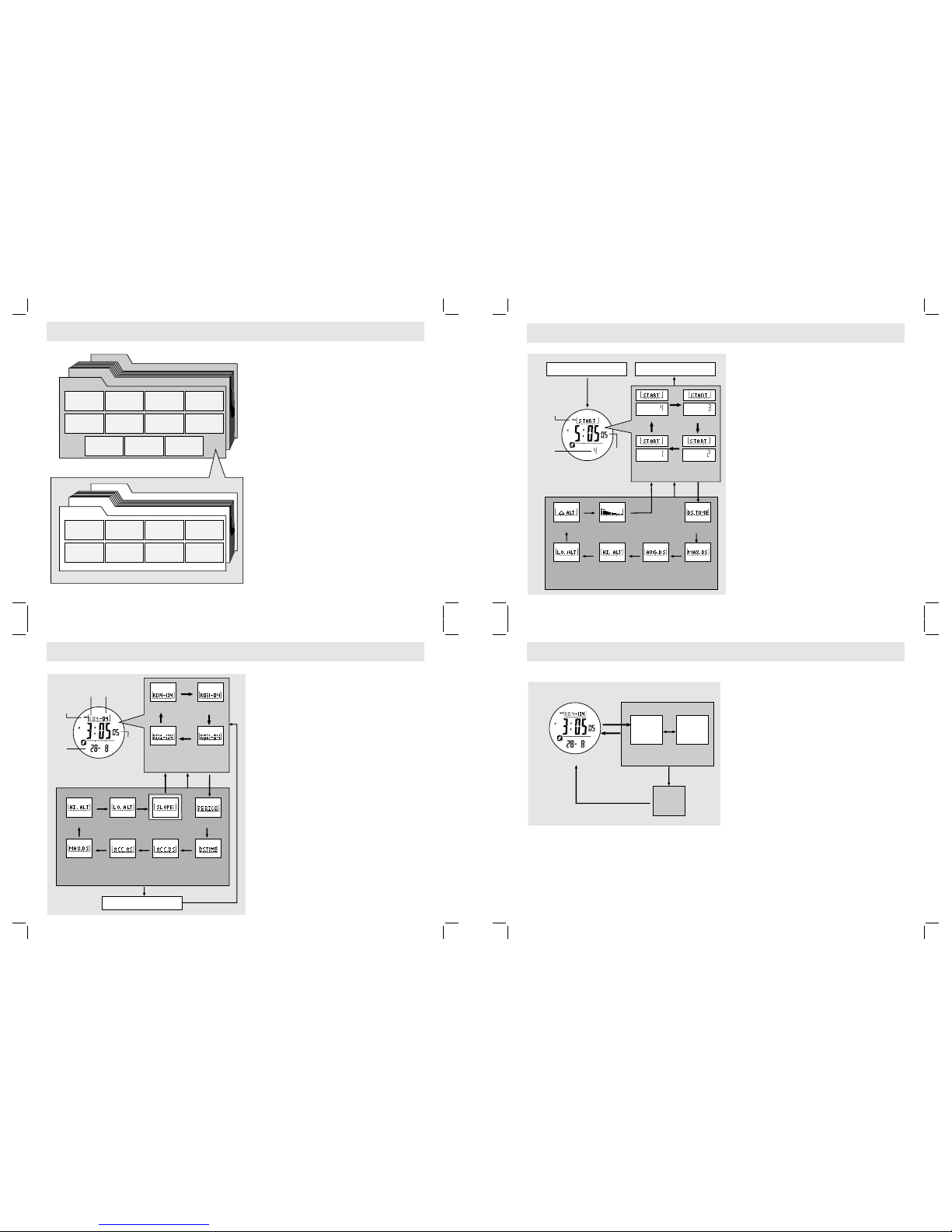
!The Ski Record logs a series of Ski Laps, and it
provides the summary of these ski laps:
!The record date,
!The record started time,
!The total travel period,
!The total number of ski lap recorded,
!The total descent time,
!The accumulative descent,
!The accumulative ascent,
!The maximum descent speed,
!The highest altitude reached,
!The lowest altitude reached and
!The slope of the ski course.
!The Ski Lap logs the data of a particular ski
lap, and it includes:
!The lap started time
!The total descent time
!The maximum descent speed,
!The average descent speed,
!The highest altitude reached,
!The lowest altitude reached,
!The altitude change, and
!The descent altitude change graph.
How to Delete the Ski
In , press the [M] button
to change the selection between 'ONE' (delete
the current record) and 'ALL' (delete all record)
following the adjacent Diagram.
!When the 'ONE' or 'ALL' is flashing (selected),
hold down the [S/S] button to confirm the
deletion or hold down the [M] button to abort
the deletion and exit the setting display.
NOTE: When the Ski Function is turned ON, the
current ski record can not be deleted.
Record
!Hold down the button in the Ski Recall Mode to
select the Record Deletion Display.
!Record Deletion Display
Ski
When the Ski Recall Mode is selected:
The total number of logged record will be
appeared on the top row of the display.
The starting time and date of the displayed
record will be appeared on the middle and
bottom row of the display respectively.
How to Select among Different Ski
P
the
How to Review the Record Data
When a target record is displayed, press the
[S/S] to re the different record data
How to Select the Ski Lap
coming 2
ap among the logged
laps.
Recall Mode Display
!
!
!
Records
!ress the [L/R] button to select a target record
among l o g ged r e c o r d s f o l l o w i n g the
adjacent diagram.
!
view . During
the review, press the [M] button once to return
to previous display.
!Check the chapter 10. for more detail
on how to select a target l
NOTE: The slope angle can be changed (even
after the ski record has been stored) as following:
!Hold down the [M] button in the Slope Review
Display to select setting display, then press
[S/S] and [L/R] button to change the angle.
When the setting is completed, hold down the
[M] button to exit the setting display.
!A l l s p e e d r e l ate d dat a wi l l b e up d a t e d
automatically after the changing.
How to Select the Ski Lap
!When one of the target record data (except
Slope Review Display) is displayed, hold down
the [M] button will enter the
the
How to Select among Different Ski Lap
Start Time Display, p
the
How to Review the Lap Data
When a target lap is displayed, press the [S/S]
to re different lap data displays
selection to select
a target lap among logged laps.
!To exit the lap selection sequence and back to
Ski Recall Mode by pressing the [M] button
once.
s
!During the Lap ress the
[L/R] button to select a target lap among
logged laps following the adjacent diagram.
!
view following
the adjacent diagram.
!To exit the lap selection sequence and back to
Ski Start Time Display by pressing the [M]
button once.
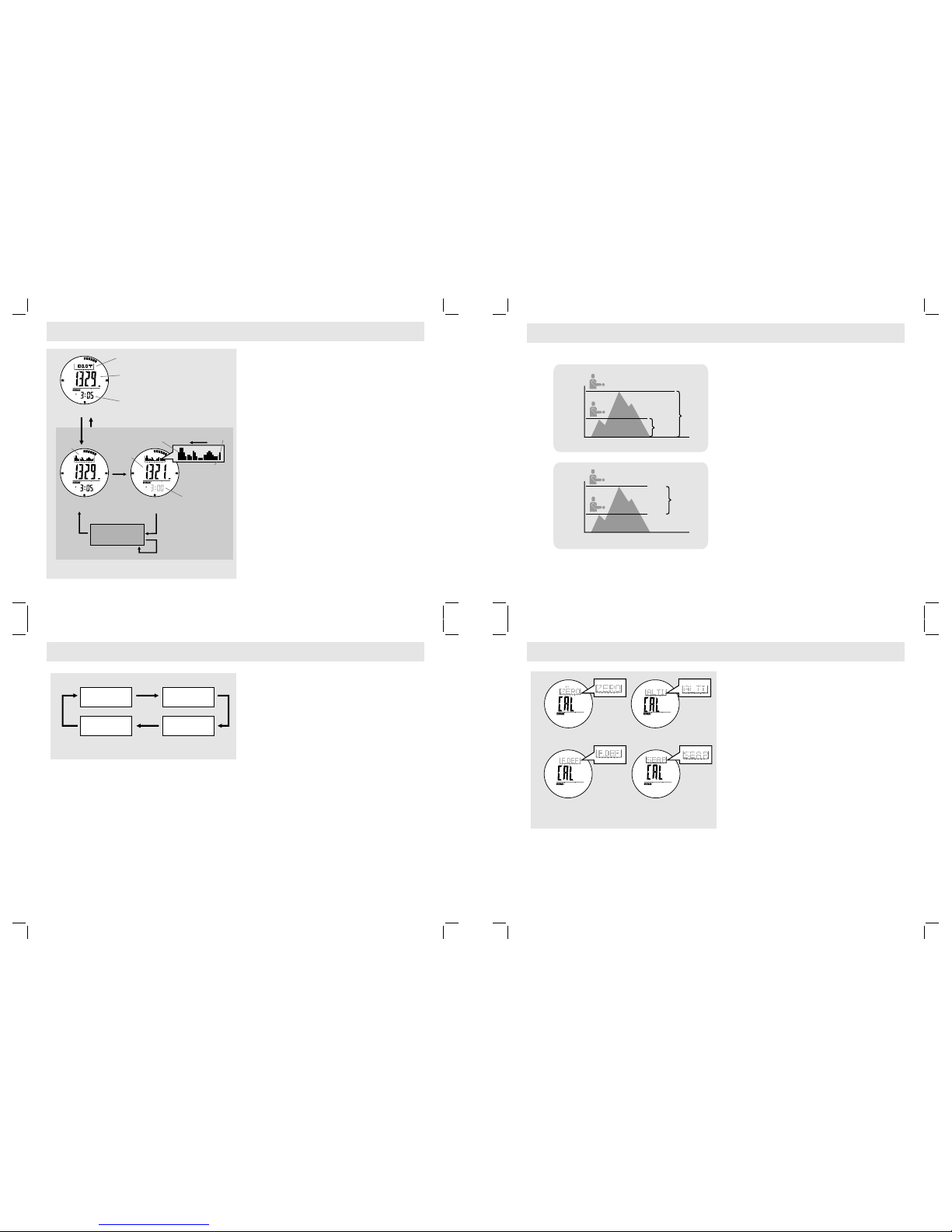
How to Switch between Measurement Units
!The Watch display altitude either in meter (m) or
feet (ft).
!The Watch display temperature either in deegree
Celsius ( C) or degree Fahrenheit ( F).
!To switch among different unit, hold down the
[S/S] button to change the units following the
adjacent diagram.
8 8
Absolute and Relative Altitude
!Absolute altitude is the vertical distance between
your current altitude and Sea Level (0 m).
!Relative altitude is the vertical distance between
your current altitude and the altitude of a specific
level at which you set the altimeter to zero.
!An example of using relative altitude:
!The altitude differe nce between the st arting
point and the f i nis h poi n t of a trek can b e
measured by Relative Altitude.
!Set the altitude to 'Zero' at the starting point,
while the Watch will show the altitude difference
at the finish point of the trek.
How to Switch between Absolute and Relative
Altitude
!C h e c k t he c o m i n g ch a p t e r ' Zer o Alti t u d e
Adjustment' Chapter for more detail on how to set
the current altitude to zero altitude.
!An 'r ' indicator will be shown with the altitude
reading as long as the Altitude has been adjusted
by the 'Zero' adjustment.
!To switch the Watch back to absolute altitude
measurement, employ one of the following altitude
ad justments: Factory Default Ad ju st me nt, Sea
Level Pressure Adjustment and Absolute Altitude
Adjustment. Check the respective chapters for
more detail on how to employ the adjustment.
Why the Need to be Adjusted
!As the absolute altitude is calculated from air
pressure, the change of air pressure would affect
the altitude reading.
!To achieve a more accurate result, the Watch
needs to be calibrated from time to time as
pressure may change gradually even within hours.
NOTE: The Watch includes an automatic Sea Level
Pressure comparison feature, this smart feature
allows NO fluct uation altitud e read ings will be
recorded when staying at the same altitude.
Altimeter ?
Altimeter Adjustment
!There are 4 kinds of adjustment method: Zero
Altitude, Absolute Altitude, Sea Level Pressure and
Factory Default Adjustment.
!Zero Altitude: Adjust altitude mandatory to zero for
relative altitude measurement. If the altimeter is
adjusted by Zero Adjustment, an " r " indicator will
be appeared on the display.
!Absolute Altitude: Set altitude to known value and it
can recall for next setting.
!Sea Level Pressure: Inp ut a spe cifi c sea leve l
pressure which get from official site.
!Factory Default: Restore the Watch to default
factory setting where assume Sea Level Pressure
is 1013.2 mb
NOTE: When the Ski Function is turned ON, Altimeter
Adjustment function is prohibited.
NOTE: Altitude is calibrated independently on each
mode. For example, if absolute altitude is selected,
the effect of the previous sea level pressure setting
will be ignored.
11.1 Altimeter Mode -Measurement Unit Selection
11.2 Altimeter Mode - Absolute and Relative Altitude
11. Altimeter Mode -3 Altimeter Adjustment Overview
Zero Altitud e
Display
Absolut e Alt itude
Display
Factory D efault
Display
Sea Level
Pressur e Display
Adjustment Displays
SET
SET
SET
Measuri ng Unit Selectio n Sequence
hold
[S/S]
hold
[S/S]
hold
[S/S]
hold
[S/S]
hold
[S/S]
8C (Cels ius )
m (Mete r)
8C (Cels ius )
ft (Fee t)
8F(Fah ren hei t)
ft (Fee t)
8F (Fahr enh eit )
m (Mete r)
[L/R]
[S/S] [S/ S]
[L/R]
[L/R]
[L/R]
- 23
hour current
time
History Display
(Current Time)
History Display
(1st Record at the hour)
record time
(flashing)
ALT I
cursor moving
direction
the 1st record
at the hour
(flashing cursor)
current
altitud e
current t ime
Temperature Display
Altimeter Mode
Altitude
History Review
current
tempera ture
Altitud e
History
graph alt itude
history
History Display
(-2 to -23 hour)
Absolute Altitude
Relative Altitude
80m
absolute
altitude
180m
absolute
altitude
100m
relative
altitude
80m
80m
180m
180m
0m
(sea level)
0m
(where the
altimeter was
adjusted to zero)
100m
0m
(sea level)
Functional Display
!The Wa t c h inclu d e s two Altime t e r funct i o nal
displays: Temperature and History Display. One of
the two functional displays will be appeared on the
top row of the display.
!Press the [S/S] to select between Temperature and
History Display.
Fast sampling
!During the Altitude Mode, hold down the [L/R] button
will activate fast sampling (sample per second) for
five minutes.
Temperature Display
!In Temperature Display, the top display shows the
current temperature in degree Celsius ( C) or deg ree
Fahrenheit ( F).
IMPOR TANT: To ge t an accur ate readi ng of a ir
temperature, you must remove the watch from the
wrist that allows no body temperature effect on your
watch.
History Display
!The Watch records the altitude reading automatically
every hour at the hour, i.e 1:00, 2:00, 3:00 and etc.
These records will be plotted into a altitude record
graph.
!In History Display, the altitude record graph shows
on the top row of the display.
!To review the altitude records of the last 23 hours,
press the [L/R] button to move cursor left cyclically,
at the same time, the respective altitude record and
its recording time (flashing) will appear on the
display.
8
8
11.0 Altimeter Mode - Temperature and History Display