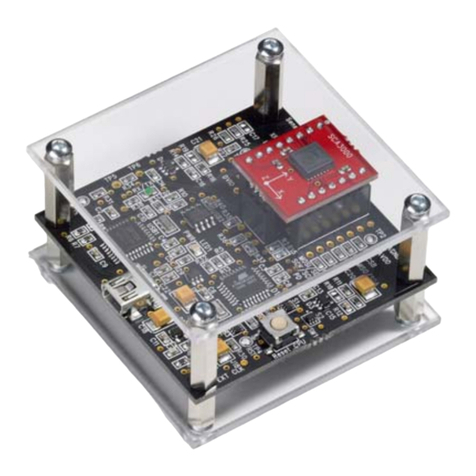
SCA3000 DEMO KIT
User Manual
4.1 Resetting GUI and µC
CMA3000 DEMO KIT GUI software can be reinitialised by selecting the “Reset demo” display from
pull down menu, see Figure 11.
MCU can be reset by exiting from the GUI and then pressing the reset button (Figure 1) on USB
interface board.
4.2 Uninstalling the GUI and USB driver
The GUI software and the USB driver (FTDI Serial Converter Driver) can be removed from
Windows Control Panel Add/Remove Programs. Please notice that removing the FTDI Serial
Converter Driver (USB driver) may affect on functionality of some other programs (such as other
demo kits provided by VTI Technologies).
5 Advanced data logging
Acceleration data can be saved from GUI software by pressing the “Save to file” button (Figure 2).
Data can be logged also by using the Windows HyperTerminal software and macro language that
is used to control the MCU of the CMA3000 DEMO KIT.
Please notice that GUI software and Windows HyperTerminal software can not be open at the
same time. Follow the steps below to start the data logging:
1. Connect CMA3000 DEMO KIT with USB cable to PC
2. Open GUI software to see the correct COM port number (SETUP display, see Figure 10).
Windows Device Manager can be also used to find out the COM port number.
3. Close the GUI software.
4. Open Windows HyperTerminal software from CD-ROM:
−“CMA3000_demo_HyperTerminal_connection.ht”, or
−see detailed serial communication settings in Table 2.
5. Press demo reset button (see Figure 1). CMA3000 DEMO KIT sends an info text to
HyperTerminal (see Figure 12). If the HyperTerminal software is unable to connect the
CMA3000 DEMO KIT or the info text does not appear,
- Press
disconnect
,
- change the COM port number to correct from port properties ,
- press
connect ,
- press reset button on CMA3000 DEMO KIT.
until info text appears to HyperTerminal screen (see Figure 12).
6. After the info text appears on HyperTerminal, send the wanted macro text file, such as
“CMA3000_data_logger.txt” from CD-ROM (“Transfer” pull down menu →“Send Text
File…” →browse for
CMA3000_data_logger_macro.txt)
7. The text file is a macro that runs in an endless loop. The macro sends 3-axis acceleration
data in hex format to HyperTerminal (see Figure 13). Example of data format:
0x3c,0x01,0x01,Z-Y-X
where “0x” indicates for hex format, and “Z-Y-X” the axis order. The Z-axis hex output is
3C, which is ‘0011 1100’ in binary format.
8. The data can be stored by capturing the data in to file:
“Transfer” pull down menu →“Capture Text…” →save captured data into wanted file and
folder.
9. Data capturing can be stopped from:
“Transfer” pull down menu →“Capture Text…” →“Stop”
Macro language is used to control the CMA3000 DEMO KIT. It can be also used to configure the
CMA3000 sensor. For more detailed information of macro language, please refer to “SCA3000
DEMO KIT macro language description 8259200”.
VTI Technologies Oy 10/21
www.vti.fi Doc.Nr. 8288400.02 Rev.0.2