manuals.online logo
Brands
  1. Home
  2. •
  3. Brands
  4. •
  5. Wadia
  6. •
  7. CD Player
  8. •
  9. Wadia 381 User manual

Wadia 381 User manual

Other manuals for 381

1

This manual suits for next models

1

Other Wadia CD Player manuals

Wadia 781I User manual

Wadia

Wadia 781I User manual

Wadia 581 User manual

Wadia

Wadia 581 User manual

Wadia 7 User manual

Wadia

Wadia 7 User manual

Wadia 581 User manual

Wadia

Wadia 581 User manual

Wadia 860 User manual

Wadia

Wadia 860 User manual

Wadia 581 User manual

Wadia

Wadia 581 User manual

Wadia 830 User manual

Wadia

Wadia 830 User manual

Wadia 860 User manual

Wadia

Wadia 860 User manual

Wadia 861 User manual

Wadia

Wadia 861 User manual

Wadia 270 User manual

Wadia

Wadia 270 User manual

Wadia 381 User manual

Wadia

Wadia 381 User manual

Wadia 302 User manual

Wadia

Wadia 302 User manual

Popular CD Player manuals by other brands

Arcam CD23 Handbook

Arcam

Arcam CD23 Handbook

Sanyo MCD-Z1F Service manual

Sanyo

Sanyo MCD-Z1F Service manual

JVC RC-ST3SL instructions

JVC

JVC RC-ST3SL instructions

Technics SL-P9066 operating instructions

Technics

Technics SL-P9066 operating instructions

Marantz HD-CD1 quick start guide

Marantz

Marantz HD-CD1 quick start guide

Sony DVP-FX850 Service manual

Sony

Sony DVP-FX850 Service manual

Philips AZ1140 Instrukcja obs?ugi

Philips

Philips AZ1140 Instrukcja obs?ugi

Alpine 7909 owner's manual

Alpine

Alpine 7909 owner's manual

JVC CH-X350 instructions

JVC

JVC CH-X350 instructions

RCA RP-7923 instruction manual

RCA

RCA RP-7923 instruction manual

Pioneer DEH-P3550MP XM Operation manual

Pioneer

Pioneer DEH-P3550MP XM Operation manual

Philips Shockproof AX2102 brochure

Philips

Philips Shockproof AX2102 brochure

Philips CD582 user manual

Philips

Philips CD582 user manual

Philips AZ 6821 operating manual

Philips

Philips AZ 6821 operating manual

Lasonic MSU-2020 user manual

Lasonic

Lasonic MSU-2020 user manual

Denon DCD-1420 Service manual

Denon

Denon DCD-1420 Service manual

Panasonic SJ-MR100 operating instructions

Panasonic

Panasonic SJ-MR100 operating instructions

Onkyo DX-7210 instruction manual

Onkyo

Onkyo DX-7210 instruction manual

manuals.online logo
manuals.online logoBrands
  • About & Mission
  • Contact us
  • Privacy Policy
  • Terms and Conditions

Copyright 2025 Manuals.Online. All Rights Reserved.

381/381i CD Player
Information & Operation Manual
381/381i CD Player
381/381i CD Player
2
Information & Operation Manual
Table of Contents
Preliminaries
Wadia Digital – A Bri f History . . . . . . . . . . . . . . . . . . . . . . . . . . . . . . . . . . . . . . . . . . . . . . . . . . . . . . . . . 3
Installati n and Set-up
Unpacking...........................................................................4
Acc ssori s .........................................................................4
Installing th Tip-To s . . . . . . . . . . . . . . . . . . . . . . . . . . . . . . . . . . . . . . . . . . . . . . . . . . . . . . . . . . . . . . . . 4
Conn cting to Your Syst m . . . . . . . . . . . . . . . . . . . . . . . . . . . . . . . . . . . . . . . . . . . . . . . . . . . . . . . . . . . . 4
Conn cting to AC Pow r . . . . . . . . . . . . . . . . . . . . . . . . . . . . . . . . . . . . . . . . . . . . . . . . . . . . . . . . . . . . . . 5
Conn cting Dir ctly to a Pow r Amplifi r . . . . . . . . . . . . . . . . . . . . . . . . . . . . . . . . . . . . . . . . . . . . . . . 5
Using with a Pr amplifi r . . . . . . . . . . . . . . . . . . . . . . . . . . . . . . . . . . . . . . . . . . . . . . . . . . . . . . . . . . . . . 5
Optimizing th Output L v l . . . . . . . . . . . . . . . . . . . . . . . . . . . . . . . . . . . . . . . . . . . . . . . . . . . . . . . . . . . . 6
Conn cting Digital Sourc s (Wad a 381 CD Player only) ..................................6
Choosing a Digital Cabl (Wad a 381 CD Player only) .....................................6
Fr qu ntly Ask d Qu stions . . . . . . . . . . . . . . . . . . . . . . . . . . . . . . . . . . . . . . . . . . . . . . . . . . . . . . . . . . . 7
General Operati n
Front Pan l Controls . . . . . . . . . . . . . . . . . . . . . . . . . . . . . . . . . . . . . . . . . . . . . . . . . . . . . . . . . . . . . . . . . . 8
Display F atur s . . . . . . . . . . . . . . . . . . . . . . . . . . . . . . . . . . . . . . . . . . . . . . . . . . . . . . . . . . . . . . . . . . . . . 9
Display Functions . . . . . . . . . . . . . . . . . . . . . . . . . . . . . . . . . . . . . . . . . . . . . . . . . . . . . . . . . . . . . . . . . . . . 9
DiscFormats ........................................................................10
R mot Control Op ration . . . . . . . . . . . . . . . . . . . . . . . . . . . . . . . . . . . . . . . . . . . . . . . . . . . . . . . . . . . .11
Playback Options . . . . . . . . . . . . . . . . . . . . . . . . . . . . . . . . . . . . . . . . . . . . . . . . . . . . . . . . . . . . . . . . . . . .13
Th ory of Op ration . . . . . . . . . . . . . . . . . . . . . . . . . . . . . . . . . . . . . . . . . . . . . . . . . . . . . . . . . . . . . . . . . .14
M nu Scr n Map . . . . . . . . . . . . . . . . . . . . . . . . . . . . . . . . . . . . . . . . . . . . . . . . . . . . . . . . . . . . . . . . . . .16
DigitalAlgorithms ....................................................................17
Appendices
Troubl shooting .....................................................................18
UsingDataDiscs ....................................................................18
Softwar Lic ns Agr m nt .........................................................18
Environm ntalCar ..................................................................18
T chnicalSp cifications..............................................................19
Saf tyPr cautions ..................................................................20
!
3
Thank You
All of us at Wadia would lik to off r thanks and congratulations to you for purchasing th Wadia 381/381i CD
Play r. W sinc r ly b li v that your Wadia 381/381i CD Play r will bring you many y ars of musical pl asur
and satisfaction.
Whil v ry n w own r is anxious to b gin list ning, w ncourag you to tak a f w minut s to r ad this manual
and familiariz yours lf with th full capabiliti s of th Wadia 381/381i CD Play r.
If you are n a hurry to beg n l sten ng, please read the sect ons of th s manual where the symbol at
r ght s shown.
Wadia Digital – A Brief History
Wadia Digital, found d in 1988, is on of th original compani s d dicat d to high p rformanc digital audio
r production. Wadia was form d by a t am of ngin rs from th Minn apolis bas d 3M Corporation (Minn sota
Mining and Manufacturing) who shar d many y ars of xp ri nc in advanc d digital t l communications
r s arch and d v lopm nt. In th arly 1980’s, th s ngin rs b cam intrigu d by th m rging compact disc
t chnology. Disappoint d with th sound quality of arly CD play rs, th y xamin d th workings and d signs of
th s arly compon nts and found th m to b unsophisticat d wh n compar d with th t chnology availabl in
oth r ar as of digital d sign. In r spons , th y found d Wadia Digital – a company bas d on th philosophy of
applying advanc d t chnology to improv th p rformanc of digital audio compon nts. Wadia’s first product, th
Wadia 2000 D coding Comput r, was an absolut br akthrough in digital audio. For many disc rning list n rs, it
prov d that Digital Audio was a musically r sponsiv , volving, and ngaging format.
Building on a tradition of xc ll nc , Wadia continu s to d v lop innovativ t chnology; r fining, list ning,
ngin ring, and improving along th way. Sinc th Wadia 2000, n w g n rations of industry-l ading d signs
hav b n introduc d and mbrac d by list n rs around th world. Each st p of th way, Wadia has consist ntly
rais d th standard for p rformanc of Digital Audio playback.
H r is a bri f list of th t chnological innovations th Wadia ngin rs hav pion r d ov r th past 20 y ars:
• DigiMast r™ pat nt d algorithm (filt r optimiz d for r producing music)
• ClockLink™ propri tary jitt r r duction t chnology
• SwiftCurr nt™ curr nt to voltag conv rsion t chnology
• First outboard Digital-to-Analog conv rt r
• First to apply glass fib r-optics to hom audio
• First to r cogniz jitt r as a sourc of audibl distortion
• First to p rf ct digital volum control
• First high- nd CD play r comp titiv with xp nsiv s parat s
• First company to provid bit p rf ct digital audio output from th iPod
Although Wadia’s digital xp rtis and track r cord xc d thos of any audio company, t chnology alon do s
not guarant musical p rformanc . Wadia d signs ar born of a d licat balanc of t chnology shap d by a
passion for music.
Wadia is proud to introduc th Wadia 381/381i CD Play r, a br akthrough in sonic p rformanc and valu , and
a strong stat m nt of our y ars of d dication to music.
4
Installati n and Set-up
Unpac ing
Us car in unpacking your Wadia 381/381i CD Play r. Insp ct it for any shipping damag and call your d al r
imm diat ly if any is found.
Do not plug your Wad a 381/381 CD Player nto an AC outlet f you f nd sh pp ng damage.
W advis saving all packing mat rials so that th unit can b asily and saf ly shipp d if th n d aris s.
Accessories
Provid d with th Wadia 381/381i CD Play r ar th following acc ssori s:
• AC pow r cord
• Four tip-to s with thr ad d studs
• Four st l coast rs
• RCA/BNC adapt r (only ncluded w th 381 CD Player)
• R mot Control
• Two typ AAA batt ri s
Do not t p the un t onto the back panel. Th s can damage nput and/or output connectors.
Installing the Tip-Toes
With th unit still position d on its sid , scr w on of th tip-to s into th bottom of ach corn r post.
Position th Wadia 381/381i CD Play r wh r you would lik it to r sid in your syst m. W r comm nd choosing
a solid, non-r sonant, l v l surfac for b st p rformanc . If this surfac is susc ptibl to damag , plac on of
th st l coast rs und r ach tip-to .
!
!
381/381i CD Player
5
Connecting to Your System
Check to make sure your Wad a 381/381 CD Player has been manufactured for operat on at your AC
l ne Voltage. Attempt ng to use the Player at any voltage other than the spec f ed on the rear of the
un t may damage the un t. Damage caused by mproper operat on s not covered by warranty. If the
voltage spec f ed s d fferent from your AC voltage, contact your Wad a dealer.
Connecting to AC Power
Th b st p rformanc is obtain d wh n th Wadia 381/381i CD Play r is plugg d dir ctly into th wall with th
pow r cord provid d. Th Wadia has pow r conditioning, surg suppr ssion and an xtr m ly sophisticat d
ov rall prot ction sch m . It should not b n c ssary to us surg prot ctors pow r condition rs or aft rmark t
pow r cords, som of which may d grad th sonic p rformanc . If you wish to xp rim nt with any of th s
d vic s, work clos ly with your local d al r – and most of all, t ust you own ea s.
Connecting Directly to a Power Amplifier
Avoid allowing static shocks to b appli d to th inputs or outputs. To pr v nt static shocks, touch any ground d
surfac , such as th Wadia 381/381i CD Play r chassis, b for conn cting or r moving a cabl . It is unlik ly
that a static shock will damag th unit, but it may caus th Wadia 381/381i CD Play r circuitry to “lock-up”
(s Troubl Shooting: Lock-Up in th App ndic s).
Inputs and outputs can b saf ly conn ct d to th Wadia 381/381i CD Play r
1. B for th unit is pow r d up
2. Wh n th unit is in R lay-Mut mod
W strongly r comm nd that you us your Wadia 381/381i CD Play r conn ct d dir ctly to your pow r amplifi r.
Ev n if you purchas d your Wadia 381/381i CD Play r with th int ntion of conn cting it to your pr amplifi r,
w sugg st that you try dir ct conn ction to your amplifi r. Many list n rs ar surpris d by th improv m nt in
p rformanc ov r v n th most xp nsiv pr amplifi rs.
To conn ct your Wadia 381/381i CD Play r to a pow r amplifi r, nsur that your pow r amplifi r is turn d off
th n conn ct your analog int rconn cts from th Wadia 381/381i CD Play r analog outputs to th amplifi r’s inputs.
Using with a Preamplifier
Whil th Wadia 381/381i CD Play r was d sign d to b us d without a pr amplifi r, no compromis s w r
mad in its d sign that will pr v nt xc ll nt op ration in a conv ntional syst m with a pr amplifi r.
Wh n using a pr amplifi r, s t th Wadia 381/381i CD Play r volum control to its maximum l v l.
CHECK
VOLTAGE
HERE
!
!
6
Optimizing the Output Level
B st p rformanc is obtain d wh n op rating th Wadia Volum Control n ar th top of its rang . If n d d, th
maximum output l v l of your Wadia 381/381i CD Play r can b adjust d to match th ov rall s nsitivity of your
syst m so that th critical list ning will tak plac with th volum control op rating n ar th top of its rang .
Th maximum output l v l of th Wadia 381/381i CD Play r is adjustabl by m ans of a s t of int rnal switch s.
Th Wadia 381/381i CD Play r is factory s t to accommodat th most common rang of syst m s nsitivity. If
you find that your typical volum l v l during critical list ning is b low 65 on th volum display, it will b
advantag ous to us a diff r nt s tting. To chang th output l v l, consult your d al r.
Connecting to Other Digital Sources (Wadia 381i CD Player only)
Th Wadia 381i CD Play r is quipp d with digital inputs which can acc pt digital signals from any of th
stablish d digital formats. (Input 1: Glass-fib r optical, Input 2: Coaxial with BNC conn ctor, Input 3: Plastic-optical
TOSLINK, Input 4: AES/EBU with XLR conn ctor)
Th Wadia 381i CD Play r digital inputs will d cod any word l ngth up to 24-bit, and any of th standard digital
audio sampling fr qu nci s up to 96kHz.
Choosing a Digital Cable (Wadia 381i CD Player only)
Whil th Wadia 381i CD Play r supports all curr ntly acc pt d transmission formats for digital audio, w
r comm nd using a high quality glass-fib r cabl such as th on availabl from Wadia. Wadia Digital was
th first company to us glass fib r-optic data transmission in digital audio. W hav continually improv d this
format and b li v that it off rs th b st, most consist nt p rformanc of all th availabl options.
Bas d on our xp ri nc , h r is a list of digital int rfac m thods in d sc nding ord r of p rformanc :
1 Glass optical (as mplemented by Wad a)
2 AES/EBU using XLR conn ctor
3 Coaxial cabl using BNC conn ctor
4 Coaxial cabl using RCA conn ctor
5 TOSLINK plastic-optical cabl
Th quality of any of th s transmission m thods d p nds on th quality of th cabl and th sophistication of
th transmitt r and r c iv r. For xampl , a high quality coaxial cabl can outp rform a low quality AES/EBU
cabl . A high quality AES/EBU cabl will outp rform a poorly impl m nt d glass optical syst m.
If you ar using a coaxial cabl w r comm nd that you hav th cabl t rminat d with a BNC conn ctor. This
will provid high r p rformanc than an RCA conn ctor. Your Wadia 381i CD Play r com s with an RCA/BNC
adapt r that can b us d for xp rim ntation b tw n diff r nt typ s of coaxial cabl .
Again, w highly r comm nd that you tak advantag of your d al r’s xp ri nc and, most importantly,
t ust you ea s.
All XLR-typ inputs and outputs on th Wadia 381/381i CD Play r, both digital and analog, us th standard
audio pin configuration:
Pin 1 - Ground
Pin 2 - Positiv signal
Pin 3 - N gativ signal
381/381i CD Player
7
Frequently As ed Questions
Should I use a Balanced or Unbalanced connect on?
If your amplifi r has a tru balanc d input, w r comm nd you us th balanc d analog output from your Wadia
381/381i CD Play r. All things b ing qual, prop rly impl m nt d balanc d (also call d diff r ntial) circuitry
sounds b tt r than unbalanc d circuitry. Th Wadia 381/381i CD Play r is a tru balanc d d sign. It g n rat s
th inv rt d signal in th digital domain and all subs qu nt proc ssing is don in balanc d mod . Your Wadia
381/381i CD Play r is d sign d to maintain many of th advantag s of tru balanc d d sign wh n using th
unbalanc d outputs. In addition, th Wadia 381/381i CD Play r output stag is capabl of driving both typ s of
outputs simultan ously.
Why should I bypass the Preampl f er?
A pr amplifi r is unn c ssary wh n using your Wadia 381/381i CD Play r. Th Wadia 381/381i CD Play r provid s
all th n c ssary control functions of a pr amp whil th signal is still in th digital domain. This avoids th
sonic d gradation caus d by analog circuitry, switch s, and wir . Th Wadia 381/381i CD Play r output stag
can driv any pow r amplifi r and any int rconn cts, v n at v ry long l ngths.
Does the Wad a Volume Control comprom se resolut on?
Th Wadia 381/381i CD Play r us s th lat st g n ration of Wadia’s propri tary digital volum control. Th volum
l v l can b vari d in th digital domain by m ans of math matical manipulation of th signal, liminating th
distortion and nois that ar in vitabl with v n th b st analog volum controls. Whil conv ntional thinking
indicat s that r ducing th volum digitally can sacrific low l v l r solution, Wadia has cr at d an innovativ
solution. Wadia’s pat nt d digital filt ring algorithm produc s a 24 bit output rath r than th 16 bits stor d on
th CD. This high-r solution signal is th n us d in th computations which in turn r duc th volum l v l. This
n w signal is f d dir ctly to th DAC chips. Through this innovativ m thod, th Wadia 381/381i CD Play r
maintains high r solution v n at th low st volum control s ttings.
Can I bypass the Wad a Volume Control?
B caus th Digital Volum control do s not includ any analog circuitry, th r is non to b bypass d. Ev n th
math matical program st p that p rforms th Digital Volum Control calculation is an int gral part of th Wadia
DigiMast r filt r algorithm and th r for cannot b bypass d. If you do not n d th Wadia Volum Control, s t
it to its maximum l v l of 100 on th display.
What about Analog Sources?
In ord r to fully r aliz th pot ntial of this typ of syst m, Wadia has a rang of Analog-to-Digital conv rt rs.
Now it is possibl to us analog sourc s, such as a tun r, tap d ck, or v n a turntabl (in conjunction with a
suitabl phono stag ) in your syst m without using a conv ntional analog pr amplifi r. Consult your d al r for
mor information on th Wadia Analog-to-Digital products.
Should I leave the Wad a 381/381 CD Player w th the power on?
Th Wadia 381/381i CD Play r is d sign d to b l ft with th pow r on with no harm or w ar to th unit. All
motors and las r circuitry turn off wh n th unit stops playing. If d sir d, th front display can b turn d off
(s Turning off th Display und r R mot Op ration). L aving th pow r on allows th circuitry to r main in
th rmally stabl , which provid s b tt r p rformanc and long r lif . Car ful list n rs will notic that th sound
of th Wadia 381/381i CD Play r will improv st adily aft r th unit is pow r d up. A n w unit will und rgo mor
dramatic chang s wh n pow r is appli d for th first tim . If you turn off your Wadia 381/381i CD Play r for
mor than an hour, you will find that th unit will und rgo similar, but l ss dramatic improv m nt onc pow r
is r appli d.

8
General Operati n
Using th switch locat d dir ctly abov th AC pow r input, turn th switch to th ON position.
Front Panel Controls
Th front pan l of th Wadia 381/381i CD Play r f atur s basic controls that allow you to op rat basic functions
without using th R mot Control.
Pr vious Track
This button will caus th unit
to mov to th pr vious track
and b gin playing.
Op n/Clos /Stop
If th draw r is op n, pushing this
button will CLOSE th draw r.
If th CD is playing, pushing this
button will STOP playing.
If th unit is not playing, pushing
this button will OPEN th draw r.
Example:
To open the d awe while the unit
is playing, push the button once to
stop and once mo e to open.
Volum Down
D cr as s th volum by 1/2 dB.
Play/N xt Track
This button will caus th unit
to advanc to th n xt track
and b gin playing.
Volum Up
Incr as th volum by 1/2 dB.
381/381i CD Player
9
Display Features
Display Functions
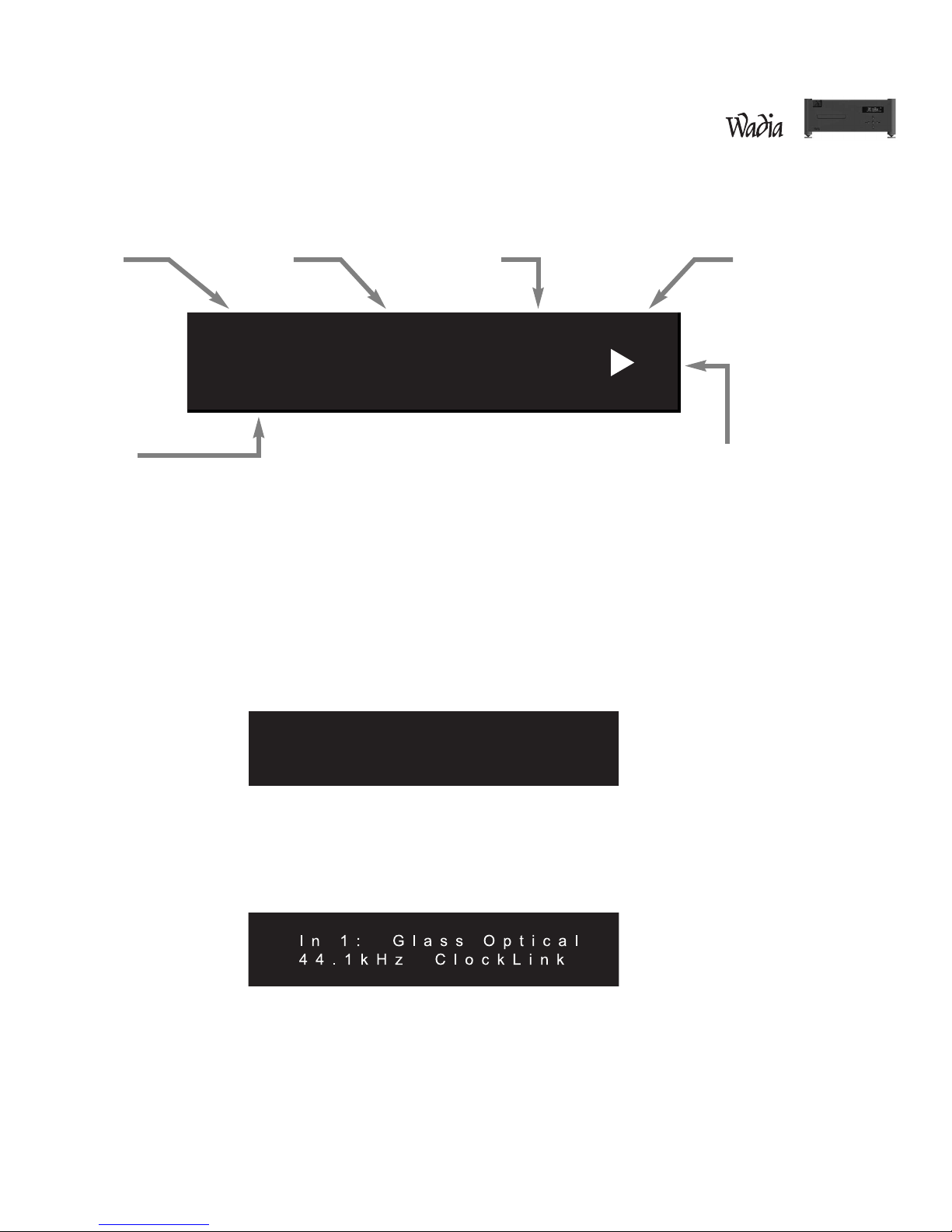
Th Wadia 381/381i CD Play r f atur s a larg display scr n. Th top s ction shows th status of th transport.
Th bottom of th display indicat s pr amp functions, as d scrib d b low.
Turn-On Scr n
This scr n is display d ach tim th Wadia 381/381i CD Play r is pow r d-up. Aft r fiv s conds, th display
will chang to th Input scr n with int rnal transport s l ct d, th n chang again to th Volum scr n with
th volum s t to Z ro. (The sc een on the 381i CD Playe will ead “381i CD Playe ”)
Input Scr n
Th Input scr n shows which input is curr ntly s l ct d. It also indicat s wh th r ClockLink is ngag d and th

sampling fr qu ncy. If th r is no signal conn ct d to th s l ct d input, th display will r ad, “No Data.”

T r a c k T i m e C D
0 1 0 2 : 5 6
L 1 0 0 L e v e l 1 0 0 R
Track Tim Playback Options Format
Transport FunctionsVolum
381 CD Player