manuals.online logo
Brands
  1. Home
  2. •
  3. Brands
  4. •
  5. American Dynamics
  6. •
  7. Electronic Keyboard
  8. •
  9. American Dynamics ControlCenter ADCC1100 User manual

American Dynamics ControlCenter ADCC1100 User manual

Other manuals for ControlCenter ADCC1100

1

This manual suits for next models

1

Popular Electronic Keyboard manuals by other brands

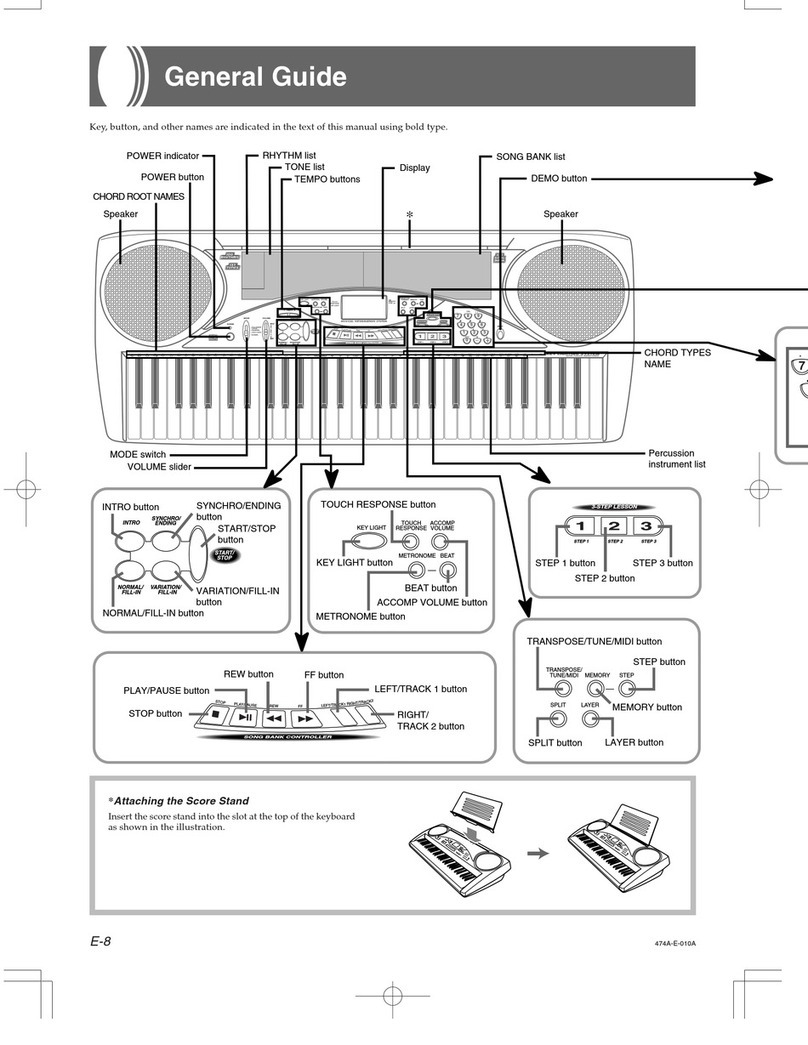
Casio LK-50 General guide

Casio

Casio LK-50 General guide

Casio VZ-1 Service manual and parts list

Casio

Casio VZ-1 Service manual and parts list

Yamaha PortaTone PSR-225GM owner's guide

Yamaha

Yamaha PortaTone PSR-225GM owner's guide

Yamaha Portatone X2500 owner's guide

Yamaha

Yamaha Portatone X2500 owner's guide

Yamaha Portatone PSR-100 owner's guide

Yamaha

Yamaha Portatone PSR-100 owner's guide

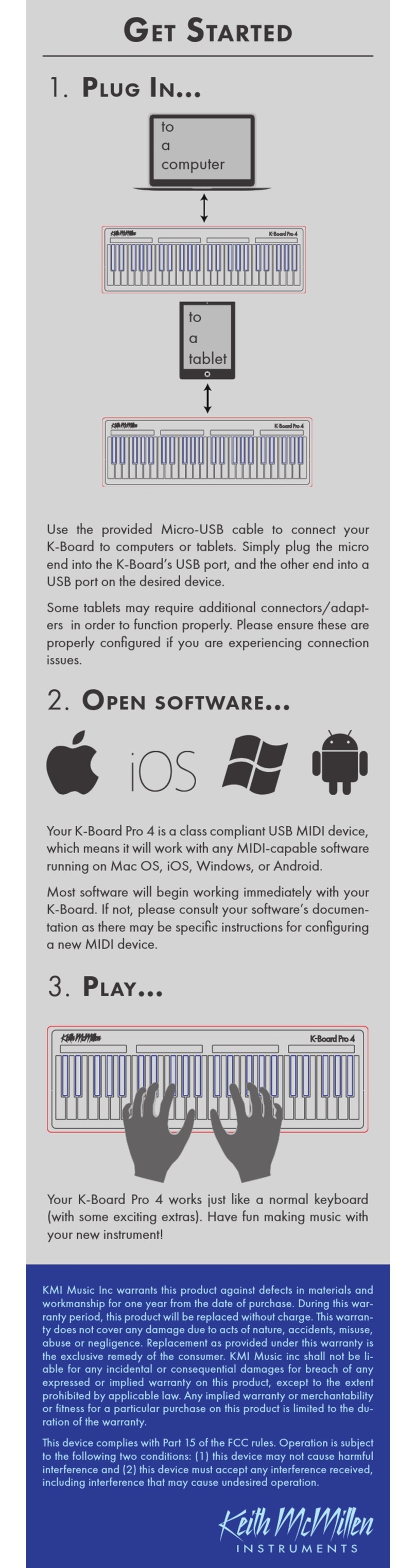
Keith McMillen Instruments K-Board Pro 4 Get started

Keith McMillen Instruments

Keith McMillen Instruments K-Board Pro 4 Get started

Yamaha PortaSound PCS-30 owner's guide

Yamaha

Yamaha PortaSound PCS-30 owner's guide

McGrey 6170 user manual

McGrey

McGrey 6170 user manual

Roland Juno-6 Operation manual

Roland

Roland Juno-6 Operation manual

Akai MPK88 quick start guide

Akai

Akai MPK88 quick start guide

Waldorf IRIDIUM quick start

Waldorf

Waldorf IRIDIUM quick start

Behringer MOTÖR 61 user manual

Behringer

Behringer MOTÖR 61 user manual

Yamaha PortaTone PSR-62 owner's guide

Yamaha

Yamaha PortaTone PSR-62 owner's guide

Casio KL-130 user guide

Casio

Casio KL-130 user guide

Casio AT-5 user guide

Casio

Casio AT-5 user guide

Casio Privia PX-100 user guide

Casio

Casio Privia PX-100 user guide

Yamaha PortaSound PSS-100 owner's manual

Yamaha

Yamaha PortaSound PSS-100 owner's manual

Yamaha PortaTone PSR-640 owner's guide

Yamaha

Yamaha PortaTone PSR-640 owner's guide

manuals.online logo
manuals.online logoBrands
  • About & Mission
  • Contact us
  • Privacy Policy
  • Terms and Conditions

Copyright 2025 Manuals.Online. All Rights Reserved.

ControlCenterTM
ADCC1100
Keyboard Installation and Operation Instructions
ii
ADCC1100
Notice
The information in this manual was current when published. The manufacturer reserves the right to
revise and improve its products. All specifications are therefore subject to change without notice.
Copyright
Under copyright laws, the contents of this manual may not be copied, photocopied, reproduced,
translated or reduced to any electronic medium or machine-readable form, in whole or in part, with-
out prior written consent of American Dynamics Video roducts Division.
© Copyright 2004
American Dynamics Video roducts Division
6795 Flanders Drive San Diego, CA 92121 U.S.A.
Trademarks
Mega ower and ControlCenter are trademarks of American Dynamics Video roducts Division.
Trademarked names are used throughout this manual. Rather than place a symbol at each occur-
rence, trademarked names are designated with initial capitalization. Inclusion or exclusion is not a
judgment on the validity or legal status of the term.
Important Information
Before proceeding, please read and observe all instructions and warnings contained in this manual.
Retain this manual with the original bill of sale for future reference and, if necessary, warranty serv-
ice.
When unpacking your new American Dynamics product, check for missing or damaged items. If any
item is missing, or if damage is evident, DO NOT INSTALL OR O ERATE THIS RODUCT. Contact
your dealer for assistance.
NOTE
This product is supplied with a printed English manual. The manual is also provided in other languages
(French, Spanish and German) on the included CD.
For your Records
Complete the following product purchase information. The factory requests this information when
contacted for technical support. It is also valuable in case of loss or theft.
Purchase Date: _______________________
Serial Number: ________________________
iii
Keyboard Installation and Operation
WARNING: TO REDUCE RISK OF ELECTRIC SHOCK, DO NOT REMOVE COVER. NO USER SERVICEABLE
ARTS INSIDE. REFER SERVICING TO QUALIFIED SERVICE ERSONNEL.
DO NOT EX OSE THIS A LIANCE TO RAIN OR MOISTURE.
DO NOT INSTALL THIS RODUCT IN HAZARDOUS AREAS WHERE HIGHLY COMBUSTIBLE
OR EX LOSIVE RODUCTS ARE STORED OR USED.
THE EQUI MENT SU LIED WITH THIS MANUAL IS DESIGNED FOR USE IN A GENERAL UR-
OSE CCTV INSTALLATION AND HAS NO OTHER FUNCTION. DO NOT EXCEED THE VOLT-
AGE AND TEM ERATURE LIMITS GIVEN IN THE S ECIFICATIONS. ONLY USE YOUR ADCC1100
KEYBOARD IN A CLEAN, DRY, DUST-FREE ENVIRONMENT.
BEFORE CLEANING, ISOLATE THE UNIT. USE ONLY A DRY, LINT-FREE CLOTH. DO NOT USE
CLEANING FLUIDS OR SOLVENTS.
THE LIGHTNING FLASH/ARROWHEAD SYMBOL, WITHIN AN EQUILATERAL TRIANGLE, ALERTS
THE USER TO THE RESENCE OF A SHOCK HAZARD WITHIN THE RODUCTS ENCLOSURE.
CAUTION: This is a Class A product. In a domestic environment this product may cause radio interference in
which case the user may be required to take adequate measures.
Electromagnetic Compatibility (EMC)
Radio Frequency Emissions
Federal Communications Commission Code of federal regulations art 15.
British Standard BSEN55022:1998 Limits and methods of measurement of radio disturbance characteristics of
information technology equipment.
Electrical Sa ety
Underwriters Laboratories Inc. UL2044 Standard for Safety - Commercial Closed Circuit Television Equipment.
British Standard BSEN60950:1999 Safety of information technology equipment, including electrical business
equipment.
Immunity
British Standard BSEN50130-4 Alarm Systems art 4 Electromagnetic compatibility roduct family standard:
Immunity requirements for components of fire, intruder and social alarm systems.
EU Con ormance Statement
A Declaration of Conformity in accordance with the above EU standards has been made and is on file with the
manufacturer.
The manufacturer declares that the product supplied with this document is complaint with the provisions of the
EMC Directive 89/336 EEC and associated amendments and, the Low Voltage Directive LVD 73/23 EEC.
Regulatory Notices
This device complies with part 15 of the FCC rules. Operation is subject to the following two conditions: (1) This
device may not cause harmful interference, and (2) this device must accept any interference received, including
interference that may cause undesired operation.
iv
ADCC1100
AVERTISSEMENT :
OUR RÉDUIRE LES RISQUES DÉLECTROCUTION, NE AS DÉ OSER LE COUVERCLE.
AUCUN COM OSANT NE EUT ÊTRE RÉ ARÉ AR LUTILISATEUR. FAIRE A EL À UN
TECHNICIEN DE MAINTENANCE COM ÉTENT.
LA AREIL DOIT ÊTRE ROTÉGÉ DE LA LUIE ET DE LHUMIDITÉ.
NE AS INSTALLER CET A AREIL DANS UN ENDROIT DANGEREUX OÙ DES RODUITS
HAUTEMENT INFLAMMABLES OU EX LOSIFS SONT STOCKÉS ET UTILISÉS.
LÉQUI EMENT FOURNI AVEC CE MANUEL A ÉTÉ CONÇU OUR UNE INSTALLATION DE
SURVEILLANCE CCTV À USAGE GÉNÉRAL ET NASSURE AUCUNE AUTRE FONCTION. NE
AS DÉ ASSER LES SEUILS DE TENSION ET DE TEM ÉRATURE INDIQUÉS DANS LES
CARACTÉRISTIQUES TECHNIQUES. LE CLAVIER ADCC1100 NE DOIT ÊTRE UTILISÉ QUE
DANS UN ENDROIT RO RE, SEC ET NON OUSSIÉREUX.
AVANT DE LE NETTOYER, IL DOIT ÊTRE ISOLÉ. UTILISER UNIQUEMENT UN CHIFFON
SEC ET NON ELUCHEUX. NE AS UTILISER DE RODUITS DE NETTOYAGE NI DE
DISSOLVANTS.
LE SYMBOLE EN FORME DÉCLAIR/TÊTE DE FLÈCHE DANS UN TRIANGLE ÉQUILATERAL
SIGNALE LA OSSIBILITÉ DUN RISQUE DÉLECTROCUTION À LINTÉRIEUR DU BOÎTIER
DU RODUIT.
ATTENTION : il sagit dun produit de classe A. Dans un environnement domestique, ce produit est susceptible de
provoquer des interférences radio, auquel cas lutilisateur devra éventuellement prendre des mesures appropriées.
Compatibilité électromagnétique
Émission de réquences radio
aragraphe 15 du code des réglementations fédérales de la FCC (Federal Communications Commission).
Norme britannique BSEN55022:1998 : limites et méthodes de mesure des caractéristiques de perturbation
radio des équipements informatiques.
Sécurité électrique
Underwriters Laboratories Inc. : norme de sécurité UL2044 : équipements commerciaux de télévision en circuit
fermé.
Norme britannique BSEN60950:1999 : sécurité des équipements informatiques, notamment les équipements
électriques commerciaux.
Immunité
Norme britannique BSEN50130-4 : systèmes dalarme, 4ème partie, compatibilité électromagnétique Norme de
famille de produits : caractéristiques dimmunité des composants des systèmes anti-incendie, anti-intrusion et
dalarme sociaux.
Déclaration de con ormité UE
Une déclaration de conformité aux normes ci-dessus de lUnion Européenne a été réalisée et est conservée
chez le constructeur.
Le constructeur déclare le produit accompagnant ce document conforme aux dispositions de la Directive 89/
336 de la CEE et ses modifications sur la compatibilité électromagnétique et de la directive LVD 73/23 de la
CEE sur les basses tensions.
Avis réglementaires
Cet équipement est conforme au paragraphe 15 des réglementations de la FCC. Son utilisation est sujette aux
deux conditions suivantes : (1) cet équipement ne doit pas générer dinterférences nuisibles et (2) cet équipement
doit accepter les interférences éventuelles, notamment les interférences susceptibles de provoquer un
fonctionnement indésirable.
v
Keyboard Installation and Operation
ACHTUNG: UM STROMSCHLÄGE ZU VERMEIDEN, DARF DIE ABDECKUNG NICHT ENTFERNT
WERDEN. DAS GERÄT ENTHÄLT KEINE DURCH DEN BENUTZER WARTBAREN TEILE.
WARTUNGSARBEITEN DÜRFEN NUR VON QUALIFIZIERTEM WARTUNGS ERSONAL
DURCHGEFÜHRT WERDEN.
DIESES GERÄT DARF KEINER FEUCHTIGKEIT ODER REGEN AUSGESETZT WERDEN.
DIESES RODUKT DARF NICHT IN GEFAHRENBEREICHEN INSTALLIERT WERDEN, IN
DENEN LEICHT ENTFLAMMBARE ODER EX LOSIVE RODUKTE GELAGERT ODER
VERWENDET WERDEN.
DIE ZUSAMMEN MIT DIESEN ANLEITUNGEN GELIEFERTE AUSRÜSTUNG IST FÜR DEN
EINSATZ IN ALLGEMEINEN CCTV-ANWENDUNGEN KONZI IERT UND DIENT KEINEM
ANDEREN ZWECK. DIE IN DEN TECHNISCHEN DATEN ANGEGEBENEN S ANNUNGS- UND
TEM ERATURGRENZEN DÜRFEN NICHT ÜBERSCHRITTEN WERDEN. VERWENDEN SIE
IHR ADCC1100-KEYBOARD NUR IN EINER SAUBEREN, STAUBFREIEN UMGEBUNG.
DAS GERÄT MUSS VOR DER REINIGUNG ISOLIERT WERDEN. VERWENDEN SIE NUR EIN
TROCKENES, FLUSENFREIES TUCH. VERWENDEN SIE KEINE
REINIGUNGSFLÜSSIGKEITEN ODER LÖSUNGSMITTEL.
DAS BLITZ-/ FEIL-SYMBOL IN EINEM GLEICHSEITIGEN DREIECK VERWEIST DEN
BENUTZER AUF EINE STROMSCHLAGGEFAHR IM INNEREN DES GEHÄUSES.
VORSICHT: Dies ist ein rodukt der Klasse A. Es kann in Wohnbereichen Funkstörungen verursachen, in
welchem Fall das Ergreifen entsprechender Maßnahmen durch den Benutzer erforderlich sein könnte.
Elektromagnetische Kompatibilität
Funk requenzemissionen
Bundesbehördliche Richtlinien gemäß Federal Communications Commission Code art 15.
British Standard BSEN55022:1998  Messgrenzen und -verfahren für Funkstörungscharakteristiken von
informationstechnischer Ausrüstung.
Elektrische Sicherheit
Underwriters Laboratories Inc. UL2044 Sicherheitsstandard  Kommerzielle CCTV-Ausrüstung.
British Standard BSEN60950:1999  Sicherheit von informationstechnischer Ausrüstung, einschließlich
elektrischer Geschäftsausrüstung.
Immunität
British Standard BSEN50130-4  Alarmsysteme, Teil 4, elektromagnetischer Kompatibilitätsstandard für die
roduktgruppe: Immunitätsanforderungen für Komponenten von Feuer-, Einbruchs- und öffentlichen
Alarmsystemen.
EU-Kon ormitätserklärung
Eine Konformitätserklärung gemäß der o. g. EU-Standards ist erfolgt und liegt beim Hersteller vor.
Der Hersteller erklärt, dass das mit diesem Dokument gelieferte rodukt die Anforderungen der EMC-Direktive
89/336 EEC und aller diesbezüglichen Änderungen sowie der Direktive für Niederspannung LVD 73/23 EEC
erfüllt.
Au sichtsbehördliche Hinweise
Dieses Gerät entspricht Teil 15 der FCC-Richtlinien. Der Betrieb ist vorbehaltlich der beiden folgenden
Bedingungen gestattet: (1) dieses Gerät darf keine schädlichen Störungen verursachen, und (2) dieses Gerät
muss alle Störungen akzeptieren, einschließlich solcher, die den Betrieb beeinträchtigen könnten.
vi
ADCC1100
ADVERTENCIA:
CON EL FIN DE REDUCIR EL RIESGO DE DESCARGA ELÉCTRICA, ABSTÉNGASE DE
RETIRAR LA CUBIERTA, YA QUE EN SU INTERIOR NO HAY NINGÚN COM ONENTE QUE
UEDA SER RE ARADO OR EL USUARIO. EN EL CASO DE QUE SEA NECESARIO, ACUDA
A ERSONAL DE SERVICIO CUALIFICADO ARA QUE REALICE LA RE ARACIÓN.
NO EX ONGA ESTE DIS OSITIVO A LA LLUVIA O LA HUMEDAD.
NO INSTALE ESTE RODUCTO EN ÁREAS ELIGROSAS EN LAS QUE HAYA ALMACENADAS
O SE UTILICEN RODUCTOS ALTAMENTE INFLAMABLES O EX LOSIVOS.
EL EQUI O SUMINISTRADO CON ESTE MANUAL ESTÁ DISEÑADO ARA SU UTILIZACIÓN
EN UNA INSTALACIÓN DE CIRCUITO CERRADO DE TELEVISIÓN (CCTV) Y NO TIENE
NINGUNA OTRA FUNCIÓN. NO SU ERE LOS LÍMITES DE TENSIÓN Y TEM ERATURA
INDICADOS EN LAS ES ECIFICACIONES. UTILICE EL TECLADO ADCC1100
EXCLUSIVAMENTE EN UN ENTORNO LIM IO, SECO Y LIBRE DE OLVO.
ANTES DE LIM IARLO, AÍSLE LA UNIDAD. UTILICE UN AÑO SECO Y SIN ELUSAS. NO
UTILICE LÍQUIDOS LIM IADORES NI DISOLVENTES.
EL SÍMBOLO DE RAYO/ UNTA DE FLECHA RODEADO OR UN TRIÁNGULO EQUILÁTERO
AVISA AL USUARIO DE LA EXISTENCIA DE ELIGRO DE ELECTROCUCIÓN EN EL INTERIOR
DE LA CARCASA DEL RODUCTO.
PRECAUCIÓN: Este es un producto de Clase A. En entornos domésticos, este producto puede provocar
interferencias de radio, en cuyo caso es posible que el usuario deba adoptar las medidas correctoras oportunas.
Compatibilidad electromagnética (EMC)
Emisión de radio recuencia
arte 15 del Código normativo federal de la Comisión Federal de comunicaciones (Federal Communications
Commission, EE UU).
British Standard BSEN55022:1998 Límites y métodos de medición de características de interferencias de
radio para equipos informáticos.
Seguridad eléctrica
Estándar de seguridad de Underwriters Laboratories Inc. UL2044: Equipo comercial de circuito cerrado de
televisión.
British Standard BSEN60950:1999 Seguridad de equipos informáticos, incluidos equipos eléctricos de uso
empresarial.
Inmunidad
British Standard BSEN50130-4, arte 4 de sistemas de alarma (Alarm Systems), estándar de compatibilidad
electromagnética para familia de productos: Requisitos de inmunidad para componentes de sistemas de alarma
antiincendios, contra intrusión y sociales.
Declaración de Con ormidad de la UE
Se ha realizado la Declaración de conformidad en cumplimiento de las normas de la UE indicadas más arriba.
El fabricante es el depositario de dicha declaración.El fabricante declara que el producto suministrado con
esta documentación cumple las normas estipuladas por la Directiva sobre EMC 89/336 CEE y sus
correspondientes enmiendas y la Directiva sobre baja tensión LVD 73/23 CEE.
Avisos sobre cumplimiento de la legislación
Este dispositivo cumple la parte 15 de las normas de la FCC. Su utilización está sujeta a las siguientes dos
condiciones: (1) Este equipo no puede provocar interferencias nocivas, y (2) este equipo debe aceptar cualquier
interferencia recibida, incluidas las interferencias que puedan provocar un funcionamiento no deseado.
1
Keyboard Installation and Operation
CHAPTER 1: ABOUT THE ADCC1100 KEYBOARD .............................................................................. 3
Key Features ....................................................................................................................................... 3
ADCC1100 Keyboard Overview .......................................................................................................... 4
CHAPTER 2: CONNECTION AND SETUP OF THE ADCC1100 ............................................................. 6
Supplied E uipment ............................................................................................................................ 6
Setting the Jumpers for the MP-KMI ..............................................................................................6
Installation ........................................................................................................................................... 7
Connections for Cable Distance of Seven Feet or Less ................................................................ 7
Connections for Cable Distance of Greater than Seven Feet ........................................................ 8
Configuring for MP48, AD1024 or Quicksite Mode ........................................................................ 9
CHAPTER 3: BASIC OPERATIONS ...................................................................................................... 10
Keyboard Access Control .................................................................................................................. 10
Logging on to the Keyboard: Mode 1 ........................................................................................... 11
Logging on to the Keyboard: Mode 2 ........................................................................................... 12
Logging on to the Keyboard: Mode 3 ........................................................................................... 12
Keyboard Menu Navigation ............................................................................................................... 13
Entering Data ..................................................................................................................................... 13
Selecting Monitors ............................................................................................................................. 14
Calling a Camera to View on a Monitor ............................................................................................. 14
Stepping Forward or Backwards through Previously Selected Cameras .......................................... 14
Controlling Camera Focus ................................................................................................................. 15
Controlling a Cameras Pan, Tilt and Zoom ...................................................................................... 15
Controlling the Camera Iris ................................................................................................................ 16
Controlling Camera Flip ..................................................................................................................... 16
Auto Iris ............................................................................................................................................. 16
Calling Presets (Shots) ...................................................................................................................... 17
Running System Tours ...................................................................................................................... 17
Holding a Tour .............................................................................................................................. 18
Restarting a Tour on Hold ............................................................................................................ 18
Stepping through a Tour ............................................................................................................... 18
Reversing a Tour .......................................................................................................................... 18
Stopping a Tour ............................................................................................................................ 18
Calling a Scratch Pad Tour ................................................................................................................ 18
Calling Salvos .................................................................................................................................... 19
Acknowledging Alarms ...................................................................................................................... 19
Auxiliaries .......................................................................................................................................... 20
Setting the Keyboard Display Brightness .......................................................................................... 20
Setting the Keyboard Display Contrast ............................................................................................. 20
Enabling or Disabling the Keyboard Audible Warning ...................................................................... 20
Viewing Satellite Sites ....................................................................................................................... 21
Viewing Satellite SitesQuicksite Mode ........................................................................................... 21
Running Patterns ............................................................................................................................... 22
Selecting and Running a Macro ........................................................................................................ 22
Selecting the Macro Page ............................................................................................................ 23
Running a Macro .......................................................................................................................... 23
Operating a VCR or Digital Recorder ................................................................................................ 24

2
ADCC1100
CHAPTER 4: PROGRAMMING WITH THE ADCC1100 KEYBOARD .................................................. 25
Setting Presets .................................................................................................................................. 25
Programming Dome Patterns ............................................................................................................ 25
Setting Scratch Pad Tours ................................................................................................................. 26
Dome Menu Functions ...................................................................................................................... 26
Navigating Dome Camera Menus ................................................................................................ 27
Locking and Unlocking a Camera ..................................................................................................... 28
Programming Macros ........................................................................................................................ 28
Stage 1 - Programming the Macro Page and Macro Icon ............................................................ 28
Programming a Macro Page Name ............................................................................................. 29
Storing the Macro Page Configuration to the Smart Card ........................................................... 30
Programming a Macro Icon .......................................................................................................... 30
Stage 2 - Programming a Macro .................................................................................................. 31
Advanced Macros ........................................................................................................................ 32
Programming Smart Cards ................................................................................................................ 33
Reading a Smart Card ................................................................................................................. 33
Programming a Smart Card ......................................................................................................... 34
Programming a New Smart Card ................................................................................................. 34
Copying Macro Information from One Smart Card to Another ..................................................... 35
Configuring Partitions ........................................................................................................................ 35
Matrix Menu ....................................................................................................................................... 38
CHAPTER 5: INSTALLER FUNCTIONS ................................................................................................ 3
Setting the Baud Rate ....................................................................................................................... 39
Enabling Lens Macro Keys ................................................................................................................ 39
Configuring for MP48, AD1024 or Quicksite Mode ............................................................................ 40
Quicksite Configuration ..................................................................................................................... 40
Configuring Satellite Sites ............................................................................................................ 41
Reading Quicksite Settings on a Smart Card .............................................................................. 42
Copying Quicksite Settings from One Smart Card to Another ..................................................... 42
APPENDIX A: MONITOR ARMING COMMANDS ................................................................................. 43
APPENDIX B: MACRO REFERENCE SHEET ...................................................................................... 44
APPENDIX C: MACRO ICON REFERENCE NUMBERS ...................................................................... 46
APPENDIX D: TROUBLESHOOTING ................................................................................................... 48
APPENDIX E: SPECIFICATIONS .......................................................................................................... 4
INDEX ..................................................................................................................................................... 50
3
Keyboard Installation and Operation
Chapter 1: About the ADCC1100 Keyboard
This chapter describes the features of the ADCC1100 keyboard. It also describes the
location and function of the keyboard's front panel components.
Key Features
The ADCC1100 is an extremely flexible and capable product, enabling the user to
customize the keyboard interface to their personal preferences. The ADCC1100
enables the user to view and control cameras and video recorders at local and remote
facilities. Additionally, the operator can acknowledge alarms with the unit.
Operators with the relevant privileges can also perform programming functions with the
ADCC1100. These include programming of presets, patterns, system and scratch-pad
tours, and macros. Macros are user programmed functions made up of many
keystrokes that are executed with a single keystroke.
A summary listing of the ADCC1100 features follows:
 Smart card protected access
 Smart card configuration and macro storage
 64 macro soft keys
 Unique Camera Step forward/back functions
 Pan/tilt and lens control through oystick positioning. Focus and iris ad ustment
through lens control keys
 Video recorder control and operation
 Tour function enables programming and execution of camera sequences
 Salvo function enables programming and execution of multiple camera scenes
 Alarm function supports monitor alarm arming, disarming, and alarm acknowledge-
ment
 Pattern and preset function enables programming and execution of display
patterns and presets (shots)
 User configured displays
 Context sensitive soft keys
 Camera, Monitor and Control partitioning by Smart card
 Easy access and control of User menus and Dome menus
4
ADCC1100
ADCC1100 Keyboard Overview
The ADCC1100 keyboard consists of the following elements:
LCD Display - displays system information, such as the currently selected monitor or
camera, and provides the menu information for use with the Soft keys and Tab keys.
Soft Keys - these eight keys are arranged four on each side of the LCD display. Their
function is context sensitive and depends on the icon displayed by the currently
selected menu.
Tab Keys - these three keys arranged below the LCD display are used to select from
the available menu tabs e.g. Operator, Program Mode, Macros, etc.
Alphanumeric Keys - keys ranging from 0 to 9 that enable the user to select specific
cameras, monitors, presets, etc. In addition, each key legend contains letter characters
abc, def, ghi, etc. These are used to enter textual items when programming macros,
camera titles, etc.
I
F
Joystick
Tab keysLCD display
Soft keys
Focus near
D
ecrement camera
Open iris
Focus far
Increment camera
Close iris
Monitor
Camera
Clear
Alphanumeric keys
RS232 Port
Smart Card Slot