CoreModule 800 QuickStart Guide iii
Contents
Chapter 1 Setting Up the CoreModule 800....................................................................................1
Using this Guide.................................................................................................................................1
Requirements.................................................................................................................................1
What’s in the Box...........................................................................................................................1
Setup Steps........................................................................................................................................2
Preparation.....................................................................................................................................2
Setting Up the Workspace.............................................................................................................2
Connecting Cables to the CoreModule 800...................................................................................3
Connecting Peripherals..................................................................................................................7
Connecting Boot Devices...............................................................................................................7
Connecting the Power Supply........................................................................................................8
Applying Power to the CoreModule 800........................................................................................8
Chapter 2 Installing CoreModule 800 Options ...........................................................................13
Memory Installation..........................................................................................................................13
Tools Required.............................................................................................................................13
Installation Guidelines..................................................................................................................13
Removing the SODIMM...............................................................................................................13
Installing the SODIMM.................................................................................................................15
Installing Software, Drivers, and Utilities..........................................................................................18
Appendix A Technical Support .......................................................................................................21
Appendix B I/O Interface Board.......................................................................................................23
Overview .......................................................................................................................................23
I/O Interface Board Layout...........................................................................................................23
I/O Interface Board Connectors...................................................................................................24
Appendix C Connector Part Numbers............................................................................................35
List of Figures
Figure 1-1. CoreModule 800 Connector Locations...........................................................................3
Figure 1-2. Connector and Pin-1 Locations ......................................................................................3
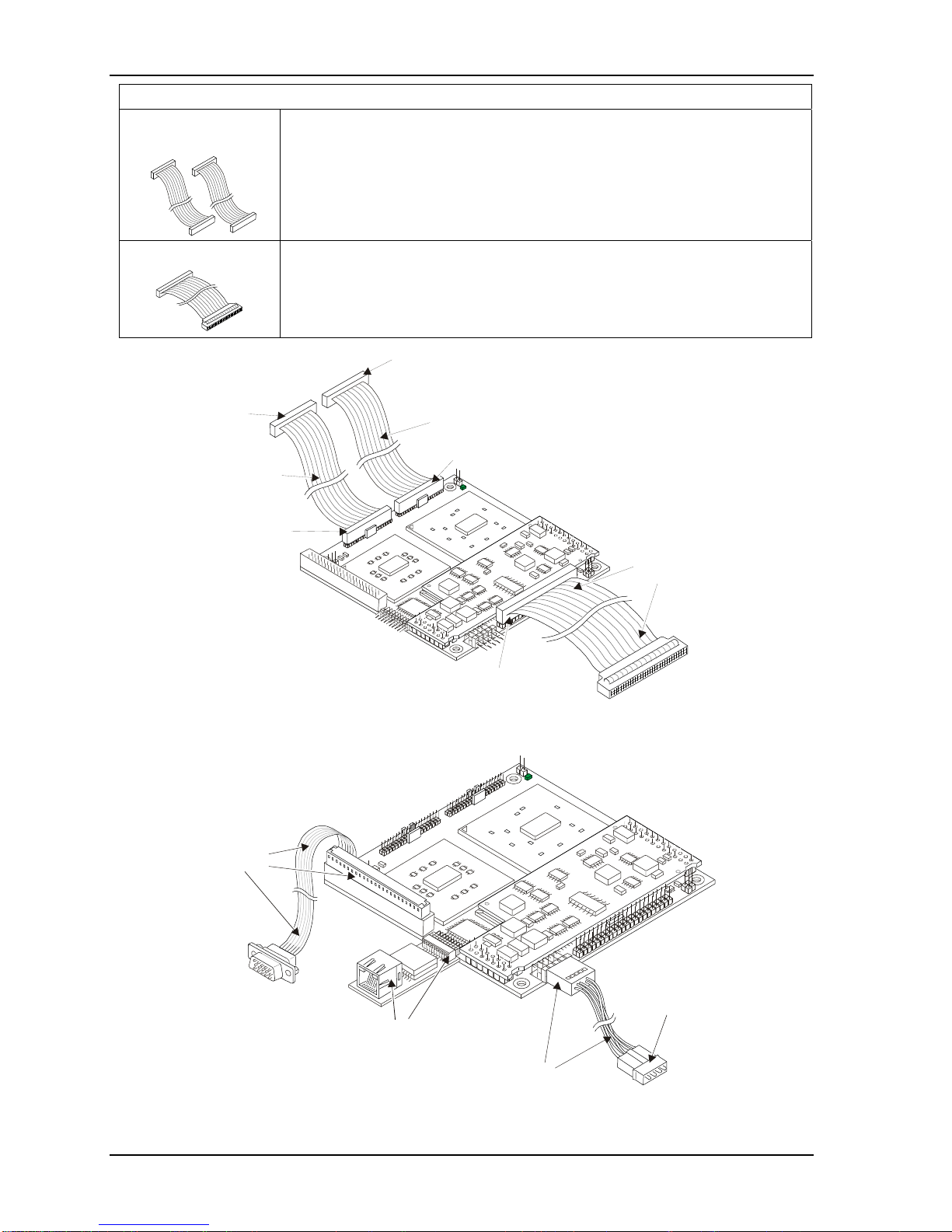
Figure 1-3. Connecting the IDE and Utility Cables ...........................................................................4
Figure 1-4. Connecting Video, Ethernet and Power Cables/Adapter ...............................................4
Figure 1-5. Connecting Utility Cables to the I/O Interface Board......................................................5
Figure 1-6. Complete CoreModule 800 Cable Assembly..................................................................6
Figure 1-7. I/O Interface Board Connections ....................................................................................6
Figure 1-8. CoreModule 800 Jumper Locations..............................................................................11
Figure 2-1. CoreModule 800 SODIMM Location (Bottom view) .....................................................14
Figure 2-2. Removing SODIMM from Socket .................................................................................15
Figure 2-3. Inserting SODIMM into Socket .....................................................................................16
Figure 2-4. Pressing down on SODIMM .........................................................................................17
Figure B-1. I/O Interface Board Connectors (Top view)..................................................................23
List of Tables
Table 1-1. CoreModule 800 Jumper Settings.................................................................................10
Table 1-2. Power Adapter Cable Wiring .........................................................................................11