Providing the Astronomical Community with
Premier Products and Services.
Astro-smart.com Copyright © 2010-2048, All rights reserved June 2020
Page 9
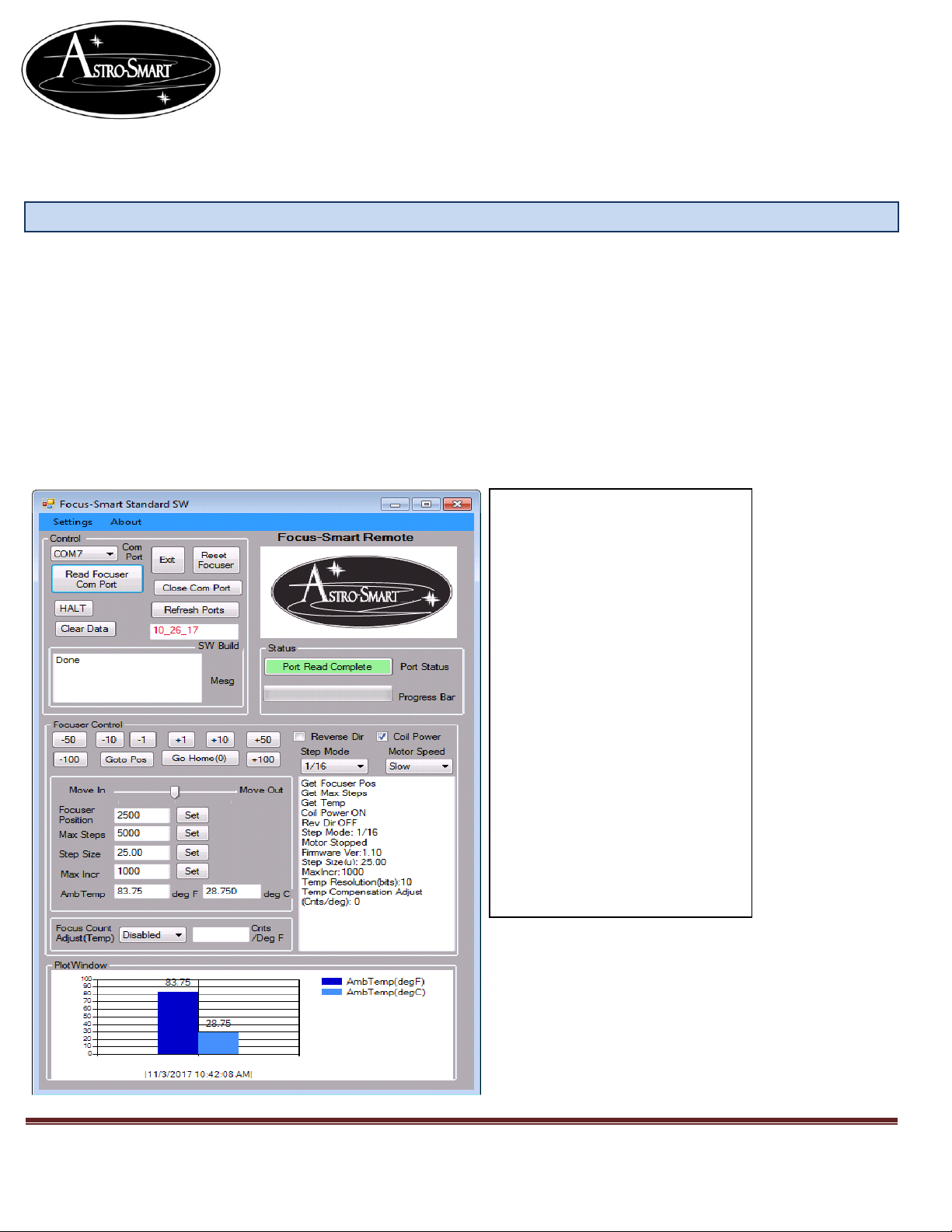
CFS-PRO, CFS-R GUI Features.
1. Focus Control Group.
a. Focuser Position ( Current focuser position wishing to Get or Set.) Example edit
textbox from 5010 to 6000 and press the Set button to reset focuser to this position. This
does not move the focuser, just sets to new value.
b. 1-100 plus or minus buttons to move focuser quickly when close to focus.
c. Snap Jog Control. Jog the focuser in and out by grabbing the center pointer and
dragging left(In) or right(Out) with mouse click and then release for the total amount of
time you want the focuser to move.
d. Goto Pos. When wanting to move focuser to new position, Enter the new position in the
focuser position textbox say “6000” and then press the Goto Pos button for the focuser to
move to that position.
e. Go Home(0). Moves the focuser to position “0” Zero.
f. Reverse Direction checkbox. Check when reverse direction desired.
g. Coil Power checkbox. Check when you want the motor power to coils ON. Want this
on when focusing so you don’t slip on focus with load.
h. Halt. You can always cancel a move with this button if so desired.
i. Step Mode Dropdown. Select Full, half,1/4,1/8,1/16,1/32 as desired. Refer to stepper
motor using for your application. Example. If using a Astro-Smart M1 stepper, a full step
mode produces 200 counts per revolution. A step mode of 1/32 produces 6400
steps(200*32) per revolution if selected.
j. Motor Speed Dropdown. Select Slow, Medium or Fast Speeds for Motor.
k. Maximum Steps. Is the maximum step limit of your focuser set by user. Set or Get
Maximum Step settings. The higher your step mode should equate to a larger Maximum
Step size to obtain the full travel capability of your telescope focuser typically 1-5 full 360
deg rotations of your focuser shaft. Examples in section G.
l. Step Size. Is the amount of radial travel on your telescope focuser moves within 1 step
or the resolution for each motor count as the result from 1 Step Time. We will define
Step Size CFZ as the number of steps tailored to your optical CFZ with at least 10-15
steps within your CFZ. Step Size and Step Size CFZ are determined by your Optical
Fstop and stepper motor configuration. See Section G.
m. Max Incr. Is the maximum amount step increment that can be used on a focuser move.
Example. If focuser position is set at 5000 and a move to 10000 is desired, a Max incr of
1000 would limit the focuser to jump no more than 1000 counts at a time before
reaching the destination position. Default Max Step size is 1000 counts.
n. Focus Temp Adjust. Add the focus counts per deg of temperature change here when
selecting the Enabled drop down beside this feature. This data should be collected based
on your optical train and location, so, if you find for every 1 deg change in ambient
temperature, your focus changes by 15 counts then you would enter this value in this
textbox and select the enabled pull down to enable temperature compensation for focus.
o. Read Focuser Com Port button. This queries the focuser for all data in GUI.
p. Settings Tab: Save And Log Settings. This option saves in flash current or default
GUI settings and Logs to a data file on your computer. Stored in c:\Focus Smart Pro
Data. The Data is stored in .csv and .log file as shown below.