EnglishDeutsch
 logo
Brands
  1. Home
  2. •
  3. Brands
  4. •
  5. Custom Brackets
  6. •
  7. Camera Accessories
  8. •
  9. Custom Brackets HDV CAGE KIT User manual

Custom Brackets HDV CAGE KIT User manual

Other Custom Brackets Camera Accessories manuals

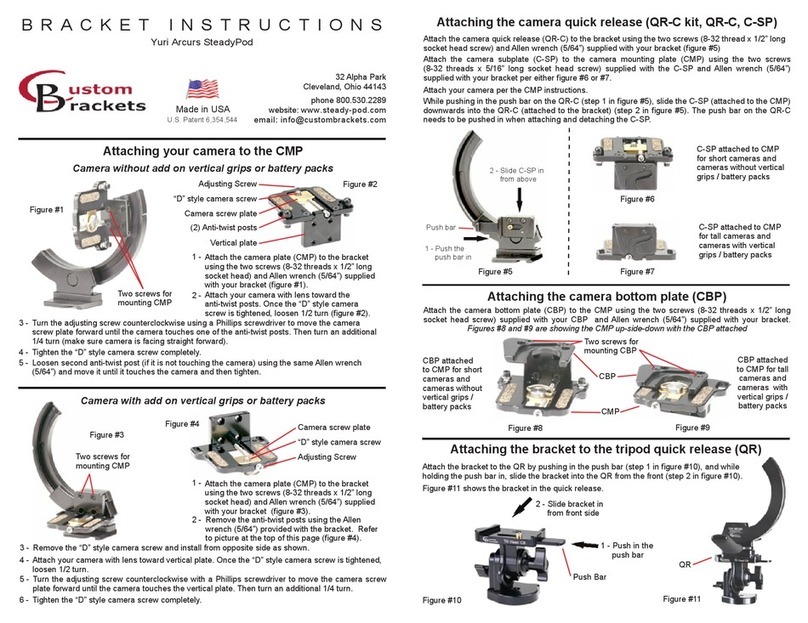
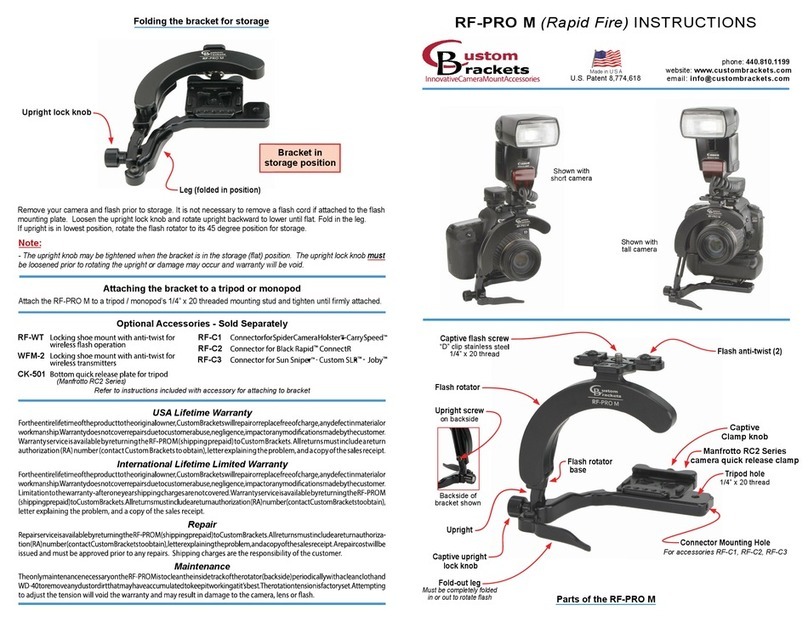
Custom Brackets RF-PRO M User manual

Custom Brackets

Custom Brackets RF-PRO M User manual

Custom Brackets Yuri Arcurs SteadyPod User manual

Custom Brackets

Custom Brackets Yuri Arcurs SteadyPod User manual

Custom Brackets Digital PRO-M User manual

Custom Brackets

Custom Brackets Digital PRO-M User manual

Custom Brackets Tilt Head CB User manual

Custom Brackets

Custom Brackets Tilt Head CB User manual

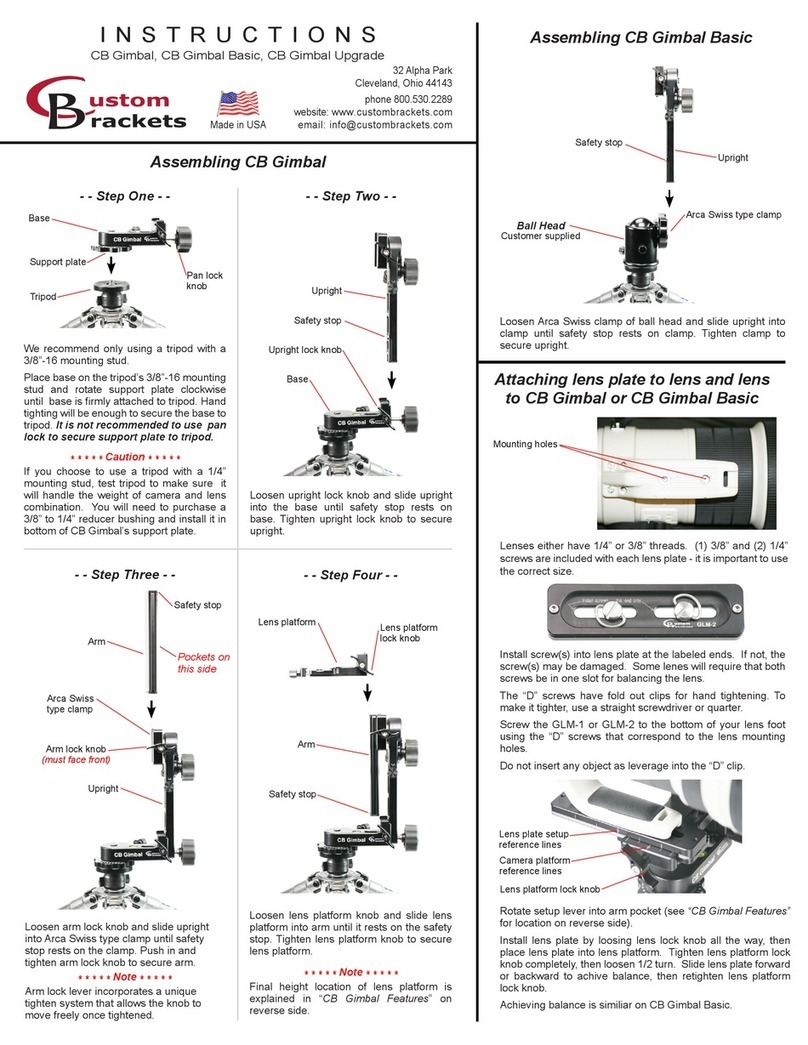
Custom Brackets CB Gimbal Basic User manual

Custom Brackets

Custom Brackets CB Gimbal Basic User manual

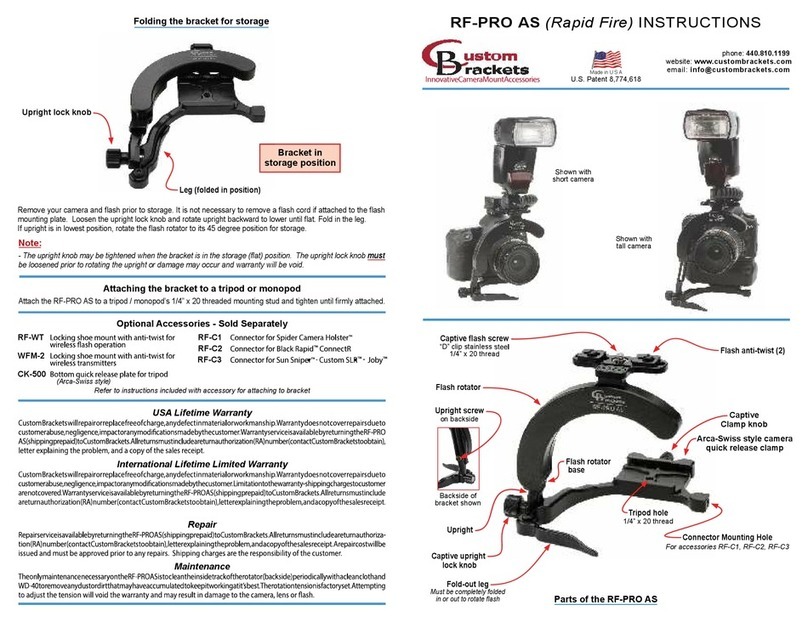
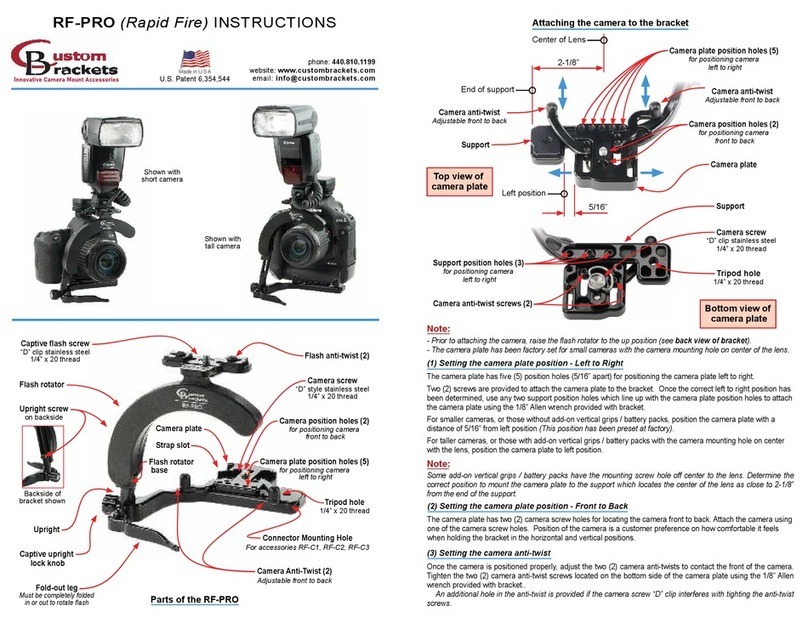
Custom Brackets RF-PRO User manual

Custom Brackets

Custom Brackets RF-PRO User manual

Custom Brackets RF-PRO AS User manual

Custom Brackets

Custom Brackets RF-PRO AS User manual

Popular Camera Accessories manuals by other brands

Bowens Camera Bag 125 null

Bowens

Bowens Camera Bag 125 null

Viltrox EF-NEX Mount instructions

Viltrox

Viltrox EF-NEX Mount instructions

Calumet 7100 Series CK7114 operating instructions

Calumet

Calumet 7100 Series CK7114 operating instructions

Ropox 4Single Series User manual and installation instructions

Ropox

Ropox 4Single Series User manual and installation instructions

Cambo Wide DS Digital Series Main operating instructions

Cambo

Cambo Wide DS Digital Series Main operating instructions

Samsung SHG-120 Specification sheet

Samsung

Samsung SHG-120 Specification sheet

Ryobi BPL-1820 Owner's operating manual

Ryobi

Ryobi BPL-1820 Owner's operating manual

Aegis ABL-36020P user manual

Aegis

Aegis ABL-36020P user manual

Fantasea EyeGrabber F Series instruction manual

Fantasea

Fantasea EyeGrabber F Series instruction manual

Honeywell HDZ20HD user manual

Honeywell

Honeywell HDZ20HD user manual

EGO BA1400T Operator's manual

EGO

EGO BA1400T Operator's manual

Sima SRW-62 user guide

Sima

Sima SRW-62 user guide

Shape A7SSMKIT Assembly manual

Shape

Shape A7SSMKIT Assembly manual

Slide Kamera HST-2 user manual

Slide Kamera

Slide Kamera HST-2 user manual

Power works 2902613 Original instructions

Power works

Power works 2902613 Original instructions

SES SE-2047-2 user manual

SES

SES SE-2047-2 user manual

Starlite OctoDome nxt instructions

Starlite

Starlite OctoDome nxt instructions

Vivo MOUNT-LT01C instruction manual

Vivo

Vivo MOUNT-LT01C instruction manual

https://manuals.online logo
https://manuals.online logoBrands
  • About & Mission
  • Contact us
  • Privacy Policy
  • Terms and Conditions

Copyright 2026 Manuals.Online. All Rights Reserved.

Attaching the camera plate to the bracket
Attaching a camera to the camera plate
(MC) shoe mount
(For locking-ring
components)
3/8” x 16
tripod mount
HDV Extension Bar
(Locking shoe mount)
Camera mounting plate
(with 1/4” x 20 screw)
Attach the camera mounting plate to the bracket using the two screws (8-32 threads x 1/2” long socket
head) and Allen wrench (5/64”) supplied with your bracket. Install screws from underneath the bracket.
There are three different positions that the camera mounting plate can be placed in. The position of the
camera mounting plate will allow access for replacing the battery.
Attach your camera with lens positioned to the front of the bracket. Tighten the “D” style camera screw
completely. Best position is to position the screw in the middle of the slot.
HDV CAGE KIT INSTRUCTIONS
phone: 446-446-0819
toll free: 800-530-2289
website: www.custombrackets.com
email: [email protected]
32 Alpha Park
Cleveland, Ohio 44143
Made in USA
Innovative Camera Supports
HDV Extension Bar
(Locking shoe mount)
(MC) shoe mount
(For locking-ring
components)
Accessory hole
for HDV Grip Set
Front View
Accessory hole
for HDV Grip Set
Wire Keeper
(MC) shoe mount
(For locking-ring
components)
Wire Keeper
Attaching the MC shoe mounts to the bracket
Attaching the Extension Bars to the bracket
The kit includes (3) MCs (shoe mount for locking-ring components). Once nal location is determined,
tighten the MC down with the “D” style screw.
The kit includes (2) Extension Bars (extended locking shoe mounts). The location of these can be
installed in the slot on the top of the bracket. They can be positioned towards the front or back of
the bracket. This allows placement of any component in the perfect position while helping maintain a
disired balance of the setup. Once nal location is determined then, tighten the Extension Bar down
with the “D” style screw.
Attaching the bracket to a tripod or monopod
The HDV Cage includes a 3/8” x 20 threaded hole on the base. To attach to a tripod or monopod, place
the base on the 3/8” x 20 mounting stud and screw it into the base until it is rmly attached.
Accessories
MC (Shoe mount for locking-ring components)
FT-JR (Locking shoe mount)
HDV Extension Bar (Extended locking shoe mount)
HDV Grip Set (Set of two grips)
Wire Keepers (additional pair)
*HDV Extension Bar, FT-JR, and MC require SP-292 D-clip screw
Camera Quick Releases
QR &T-CP (Custom Brackets quick release)
QRA (Arca Swiss style quick release receiver)
QRM (Manfrotto RC2 series quick release receiver)
Bracket to Tripod Quick Releases
QR &CK-502 (Custom Brackets quick release - for tripod with 1/4” x 20 )
CK-500 (Mounts into Arca Swiss style quick release receiver)
CK-501 (Mounts into Manfrotto RC2 series quick release receiver)
For a period of ve (5) years from date of purchase, Custom Brackets will repair or replace free of charge,
any defect in material or workmanship. Warranty does not cover repairs due to abuse, negligence, impact
or any modications made by the customer. Warranty service is available by returning the HDV Cage Kit
(shipping prepaid) to Custom Brackets. All returns must include a return authorization (RA) number (email
[email protected] to obtain), letter explaining the problem, and a copy of the sales receipt. Method
of shipping and shipping charges back to customer will be provided by Custom Brackets.
USA 5 Year Warranty
Repair service is available by returning the HDV Cage Kit (shipping prepaid) to Custom Brackets. All returns
must include a return authorization (RA) number (email [email protected] to obtain), letter explaining
the problem. A repair cost will be issued and must be approved prior to any repairs. The repaired HDV Cage
kit will be shipped to customer by UPS ground unless otherwise specied by customer and shipping charges
are the responsibility of the customer.
Repair
For a period of ve (5) years from date of purchase, Custom Brackets will repair or replace free of charge,
any defect in material or workmanship. Warranty does not cover repairs due to abuse, negligence, impact
or any modications made by the customer. Method of shipping and shipping charges back to customer
will be provided by Custom Brackets during rst year of warranty only. Remaining warranty years, the
HDV Cage kit will be shipped to customer by UPS unless otherwise specied by customer and charges are
the responsibility of the customer. Warranty service is available by returning the HDV Cage Kit (shipping
prepaid) to Custom Brackets. All returns must include a return authorization (RA) number (email info@
custombrackets.com to obtain), letter explaining the problem, and a copy of the sales receipt.
International 5 Year Limited Warranty
The HDV Cage Kit is constructed from anodized aircraft aluminum for a lightweight and anodized for a
scratch-resistant nish.
The HDV Cage Kit is designed completely maintenance-free.
HDV Cage Kit Facts