ENGLISH USER MANUAL
Briteq®7/13 BT-AKKULITE IP
•Press the [ENTER] button to select.
•Use ▲and ▼button to select one of the available shows (AC00…AC15)
•Once the desired show is selected, press the [ENTER] button to confirm.
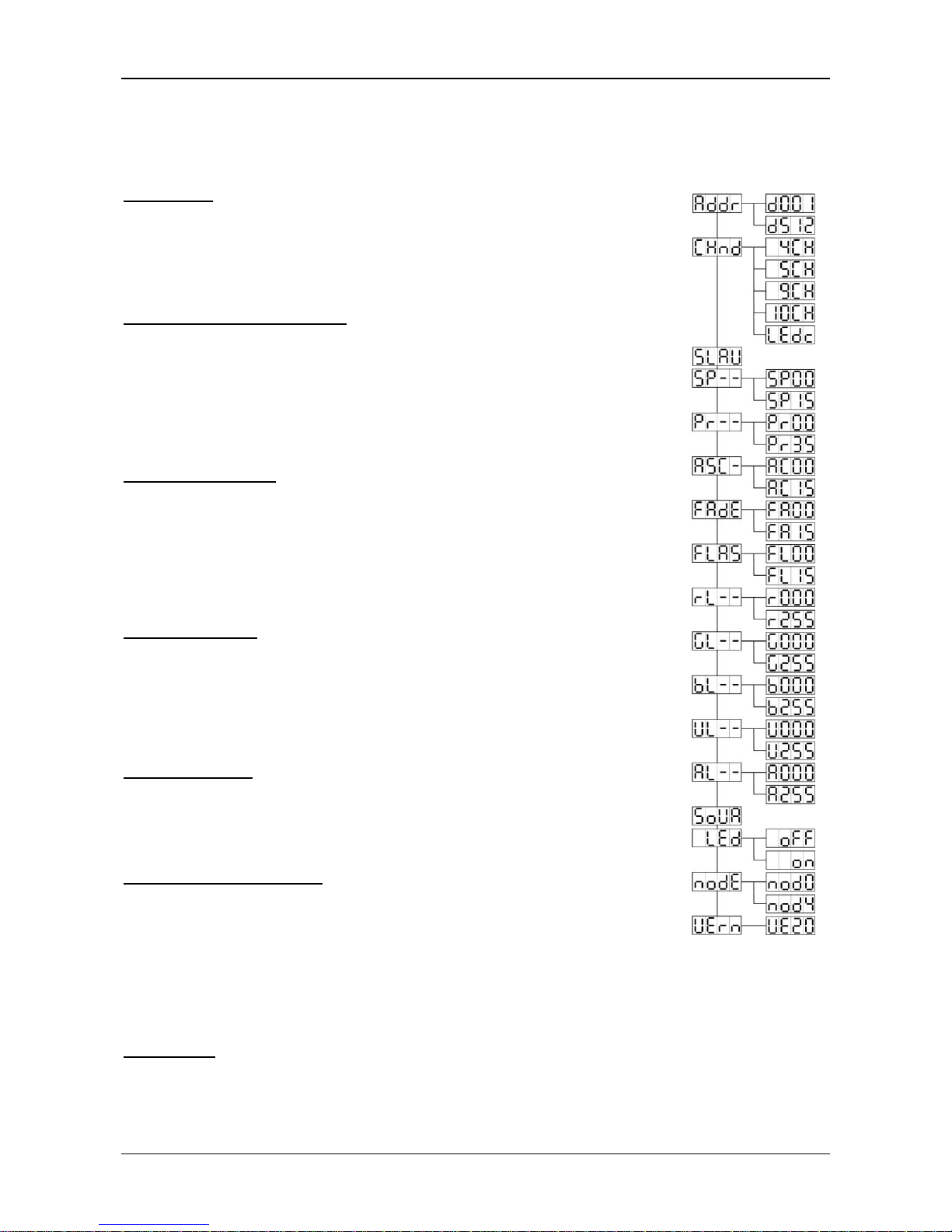
[FAdE] Mode
Used to choose a color fading show
•Press the [MENU] button.
•Press the ▲or ▼buttons until [FAdE] is shown on the display.
•Press the [ENTER] button to select. The display starts blinking.
•Use ▲and ▼button to select a value between [FA00] (fast fading) and [FA15] (slow fading).
•Once the desired mode is selected, press the [ENTER] button to confirm.
[FLAS] Strobe Mode
Used to select the strobe speed.
•Press the [MENU] button.
•Press the ▲or ▼buttons until [FLAS] is shown on the display.
•Press the [ENTER] button to select. The display starts blinking.
•Use ▲and ▼buttons to select the speed (FL00…FL15)
•Once the desired speed is selected, press [ENTER] to confirm.
[rL--] Mode
Used to set the minimum value of the Red color
•Press the [MENU] button.
•Press the ▲or ▼buttons until [rL--] is shown on the display.
•Press the [ENTER] button to select. The display starts blinking.
•Use ▲and ▼buttons to select the speed (r000…r255)
•Once the desired value is selected, press [ENTER] to confirm.
[GL--] Mode
Used to set the minimum value of the Green color
•Press the [MENU] button.
•Press the ▲or ▼buttons until [GL--] is shown on the display.
•Press the [ENTER] button to select. The display starts blinking.
•Use ▲and ▼buttons to select the speed (G000…G255)
•Once the desired value is selected, press [ENTER] to confirm.
[bL--] Mode
Used to set the minimum value of the Blue color
•Press the [MENU] button.
•Press the ▲or ▼buttons until [bL--] is shown on the display.
•Press the [ENTER] button to select. The display starts blinking.
•Use ▲and ▼buttons to select the speed (b000…b255)
•Once the desired value is selected, press [ENTER] to confirm.
[UL--] Mode
Used to set the minimum value of the White color
•Press the [MENU] button.
•Press the ▲or ▼buttons until [UL--] is shown on the display.
•Press the [ENTER] button to select. The display starts blinking.
•Use ▲and ▼buttons to select the speed (U000…U255)
•Once the desired value is selected, press [ENTER] to confirm.
[AL--] Mode
Used to set the minimum value of the Amber color
•Press the [MENU] button.
•Press the ▲or ▼buttons until [AL--] is shown on the display.
•Press the [ENTER] button to select. The display starts blinking.
•Use ▲and ▼buttons to select the speed (A000…A255)
•Once the desired value is selected, press [ENTER] to confirm.