
BURKA V1 MAX User manual

EN
TABLE OF CONTENT
SAFETY INSTRUCTIONS ...........................................................02
PARTSAND FUNCTIONS............................................................02
THE SPEAKER’S BATTERY........................................................03
CHARGING ...................................................................................03
POWER ON/OFF.........................................................................03
SIRI FUNCTIONALITY.................................................................03
CONNECT THE SPEAKER..........................................................03
DISCONNECT THE SPEAKER....................................................03
RECONNECT THE SPEAKER.....................................................03
PLAYING MODE...........................................................................04
PLAY MUSIC USING MICRO SD CARD ....................................04
AUDIO CABLE CONNECTION ...................................................04
THE PAUSE BUTTON’S FUNCTIONALITY................................04
CHANGE VOLUME AND SONG .................................................04
HANDS-FREE FUNCTIONALITY...............................................05
RESET FUNCTIONALITY............................................................05
AUTOMATICALLY TURN OFF FUNCTIONALITY ......................05
TECHNICAL PARAMETERS .......................................................05
PACKAGE INCLUDING................................................................05
TWS CONNECTION.....................................................................06
TWS DISCONNECTION ..............................................................06
EXPLANATION.............................................................................06
FAULT AND MAINTENANCE.......................................................06
NOTES BEFORE USE .................................................................07
FCC STATEMENT ........................................................................07
WARNING.....................................................................................07
NOTE.............................................................................................07
FCC Radiation Exposure Statement.....................................08
TROUBLESHOOTING..................................................................08
Outdoor Wireless Speaker
USER MANUAL
02
EN
SAFETY INSTRUCTIONS
PARTSAND FUNCTIONS
Read all instructions
Only charge with devices rated and marked with 5V to avoid damage to the speaker.
Do not open up the speaker, it voids the warranty and may damage the product.
Rechargeable batteries have a limited number of charge cycles.
Battery life and number of charge cycles varies by use and settings.
Never place the speaker close to high temperature heat sources.
To keep the warranty valid, never try to repair the product yourself.
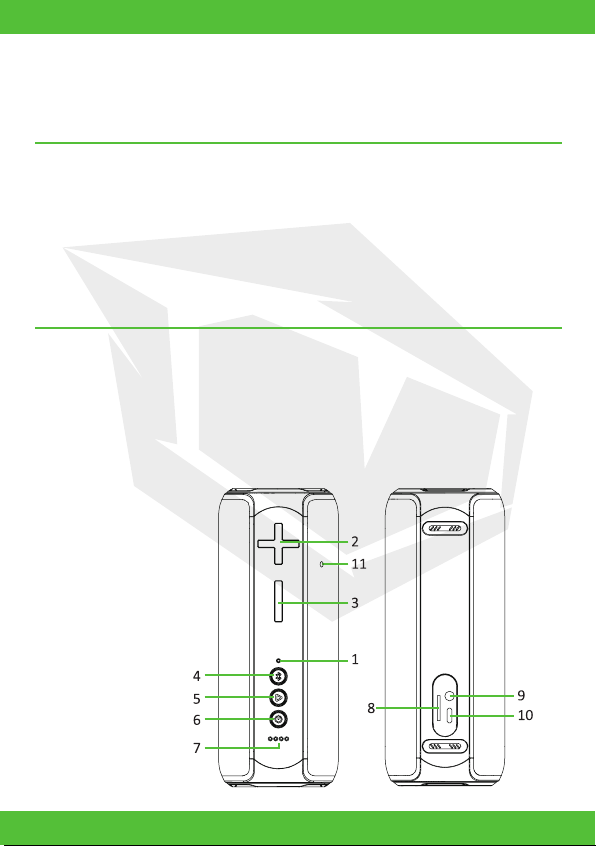
1. Bluetooth indicator.
2. +: Volume up button: next song, increase the volume.
3. -: Volume down button: previous song, decrease the volume.
4. Bluetooth button: switch the playing mode.
5. Pause button: play, pause, answer call, TWS.
6. Power button: power on/off, siri, reset.
7. Battery level indicator.
8. TF card slot.
9. AUX IN port.
10. Type-C charging port.
11. Microphone.

03
EN
THE SPEAKER’S BATTERY
POWER ON/OFF
SIRI FUNCTIONALITY
CONNECT THE SPEAKER
DISCONNECT THE SPEAKER
RECONNECT THE SPEAKER
CHARGING
A built-in rechargeable battery powers the speaker.
Power on: Long press power button 3 seconds to power on the speaker, then the Bluetooth
indicator light is on and you can connect Bluetooth devices.
Power off: Long press power button 3 seconds to power off the speaker, and then
Bluetooth indicator will turn off.
Short press power button to activate SIRI (IOS), supports Huawei
intelligent voice assistant.
Turn on the speaker, the bluetooth indicator flashing blue, on your device search for
Bluetooth devices. Select the speaker from the list. It will give an indication sound when
the connection is successful. the bluetooth indicator solid blue. Only one Bluetooth device
can be connected at the same time. If you want to connect another device to the speaker,
then first disconnect the current one.
When it’s connected via Bluetooth: long press bluetooth button to disconnect.
Some Bluetooth devices support automatic reconnection, with those devices the speaker
will automatically reconnect. The speaker will not automatically reconnect on devices that
does not support automatic reconnection. When it’s not connected: long press bluetooth
button to connect to the last disconnected device.
Connect the supplied charging cable to the charge input and to a USB port on your
computer or a USB charger. The charging LED is lit red during charging. The LED turns off
when fully charged. It is recommended to charge 10 minutes before power on if you 7 days
unused, then you can continue to use while charging.

04
EN
PLAYING MODE
AUDIO CABLE CONNECTION
THE PAUSE BUTTON’S FUNCTIONALITY
CHANGE VOLUME AND SONG
PLAY MUSIC USING MICRO SD CARD
Short press bluetooth button to switch different playing mode: BT, AUX, TF.
Power the speaker on.
Connect a 3.5 mm audio cable to the speaker and your device.
The speaker is now connected to your device.
Short Press:
1) Music playback status: play, pause function.
2) When there is an incoming call: answer the call.
3) When you’re receiving the call: hang up the phone call.
Long Press:
1) When you’re calling: Press 2 seconds to reject the call.
2) Press 2 seconds to enter TWS connection, once connected,
press 2 seconds to disconnect TWS connection.
Double press: When it’s connected via Bluetooth to your phone: to call back the last call.
When listening to music
Increase volume: Short press on the “+” button.
Decrease volume: Short press on the “-“ button.
Previous song: Long press on the “-” button.
Next song: Long press on the “+” button.
Connect a micro SD card and power on the speaker.

05
EN
HANDS-FREE FUNCTIONALITY
RESET FUNCTIONALITY
AUTOMATICALLY TURN OFF FUNCTIONALITY
TECHNICAL PARAMETERS
PACKAGE INCLUDING
1. Connect your phone via Bluetooth, the speaker will play ringtones while a call coming.
2. Short press the pause button to answer the call on the speaker, you can talk to each
other through the microphone hole, after call ended, it will continue to play music.
3. Long press the pause button on the speaker to reject an incoming call.
4. When you connect your phone, press twice in rapid pause button
to call back the last call by telephone.
The speaker will automatically turn off in 10 minutes when Bluetooth is not connected
and no music is playing.
Hold the power button for 6 seconds to automatically reset the speaker and turn it off.
• Model: Bukra V1 MAX
• Speaker: Ø66mm 4Ω 15W*2
• Charging time: 3 hours
• Input: 5.0V 1.0A
• Product Weight: 760g
• Bluetooth: V5.0
• Built-in rechargeable battery: Li-on, 7.4V,
2500mAh
• Playing time: 8 hours
• Product Size: 91*96*225mm
• Range: Up to 10m
• Waterproof level: IPX7
•1pcs* E300 wireless speaker
•1pcs* Product manual
• 1pcs* Type-C USB cable

06
EN
TWS CONNECTION
EXPLANATION
TWS DISCONNECTION
FAULT AND MAINTENANCE
Solution:
(1) Please check whether the multifunction indicator light flashes blue. Please power on
your speakers if the light isn’t on.
Please charge the speaker if the light is still not on.
(2) Please turn off the other Bluetooth devices, if there are many Bluetooth devices sur-
rounding. This may result in search difficulties.
(3) Restart wireless speaker on devices for Bluetooth search function.
1: Turn on both speakers.
2: Press and hold the Play/Pause-button on one of the speakers for about 2 seconds until
you hear a “beep”sound.
The default is the primary speaker that you operated the Play/Pause-button of this spaker
for pairing initially.
3: Release play/Pause button. It can take a few more seconds before speakers connect to
each other. Check the indicator lights to
distinguish L/R channel: The blue light on one speaker is flashing blue forevery 3 seconds
that should be the left channel(the primary speaker); the blue light on the other speaker is
solid blue that should be the right channel.
4: Go into the Bluetooth menu on your smartphone and pair the speakers with your phone
by selecting the speaker model number.
(it will only display 1 number which is both combined in to one)
1. the symbol indicates: The product is only suitable for the safe non-tropical climates.
2. Note: Please use the same type or equivalent type of battery to replace if the battery is
scrapped. Otherwise maybe explosion occurs.
3. The lithium battery may not be exposed such as fire or excessive heat.
1. Press and hold the Play/Pause-button on one of the speakers for about 2 seconds until
you hear a “beep”sound.
First fault: connection failed.

07
EN
Solution:
(1) View the distance between the player and the speaker has not been exceeded effective
Bluetooth connection distance 8-12meters.
(2) Ensure there is not any obstacle between the play device and speakers.
(3) Check the playback device or whether the speaker is in a low power state.
This equipment has been tested and found to comply with the limits for a Class B digital
device, pursuant to Part 15 of the FCC Rules.
These limits are designed to provide reasonable protection against harmful interference in
a residential installation.
Second problem: The music player appears sound cuts off.
NOTES BEFORE USE
FCC STATEMENT
WARNING:
NOTE
This product is designed with full attention for safety performance. To ensure safe
operation, please follow the following rules:
1. Place the speakers in a stable position avoid fall and cause damage or personal injury.
2. Do not drop, disassemble, open, crush, bend, puncture, burn speaker.
3. Do not close to any heat source (such as radiators, heating equipment, stoves, or other
heat-generating equipment) where the use of speakers.
4. Please send professional maintenance staff to repair for any reason damage.
5. Before wiping with a dry cloth to clean the speakers, set the power switch to the off
position and unplug the power cord from the power outlet.
6. Health considerations, please adjust the sound to a suitable level.
This device complies with Part 15 of the FCC Rules. Operation is subject to the following
two conditions:
(1) This device may not cause harmful interference, and
(2) This device must accept any interference received,
including interference that may cause undesired operation
Changes or modifications not expressly approved by the party responsible for compliance
could void the
user’s authority to operate the equipment.

08
EN
Recharge your speaker.
Reset your speaker. hold the power button for 6 seconds to automatically reset the speak-
er and turn it off.
Adjust the volume.
Make sure that your Bluetooth device is within range.
Ensure there is no obstacles in the way that can block/disturb the signal.
Check via the device’s Bluetooth connection if the speaker is connected with the device.
Move the device closer to the speaker or try removing obstacles between them.
Disconnect other connected devices and then try again.
You can force a disconnection by moving out of Bluetooth range (10 m).
In order to avoid harming the product performance, please do charge your device every 3
months at the least.
The speaker does not turn on?
The speaker does not turn off or does not respond
There is no sound
There is poor sound quality?
Cannot connect the device with the speaker?
FCC Radiation Exposure Statement
TROUBLESHOOTING
This equipment complies with FCC radiation exposure limits set forth for an uncontrolled
environment. This equipment should be installed and operated with minimum distance
20cm between the radiator & your body.
This equipment generates uses and can radiate radio frequency energy and, if not installed
and used in accordance with the instructions, may cause harmful interference to radio
communications. However, there is no guarantee that interference will not occur in a
particular installation. If this equipment does cause harmful
interference to radio or television reception, which can be determined by turning the
equipment off and on, the user is encouraged to try to correct the interference by one or
more of the following measures:
Reorient or relocate the receiving antenna.
Increase the separation between the equipment and receiver.
Connect the equipment into an outlet on a circuit different from that to which the receiver
is connected.
Consult the dealer or an experienced radio/TV technician for help.

TR
İçindekiler
GÜVENLİK TALİMATLARI ...........................................................02
PARÇALAR VE ÖZELLİKLER......................................................02
HOPARLÖR PİLİ..........................................................................03
ŞARJ ETME..................................................................................03
GÜCÜ AÇMA/KAPAMA................................................................03
SİRİ İŞLEVİ ..................................................................................03
HOPARLÖRÜN BAĞLANTISINI KURMA ...................................03
HOPARLÖRÜN BAĞLANTISINI SONLANDIRMA.....................03
HOPARLÖRÜ YENİDEN BAĞLAMA...........................................03
OYNATMA MODU ........................................................................04
MICRO SD KARTTAN MÜZİK OYNATMA...................................04
SES KABLOSUYLA BAĞLANTI .................................................04
DURAKLATMA TUŞUNUN İŞLEVİ.............................................04
SES SEVİYESİNİ VE ŞARKIYI DEĞİŞTİRME............................04
ELLER SERBEST ÖZELLİĞİ.......................................................05
SIFIRLAMA İŞLEVİ......................................................................05
OTOMATİK KAPANMA İŞLEVİ....................................................05
TEKNİK PARAMETRELER..........................................................05
PAKET İÇERİĞİ ............................................................................05
TWS BAĞLANTISI .......................................................................06
TWS BAĞLANTISINI SONLANDIRMA.......................................06
AÇIKLAMA....................................................................................06
SORUNLAR VE BAKIM ...............................................................06
KULLANIM ÖNCESİ İÇİN NOTLAR............................................07
FCC BEYANI:................................................................................07
UYARI............................................................................................07
NOT...............................................................................................07
FCC Radyasyon Riski Beyanı ..................................................08
SORUN GİDERME.......................................................................08
Dış Mekan için Kablosuz Hoparlör
Kullanım Kılavuzu
Table of contents
Languages:

















