capello CR50 User manual

CR50
wireless speaker and
alarm clock with
phone charger
Sleep & Sound

CAUTION
RISK OF ELECTRIC SHOCK
DO NOT OPEN
DANGEROUS VOLTAGE: The lightning flash with arrowhead symbol, within an equilateral triangle is intended
to alert the user to the presence of uninsulated dangerous voltage within the product’s enclosure that may be
of sufficient magnitude to constitute a risk of electric shock to persons.
ATTENTION: The exclamation point within an equilateral triangle is intended to alert the user to the presence
of important operating and maintenance (servicing) instructions in the literature accompanying the appliance.
CAUTION: TO REDUCE THE RISK OF ELECTRIC SHOCK, DO NOT REMOVE COVER (OR BACK).
NO USER-SERVICEABLE PARTS INSIDE. REFER SERVICING TO QUALIFIED SERVICE PERSONNEL.
FCC WARNING: This equipment may generate or use radio frequency energy. Changes or modifications to this equipment may
cause harmful interference unless the modifications are expressly approved in the instruction manual. The user could lose the
authority to operate this equipment if an unauthorized change or modification is made.
ATTENTION: POUR ÉVITER LES CHOC ÉLECTRIQUES, INTRODUIRE LA LAME LA PLUS LARGE DE LA FICHE DANS LA BORNE
CORRESPONDANTE DE LA PRISES ET POUSSER JUSQU’AU FOND.

NOTE: This equipment has been tested and found to comply with the limits for a Class B digital device, pursuant to part 15 of the
FCC Rules. These limits are designed to provide reasonable protection against harmful interference in a residential installation.
This equipment generates, uses and can radiate radio frequency energy and, if not installed and used in accordance with the
instructions, may cause harmful interference to radio communications. However, there is no guarantee that interference will not
occur in a particular installation. If this equipment does cause harmful interference to radio or television reception, which can be
determined by turning the equipment off and on, the user is encouraged to try to correct the interference by one or more of the
following measures:
• Reorient or relocate the receiving antenna.
• Increase the separation between the equipment and receiver.
• Connect the equipment into an outlet on a circuit different from that to which the receiver is connected.
• Consult the dealer or an experienced radio/TV technician for help.
Compliance information: This device complies with Part 15 of the FCC Rules. Operation is subject to the following two conditions:
(1) this device may not cause harmful interference, and (2) this device must accept any interference received, including interference
that may cause undesired operation.
WARNING: TO PREVENT FIRE OR SHOCK HAZARD,D O NOT EXPOSE THIS UNIT TO RAIN OR MOISTURE.
SURGE PROTECTORS: It is recommended to use a surge protector for AC connection. Lightning and power surges ARE NOT
covered under warranty for this product.
This Class B digital apparatus complies with Canadian ICES-003. Cet appareil numérique de la classe B est conforme à la norme
NMB-003 du Canada.

SAFETY PRECAUTIONS
a. Do not expose this unit or the AC/DC adaptor to dripping or splashing water. Keep liquid-filled objects
such as vases, away from this unit and AC/DC adaptor.
b. To ensure that this unit is completely disconnected, unplug it from the wall.
c. Ensure that the AC/DC adaptor is easily accessible.
d. Please note the information printed underneath the unit.
e. Batteries should not be exposed to excessive heat such as direct sunshine, fire, etc.
f. Do not impede the ventilation of this unit by covering the ventilation openings with items such as newspapers,
table-cloths, curtains, etc.
g. Keep open flames, such as lighted candles, away from this unit.
h. Do not place this unit in closed bookcases, racks, or other spaces without proper ventilation.
i. Use only the same or equivalent type batteries as there is a danger of explosion if the incorrect batteries are used
or they are installed incorrectly.
j. Dispose of batteries properly according to environmental regulations.
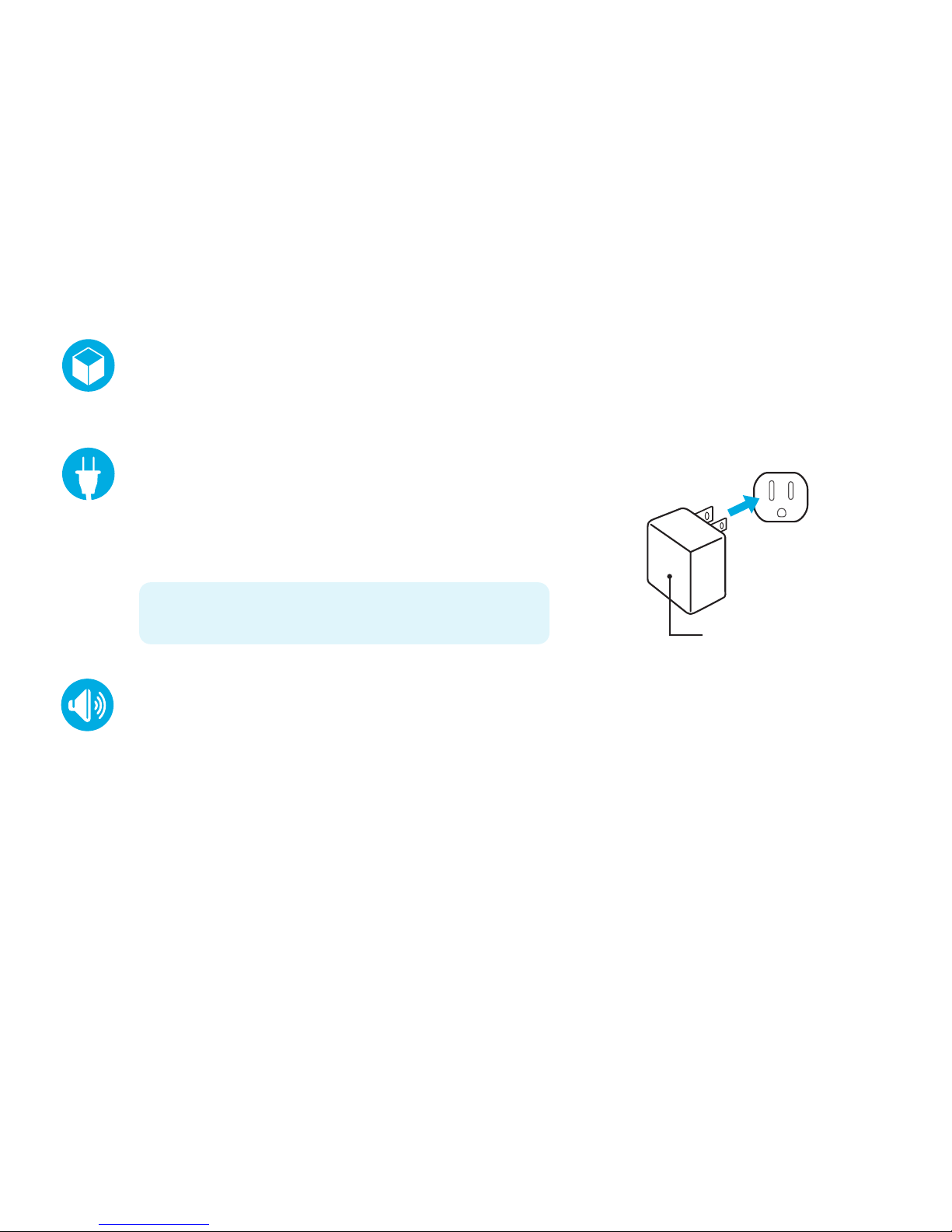
inside the box
CR50 Charge Up alarm clock radio, AC power adapter and user guide.
adjusting the volume
Press the VOL +or VOL – button repeatedly to increase or decrease the volume to a safe listening level.
AC power source
Insert the small end of the AC adaptor into the DC In Jack
(located on the rear of the unit). Connect the other end to a
wall outlet providing 100-240V AC, 50/60 Hz.
The output of the provided AC/DC Adaptor is DC 5V 3A.
note: Disconnect both ends of the power cord when not in use.
Use only the supplied AC adaptor with the following specs:
AC In - 100-240V AC, 50/60Hz / DC Out - 5V 3A
AC outlet
AC/DC adapter plug

location of controls
POWER button
Volume +
SOURCE button
TUNE / SKIP – button
PAIR button
PLAY button
PRESET button
Volume – button
TUNE / SKIP + button
ALARM 1 switch
SLEEP button
TIME SET button
ALARM 2 switch
SNOOZE button
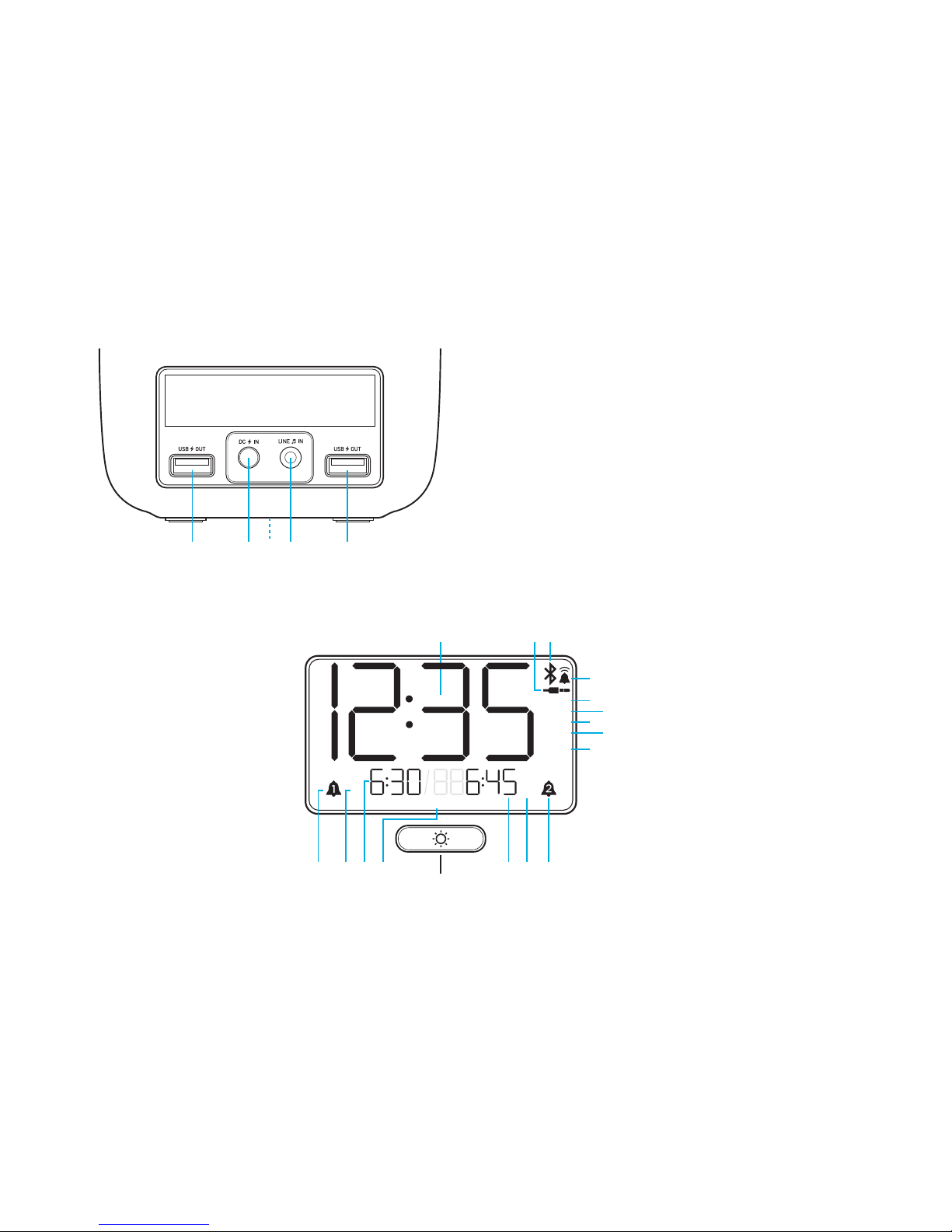
USB Charging port
DC In jack
Backup battery compartment
Line-In jack
USB Charging port
Time display
Line-In / AUX
Bluetooth
Buzzer
NAP
Sleep Timer
FM Radio
Radio PRESET
AM/PM Time
ALARM 2
AM/PM (ALARM 2)
ALARM 2 Set Time
Dimmer button
Day of the week
ALARM 1 Set Time
AM/PM (ALARM 1)
ALARM 1
zzz zzz
PM
AM
AM
PM
FM
PM
AM
M T W Th F Sat Sun
PRESET
SLEEP
NAP
LED Display indicators

backup battery installation
Two (2) ‘AAA’ size batteries can also be used to power the unit, as well as backup for the clock, alarm time,
preset memories if the AC/DC adapter is disconnected or there is a power failure.
Open the battery door by pushing in on the tabs, then removing the door.
Insert two (2) ‘AAA’ batteries following the correct polarity indicated in the battery compartment.
Replace the battery door back on the compartment.
notes: The batteries are used to backup the clock and alarm times when the AC adaptor is disconnected or there
is a power failure. Alkaline batteries are recommended for the longest playing time.
The battery indicator will appear and flash in the display when there are no batteries or when the batteries are low
and need to be replaced.
When replacing the battery, do not disconnect the AC power adapter otherwise the current time, alarm and station
presets will be erased.
battery precautions when using batteries in this device:
•Warning - Danger of explosion if batteries are incorrectly replaced. Replace only with the same or equivalent type.
•Use only the size and type of batteries specified.
•Be sure to follow the correct polarity when installing the batteries as indicated. A reversed battery may cause
damage to the device.
•Do not mix different types of batteries together (e.g. Alkaline, Rechargeable and Carbon-zinc) or old batteries with
fresh ones.
•If the device is not to be used for a long period of time, remove the batteries to prevent damage or injury from
possible battery leakage.
•Do not try to recharge a battery not intended to be recharged - it can overheat and rupture. (Follow battery
manufacturer’s directions)

setting the alarm
Slide the ALARM 1 switch to the “SET” position and the display will begin flashing “12”.
Press the TUNE / SKIP
<<
or TUNE / SKIP
>>
button repeatedly to advance the alarm hour. When you
reach the desired alarm hour, press the TIME SET button to confirm.
With “:00” flashing now, press the TUNE / SKIP
<<
or TUNE / SKIP
>>
button repeatedly until you reach
the desired alarm minute.
Press the TIME SET button to confirm the alarm setting.
(continue on next page)
setting the clock and date
Plug in the CR50 Charge Up but leave the power ‘OFF’.
Press and hold the TIME SET button until the display flashes “12” then press the TUNE / SKIP
<<
or
TUNE / SKIP
>>
button repeatedly to advance to the correct current hour.
Press the TIME SET button to confirm and now the digits “00” will begin flashing. Pressing the TUNE /
SKIP
<<
or TUNE / SKIP
>>
button repeatedly to adjust the minutes.
When you reach the correct current minute, press the TIME SET button again to confirm.
Four digits which display the year will begin flashing below the time. Press the TUNE / SKIP
<<
or TUNE / SKIP
>>
button repeatedly to advance to the correct current year.
Press TIME SET button to confirm the current year and the display will begin flashing “1/1”. Press the
TUNE / SKIP
<<
or TUNE / SKIP
>>
button repeatedly to advance the correct current month.
Press TIME SET button to set the current month then press the TUNE / SKIP
<<
or TUNE / SKIP
>>
button repeatedly to advance the correct current day then press TIME SET again to confirm.

silencing the alarm
When the alarm sounds, press the POWER button to silence the alarm.
The ALARM 1 icon will appear on the display, indicating that the alarm is reset and will sound again
in 24 hours.
disabling the alarm
If the alarm is not needed the next day, slide the ALARM 1 switch to the “OFF” position and the
ALARM 1 icon will disappear from the display, indiacting that the alarm is off and will not sound.
To reactivate the alarm next time it is needed, slide the ALARM 1 switch to the “ON” position and
the ALARM 1 icon will appear on the display, then check to make sure the alarm time is correct.
setting the alarm (con’t)
Press the TUNE / SKIP
<<
or TUNE / SKIP
>>
button to select the BUZZER or FM radio as the alarm
source to wake you up.
Slide the ALARM 1 switch to the “ON” position to complete the the process and the indicator will stop
flashing and become solid.
notes: Before setting the alarm, make sure that the clock time is set correctly (see "Setting the clock").
To set the radio alarm, first tune to the desired station and adjust the volume (see "Playing the radio").
To set ALARM 2 simply follow the same directions above but use the ALARM 2 button.
Table of contents
Other capello Speakers manuals