manuals.online logo
Brands
  1. Home
  2. •
  3. Brands
  4. •
  5. Capra
  6. •
  7. Automobile
  8. •
  9. Capra BORN User manual

Capra BORN User manual

Popular Automobile manuals by other brands

Jeep Compass user guide

Jeep

Jeep Compass user guide

Mitsubishi 3000GT Service manual

Mitsubishi

Mitsubishi 3000GT Service manual

Chevrolet Traverse 2012 owner's manual

Chevrolet

Chevrolet Traverse 2012 owner's manual

Oldsmobile 1996 Achieva owner's manual

Oldsmobile

Oldsmobile 1996 Achieva owner's manual

Cadillac 2005 CTS Personalization guide

Cadillac

Cadillac 2005 CTS Personalization guide

Toyota AVALON HYBRID Warranty & maintenance guide

Toyota

Toyota AVALON HYBRID Warranty & maintenance guide

Toyota HILUX Owner's manual supplement

Toyota

Toyota HILUX Owner's manual supplement

Lincoln 2015 NAVIGATOR owner's manual

Lincoln

Lincoln 2015 NAVIGATOR owner's manual

Toyota Corolla 2002 owner's manual

Toyota

Toyota Corolla 2002 owner's manual

Toyota 2002 MR2 Spyder owner's manual

Toyota

Toyota 2002 MR2 Spyder owner's manual

Toyota Camry Hybrid 2012 Warranty & maintenance guide

Toyota

Toyota Camry Hybrid 2012 Warranty & maintenance guide

Mazda 323 Protege owner's manual

Mazda

Mazda 323 Protege owner's manual

Subaru 2014 Forester Quick manual

Subaru

Subaru 2014 Forester Quick manual

Toyota Avensis ZZT251 2003 Service and repair manual

Toyota

Toyota Avensis ZZT251 2003 Service and repair manual

Mercedes-Benz 2013 SL Operator's manual

Mercedes-Benz

Mercedes-Benz 2013 SL Operator's manual

Chrysler 300 2013 Product highlights

Chrysler

Chrysler 300 2013 Product highlights

Toyota Corolla 2008 owner's manual

Toyota

Toyota Corolla 2008 owner's manual

Volkswagen california d3519cdb02a9dab29cd827771f7c11a

Volkswagen

Volkswagen california d3519cdb02a9dab29cd827771f7c11a

manuals.online logo
manuals.online logoBrands
  • About & Mission
  • Contact us
  • Privacy Policy
  • Terms and Conditions

Copyright 2025 Manuals.Online. All Rights Reserved.

CUPRA BORN
QUICK START GUIDE
01
TABLE OF
CONTENTS
CONNECTIVITY
SWITCHING ON
ELECTRICAL CHARGE
INFOTAINMENT
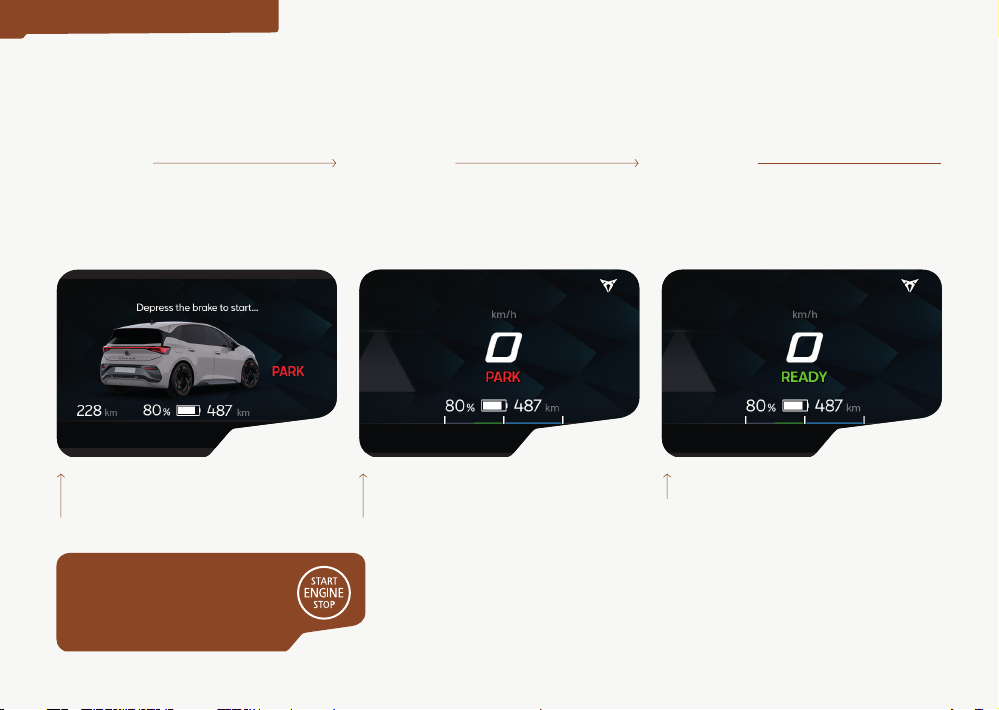
AUTOMATIC CONNECTION OF THE DRIVE SYSTEM
Enter the vehicle Press the brake pedal Select Dor Ron the
gear selector
Confort Ready:
Air conditioning and infotainment
available
Park:
Vehicle on and stopped in a park status
Ready:
Vehicle ready to drive
The Digital Cockpit displays: The Digital Cockpit displays: The Digital Cockpit displays:
01 02 03
SWITCHING ON
AUTOMATIC DRIVER DETECTION
NEW FEATURE WITH CUPRA!
Possible to switch on the vehicle’s
ignition without pressing the
Start ENGINE Stop button
AUTOMATIC OFF
Brake to stop
(if Autohold is not on,
pressPon the selector)
Leave the vehicle
(no need to press the
StartENGINE Stop button)
Activate door locking
Ready:
Vehicle on and stopped, ready to drive
The vehicle is switched o by
automatic driver detection
The Digital Cockpit displays: The Digital Cockpit displays: The Digital Cockpit displays:
01 02 03
SWITCHING ON
NEW FEATURE WITH CUPRA!
Possible to switch o the vehicle’s
ignition without pressing the
StartENGINE Stop button
RECOGNISE WHETHER THE
DRIVE SYSTEM IS ON OR OFF
With the drive
systemon
The Digital Cockpit displays
the speedometer / speed
indicator:
With the drive
systemo
The Digital Cockpit displays the
Cupra Born car:
01
02
SWITCHING ON
ACCESS ROUTE TO THE DIGITAL MANUAL
With the Main Menu in “tile” mode , press:
Help > Vehicle wallet
01
Infotainment reset
As with most state-of-the-
art computer and electronic
equipment, in certain cases
the system may need to be
rebooted to make sure that
it operates correctly. To do
this, if appropriate, press
and hold the On/O button
of the infotainment system
for approx. 15 seconds until
the CUPRA logo appears
onthedisplay.
INFOTAINMENT
CUPRA CONNECT
REGISTRATION PROCESS
To make registration easier, watch the following video for
a step-by-step explanation of the registration process:
Download the “How to register” video here
Use the My CUPRA App to
register:
Don’t have the My CUPRA App yet?
Download it here:
QR code
CONNECTIVITY
Create a CUPRA ID,
login and complete
your prole
01 Link the vehicle to your
CUPRA ID
02.1 Enter the vehicle identication
number, accept the legal terms and
conditions. Order service packs.
02.2 Scan the QR code generated
by the Infotainment system
02 Registration complete
03
01. CUPRA ID
02.1. Enter the vehicle
identication number
02.2. Scan the QR code
orenter the CUPRA ID
credentials
03. Complete as primary user
CONNECTIVITY
CHARGING THE HIGH-VOLTAGE BATTERY
Make sure that the
cable is connected
correctly (the cable
must be locked by
the vehicle).Start the process by
following the instructions of the
charging point.
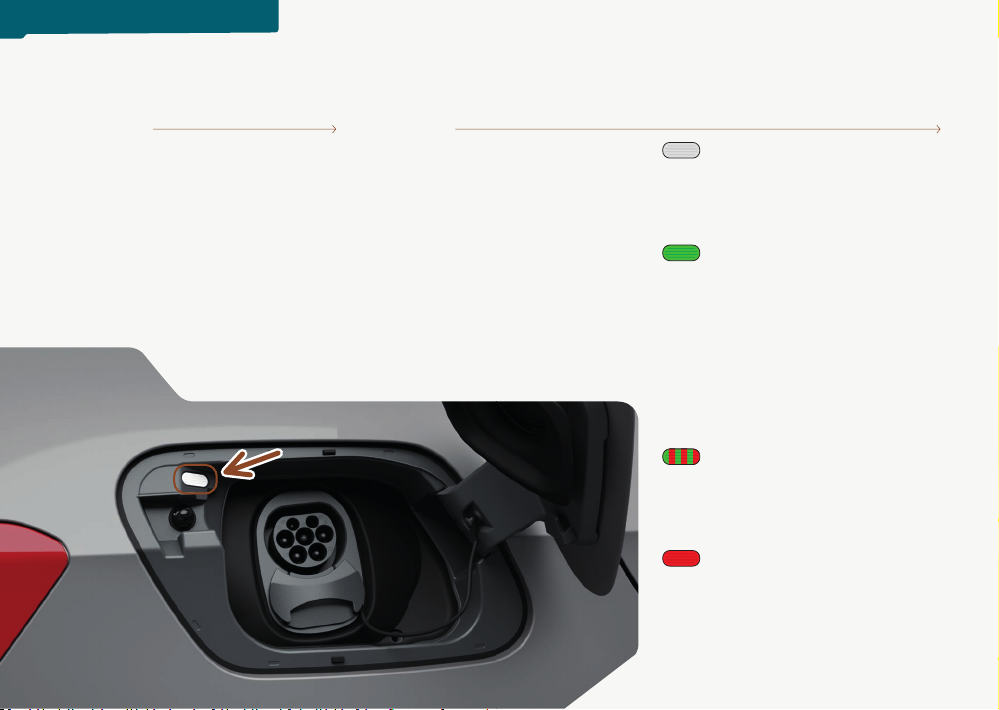
Check the charging
status using the
indicator light on the
charging cover. For
more information, see the sticker
next to the charging socket itself or
the “Charging the high-voltage
battery” chapter of the user
manual.
01 02 White LED
• Flashing: Preparing the charging
process.
• Permanently on: Not charging
Green LED
• Flashing: The battery is charging.
• Permanently on: Process
completed without problems,
full charge.
• Sparkling: If programmed
charging has been activated,
the charging process has not yet
started.
LED alternately ashing
green and red
• Reduced charging current or
fault in the charging connector.
Red LED
•Permanently on: Fault in the
charging system. If it remains on
after several attempts, seek spe-
cialist assistance.
ELECTRICAL CHARGE