Read and Save ese Safety Precautions
1. Turn off electricity at main switch before wiring or servicing fan in order to avoid
possible electrical shock.
2. All wiring must be in accordance with the National Electric Code (ANSI/NFPA70-1999) and local
electrical codes. Electrical installation should be performed by a qualified licensed electrician.
3. After making the wire connections, the wires should be spread apart with the grounded
conductor and the equipment-grounding conductor on the one side of the outlet box
and the ungrounded conductor on the other side of the outlet box.
4. e splices after being made should be turned upward and pushed carefully up into the outlet box.
5. Conductor of a fan identified as grounded conductor to be connected to grounded conductor of power
supply, conductor of a fan identified as ungrounded conductor to be connected to an ungrounded
conductor of power supply, conductor of fan identified for equipment grounding to be connected
to an equipment-grounding conductor.
6. Fan should not be mounted in an area where it might get wet.
7. WARNING:To reduce the risk of fire, electric shock or personal injury, mount to outlet box
marked "Acceptable for Fan Support" and use mounting screws provide with the outlet box.
e outlet box and its support must be able to support the moving weight of the fan (at least 35lbs)
8. For safety and best operating results, we recommend that you have a qualified
electrician assemble and install your fan.
9. WARNING:To reduce the risk of fire or electric shock, use this fan only with solid state speed
control device provided.
10. To reduce the risk of personal injury, do not bend the blade brackets when installing the brackets,
balancing the blades or cleaning the fan. Do not insert foreign objects in between rotating fan blades.
11. Weight: e weight of the complete fan, incuding assembly hardware is 32.67 lbs.
Before Assembly
1. Make sure that the fan voltage (120) is compatible with your own electrical system.
2. Check to make sure that your carton contains all the parts mentioned in the parts list.
NOTE: e box can be used as a work space to prevent any damage on the
ornamental surface.
CAUTION: Before installing, choose a location for mounting the fan where the blades
have at least 7 feet of clearance from all objects and floor. Mount an
outlet box to the ceiling or use an existing box
CAUTION: Do not mount fan to sheet rock or drywall type materials. To insure
proper support, use the two #1 wood screws to secure mounting bracket to joist
or beam. If the location you choose does not have a suitable support beam, install a
2”x 4” brace between ceiling joists to support.
S1
S2
S3
S4
S6
S5
Hardware
Inventory
Screw Package
S1. Wood Screws & Washers
S2. Bracket Screws & Washers
S3. Blade Screws & Rubber Washers
S4. Wire Connectors
S5. Safety Bolt & Nut
S6. "J" Hook
S7. Zip Tie
Quantity
2
2
16
3
1
1
1
OUTLET BOX
Outlet Box (A)
Mounting Bracket (1)
Bracket Screws
& Washers (S2)
Support Beam
Wood Screws (S1)
Canopy Screws
Ceiling
Wood Screws (S1)
“J” Hook (S6)
Installing Mounting Bracket
Prior to securing mounting bracket, screw "J" hook (S6) into ceiling outlet box as
a secondary support means. Secure mounting bracket (#1) to the outlet box (A) by
tightening bracket screws and washers (S2) as shown. If not mounting to an outlet
box, use wood screws and washers (S1) and mount securely to ceiling beam.
NOTE: Do not mount directly to sheet rock or ceiling tile.
WARNING: Failure to completely tighten downrod as described in steps
above could result in the fan loosening and possibly falling.
Lift fan onto the mounting bracket (#1). Turn housing until hanging ball seats
itself into ball socket (listen for click).
WARNING: To reduce the risk of fire, electric shock or personal injury,
mount so outlet box marked "acceptable for fan support" and use mounting
screws provided with the outlet box. Most outlet boxes commonly used for
the support of lighting fixtures are not acceptable for fan support and may
need to be replaced. Consult a qualified electrician if in doubt.
For added security, attach safety cable from fan unit to "J" hook (S6) in outlet
box. Secure by looping zip tie (S7) through safety cable and "J" hook. Tighten
zip tie securely.
White (Neutral)
Ground
White
Black
Wire
Connectors
(S4)
Ground
(Green)
Blue
Black
(Power)
Outlet Box
Ground (Green)
Downrod
Ground
(Green)
Mounting Bracket
Ground (Green)
2. After connections are made, turn
splices upward and push carefully
into outlet box. Separate blue and
black wires on one side of the box,
and white and green wires on the
other side.
1. Connect fan wires to ceiling
wires: white fan wire to white outlet
wire, black to black and green to
green. Wire connectors (S4) are
provided for your convenience. If an
additional blue wire is present then
also connect the blue wire to the
black wire. (Optional light kit may
be wired to individual wall switches,
if desired.)
ere are 4 colored wires coming from the top of the motor
(including ground wire).
Attaching the fan blades to the motor:
Insert blades into blade slot on motor housing. Align motor holes to
blade holes and secure with screws provided.Tighten screws (S3) securely.
Repeat procedure with remaining blades.
Remove and retain 3 screws from
the light kit mounting plate. While
holding the light kit assembly under
your fan, snap together the wire
connection plugs. Match wire colors,
black to black and white to white.
Place light kit assembly onto
mounting plate. Secure with
the 3 screws.
P. O. Box 1037
650 S. Royal Lane, Suite 100
Coppell, TX 75019 EE.UU.
(800) 486- 4892
8:00 a 5:00 CST (Hora local central)
Número de fax sin cargo: (877) 304-1728
www. craftmade.com
P. O. Box 1037
650 S. Royal Lane, Suite 100
Coppell, TX 75019 EE.UU.
de 8 heures à 17 heures (Heure standard du centre)
Numéro de télécopieur gratuit : (877) 304-1728
www. craftmade.com
P.O. Box 1037
650 S. Royal Lane, Suite 100
Coppell, TX 75019
(800) 486-4892
8:00 to 5:00 CST (Central Standard Time)
Toll Free Fax: (877) 304-1728
www.craftmade.com
Fredricksburg
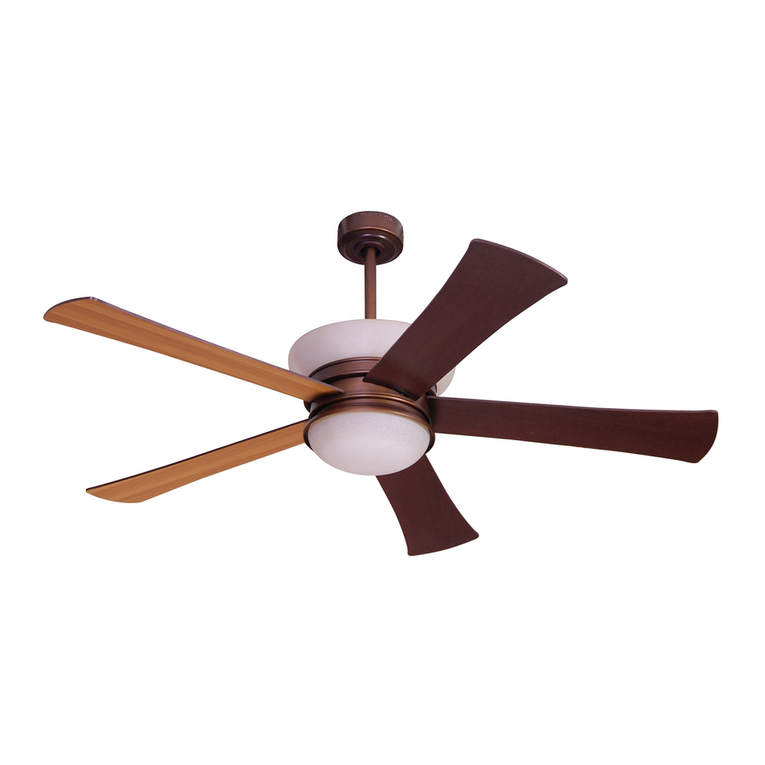
Ceiling Fan
Trouble Shooting
Problem A: Fan Will not Start
Remedies:
1. Check fuse or circuit breaker and replace if necessary
2. Turn off electrical power and check all wire connectors.
3. Check on/off TCS and wall control selector switch. See operation instructions.
Problem B: Fan is Excessively Noisy
Remedies:
1. Check that all screws in fan assembly are tight and properly seated.
2. Check to make sure mounting bracket is installed properly.
3. Check to make sure light kit and glass are installed properly and tight.
4. If wall control is used, insure the wall control is not a transformer or a variable speed type.
Problem C: Fan Wobbles
Remedies:
1. Check that all blades are screwed firmly into blade holders.
2. Check that all blade holders are screwed firmly into motor.
3. Check the weight of blades. All our blades are weighed on electronic scales. e weight is
marked on the reverse side of the fan blade near the motor end. All of the blades should be
the same weight to prevent fan from wobbling.
4. A balancing kit is enclosed if needed.
Install 3 candelabra bulbs (included). Install light kit glass to the
light kit assembly with rubber washer, flat washer and hex nut.
Do NOT over tighten.
Install cap and screw finial onto the light kit assembly.
Tools you Need
1. Phillips Screwdriver 2.Adjustable Wrench 3. Flat Screwdriver 4.WireStrippers
Quantity
1
2
1
1
1
5
1
3
1
1
1
Parts
1. Mounting Bracket
2. Down Rod Assembly
4" & 6" Rod Supplied
3. Canopy & Canopy Ring
4. F lange Cover
5. Fan Housing & Motor
6. Blades (Included)
7. Light Kit Assembly
8. Candelabra Bulbs (Included)
9. Light Kit Glass
10. Cap & Finial
11. TCS Control (Included)
What You Have
1
2
3
4
7
8
5
6
10
9
11
Turn off circuit breakers and wall switch to the fan supply line leads.
IMPORTANT: If using the angle mount method,check to make sure the ceiling angle is
not steeper than 35º. Angles greater than 35ºwill require a 45ºangle adapter.
• Check to make sure blades are at least 30” from any obstruction.
• Check Down rod Length to make sure blades are at least 7’ above the floor.
a.) Downrod Mount
(Normal Ceilings)
b.) Angle Mount
(Vaulted Ceilings)
Preparation
Important: When using an existing outlet box, be sure the box is
securely attached to the building structure and can support the full
weight of the fan. Failure to do so can result in serious injury or death.
30”
84”
Downrod Assembly
Locate downrod assembly. Loosen ball screw on black hanging ball to free
lock pin. Black hanging ball will slide down.Remove ground screw and green
ground wire. Remove hanging ball from downrod and save all parts. Insert
fan wires through downrod.
S7
Tighten top set screw against downrod.
Insert safety bolt (S5) through flange and
downrod and attach nut.Tighten firmly.
read the downrod onto the motor housing
making sure the wires don’t get twisted.
Place flange cover (4) over downrod assembly. Place Canopy Assembly (3)
over downrod (2).
Replace hanging ball, insert hanging pin through downrod and tighten set
screw in hanging ball into downrod.
ON/OFF For emergency shut off.
HIGH Controls fan motor speed. To select desired speed, press
MEDIUM button once and release.
LOW
REVERSE Controls direction of fan blades. To reverse fan blades, press
once and release.
FAN OFF Turns fan motor speed off. Press once to turn off. To start
motor speed again, hit one of the motor speed buttons.
L-1 Controls no function on this fan.
L-2 Controls the on/off and intensity for optional light kit. Push
and release for on/off function. Hold down for full range light
dimming.
NOTE: The “High”, “Medium” or “Low” buttons may be used to start
the fan motor. The speed of the fan may be changed at anytime.
Remote Control Operation Instructions
Attach canopy (3) to the Mounting bracket by placing screws into slot in
canopy. Twist clockwise to lock into place.Tighten screws firmly.
Insert canopy ring onto canopy,turn clockwise to lock into place.
123
56789
11 12 13 14
4
10