Operation
Common Operation
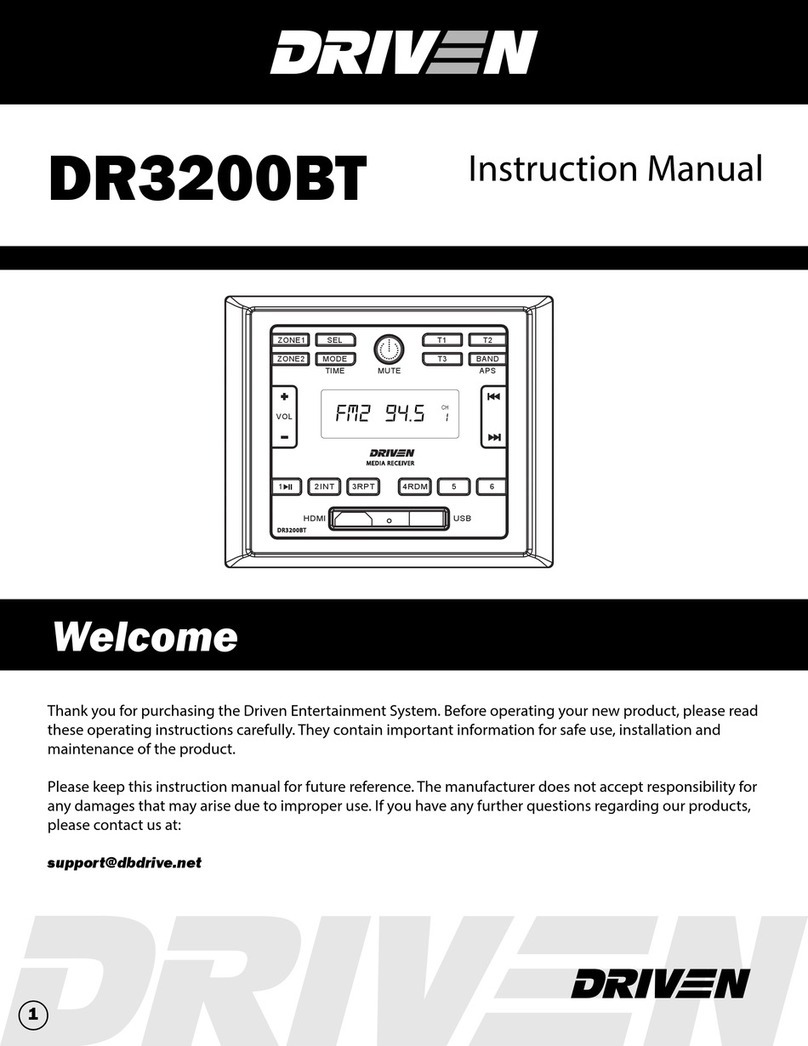
1. To power the unit On/O
When the unit is powered Off, it may be switched On by pressing the POWER button. When the unit is
switched On, press and hold the POWER button to switch it o.
2. To select a function mode
Press MODE button repeatedly on on the front panel to select the corresponding mode.
(FM/AM, AV1, AV2, BLUETOOTH, HDMI)
3. To adjust the volume level
During playback, press VOLUME+ or VOLUME- button on the front panel to increase or decrease the
volume.
4. To mute or resume the sound
During playback, short press POWER button on the front panel to mute sound. Repeat this to disable
mute function.
5. To check speaker output status and select speaker output
Short-press ZONE 1 or ZONE 2 button on the front panel to check the speaker output status.
Press and hold ZONE 1 or ZONE 2 button on the front panel to turn ON/OFF the corresponding speaker
output, “Z 1 ON/OFF” or “Z 2 ON/OFF” will be displayed on the LCD.
6. To set the sound mode and menu
Press and hold SEL button to turn on BASS, then press SEL button repeatedly to select or circulate
through TRE (treble), EQ OFF (FLAT/AMERICA3/AUSTRALIA/EUROPE), press VOLUME+/- to change the
settings. Press SEL button to conrm your selection.
- 1) VOL LAST / VOL DEFA
VOL LAST: The last volume level setting will be saved automatically after the unit is swithced o, and
restored after powered on.
VOL DEFA: Press SEL button on the front control panel, the AVOL mark will be displayed on LCD. Use
VOLUME +/- to set the volume level as a constant value.
- 2) VOL LAST / VOL DEFA
In Radio mode, with the DX/LOCAL selection you can change the attenuator settings at the input stage
of the radio. This selection helps to avoid overloading the radio when strong (local) stations are received.
Select DX (DISTANT) mode to receive far/weak radio stations (highest sensitivity settings are enabled)
and select LOCAL for very strong stations (which are located nearby).
- NOTE: This button is only for FM reception. In AM mode, LOC is in valid.
7. To display and adjust the time
Press and hold MODE button to display time.
Press and hold MODE button for ~ 2 seconds until the time displays then release and hold MODE button
again until the hour begins to ash. Use VOLUME+/- button to adjust the hour. While hours is ashing,
hold MODE button until minutes begin to ash then Use VOLUME+/- button to adjust the hour.
6