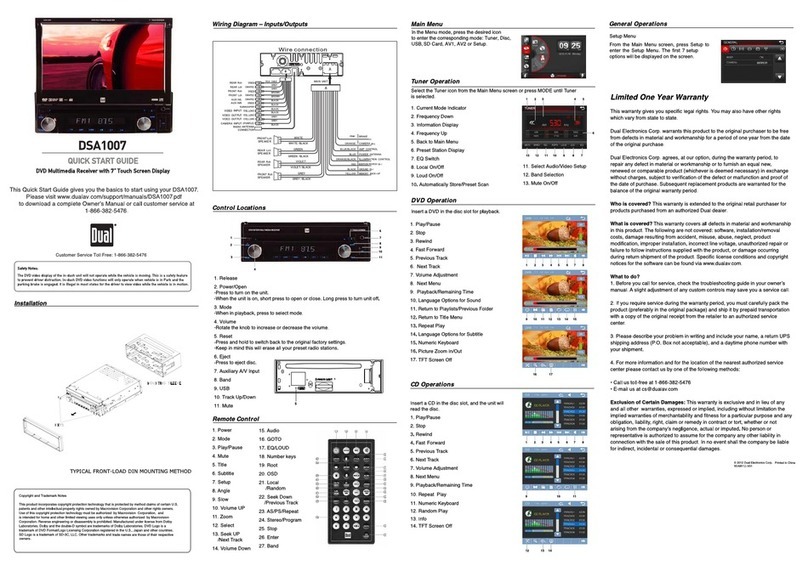
Tuner Operation
Main Menu
Select the Tuner icon from the Main Menu screen or press MODE until Tuner
is selected.
1. Current Mode Indicator
2. Frequency Down
3. Information Display
4. Frequency Up
5. Back to Main Menu
6. Preset Station Display
7. EQ Switch
8. Local On/Off
9. Loud On/Off
10. Automatically Store/Preset Scan
11. Select Audio/Video Setup
12. Band Selection
13. Mute On/Off
DVD Operation
Insert a DVD in the disc slot for playback.
1. Play/Pause
2. Stop
3. Rewind
4. Fast Forward
5. Previous Track
6. Next Track
7. Volume Adjustment
8. Next Menu
9. Playback/Remaining Time
10. Language Options for Sound
11. Return to Playlists/Previous Folder
12. Return to Title Menu
13. Repeat Play
14. Language Options for Subtitle
15. Numeric Keyboard
16. Invalid Key
17. Picture Zoom In/Out
18. TFT Screen Off
CD Operations
Insert a CD in the disc slot, and the unit will
read the disc.
1. Play/Pause
2. Stop
3. Rewind
4. Fast Forward
5. Previous Track
6. Next Track
7. Volume Adjustment
8. Next Menu
9. Playback/Remaining Time
10. Repeat Play
11. Numeric Keyboard
12. Random Play
13. Info
14. TFT Screen Off
iPod
®
Operation
Select iPod on the Main Menu
1. Repeat
2. Play/Pause
3. Rewind
4. Fast Forward
5. Previous Track
6. Next Track
7. Source Volume Adjustment
8. Back to Main Menu
General Operations
Setup Menu
From the Main Menu screen, press Setup to
enter the Setup Menu. The first 7 setup
options will be displayed on the screen.
Installation
Control Locations
Wiring Diagram – Inputs/Outputs
A
A
B
(
(
(
(
(
(
(
(
(
(
(
(
(
(
(
(
(
(
(
(
B
USB
C
C
ORA NGE
BRAKE
BLUE
ORANGE/BLACK
BLUE/BLACK AM P CONT ROL
POWER ANTENNA
ILLUMINATION CONTROL
YELLOW
BLACK
CAMERA
1. Micro SD Card Slot
2. Power/Mode
-Press to turn on the unit
-When in playback, press to select mode.
-When the unit is on, press and hold to
turn off unit.
3. Mute/TFT Standby
-When unit on, press and hold to turn off
the TFT.
4. Volume UP
-Press the VOL button to increase the volume.
5. Volume Down
-Press the VOL button to decrease the volume.
6. Infrared Sensor
7. Reset
-Press and hold to switch back to the original factory settings.
-Keep in mind this will erase all your preset radio stations.
8. Eject
-Press to eject disc.
10. DVD
-Press to change to DVD mode.
11. Tuner
-Press to change to Tuner mode.
12. Auxiliary A/V Input
15. Audio
16. GOTO
17. EQ/LOUD
18. Number keys
19. Root
20. OSD
21. Local
/Random
22. Seek Down
/Previous Track
23. AS/PS/Repeat
24. Stereo/Program
25. Stop
26. Enter
27. Band
1
2
3
4
5
6
7
8
9
10
11
12
Copyright and Trademark Notes
This product incorporates copyright protection technology that is protected by method claims of certain U.S.
patents and other intellectual property rights owned by Macrovision Corporation and other rights owners.
Use of this copyright protection technology must be authorized by Macrovision Corporation, and
is intended for home and other limited viewing uses only unless otherwise authorized by Macrovision
Corporation. Reverse engineering or disassembly is prohibited. Manufactured under license from Dolby
Laboratories. Dolby and the double-D symbol are trademarks of Dolby Laboratories. DVD Logo is a
trademark of DVD Format/Logo Licensing Corporation registered in the U.S., Japan and other countries.
microSD Logo is a trademark of SD-3C, LLC. iPod and iPhone are trademarks of Apple Inc., registered in the U.S.
and other countries. Dual Electronics Corporation is not affiliated with Apple, Inc. Other trademarks and
trade names are those of their respective owners.
QUICK START GUIDE
DVD Multimedia Receiver with 6.2” Touch Screen Display
XDVD1262
The DVD video display of the in-dash unit will not operate while the vehicle is moving. This is a safety feature
to prevent driver distraction. In-dash DVD video functions will only operate when vehicle is in Park and the
parking brake is engaged. It is illegal in most states for the driver to view video while the vehicle is in motion.
Safety Notes:
1 2 3 4 5 6 7 8
9 10 11 12 13 14 15
16 17 18
1 2 3 4 5 6 7 8
12 13 14
9 10 11
1 2 3 4 5 6 7 8
13 12 11 10 9 8 7
1 2 3 4 5
6
Remote Control
TUNER
Limited One Year Warranty
This warranty gives you specific legal rights. You may also have other rights
which vary from state to state.
Dual Electronics Corp. warrants this product to the original purchaser to be free
from defects in material and workmanship for a period of one year from the date
of the original purchase.
Dual Electronics Corp. agrees, at our option, during the warranty period, to
repair any defect in material or workmanship or to furnish an equal new,
renewed or comparable product (whichever is deemed necessary) in exchange
without charges, subject to verification of the defect or malfunction and proof of
the date of purchase. Subsequent replacement products are warranted for the
balance of the original warranty period.
Who is covered? This warranty is extended to the original retail purchaser for
products purchased from an authorized Dual dealer and used in the U.S.A.
What is covered? This warranty covers all defects in material and workmanship
in this product. The following are not covered: software, installation/removal
costs, damage resulting from accident, misuse, abuse, neglect, product
modification, improper installation, incorrect line voltage, unauthorized repair or
failure to follow instructions supplied with the product, or damage occurring
during return shipment of the product. Specific license conditions and copyright
notices for the software can be found via www.dualav.com.
What to do?
1. Before you call for service, check the troubleshooting guide in your owner’s
manual. A slight adjustment of any custom controls may save you a service call.
2. If you require service during the warranty period, you must carefully pack the
product (preferably in the original package) and ship it by prepaid transportation
with a copy of the original receipt from the retailer to an authorized service
center.
3. Please describe your problem in writing and include your name, a return UPS
shipping address (P.O. Box not acceptable), and a daytime phone number with
your shipment.
4. For more information and for the location of the nearest authorized service
center please contact us by one of the following methods:
• Call us toll-free at 1-866-382-5476
• E-mail us at cs@dualav.com
Exclusion of Certain Damages: This warranty is exclusive and in lieu of any
and all other warranties, expressed or implied, including without limitation the
implied warranties of merchantability and fitness for a particular purpose and any
obligation, liability, right, claim or remedy in contract or tort, whether or not
arising from the company’s negligence, actual or imputed. No person or
representative is authorized to assume for the company any other liability in
connection with the sale of this product. In no event shall the company be liable
for indirect, incidental or consequential damages.
This Quick Start Guide gives you the basics to start using your XDVD1262.
Please visit www.dualav.com/support/manuals/XDVD1262.pdf
to download a complete Owner’s Manual or call customer service at
1-866-382-5476.
Customer Service Toll Free: 1-866-382-5476
© 2012 Dual Electronics Corp.
NSA0412-V01