manuals.online logo
Brands
  1. Home
  2. •
  3. Brands
  4. •
  5. Eyeris
  6. •
  7. Digital Camera
  8. •
  9. Eyeris ERB-LW1965N Supplement

Eyeris ERB-LW1965N Supplement

This manual suits for next models

1

Popular Digital Camera manuals by other brands

Canon WP-DC35 user guide

Canon

Canon WP-DC35 user guide

Xiaomi 70mai Dash Cam Lite user manual

Xiaomi

Xiaomi 70mai Dash Cam Lite user manual

Samsung PL70 Quick start manual

Samsung

Samsung PL70 Quick start manual

GE E1680W user manual

GE

GE E1680W user manual

Canon EOS 1200D instruction manual

Canon

Canon EOS 1200D instruction manual

Tevion MD 86497 user guide

Tevion

Tevion MD 86497 user guide

Exakta VX Features

Exakta

Exakta VX Features

Kodak Digital Science DC120 user guide

Kodak

Kodak Digital Science DC120 user guide

Nikon FM3A Specifications

Nikon

Nikon FM3A Specifications

Vectra Fitness H1 Quick reference guide

Vectra Fitness

Vectra Fitness H1 Quick reference guide

Nikon COOLPIX 775 quick start guide

Nikon

Nikon COOLPIX 775 quick start guide

Olympus IR 500 - 4MP Digital Solutions Camera Manuel de Référence

Olympus

Olympus IR 500 - 4MP Digital Solutions Camera Manuel de Référence

Samsung EC-L100ZBBA brochure

Samsung

Samsung EC-L100ZBBA brochure

FujiFilm FINEPIX BL01124-201 owner's manual

FujiFilm

FujiFilm FINEPIX BL01124-201 owner's manual

Panasonic DMC-L10KPP Service manual

Panasonic

Panasonic DMC-L10KPP Service manual

Hyundai Electric HYU-CC-CHBF12001 Quick installation guide

Hyundai Electric

Hyundai Electric HYU-CC-CHBF12001 Quick installation guide

Sony DSC-WX80 specification

Sony

Sony DSC-WX80 specification

Nikon Nuvis S - Point & Shoot instruction manual

Nikon

Nikon Nuvis S - Point & Shoot instruction manual

manuals.online logo
manuals.online logoBrands
  • About & Mission
  • Contact us
  • Privacy Policy
  • Terms and Conditions

Copyright 2025 Manuals.Online. All Rights Reserved.

www.eyerisdigital.com
Installation and Operating
Instruction Manual
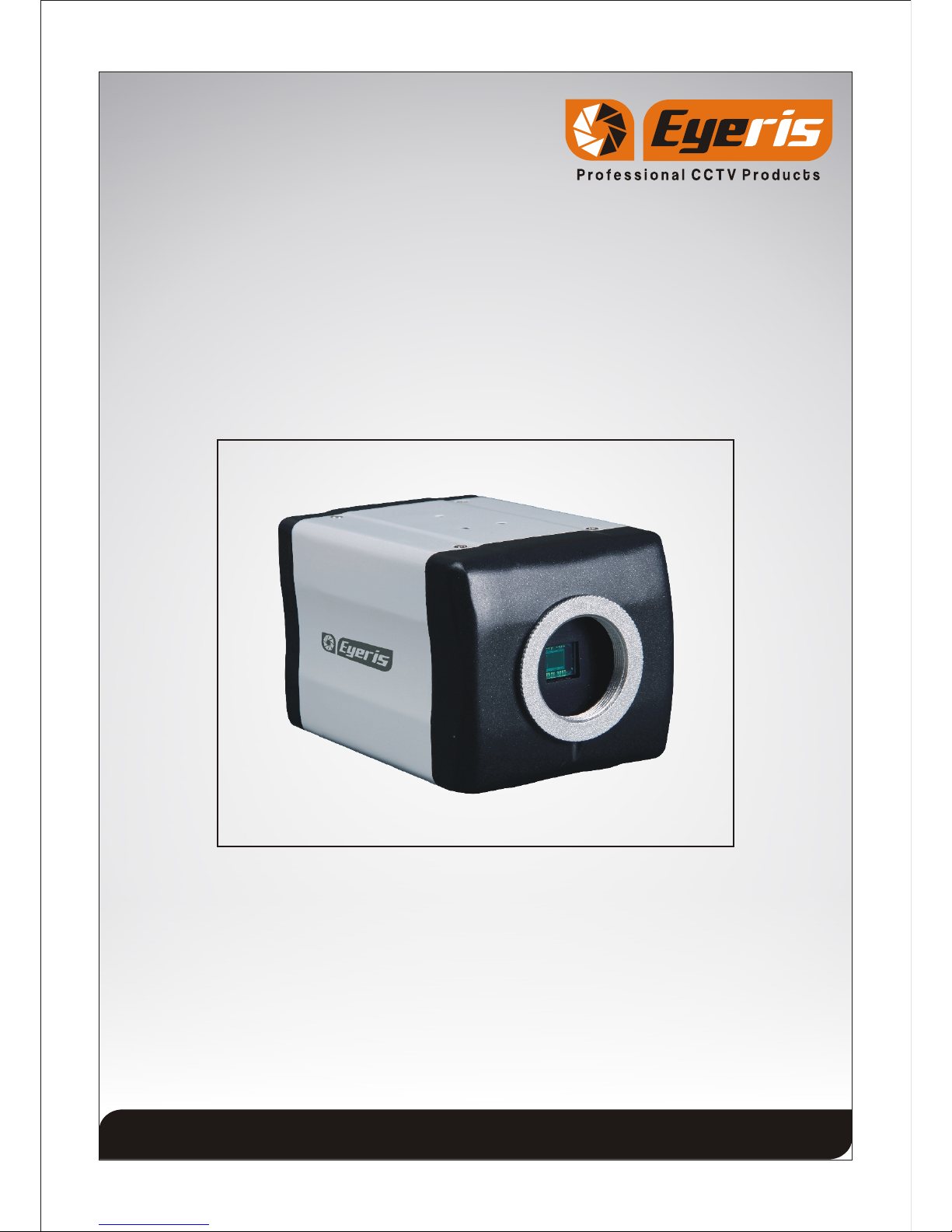
TRUE WDR C/CS(BOX) MOUNT CAMERA
ERB-LW1965N
ERB-LW1965P
Thank you for your purchase of this product.
Before attempting to connect or operate this product, please read these instructions
completely.
Product specifications and its contents subject to change without any prior notice.
The picture is for reference, the object as the standard.
Page 1
CONTENTS
1. General Information
- Safety Precaution
- Package contents
2. Installation of Camera
- Camera Connection
- Installation of Camera
- Tips for Camera Location
- Dimension
3. Operation Guide
- Menu structure
- Function Description
4. Technical Specification
5. Troubleshooting
6. Cleaning and Care
7. Maintenance and Support
Page 2
1.General Information
>Safety Precaution
1.Read these instructions carefully before commissioning the camera in order to avoid
damages caused by improper installation or use.
2.Do not abuse the camera. Avoid striking, shaking, etc. The camera could be damaged
by improper handing or storage.
3.Use a dry cloth to clean the camera lens glass when dirty. When the dirt is hard to
remove, use a mild detergent and wipe gently. Then wipe off the remaining detergent
with a dry cloth.
4.Do not aim the camera at bright objects. Whether the camera is in use or not, never aim
it at the sun or other extremely bright objects. Otherwise, blooming or smears may be
caused.
5.In case of outdoor use, you have to install the camera in a suitable weather protection
case incl. heating element.
6.Operate the camera with the designated voltage only.
7.Use the camera at temperatures within -10 C to +50 C and humidity below 90%.
>Package Contents
1.True WDR C/CS(Box) Mount Camera
2.Operating Instructions
3.Mounting Template Sticker
Caution
To Reduce the risk of electric shock, do not remove cover. No
user serviceable parts inside. Refer servicing to qualified
service personnel.
Page 3
2.Installation of Camera
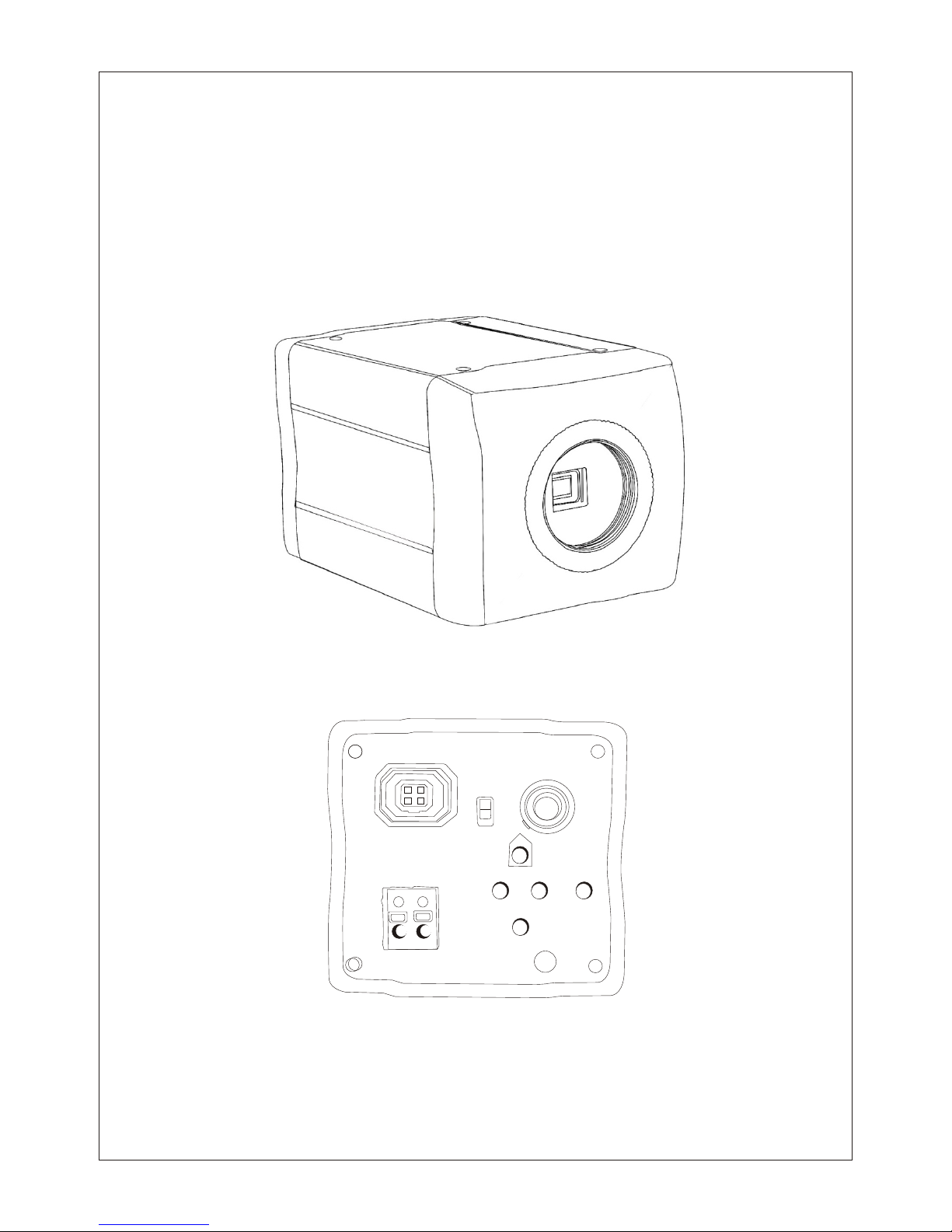
>Camera Connections
12V DC Power Supply
Use standard 12V DC output power supply. Connect 12V DC supply to 2-pin power
terminal block. Check power supply polarity (+ and -).
Video Output Connection
Use standard 75 Male BNC pin terminate with Co-axial video cable then connect to
camera video out BNC Female pin.
>Installation of Camera
Mounting Template Sticker: The mentioned technical drawing is for reference only.
Actual size of Mounting Template Sticker is matched with Dome Base. Stick Mounting
Template Sticker supplied for drilling the mounting hole on the mounting surface.
>Tips for Camera Location
1. Never expose the camera to direct sunlight without additional camera housing. Keep
sufficient distance to direct heat sources.
2. Never install the camera at humid, oily or dusty locations without using an additional
housing. (Without additional housing the camera is not suitable for outdoor use)
3. Do not aim the camera towards indoor lighting, the windows, the sunlight or the sky.
(To get good pictures, camera and light should be aimed towards the object)
4. Avoid peak light as background (Also caused by reflection)

Page 4
>Dimension
Page 5
EXPOSURE
COLOR
FUNCTION
SYNC
SETUP
EXIT
WB MODE
R-Y GAIN
B-Y GAIN
DAY&NIGHT
D&N MODE
A-SUP
C-SUP
MIRROR
SHARPNESS
GAMMA
FREEZE
NEGA
3_DNR
D_ZOOM
SLC
DIS
HME
MOTION
MOTION
SET WINDOW
ALL SET
ALL CLEAR
SENSITI
SHOW NDI
DELAY OUT
PRIVACY
MASK 1
MASK 6
MASK 5
MASK 4
MASK 3
MASK 2
SYNC MODE
V_PHASE
CAMERA ID
DPC
MONITOR
LANGUAGE
BAUDRATE
OMNI LENS
TITLE
EXIT
SAVE & EXIT
FACTORY SET
OSD MANU
E. SHUTTER
BLC
LENS
WDR
AGC
SENSE_UP
>Menu Structure
3. Operation Guide :
Page 6
>Function Description
1 Exposure:
Lens : 2 mode DC and Manual with set brightness level
from 0 to 100.
Shutter : 4 Mode - FLK, Fixed, Manual and Auto
1/100 or 1/120 @ FLK
1/50,1/250,1/500, 1/1000, 1/2000, 1/4000,
1/10000, 1/100000 @ Fixed
BLC (Back Light Compensation) : OFF/ ON with adjust in 5 zone
WDR (Wide Dynamic Range) : OFF/ ON with adjust level range from 0 ~ 10
AGC (Auto Gain Control) : 4 level High, Middle, Low, OFF
SENS UP : OFF/ Auto, adjust with range of X2 ~ X256
2.Color :
W/B Mode : ATW, AWC, Manual
R-Y Gain : Can be set level from 0 ~ 255.
B-Y Gain : Can be set level from 0 ~ 255.
3.Day Night :
D & N Mode : 3 level Auto, Color, B/W
C_SUP (Color Suppression) : Can be set level from 0 ~ 15
A_SUP (Aperture Suppression) : Can be set level from 0 ~ 15
This two above function is used under low light condition. Using these functions you
can get image without noise.
4.Function :
Mirror : 4 Mode OFF, Mirror, V-Flip, Rotate
Sharpness : Can be set level from 0 ~ 15
Gamma : 3 Level 0.45, 0.6, 1
Freeze : ON/OFF
Negative Image : ON/OFF
D-Zoom : OFF/ON with adjust with X1.0 to X3.0
3- DNR : four level Off, Low, Middle, High
SLC (Side Light Compensation) : Can be set level from 0 ~ 50
HME : Can be set level from 0 ~ 50
DIS (Digital Image Stabilizer) : ON/OFF
Page 7

5.Motion : OFF/ON with 16 X 15 selectable zone with
sensitivity level from 0 ~99
6.Privacy Masking : OFF/ON with 6 selectable zone
7.Sync : 2 mode Inter, Auto
8.Setup:
Camera ID : Can be set range from 0 ~ 255
Title Edit : A ~ Z, 0 ~ 9, can set position also
Monitor : 2 mode CRT, LCD
DPC SET (Dead Pixel Cancellation): Can be set white and black level. This function is
used for takes off the dead pixel
Baud rate : can be set diff baud rate like 2400, 4800, 9600,
14400, 19200
9 Exit
Page 8
Fixed 1/50~1/100,000sec
4. Technical Specification
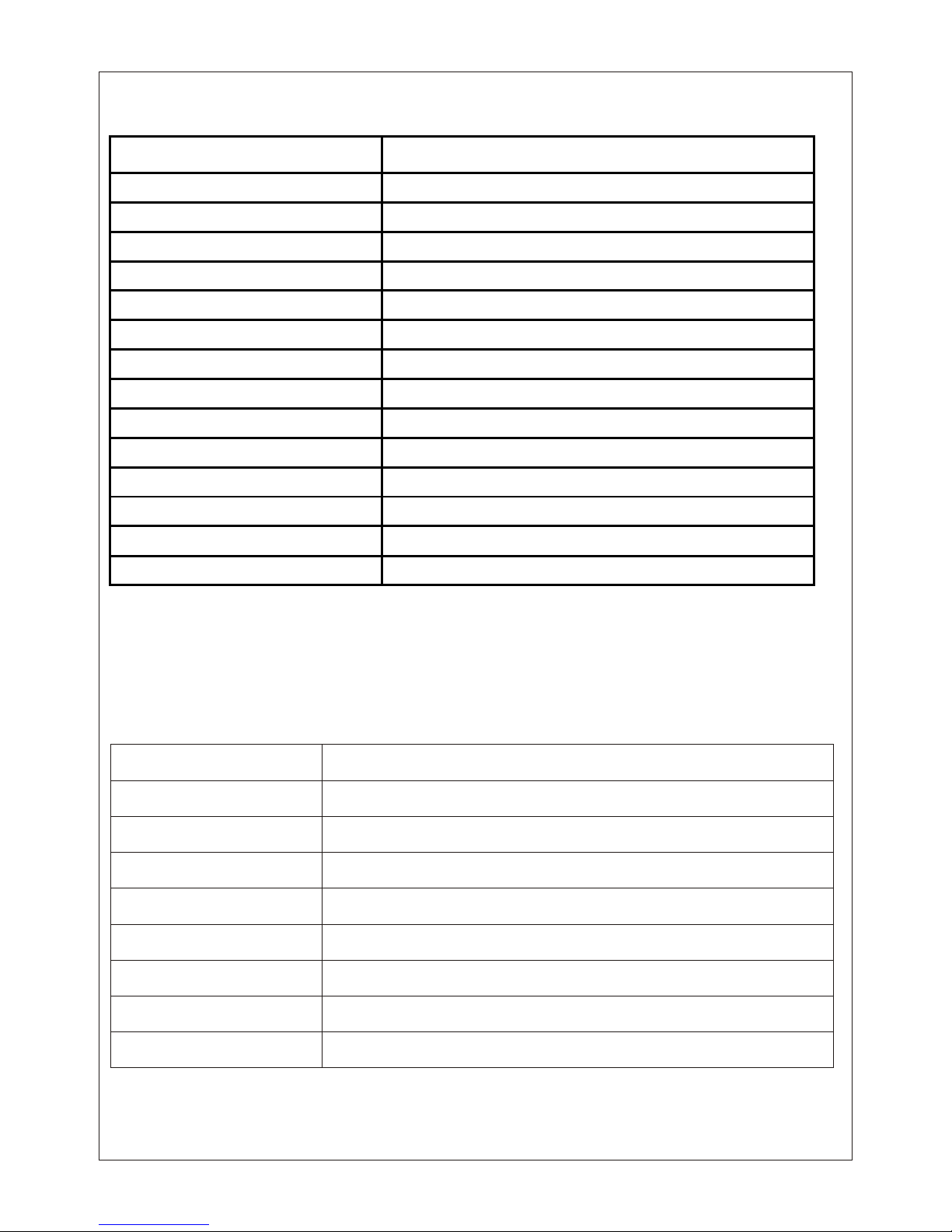
Video
ERB-LW1965N ERB-LW1965P
Model Number
CCD
Signal System
1/3" SONY Super HAD II Double Scan CCD
Lens C/CS Mount Lens
Effective Pixel
Horizontal Resolution 650 TVL
768 x 494
NTSC
15.734KHz
59.94KHz
752 x 582
PAL
15.625KHz
50Hz
Min Illumination@ Night
Min Illumination@ Day
0.08 Lux / 0.001@Sens-up
0.8Lux
Gamma
Scanning Frequency (V)
Scanning Frequency (H)
0.45 Adjustable
S/N Ratio More than 48db
Video Output 1V p-p, 75
Operational
Sync System 2:1 Internal
Exposure Mode
Lens
Auto/Manual/FLK
DC IRIS / Manual
AUTO AUTO
FLK 1/120 FLK 1/100
Fixed 1/60~1/100,000sec
ON/OFF
AGC
Shutter Speed
Day/Night Mode
Freeze
3-DNR
SENS-UP
WDR
BLC
Auto/Color/B/W
ON/OFF
High/Middle/Low/OFF
2,4,8,16,32,64,128,256
ON/OFF
ON/OFF
Mirror
Digital Image Stabilizer
OFF/Mirror/V-Flip/Rotate
ON/OFF
Privacy Masking
HME
Motion Detection
Digital Zoom
On /Off, Supports up to 6 Zone
ON/OFF
On /Off, Supports up to 16*15 Zone
3X
Page 9
Monitor Option
ON/OFF
CRT/LCD
SLC
Camera Name
Color Control
Yes, A to Z, 0 to 9, & etc
Contrast, Sharpness, Hue, saturation
White Balance ATW / AWB / MANUAl / FIXED
Electrical
Power Supply 12V DC
-10°C ~ 50°C
95%
Standard Size Box Camera
530g
100(L) x 60(H) x 60(W) mm
Environmental
Current Consumption 150mA
Dimensional
Humidity
Housing
Weight
Dimension
Operating Temperature
5. Troubleshooting
Error Cause
No Picture Check supply voltage, check power cable and video cable
The picture is noisy Insufficient light (Properly adjusted to the camera)
The picture is too bright Too much peak light, change camera location or active back
light function of the camera
The picture is not sharp Lens focus not adjusted properly
The picture is distorted Different GND potentials between camera and monitor (Bad
connection)
Ghost Image Wrong 75 termination, shield of video cable interrupted.
Page 10