Troubleshooting
State of Charge Gauge and Device Trouble Codes (DTCs)
The first step in troubleshooting a LiFT Pack is observing the State of Charge gauge (SOC) on top of the battery.
Under normal operation, the gauge will have solid lights showing the LiFT Pack state of charge. If the pack is
charging, the lights will display a scrolling pattern. If a single LED is blinking it is a Device Trouble Code (DTC).
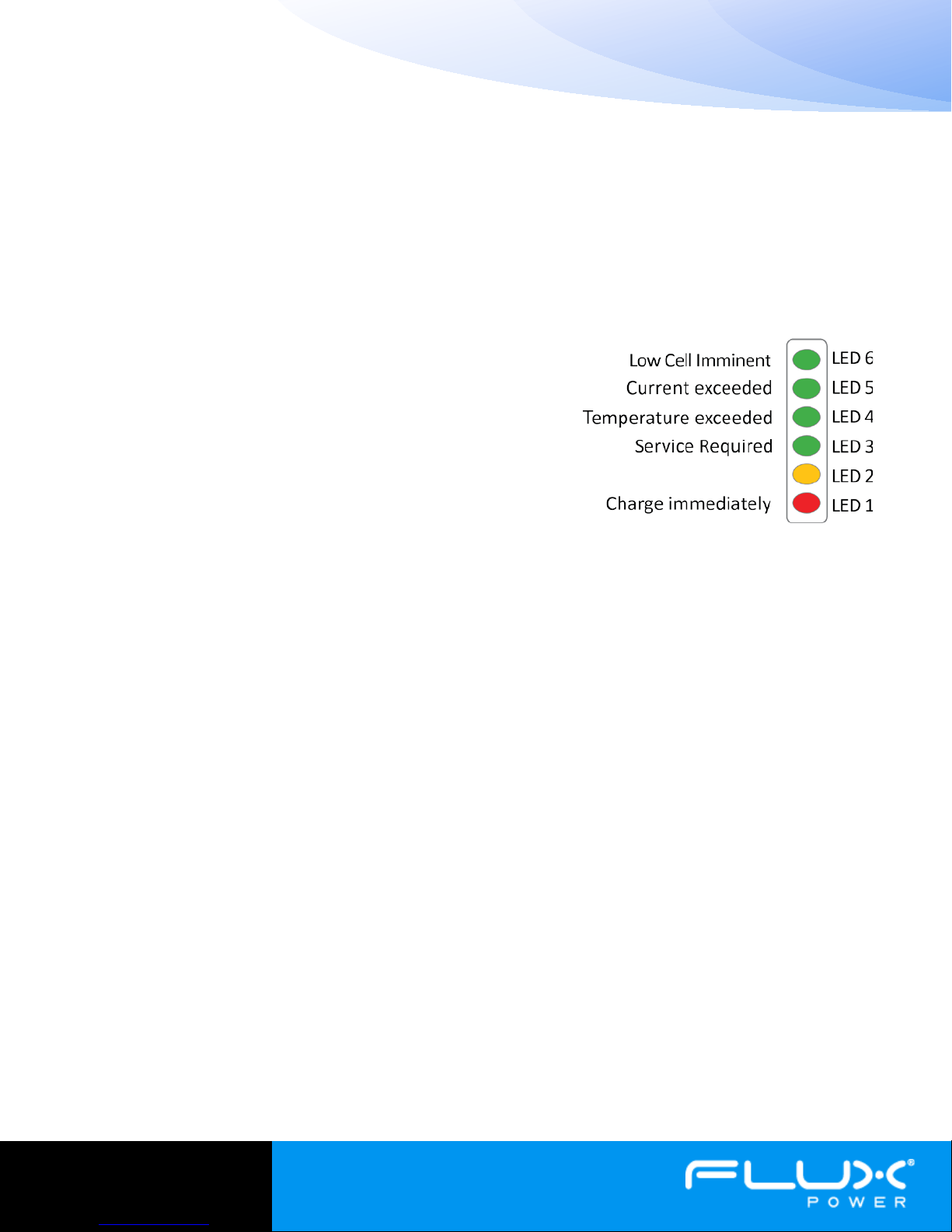
DTCs let the user or technician quickly assess why a LiFT Pack may be disrupting operation. The following list
details each DTC.
-LED 6: Low cell voltage imminent, charge battery to fix.
-LED 5: Current exceeded, >90A continuous will cause this
alert.
-LED 4: Over/Under temperature – If the battery gets too hot
and cuts power to the truck, it must cool by before it will re-
enable power to the truck.
-LED 3: Service required – All temperature sensors are
malfunctioning.
-LED 2:Unused.
-LED 1: Charge immediately – The battery is either empty, or a single
cell voltage is low. The pack may cut power to the truck if a cell is
too low.
Solid Red Light on SOC, No Power to Truck
If the SOC shows a solid red light and there is no power to the truck, it is in sleep mode and is protecting itself
from over discharge. To wake the pack up, first cycle the breaker. If this does not return power to the truck, the
pack must be plugged in to charge.
No Lights on SOC, No Power to Truck
If there are no lights on the LiFT Pack SOC, there are a few possible scenarios.Some which require you to remove
the lid. First Remove the LiFT pack from the truck, then unscrew the 16 top bolts to remove the top of the
battery. It should have enough slack in the battery leads to lay on the top edge of the battery.
1Storage Mode – The pack may be in storage mode. Check the breaker in the cable storage box on the lid
of the battery. Cycle the breaker by firmly pressing the red button in (OFF), and then folding in the yellow
tab on the side of the breaker (ON). If this does not revive the battery, continue to step 2.
2Failed Breaker – Check the breaker in the closed position for continuity. The top must be removed to
access the back of the breaker where the posts are located. Check these for continuity.
3Blown Fuse– There are two fuses inside the LiFT Pack, the main fuse (200A), and the inline blade fuse
(3A). The fuse locations are shown in figure 3. Check the fuses for continuity and replace if blown.
4Over Discharged – LiFT Packs contain advanced electronics which draw power from the battery. These
systems slowly drain the battery, and if not charged regularly, will drain the pack. If a pack drains below
4V, the electronics shut down and the contactors opens. To revive the pack, follow the procedure in the
Over Discharged section (page 5).
Figure 2: SOC gauge showing Device
Trouble Codes (DTCs)