EnglishDeutsch
 logo
Brands
  1. Home
  2. •
  3. Brands
  4. •
  5. GE
  6. •
  7. Microwave Oven
  8. •
  9. GE JE1390 User manual

GE JE1390 User manual

Other manuals for JE1390

1

Other GE Microwave Oven manuals

GE Profile JVM1090 User manual

GE

GE Profile JVM1090 User manual

GE JMT10F Installation instructions

GE

GE JMT10F Installation instructions

GE Spacemaker JVM140H User manual

GE

GE Spacemaker JVM140H User manual

GE PVM9215 User manual

GE

GE PVM9215 User manual

GE JE740 User manual

GE

GE JE740 User manual

GE JVM1540WMC User manual

GE

GE JVM1540WMC User manual

GE JEM31 User manual

GE

GE JEM31 User manual

GE PSA9240DF1WW User manual

GE

GE PSA9240DF1WW User manual

GE JE1468L Use and care manual

GE

GE JE1468L Use and care manual

GE Appliances JES1456 User manual

GE

GE Appliances JES1456 User manual

GE JVM6175 User manual

GE

GE JVM6175 User manual

GE JEM3072 User manual

GE

GE JEM3072 User manual

GE CEB1590SS User manual

GE

GE CEB1590SS User manual

GE JVM6172 User manual

GE

GE JVM6172 User manual

GE JES1034 User manual

GE

GE JES1034 User manual

GE JEM25 User manual

GE

GE JEM25 User manual

GE JE1555T User manual

GE

GE JE1555T User manual

GE Profile Spacemaker PVM2070DM User manual

GE

GE Profile Spacemaker PVM2070DM User manual

GE JVM6172RFSS Operating manual

GE

GE JVM6172RFSS Operating manual

GE PSB9120SF1SS User manual

GE

GE PSB9120SF1SS User manual

GE JES1146BF User manual

GE

GE JES1146BF User manual

GE Spacemaker XL JVM1850 User guide

GE

GE Spacemaker XL JVM1850 User guide

GE JEB1095 User manual

GE

GE JEB1095 User manual

GE JES0738DP User manual

GE

GE JES0738DP User manual

Popular Microwave Oven manuals by other brands

Samsung CE2815NR null

Samsung

Samsung CE2815NR null

Panasonic NN-S553WF null

Panasonic

Panasonic NN-S553WF null

Daewoo KOG-574R0S Service manual

Daewoo

Daewoo KOG-574R0S Service manual

LG MH7040SS instruction manual

LG

LG MH7040SS instruction manual

Sharp R-895(AL)M Service manual

Sharp

Sharp R-895(AL)M Service manual

Dometic DOTRM13W installation instructions

Dometic

Dometic DOTRM13W installation instructions

Sanyo EM-X680 instruction manual

Sanyo

Sanyo EM-X680 instruction manual

Sharp R-393M quick start guide

Sharp

Sharp R-393M quick start guide

KitchenAid KMCX4510 Use and care

KitchenAid

KitchenAid KMCX4510 Use and care

Smeg S45MCX1 Instructions for use

Smeg

Smeg S45MCX1 Instructions for use

Russell Hobbs RHM2044 user guide

Russell Hobbs

Russell Hobbs RHM2044 user guide

Sunbeam SMW759 owner's manual

Sunbeam

Sunbeam SMW759 owner's manual

Bosch CEG732X.1B User manual and installation instructions

Bosch

Bosch CEG732X.1B User manual and installation instructions

Dometic Roadmate 230 operating manual

Dometic

Dometic Roadmate 230 operating manual

Samsung SJ0396W Owner's instructions

Samsung

Samsung SJ0396W Owner's instructions

Sanyo EM-P494WS Supplement of service manual

Sanyo

Sanyo EM-P494WS Supplement of service manual

Sharp R-240 Operation manual

Sharp

Sharp R-240 Operation manual

Electrolux EMS2840 user manual

Electrolux

Electrolux EMS2840 user manual

https://manuals.online logo
https://manuals.online logoBrands
  • About & Mission
  • Contact us
  • Privacy Policy
  • Terms and Conditions

Copyright 2026 Manuals.Online. All Rights Reserved.

seandtire Guide
Microwave/ConvectionOven
n
!Safe~ instructions....................3-5
Precautionsto Avoid PossibleExposure
to ExcessiveMicrowave Energy.............2
wOperatingInstructions,~ps
Aluminum Foil..........................................4. 28
Clock..................................................................8
ClockDisplayOn/Off .................................9
Combination Cooking..........10. 11,26-28
Combination Roast...........................27. 28
CookingbyTemperature ........................27
CookingbyTime ..................................-....26
ControlPanel...............................................8. 9
ConvectionCooking.................10, 11,24,25
CookingbyTemperature ........................25
CookingbyTime .......................................24
CookingReference Guide..........................29
Cookware and Accessories.......................11
DelayStart .....................................................14
Features............................................................7
Microwave Cooking........................9. 12-22
Add 30 Seconds.......................................l 4
Auto Defrost.......................................l 7, 18
Beverage....................................................19
ChildLock-Out......................................8. 12
Cook.............................................................2l
CookingbyTemperature ........................16
CookingbyTime ...............................13, 14
CookingComplete Reminder ..................7
DefrostingbyTime...................................15
DelayStart/Reminder .............................14
ExpressCook........................................8. 14
Ktchen Timer ............................................12
Microwaving Tips .......................................6
Popcorn......................................................l g
Power Levels............................6. 8, 12–16
Reheat.........................................................2O
SoundFeature......................................8. 14
OvenShelf.....4. 5,7, 11, 19-21,23,27,30
Probe..................................4. 7–9, 16, 25r Z7
What Your Oven Can Do............................10
GEAppliances
Problem Solver...............................3z
More questions?...call
GEAnswerCenter@800.626.2000
CareandCleaning............................30
Control Panel ................................................3O
Oven Shelf .....................................................3O
Temperature Probe.....................................30
installation..........................................3l
Adapter Plugs...............................................31
ExtensionCords...........................................31
Groundinginstructions...............................3l
Consumer Services...................35
Appliance Registration..................................2
Important Phone Numbers........................35
Model and Serial Number Location...........2
Warranty ........................................BackCover
1I
~LP US~LP YOU...
Beforeusingyouroven,
readthisguidecareftily.
It is intended to help you operate
and maintain your new microwave
oven properly.
Keep it handy for answers to your
questions.
If you don’t understand something
or need more help, call:
GE Answer Center@
800.626.2000
24 hours aday, 7days aweek
Writedownthemodeland
serialnumbers.
You’llfind them on alabel on the
left side of the control panel (seen
when the door is open).
These numbers are also on the
Consumer Product Ownership
Registration Card that came with
your microwave oven. Before
sending in this card, please write
these numbers here:
Model Number
Setial Number
Use these numbers in any
correspondence or service calls
concerning your microwave oven.
Besureyourmicrowave
ovenis registered.
It is important that we know the
location of your microwave oven
should aneed occur for
adjustments.
Yoursupplier is responsible for
registering you as the owner.
Please check with your supplier to
be sure he has done so; also send
in your Consumer Product
Ownership Registration Card. If
you move, or if you are not the
original purchaser, please write to
us, stating model and serial
numbers.
Thisapptiancemust be re~stered.
Please be certain that it is.
Write to:
GE Appliances
Range Product Service
Appliance Park
Louisville, KY 40225
Myou receiveda
damagedoven...
Immediately contact the deder (or
builder) that sold you the oven.
Savetimeandmoney.
Beforeyourequestservice...
Check the Problem Solver in the
back of this guide. It lists causes of
minor operating problems that you
can correct yourself.
AUthesethingsarenormal
withyourmicrowaveoven.
●Dimming oven light and change
in blower sound may occur while
operating at power levels other
than high.
●Dull, thumping sound while oven
is operating.
●Some TV-Radio interference
might be noticed while using
your microwave oven. It’s
similarto the interference caused
by other small appliances and
does not indicate aproblem with
your oven.
●Steam or vapor escaping from
around the door.
●Light reflection around door or
outer case.
●During cooking you will hear
“cracking” and “popping” noises
which are nothing more than
normal expansion of the oven.
●At the end of microwave cycles
you will hear aslightthump. This
is normal.
PRECAUTIONSTO AVOIDPOSSIBLEEXPOSUm
TO EXCESSIVEMICROWAVEENERGY
(a)DoNotAttemptto operatethis oven with
the door open sinceopen-dooroperationcan
result in harmfulexposureto microwave
energy.It is importantnot to defeator tamper
with the safetyinterlocks.
(b)DoNotPlaceanyobjectbetweenthe oven
front face and the dooror allow soilor cleaner
residueto accumulateon sealingsurfaces.
(c)DoNotOperatethe ovenif it is damaged.It is
particularlyimportantthatthe ovendoorclose
properlyand that thereis no damageto the:
(1) door (bent)
(2) hingesand latches(broken or loosened)
(3) door sealsand sealingsurfaces.
(d)me OvenShodd Notbe adjustedor repaired
by anyoneexceptproperlyqualifiedservice
personnel.
2
~ORTANT SA~~ ~STRUCmONS
Readdktrudom beforewhg yourapptiance.
When using electricalappliances,basic safety
precautionsshouldbe followed,includingthe
following:
AWA~lNG-Toreducethetiskof
burns, electricshock,fire, injuryto persons
or exposureto excessivemicrowaveenergy:
●Readand followthe specific “Precautionsto
AvoidPossibleExposureto ExcessiveMicrowave
Energy” on thepreviouspage.
●Ttis app~ancemustbe grounded.Connectonly
to properly groundedoutlet.See Grounding
Instructionssectionin the back of this guide.
●Usethisapplianceody for itsintendeduseas
describedin tiis guide.Do not use corrosive
chemicalsor vaporsin this appliance.This
microwave/convectionoven is specifically
designedto heat or cookfood, and is not
intendedfor laboratoryor industrialuse.
●For bestoperation,plugthis applianceinto
itsownelectricaloutlet,to preventflickering
oflights,blowingoffuseor trippingofcircuit
breaker.
*Donot mount thisappfianceoverasink.Install
or locatethis applianceody in accordancewith
the providedInsta~ationInstructions.
●Becertain to placethefront surfaceofthe door
threeinchesor morebackfromthe countertop
edgeto avoidaccidentaltippingofthe
appliancein normalusage.
●Donotcoveror blockanyopeningsonthe
appliance.
●Donot storethis applianceoutdoors.Do not
use this productnear water—for example,in awet
basement,near aswimmingpool or near asink.
●This microwaveovenisnot approvedor tes~d
for marine use.
●Donot operate anyheatingor cooking
appliancebeneaththismicrowaveoven.
●Donotmount the microwaveovenoveror near
anyportion ofaheatingor cookingappfiance.
●Donot storeanythingdirectlyon topofthe
microwaveovensurfacewhenthemicrowave
ovenisinoperation.
●Donotimmersepowercord or plugin water.
.Keeppowercordawayfrom heatedsurfaces.
●Donot letpowercordhang overedgeoftable
or counter.
●Donot operatethisapplianceifit has a
damagedpowercordor plug,ifitis not
workingproperly,or ifit has beendamaged
or dropped.
sSeedoor surfacecleaninginstructionsinthe
Careand Cleaningsection(s)ofthisguide.
●Donot operatetheovenwithoutthe turntable
and the turntable supportseatedand in place.
●Donot allowthe turntable to be restrictedso
theturntible cannotrotate.
●Thisapplianceshouldbe servicedonlyby
qualifiedservicepersonnel.Contict nearest
authorizedservicefacilityfor examination,
repair or adjustment
●Aswithanyappliance,closesupervisionis
necessarywhenusedbychildren.
●Toreducethe risk offirein the ovencavity:
—Donotovercookfood.Carefullyattendappliance
ifpaper,plasticorothercombustiblematerialsare
placedinsidethe ovento facilitatecooking.
—Removewiretwist-tiesand metalhandlesfrom
paper or plasticcontainersbefore placingthem in
theoven.
—Donot useyourmicrowavdconvectionovento
dry newspapers.
—Donot userecycledpaper produck. Recycled
papertowels,napkinsand waxed paper can
containmetal fleckswhich may cause arcing
or ignite.Paper productscontainingnylon or
nylonfilamentsshouldbe avoided,as they may
also ignite.
—Donot poppopcornin your microwaveoven
unlessin aspecialmicrowavepopcorn accessory
or unless you use popcornlabeled for use in
microwaveovens.
—Donotovercookpotatoes.They coulddehydrate
andcatch fire,causingdamageto youroven.
(continued next page)
3
U
!WORTANT SAm~ ~STRUC~ONS
(continued)
—Donotoperatethe ovenin microwaveor
combinationmodeswhileemptyto avoid
damageto the ovenand thedangeroffire.
If by accidentthe oven shouldrun empty a
minuteor two,no harmisdone.However,try to
avoid operatingthe ovenemptyat dl times-it
savesenergyand prolongsthe life of the oven.
—Donotusetheovenfor storagepurposes.
Donotleavepaper producti, cookingutensils
or foodin the ovenwhennotinuse.
—Hmaterialsinsideovenshouldignite,keep
oven doorclosed,turn ovenoff, and disconnect
power cord, or shutoff power at the fuse or
circuitbreakerpanel. Hthe dooris opened,the
fire may spread,
●Someproductssuchas wholeeggsand sealed
conkiners-for example,closedglassjars—
willexplodeandshouldnotbeheatedin this
microwaveoven.Such use of themicrowave/
convectionoven could resultin injury.
●Avoidheatingbabyfoodinglassjars,evenwith
thelidoff.Makesureallinfantfoodisthoroughly
cooked.Stirfoodtodistributetheheatevenly.Be
carefultopreventscaldingwhenwarming
formulaorbreastmik. Thecontainermayfeel
coolerthanthetik reallyis.Alwaystestthernik
beforefeedingthebaby.
●Whenusingthe convectionor combination
cookingfunctions,boththeoutsideandinsideof
theovenwillbecomehot.Alwaysusehotpadsto
removecontainersoffoodandaccessoriessuchas
ovenshelfandtemperatureprobe,
●Oversizedfoodor oversizedmetalcookware
shouldnotbeusedin amicrowave/convection
ovenbecausetheyincreasetherisk ofelectric
shockand cotid causeafire.
●Donotcleanwithmetalscouringpads.Heces
canburn offthepad and touchelectricalparts
involvingrisk ofelectricshock.
●Donotusepaper productswhenthe
microwave/convectionovenisoperatedin the
convectionor combinationmode.
●Donotstoreanymaterhds,other than our
recommendedaccessories,in thisovenwhen
notin use.
●Donot defrostfrozenbeveragesinnarrow
neckedbottles(especiallycarbonatedbeverages).
Evenifthecontainerisopened,pressurecanbuild
up. This can causethecontainerto burst,possibly
resultingin injury.
●Usefoilonlyas directedin thisguide.
Wdinnersmaybemicrowavedinfoiltraysless
than3/4”high;removethetopfoilcoverand
returnthetraytothebox.Whenusingfoilinthe
microwave/convectionoven,keepit at least1
inchawayfromthesidesofthe oven.
●Donot coverthe shelfor anyother part ofthe
ovenwithmetalfoil.Thiswi~cause
overheatingofthemicrowave/convectionoven.
*●Cookwaremaybecomehot because
ofheattransferredfromtheheated
food.Potholdersmaybeneededto
handlethecookware.
●Sometimes,the ovenfloor,turntable and
wallscan becometoohot to touch.Becareful
touchingthefloor,turntableandwallsduringand
aftercooking.
●Foodscookedin liquids(suchaspasta)maytend
toboilovermorerapidlythanfoodscontaining
lessmoisture.Shouldthisoccur,refertotheCare
andCleaningsection(s)forinstructionsonhowto
cleantheinsideoftheoven.
cThermometer-Do notuseregular cooking
or oventhermometerswhencookingby
microwaveor combination.The metal and
mercuryin these thermometerscould cause
“arcing”and possibledamage to the oven.
Do not use athermometerin food you are
microwavingunlessthe thermometeris designed
or recommendedfor use in the microwave oven.
●Removethe temperatureprobefromthe oven
whennotusingit tocookwith.Ifyouleavethe
probeinsidetheovenwithoutinsertingit infood
orfiquid,andturnonmicrowaveenergy,it can
createelectricalarcingintheoven,damageoven
wa~sanddamagethetemperatureprobe.

●Plasticcookwar~Plastic cookwaredesignedfor
●
microwavecookingis very useful, but shouldbe
used carefully.Evenmicrowave-safeplasticmay
not be as tolerantof overcookingconditionsas are
glass or ceramicmaterialsand may softenor char
if subjectedto shortperiodsof overcooking.
In longerexposuresto overcoobg, the food
and cookwarecouldignite.For these reasons:
1)Use microwave-safeplasticsonly and usethem
in strictcompliancewiththe cookware
manufacturer’srecommendations.2) Do not
subjectemptycookwareto microwaving.
3) Do not permitchildrento use plasticcookware
withoutcompletesupervision.
WhencookingPork,followthedirections
exactlyand al;;ys cookthe meat to an internal
temperatureof at least 170°F.This assuresthat,in
the remote possibilitythat trichinamay be present
in the meat, it willbe killed and meat will be safe
to eat.
●Do notboile~s inamicrowaveoven.Pressure
will build up insideegg yok and will cause it to
burst, possiblyresultingin injury.
+
●Foodswithunbrokenouter “skin”
suchas potatoes,sausages,tomatoes,
apples,chickenlivers and other
giblets,and egg yoks (see previous
caution)shouldbe piercedto allow
steamto escapeduring cooking.
●Spon@neousbofling-Under certainspecial
circumstances,liquidsmaystarttoboilduringor
shortlyafterremovalfromthemicrowaveoven.
Topreventburnsfromsplashingliquid,we
recommendthefollowing:beforeremovingthe
containerfromtheoven,allowitto standinthe
ovenfor30to40secondsaftertheovenhasshut
off.Donot boilliquidsin narrow-necked
containerssuchas softdrink bottles,wine
flmksand especiallynarrow-neckedcoffee
cups.Evenifthecontainerisopened,excessive
steamcanbuildupandcauseittoburstor
ovefiow.
●Notallplasticwrap issuitible for usein
microwaveovens.Checkthepackagefor
properuse.
●“Botiable”cookingpouchesand tightlyclosed
plasticbags shouldbeslit,piercedorventedas
directedbypackage.Iftheyarenot,plasticcould
burstduringorimmediatelyaftercooking,
possiblyresultingininjury.Also,plasticstorage
containersshouldbeatleastpartiallyuncovered
becausetheyformatightseal.Whencooking
withcontainerstightlycoveredwithplasticwrap,
removecoveringcarefullyanddirectsteamaway
fromhandsandface.
,’/tfi,y
e●Hotfoodsand st- @ncause
-....
..-burns.Becarefulwhenopeningany
~containersofhotfood,including
popcornbags,cookingpouchesand
boxes.Topreventpossibleinjury,
directsteamawayfromhandsandface.
sUseoftheshetiaccessory:
—Removethe sheti from oven when not in use.
—Use pot holders when handlingthe she~ and
cookware.They may be hot.
—Be sure that the shelfis positionedproperly
insidethe oven to preventproductdamage.
Optional Accessories
Availableat extra cost from your GE supplier.
JX1327MBV and JX1330MBV (for model
~1390GV) or JX1327MWV andJX1330MWV
(formodel~1390WV) Installation~t converts
this oven to abuilt-in wall oven.
SA~ T~SE
~STRUCTIONS
●Make sure all cookware used in your microwave
oven is suitable for microwaving. Most glass
casseroles, cooking dishes, measuring cups, custard
cups, pottery or china dinnerwme which does not
have metallic trim or glaze with ametallic sheen
can be used. Some cookware is labeled “suitable for
microwaving.”
●Hyou are not
sure if adish is
microwave-safe,
use this test:
Place in the oven
both the dish you
are testing and a
glass measuring
cup filled with one
cup of water—set the measuring cup either in or
next to the dish. Microwave 1minute at high. If the
dish heats, it should not be used for microwaving. If
the dish remains cool and only the water in the cup
heats, then the dish is microwave-safe.
●Paper towels, waxed paper and plastic wrap
can be used to cover dishes in order to retain
moisture and prevent spattering. Be sure to vent
plastic wrap so steam can escape.
●Some microwaved foods require stirring, rotiting
or rearranging.
●Steam builds up pressure in foods which are
tightly covered by askin or membrane. Pierce
potatoes, egg yoks and chicken livers to prevent
bursting.
Eyouuseameatthermometerwhilecooking,make
sureit issafefor use in microwaveovens.
VA~BLE POWER LEVELS(1-10)
How to Change Power Level
1. PressMICRO COOK or TIME DE~OST.
2. Select cooking or defrosting time. ~~ PJ FJ
3. Press POWER LEVEL. EBm
4. Select desired power level 1–10. ❑mm
5. Press START. ❑mn
Variablepower levelsadd flexibilityto your microwave
cooking.The power levelson your microwave oven
can be compared to the surface unitson arange. High
(Power Level 10)or full power is the fastest way to
cook and gives you 100%power. Each power level
givesyou microwaveenergy acertain percent of the
time. Power Level 7is microwave energy 70% of the
time. Power Level 3is energy 30% of the time.
Ahigh setting (10) will cook faster but may need
additional attention such as frequent stirring, rotating
or turning over. Most of your cooking will be done
on High (Power Level 10).Alower setting will cook
more evenly and with less attention given to stirring
or rotating the food. Some foods may have better
flavor, texture or appearance if one of the lower
settingsis used. Youmay wish to use alower power
level when cooking foods that have atendency to
boil over, such as scalloped potatoes.
Rest periods (when the microwave energy cycles o~
give time for the food to “equalize” or transfer heat
to the inside of the food. An example of this is shown
with Power Level 3—the defrost cycle. If microwave
energy did not cycle off, the outside of the food would
cook before the inside was defrosted.
Here are some examples of uses for various power
levels:
Ipoul~; bakin~ casseroles
and reheating.-
Medium 5Slow cooking and tenderizing
Isuch as stew~and less tende~
cuts of meat.
Low 3Defrosting without cooking;
simmering; delicate sauces.
warm1Keeping food warm without
ove;co~king; softening butter.
6
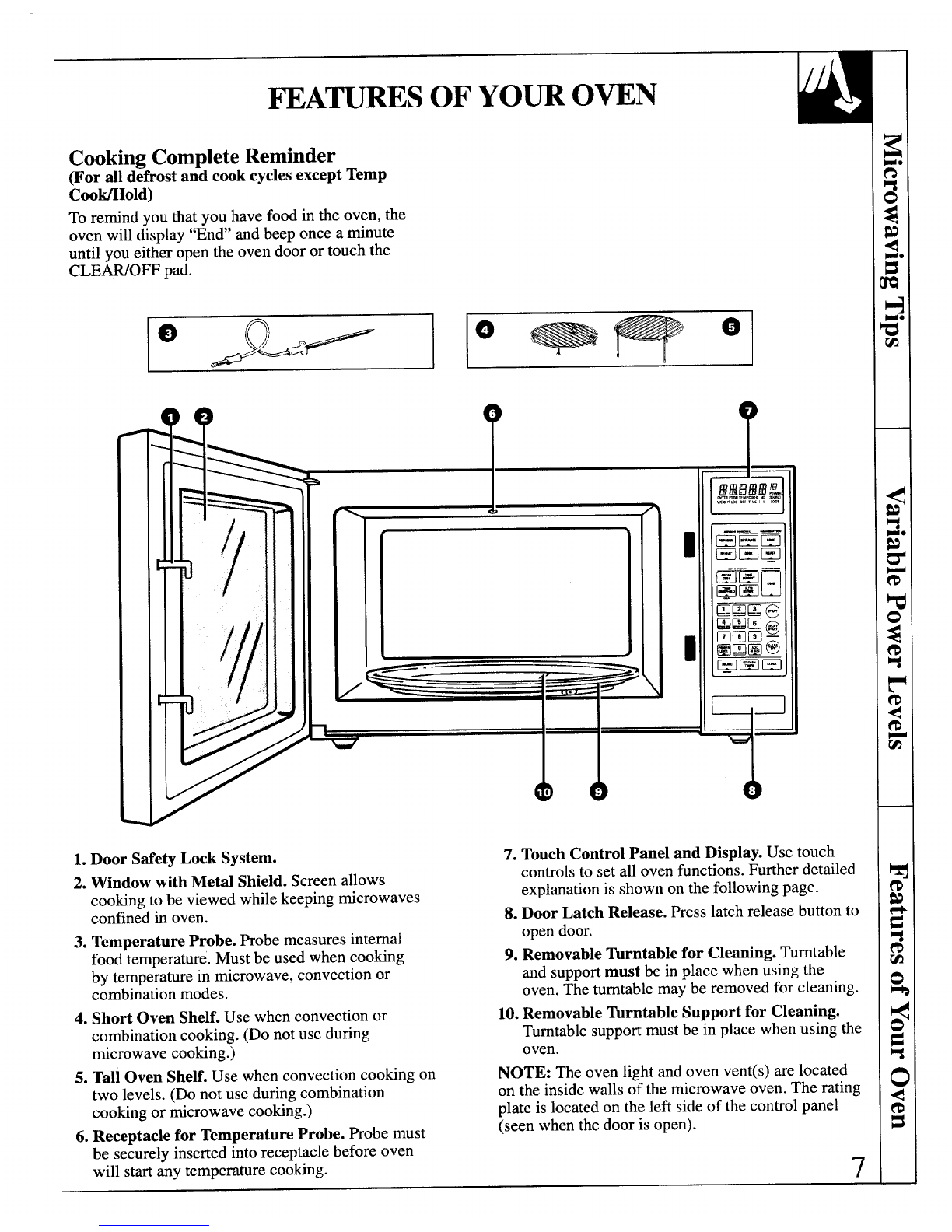
Cooking Complete Reminder
(For all defrost and cook cycles except Temp
Coo~old)
To remind you that you have food in the oven, the
oven will display “En&’and beep once aminute
until you either open the oven door or touch the
CLEAWOFF pad.
I
I
1. Door SafetyLocksystem. 7. Touch Control Panel and Display. Use touch
2. Window with Metil Shield. Screen allows
cooking to be viewed while keeping microwaves
confined in oven.
3. Temperature Probe. Robe measures internal
food temperature. Must be used when cooking
by temperature in microwave, convection or
combination modes.
4. Short Oven Shelf. Use when convection or
combination cooking. (Do not use during
microwave cooking.)
5. Tall Oven SheE. Use when convection cooking on
two levels. (Do not use during combination
cooking or microwave cooking.)
6. Receptacle for Temperature Probe. Probe must
be securely inserted into receptacle before oven
will start any temperature cooking.
controls to set all oven functio~s. Further detailed
explanation is shown on the following page.
8. Door Latch Release. Presslatch release button to
open door.
9. Removable Turntable for Clwning. Turntable
and supportmust be in place when using the
oven. The turntable may be removed for cleaning.
10. Removable ~rntable Support for Cleaning.
Turntable support must be in place when using the
oven.
NOTE: The oven light and oven vent(s) are located
on the inside walls of the microwave oven. The rating
plate is located on the left side of the control panel
(seen when the doorisopen).
7
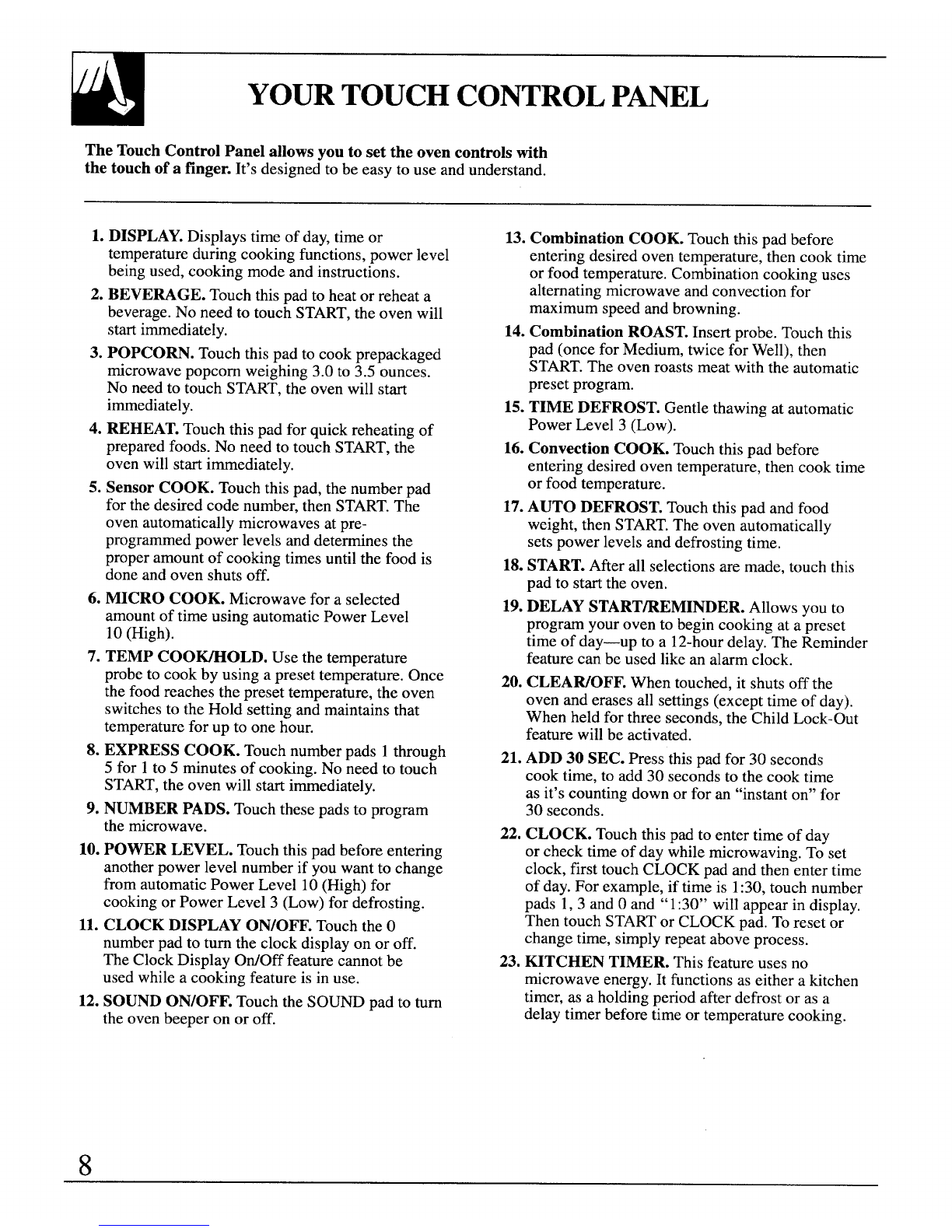
YOURTOUCHCONTROLP~L
The TouchControl Panel allows you to set the oven controls tith
the touch of afinger. It’s designed to be easy to use and understand.
1. DISPLAY.Displays time of day,time or
temperature during cooking functions, power level
being used, cooking mode and instructions.
2. BEVERAGE. Touch thispad to heat or reheat a
beverage. No need to touch START,the oven will
start immediately.
3. POPCORN. Touch this pad to cook prepackaged
microwave popcorn weighing 3.0 to 3.5 ounces.
No need to touch START, the oven will start
immediately.
4. REHEAT.Touch this pad for quick reheating of
prepared foods. No need to touch START, the
oven will start immediately.
5. Sensor COOK. Touch this pad, the number pad
for the desired code number, then START.The
oven automatically microwaves at pre-
programmed power levels and determines the
proper amount of cooking times until the food is
done and oven shuts off.
6. MICRO COOK. Microwave for aselected
amount of time using automatic Power Level
10 (High).
7. TEMP COO-OLD. Use the temperature
probe to cook by using apreset temperature. Once
the food reaches the preset temperature, the oven
switches to the Hold setting and maintains that
temperature for up to one hour.
8. EXPRESS COOK. Touch number pads 1through
5for 1to 5minutes of cooking. No need to touch
START,the oven will start immediately.
9. NUMBER PADS. Touch these pads to program
the microwave.
10. POWER LEVEL. Touch this Dadbefore entering
11.
12.
.
another power level number if you want to change
from automatic Power Level 10 (High) for
cooking or Power Level 3(Low) for defrosting.
CLOCK DISPLAY ON/OFF. Touch the O
number pad to turn the clock display on or off.
The Clock Display OtiOff feature cannot be
used while acooking feature is in use.
SOUND ON/OFF. Touch the SOUND pad to turn
the oven beeper on or off.
8
13. Combination COOK. Touch this pad before
entering desired oven temperature, then cook time
or food temperature. Combination cooking uses
alternating microwave and convection for
maximum speed and browning.
14. Combination ROAST. Insert probe. Touch this
pad (once for Medium, twice for Well), then
START.The oven roasts meat with the automatic
preset program.
15. TIME DEFROST. Gentle thawing at automatic
Power Level 3(Low).
16. Convection COOK. Touch this pad before
entering desired oven temperature, then cook time
or food temperature.
17.AUTO DEFROST. Touch this pad and food
weight, then START.The oven automatically
sets power levels and defrosting time.
18.START.After all selections are made, touch this
pad to start the oven.
19.DELAY START~EMINDER. Allows yOUto
program your oven to begin cooking at apreset
time of day—up to a12-hourdelay. The Reminder
feature can be used like an alarm clock.
20. CLEAWOFF. When touched, it shuts off the
oven and erases all settings (except time of day).
When held for three seconds, the Child Lock-Out
feature will be activated.
21. ADD 30 SEC. Press this pad for 30 seconds
cook time, to add 30 seconds to the cook time
as it’scounting down or for an “instant on” for
30 seconds.
22. CLOCK. Touch this pad to enter time of day
or check time of day while microwaving. To set
clock, first touch CLOCK pad and then enter time
of day. For example, if time is 1:30,touch number
pads 1, 3and Oand “1:30” will appear in display.
Then touch STARTor CLOCK pad. To reset or
change time, simply repeat above process.
23. KITCHEN TIMER. This feature uses no
microwave energy.It functions as either akitchen
timer, as aholding period after defrost or as a
delay timer before time or temperature cooking.
,
L
.,., i,
@~@
@L@
G;
SOUND
(AJ
ON~W
L/
TemperatureProbe WhenYouPlugin the Oven ClockDisplayOtiOff Feature
“ProbE” appears on the The display panel displays “88888,”
&splay when: “18 POWER’ and all of the oven
●Probe has been forgotten when functions. After 15 seconds, all lights
Combination Roast or Temp disappear and “RESET” appears in
Coo~old function is being used. the upper portion. Touch the
CLEAWOFF pad, set the Clock and
●Probe is not securely seated in oven is ready for use.
oven wall receptacle. This will happen any time there is a
power outage.
The Clock Display OtiOff Feature
allows you to turn the clock display
on or off without changing the time
on the clock. Touch the Onumber pad
to turn the clock display on or off.
The Clock Display OtiOff feature
cannot be used while acooking
feature is in use.
9
Cooking with your new oven offers awide variety of
food preparation options. Microwave cooking uses
very short, high-frequency radio waves.The movement
of the microwaves through the food generatesheat and
cooks most foods faster than regular metiods, while
retaining their natural texture and moisture.Microwave
cooking heatsfood directly,not the cookware or the
interior of the oven. Reheating is easy and defrosting is
particularly convenient because less time is spent in
food preparation.
Convection cooking constantly circulates heated air
around the food, creating even browning and sealed-
in flavor by the constant motion of hot air over the
food surfaces.
Yournew oven also offers the option of combination
cooking, using microwave energy along with
convection cooking. Youcook with speed and
accuracy, while browning and crisping to perfection.
Youcan use microwave cooking,convectioncooking or
combinationcooking to cook by time. Simplypreset the
length of cookingtime desired and youroven turns off
automatically.Or you can cook by temperature,by
these methods,using the temperatureprobe to
determinethe donenessby the intemd temperature of
the food. This method takes the guessworkout of
cooking, shuttingthe oven off automaticallywhen the
food reaches the desired temperature.
The SensorCookingfeaturesmake your microwave do
the cookingfor you.It’seasy and convenient—just
follow the step-by-step instructions in this guide. A
sensor detects steam from the food and automatically
adjusts cooking time and power level for best results.
Combination Roast uses alternating microwave and
convection to roast meats to perfection.
Auto Defrost automaticallysetsthe defrosting time and
power levels according to the weight of the food. Just
enter the food weight in pounds and tenths of apound
and touch the STARTpad. The oven automatically
calculates the correct defrostingtime and power levels.
The Delay Stafieminder feature lets you program
the oven to start cooking at adesired time, even if
you’re not athome. The Reminderfeaturecanbe used
likeanalarmclock.
The following guide showsataglance thedifference
betweenmicrowave, convection andcombination
cooking.
ComparisonGuide
Microwave Convection Combination
COOMNG Microwaveenergyis Hotaircirculatesaround Microwaveenergyandconvection
METHOD distributedevenlythroughout foodtoproducebrowned heatcombinetocookfoodsinupto
theovenforthorough,fast exteriorsandsealinjuices. one-halfthetimeof regularovens,
cookingof food. whilebrowningandsealinginjuices.
HEAT Microwaveenergy. Circulatingheatedair. Microwaveenergyandcirculating
SOURCE heatedair.
HEAT Heatproducedwithinfood Heatconductedfrom Foodheatsfrominstantenergyfrom
CONDUCTION byinstantenergypenetration. outsideof foodtoinside. penetrationandheatconductedfrom
outsideof food.
BENEFITS Fast,highefficiencycooking. Aidsinbrowningandseals Shortenedcookingtimefrom
Ovenandsurroundingsdo inflavor.Cookssomefoods microwaveenergy,plusbrowning
notgethot.Easyclean-up. fasterthanregularovens. andcrispingfromconvectionheat.
ReadthisguidetolearnthemanydifferentthingsyourMicrowave/ConvectiodCombinationOvencando.
Youwillfindawidevarietyof cookingmethodsandprogramsdesignedto suityourlifestyle.
10