manuals.online logo
Brands
  1. Home
  2. •
  3. Brands
  4. •
  5. Hitachi
  6. •
  7. TV
  8. •
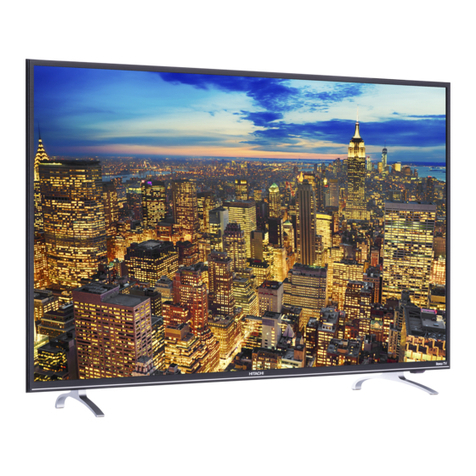
  9. Hitachi 61SWX10B User manual

Hitachi 61SWX10B User manual

Other manuals for 61SWX10B

2

This manual suits for next models

6

Other Hitachi TV manuals

Hitachi C21-TF641S User manual

Hitachi

Hitachi C21-TF641S User manual

Hitachi 57S715 User manual

Hitachi

Hitachi 57S715 User manual

Hitachi L32A102 User manual

Hitachi

Hitachi L32A102 User manual

Hitachi 51F710A/DP55 User manual

Hitachi

Hitachi 51F710A/DP55 User manual

Hitachi L24VG07U User manual

Hitachi

Hitachi L24VG07U User manual

Hitachi 27CX0B User manual

Hitachi

Hitachi 27CX0B User manual

Hitachi C2178FS User manual

Hitachi

Hitachi C2178FS User manual

Hitachi 22HYD06U User manual

Hitachi

Hitachi 22HYD06U User manual

Hitachi CL43WP910TAN User manual

Hitachi

Hitachi CL43WP910TAN User manual

Hitachi ULTRAVISION C58M6 User manual

Hitachi

Hitachi ULTRAVISION C58M6 User manual

Hitachi 55HK6200U User manual

Hitachi

Hitachi 55HK6200U User manual

Hitachi 40HXC06U User manual

Hitachi

Hitachi 40HXC06U User manual

Hitachi L22DP03C User manual

Hitachi

Hitachi L22DP03C User manual

Hitachi 40HBD06U User manual

Hitachi

Hitachi 40HBD06U User manual

Hitachi C2119T User manual

Hitachi

Hitachi C2119T User manual

Hitachi 32R20 User manual

Hitachi

Hitachi 32R20 User manual

Hitachi 24HXJ15U User manual

Hitachi

Hitachi 24HXJ15U User manual

Hitachi C1422R User manual

Hitachi

Hitachi C1422R User manual

Hitachi C2524T User manual

Hitachi

Hitachi C2524T User manual

Hitachi 51F510 DP43 User manual

Hitachi

Hitachi 51F510 DP43 User manual

Hitachi Ultravision C55M6 User manual

Hitachi

Hitachi Ultravision C55M6 User manual

Hitachi C2121T User manual

Hitachi

Hitachi C2121T User manual

Hitachi Roku TV Series User manual

Hitachi

Hitachi Roku TV Series User manual

Hitachi Opus C2164TN User manual

Hitachi

Hitachi Opus C2164TN User manual

Popular TV manuals by other brands

Philips 32PFL7403D null

Philips

Philips 32PFL7403D null

Philips 19PFL3403D null

Philips

Philips 19PFL3403D null

Philips 19PFL5403D null

Philips

Philips 19PFL5403D null

Philips 32PFL7605C null

Philips

Philips 32PFL7605C null

Philips 32PFL7603D - annexe 1 null

Philips

Philips 32PFL7603D - annexe 1 null

Haier HS-2190 null

Haier

Haier HS-2190 null

Philips 19PFL3404D null

Philips

Philips 19PFL3404D null

Toshiba 27A10 owner's manual

Toshiba

Toshiba 27A10 owner's manual

Philips 42PF9630A/37 user manual

Philips

Philips 42PF9630A/37 user manual

DAEWOO ELECTRONICS DTQ-14V1FC Service manual

DAEWOO ELECTRONICS

DAEWOO ELECTRONICS DTQ-14V1FC Service manual

Changhong Electric uhd55b6000is Operation manual

Changhong Electric

Changhong Electric uhd55b6000is Operation manual

Philips Matchline 21CE7551 operating instructions

Philips

Philips Matchline 21CE7551 operating instructions

Panasonic Genus TX-G10 operating instructions

Panasonic

Panasonic Genus TX-G10 operating instructions

Toshiba 19A20 Service manual

Toshiba

Toshiba 19A20 Service manual

Philips 25PT4523-16 manual

Philips

Philips 25PT4523-16 manual

Sony XBR-100Z9D reference guide

Sony

Sony XBR-100Z9D reference guide

Philips PR0930X3 owner's manual

Philips

Philips PR0930X3 owner's manual

Philips Brilliance 231P4QPY user manual

Philips

Philips Brilliance 231P4QPY user manual

manuals.online logo
manuals.online logoBrands
  • About & Mission
  • Contact us
  • Privacy Policy
  • Terms and Conditions

Copyright 2025 Manuals.Online. All Rights Reserved.

',CTION COLOR TV
_TING GUIDE
IMPORTANT SAFETY INSTRUCTIONS
FIRST TIME USE
THE GENIUS
REMOTE CONTROL
2-4
5-22
23-35
ULTRATEC BIT-MAP
ON-SCREEN DISPLAY 36-70
,_,_ ASK USEFUL INFORMATION INDEX 71-75
-_-RGYSTAR ® Partner, Hitachi, Ltd. has determined that this
_eets the ENERGYSTAR ® guidelines for energy efficiency.
IMPORTANT
Follow all warnings and instructions marked on this projection television.
WARNING
RISK OF ELECTRIC SHOCK
DO NOT OPEN
CAUTION: TO REDUCE THE RISK OF ELECTRIC SHOCK,
DO NOT REMOVE COVER (OR BACK).
NO USER SERVICEABLE PARTS INSIDE.
REFER SERVICING TO QUALIFIED SERVICE PERSONNEL.
The lightning flash with arrowhead symbol, within an equilateral
triangle, is intended to alert the user to the presence of uninsulated
"dangerous voltage" within the products enclosure lhat may be of a
sufficient magnitude to constitute a risk of electric shock 1o persons.
The exclamation point within an equilateral triangle, is intended to
alert the user to the presence of imporlant operating and
maintenance (servicing) instruclions in lhe lilerature accompanying
the appliance.
WARNING:
TO REDUCE THE RISK OF FIRE OR ELECTRIC SHOCK, DO NOT
EXPOSE THIS APPARATUS TO RAIN OR MOISTURE.
NOTE: • There are no user serviceable parts inside the television.
• Model and serial numbers are indicated on back side of the television.
• This television is not intended for use in a computer room.
CAUTION: Adjust only those controls that are covered in the instructions, as improper changes or modifications not
expressly approved by HITACHI could void the user's warranty.
MODIFICATIONS: The FCC requires the user to be notified that any changes or modifications made to this device that
are not expressly approved by Hitachi America, Ltd. Home Electronics Division may void the user's
warranty.
POWER SOURCE
I
I
I
I
This projection television is designed to operate on 120 Volts 60Hz, AC current.
Insert power cord into a 120 Volt 60Hz outlet.
TO PREVENT ELECTRIC SHOCK, DO NOT USE THE TELEVISION'S (POLARIZED)
PLUG WITH AN EXTENSION CORD, RECEPTACLE, OR OTHER OUTLET UNLESS THE
BLADES AND GROUND TERMINAL CAN BE FULLY INSERTED TO PREVENT BLADE
EXPOSURE.
NEVER CONNECT THE TELEVISION TO 50HZ, DIRECT CURRENT, OR ANYTHIN(
OTHER THAN THE SPECIFIED VOLTAGE.
NOTE: This television receiver will display television closed captioning, (r_ or E_), in accordance with I
paragraph 15.119 of the FCC rules. I
_CAUTION: Never remove the back cover of the television as this can expose you to very high voltages and other
servicehazards'shop,f the te ev s on does not operate proper y, unp ug the te ev s on and ca your author zed dea er or
2
SAFETY TIPS
IMPORTANT SAFETY INSTRUCTIONS
CAUTION: • Read these instructions.
• Keep these instructions.
• Heed all warnings.
• Follow ait instructions.
SAFETY POINTS YOU SHOULD KNOW ABOUT
YOUR HITACHI PROJECTION TELEVISION
Our reputation has been built on the quality, performance, and ease of service of HITACHI televisions.
Safety is also foremost in our minds in the design of these units. To help you operate these products properly, this section illustrates safety tips which
will be of benefit to you. Please read it carefully and apply the knowledge you obtain from it to the proper operation of your HITACHI television.
Please fill out your warranty card and mail it to HITACHI. This will enable HITACHI to notify you promptly in the improbable event that a safety
problem should be discovered in your product model.
FORYOURPERSONALSAFETY
1 Do not defeat the safety purpose of
tile pa[adzed or grounding type plug
A polarized plug has _o blades with
one wider than the othe_ A
grounding type plug has two blades
and a third grounding prong¸ The
wide blage or the _ird prong are
provided for your safety¸ If the
prowded plug does not fit into your
outlet, consult an eJectriclan for
replacement of the obsoJete outlet¸
2 When the power cord or plug is
damaged or frayed, unplug the
television from the wall outlet and
refer servicing to qualified service
personnel¸
3 DO not overload walt outlets and
extension cords as this can resuJt in
fire or electric shock¸
6.
4 Protect the power cord from being O_-
walked on or pinched particularly at
plugs, convenience receptacles,
and the point where they exit from
the apparatus
5 DO not attempt to service the
teJevision yourself as opening or
removing covers may expose you
to dangerous voltage or other
hazards. Refer all servicing to
qualified service personnel
g.
Never push objects of any kind into
the television's cabinet slots as they
may touch dangerous voltage points
or short out parts that could result in
a fire or electric shock Never spill
liquid of any kind on the television
ifthe television has been dropped or
the cabinet has been damaged,
unplug the television from the wall
outlet and refer servicing to qualified
service personnel
Refer all servicing to qualified
service personnel Servicing [s
required when the apparatus has
been damaged [n any way, such
as power supaty cord or plug [s
damaged, liquid has been ag[lled
or objects have fallen into the
apparatus, the apparatus has
been exposed to rain or moisture,
does not ooparate normalty, or
has been dropped
Do not subject your television to
impact of any kind Be careful not to
damage the picture tube surface
Clean only with dry cloth
11 1 Do not place the television on an
unstable cart, stand, or table The
television may fall, causing
serious lniury to a child or an
adult, and serious damage to the
appliance Use only with a cart or
stand recommended by the
manufacturer, or sold with the
television¸ Wall or shelf moun_Jng
should follow the manufacturer's
instructions, and should use a
mounting kit approved by the
manulacturer
11 2 Use only with the cart, stand,
tripod, bracket, or table specified
by the manufacturer, or sold with
the agparatues When a cart [s
used, use caution when moving
the cart/apparatus combination to
avoid iniury from tip over
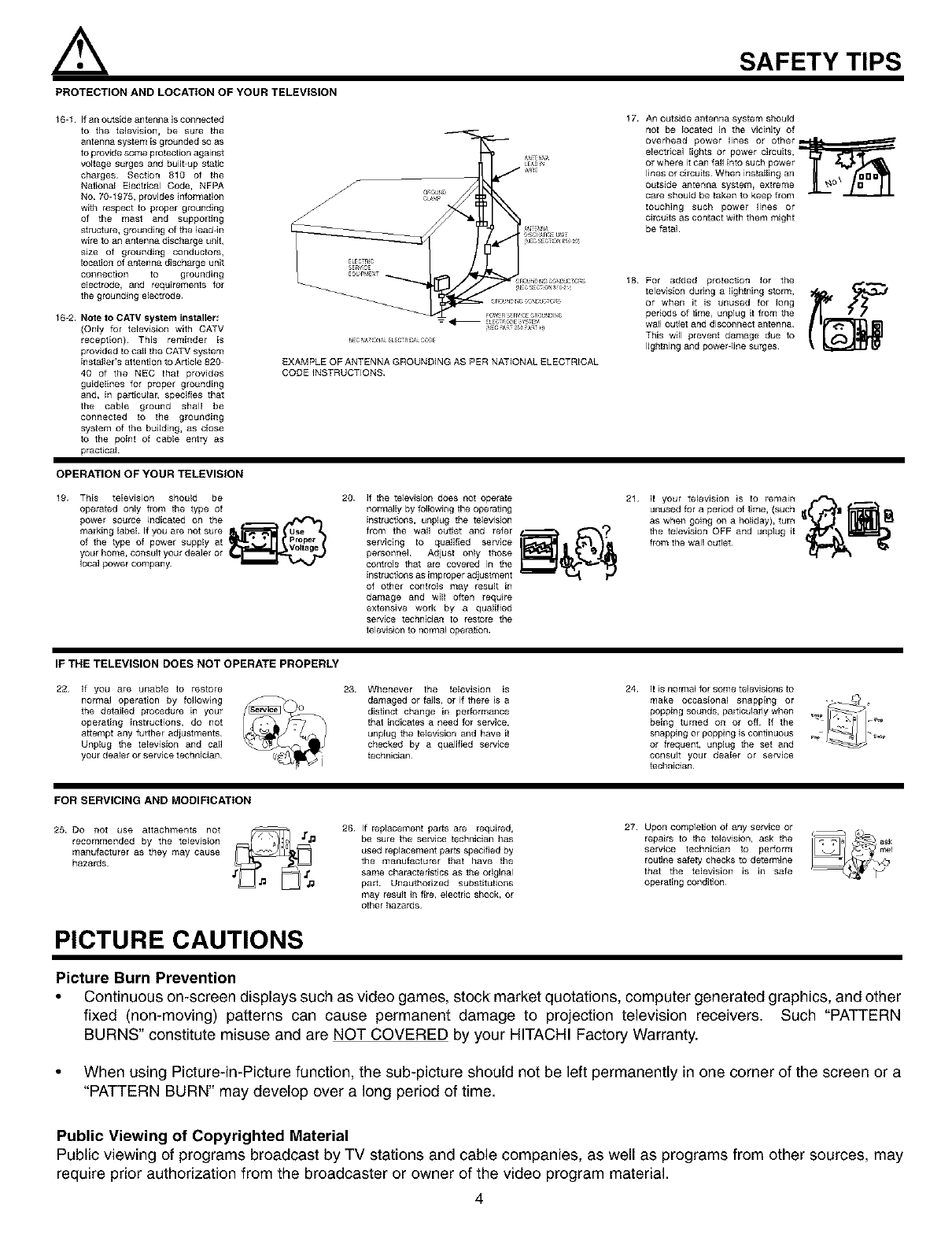
PROTECTION AND LOCATION OF YOUR TELEVISION
12 Do not use this apparatus near
water
• Never expose the television to
rain or water If the set has been
exposed to rain or water, unplug
television from wail outlet and
refer to qualified service
personnel¸
13 Choose a place where light
(artificial or sunlight) does not
shine directly on the screen
14 Avoid dusty places Accumulated _" _.e?_-.j$_¥'_j
dust inside the chassis may cause
failure of the television when high
humidity persists
15 The television has slots or openings
[n the cabinet for ventilation
purposes which provide reliable
operation ol the receiver and
protect the television from
overheating These openings must
not be bJocked or covered¸
• Do not block any ventilation
openings Installin accordance with
the manufacturer's instructions
• Never cover the slots or openings
with cloth or other material
Never block the bottom ventilation rJ[_
slots of the television by placing [ton
a bed, sofa, rug, etc
• Do not install near any heat sources ,,u%,_,
such as radiators, heat registers, _ _j'_
stoves, or other apparatus (including f_,_'_'_'_
amplifiers) that produce heat¸
• Never place the television near or
over a radiator or heat generator¸
• Never place the television in a built in l_l|
encJosure unless proper ventilation
is provided¸
3
PROTECTION AND LOCATION OF YOUR TELEVISION
SAFETY TIPS
16 1 If an outside antenna is connected
to the tetevision, be sure the
antenna system ls grounded so as
to provide some protection against
voltage surges and buildup static
charges¸ Section 810 of the
National Electrical Code, NFPA
No 70 1975, provides information
with respect to proper grounding
of the mast and supporting
structure, grounding of the lead-in
wire to an antenna discharge unit,
size of grounding conductors,
IDeation of antenna discharge unit
connection to grounding
electrode, and requirements for
the grounding eJectrode
16 2. Note to CATV system installer;
(Only for television with CATV
reception) This reminder ls
provided to call the CATV system
[nstafler's attention to Ar tlcle 820
40 of the NEC that provides
guidelines for proper grounding
and, [n particular, specifies that
the cable ground shall be
connected to the grounding
system of the building, as ctose
to the point of cable entry as
practical
EXAMPLE OF ANTENNA GROUNDING AS PER NATIONAL ELECTRICAL
CODE iNSTRUCTIONS
17 An outside antenna system should
not be located in the vicinity of
overhead power lines or other_
electrical tights or power circuits,
or where it can fail into such power
lines o_ circuits When installing an
outside antenna system, extreme
care should be taken to keep from
touching such power fines or
circuits as contact with them might
be fatal
18 For added protection for the
television dunng a lightning stom_,
or when it is unused for long
periods of time, unplug it from the
wa_ out_et and disconnect antenna
This will prevent damage due to
lightning and power line surges¸
OPERATION OF YOUR TELEVISION
19 This television should be
operated only from the type of
power source indicated on the
marking [abel If you are not sure
of the type of power supply at
your home, consult you_ dealer or
local power company¸
20 If the telewsion does not operate
normally by following the opera_ng
instructions, unplug the television
from the waft outlet and refer
servicing to qualified service
personnel Adjust only those
controls that are covered in the
instructions as improper adjustment
of other controls may result in
damage and will often require
extensive work by a qualified
service technlciaJ_ to restore the
television to normal operation
21 if your television is to remain
unused for a period of _me, (such j
as whel_goh_gonaholiday),tum _ _
the teJevision OFF and unplug it
from the wal_ outlet _/_1 _'_
IF THE TELEVISION DOES NOT OPERATE PROPERLY
22 if you are unable to restore
normal operation by foflow[ng
the detailed procedure in your
operating instructions, do not
attempt any further adjustments
Unplug the television and call
you_ deale_ or service technician¸
23 Whenever the television [s
damaged or fails, or if there is a
distinct change in pe#ormaRce
that indicates a need for service,
unpEug the television and have it
checked by a qualified service
technician¸
24 it is normal for some teEevisions to
make occasional snapping or -_+
popping sounds, partlcuEady when _+
being turned on or off If the
snapping or popping is continuous _.+p
or frequent, unplug the set and
consult your dea_er or service
technician
FOR SERVICING AND MODIFICATION
25 Do not use attachments not
recommended by the television
manufacturer as they may cause
hazards
26 If replacement parts are required,
be sure the service technician has
used replacement parts specified by
the manufacturer that have the
same characteristics as +J_eoriginal
part Unauthorized substitutions
may result iR fire, electric shock, or
other hazards
27 Upon completion of any service or
repairs to the television, ask the
service technician to perform
rou_ne safety checks to determine
that the television is in safe
operating condition¸
PICTURE CAUTIONS
Picture Burn Prevention
•Continuous on-screen displays such as video games, stock market quotations, computer generated graphics, and other
fixed (non-moving) patterns can cause permanent damage to projection television receivers. Such "PATTERN
BURNS" constitute misuse and are NOT COVERED by your HITACHI Factory Warranty.
• When using Picture-in-Picture function, the sub-picture should not be left permanently in one corner of the screen or a
"PATTERN BURN" may develop over a long period of time.
Public Viewing of Copyrighted Material
Public viewing of programs broadcast by TV stations and cable companies, as well as programs from other sources, may
require prior authorization from the broadcaster or owner of the video program material.
4

ACCESSORIES
Check to make sure you have the following accessories before disposing of the packing material.
O(D#O
QQOD
(OC) O)
.....O'(QO .......
0 0 0
o
CLU-5711TSI 1.
(D(DQ
(D C) (b
(o q) qo
....0 (o 0 ......
_®_
0_o®
CLU-5713TSI 1.
PART NAME
43" TELEVISION
STAND
SP-43W
(Notincluded,
orderseparately)
OPTIONAL
PART NO,
H530052
CUSTOM HITACHI TELEVISION STAND
Excellent for VCR and video4ape storage.
Special features include smoked glass doors
and an adjustable shelf. Available in shark grey.
ILLUSTRATION
2,
,_ CAUTION: Television stand model SP-43W is designed for use with a 43 inch or smaller television set. Use of a smaller
stand, a non Hitachi recommended stand or a generic stand may result in instability, causing possible injury.
1. Remote Control Unit CLU-5711TSI (Part No. HL01641), or
Remote Control Unit CLU-5713TSI (Part No. HL01643).
2. Two "AA" size, 1.5V batteries (For Remote Control Unit).
REMOTE CONTROL BATTERY INSTALLATION AND REPLACEMENT
1. Open the battery cover of the remote control by pushing the notched part of the cover with your fingers and pulling the
cover off.
2. Insert two new "AA" size batteries for the remote control. When replacing old batteries, push them towards the springs
and lift them out.
3. Match the batteries to the (+) and (-) marks in the battery compartment.
BOTTOM VIEW
4. Replace the cover.
CAUTION:
Lilt _p o_ tab to
_emove _a_k eeve_.
Danger of explosion if battery is incorrectly replaced. Replace with the same or equivalent type.
5I
HOW TO SET UP YOUR NEW HITACHI PROJECTION TV
ANTENNA
Unless your TV is connected to a cable TV system or to a centralized antenna system, a good outdoor color TV antenna is
recommended for best performance. However, if you are located in an exceptionally good signal area that is free from interference and
multiple image ghosts, an indoor antenna may be sufficient.
LOCATION
Select an area where sunlight or bright indoor illumination will not fall directly on the picture screen. Also, be sure that the location
selected allows a free flew of air to and from the perforated back cover of the set.
To avoid cabinet warping, cabinet color changes, and increased chance of set failure, do net place the TV where temperatures can
become excessively hot, for example, in direct sunlight or near a heating appliance, etc.
VIEWING
The major benefit of the HITACHI Projection Television is its large viewing screen. To see this large screen at its best, test various
locations in the room to find the optimum spot for viewing.
The best picture is seen by sitting directly in front of the TV and about 10 to 18 feet from the screen. Picture brightness decreases as
the viewer moves to the left and right of the receiver.
During daylight hours, reflections from outside light may appear on the screen. If so, drapes or screens can be used to reduce the
reflection or the TV can be located in a different section of the room.
If the TV's audio output will be connected to a Hi-Fi system's extemal speakers, the best audio performance will be obtained by placing
the speakers equidistant from each side of the receiver cabinet and as close as possible to the height of the picture screen center. For
best stereo separation, place the external speakers at least four feet from the side of the TV, place the surround speakers to the side
or behind the viewing area. Differences in room sizes and acoustical environments will require some experimentation with speaker
placement for best performance.
0'
1
,_ CAUTION: Magnetic fields, such as those of external speakers, may cause the picture to distort if they are placed tee
close to the television. Move the magnetic field source away from the television until there is no picture
distortion.
6
HOOK-UP CABLES AND CONNECTORS
Most video/audio connections between components can be made with shielded video and audio cables that have phono connectors.
For best performance, video cables should use 75-Ohm coaxial shielded wire. Cables can be purchased from most stores that sell
audio/video products. Below are illustrations and names of common connectors. Before purchasing any cables, be sure of the output
and input connector types required by the various components and the length of each cable.
3O0-Ohm Twin Lead Connector
This outdoor antenna cable must be connected to an antenna
adapter (300-Ohm to 75-Ohm).
"F" Type 75-Ohm Coaxial Antenna Connector
For connecting RF signals (antenna or cable TV) to the antenna
jack on the television.
@
Phono Connector
Used on all standard video and audio cables which connect to
inputs and outputs located on the television's rear jack panel and
front control panel.
S-VIDEO (Super Video) Connector
This connector is used on camcorders, VCRs, and laserdisc
players with an S-VIDEO feature in place of the standard video
cable to produce a high quality picture.
ANTENNA CONNECTIONS TO REAR JACK PANEL
VHF (75-Ohm) antenna/CATV (Cable TV)
When using a 75-Ohm coaxial cable system, connect the outdoor
antenna or CATV coaxial cable to the ANT A (75-Ohm) terminal. If
you have a second antenna or cable TV system, connect the coaxial
cable to the ANT B terminal.
VHF (3O0-Ohm) antenna!UHF antenna
When using a 3gO-Ohm twin lead from an outdoor antenna, connect
the VHF or UHF antenna leads to screws of the VHF or UHF
adapter. Plug the adapter into the antenna terminal on the TV.
When both VHF and UHF antennas are connected
Attach an optional antenna cable mixer to the TV antenna
terminal, and connect the cables to the antenna mixer. Consult
your dealer or service store for the antenna mixer.
Tooutdoorantenna
r__l_. Tosecondantenna
or cablesystem
To outdoor VHF
or UHF antenna
t
Tooutdoor
ToUHF ANT A/ANTB antennaor
Antenna
, _ C'_ system
¢
Antenna mixer
7
FRONT VIEW
FRONT PANEL CONTROLS
Models: 61UWX10BA, 53UWX10B, _
43UWX10B
® ®
IIIIIIIIII
Models: 61SWX10B, 61SWX12B,
53SWX10B, 53SWX12B
@0 ® ®
,!
_ [_
HITACHI
......oo i o%
..... T
® ®
(_) MENU/SELECT button
This button allows yeu te enter the MENU, making it possible to set TV features to your preference without using the remote. This
button also serves as the SELECT button when in MENU mode.
(_) INPUT/EXIT button
Press this button to select the current antenna source, VIDEO: 1, 2, 3, 4, 5 or alternate antenna source. Your selection is shown
in the top right corner of the screen. This button also serves as the EXIT button when in MENU mode.
NOTES: Your remote control does not have an INPUT button. To change to video inputs, press VIDI-VID5 buttons depending
on your choice (see page 23).
(_ CHANNEL selector
Press these buttons until the desired channel appears in the top right corner of the TV screen. These buttons also serve as
the cursor down (_') and up (A) buttons when in MENU mode.
(_ VOLUME level
Press these buttons for your desired sound level. The volume level will be displayed on the TV screen. These buttons also serve
as the cursor left (4) and right (>-) buttons when in MENU mode.
(_) POWER button
Press this button to turn the TV on or off.
8
FRONT PANEL CONTROLS
(_) POWER light
You will see a red light when the TV is turned on.
(_) PERFECT PICTURE sensor
The Perfect Picture sensor will make automatic picture adjustments depending on the amount of light in the room to give the best
picture. (see page 57)
(_ REMOTE CONTROL sensor
Point your remote at this area when selecting channels, adjusting volume, etc.
(_) MAGIC FOCUS
Use this button to adjust your picture quality to optimum performance.
(_) FRONT INPUT JACKS (for VIDEO: 3)
Use these audio/video jacks for a quick hook-up from a camcerder or VCR to instantly view your favorite show or new recording.
Press the INPUT button until VIDEO: 3 appears in the top right corner of the TV screen. Ifyou have mene sound, insert the audio
cable into the left audio jack.
NOTES: 1. Your HITACHI Projection TV will appear to be turned OFF if there is no video input when VIDEO: 1, 2, 3, 4 or 5 is

selected. Check the Power Light to make sure the TV is turned off when net in use.
2. To see an auto-demonstration of the on-screen displays with HELP text displayed, press and hold the POWER
button on the TV set for approximately five seconds. Press the POWER button on the TV again to end the auto-
demonstration.
9
FRONT PANEL JACKS AND CONNECTIONS
The front panel jacks are provided as a convenience to allow you to easily connect a camcorder or VCR as shown in the following
examples:
INPUT MENU
[] []
EgQT SELE,_r
OO
VOL- VOI.+ CH- CH+
D D D D
I,%_o.-, T
]o_ic
_IC_
S-INPUT
(Optional, see note)
INPUT MENU VOI.- VOI.+ CH- CH+
D D D D D D
_,r_,ELE_ " 'OU_." "
I,.-,10o o] []
FOCUS
IllNPUT
OUTPUT
@ _) _Lou_ P S-VHS Video camera
S-VHS V UT
Backot VCR
J,
NOTE: 1. Completely insert connection cord plugs when connecting to front panel jacks. If you do not, the played back picture
may be abnormal.
2. If you have a S-VHS VCR, use the S-INPUT cable in place of the standard video cable.
3. If you have a mono VCR, insert the audio cable into the left audio jack of your TV.
10