manuals.online logo
Brands
  1. Home
  2. •
  3. Brands
  4. •
  5. Holux
  6. •
  7. GPS
  8. •
  9. Holux M 1200E User manual

Holux M 1200E User manual

Other manuals for M 1200E

3

Other Holux GPS manuals

Holux UB-93 SPECIFICATION V0.4 User manual

Holux

Holux UB-93 SPECIFICATION V0.4 User manual

Holux GM-270 User manual

Holux

Holux GM-270 User manual

Holux 236 User manual

Holux

Holux 236 User manual

Holux GR-230 User manual

Holux

Holux GR-230 User manual

Holux 236 User manual

Holux

Holux 236 User manual

Holux GR-213USB User manual

Holux

Holux GR-213USB User manual

Holux GR-90 User manual

Holux

Holux GR-90 User manual

Holux M-241 User manual

Holux

Holux M-241 User manual

Holux GR-211 User manual

Holux

Holux GR-211 User manual

Holux M-1200 User manual

Holux

Holux M-1200 User manual

Holux GR-90 User manual

Holux

Holux GR-90 User manual

Holux GPSPORT 245 BIKE - User manual

Holux

Holux GPSPORT 245 BIKE - User manual

Holux Tracker-007 User manual

Holux

Holux Tracker-007 User manual

Holux GM-120 User manual

Holux

Holux GM-120 User manual

Holux M-1000C - User manual

Holux

Holux M-1000C - User manual

Holux GPSport 260 User manual

Holux

Holux GPSport 260 User manual

Holux GR-88 User manual

Holux

Holux GR-88 User manual

Holux M-1200 User manual

Holux

Holux M-1200 User manual

Holux M-89 - User manual

Holux

Holux M-89 - User manual

Holux M-1000B User manual

Holux

Holux M-1000B User manual

Holux GR-213U User manual

Holux

Holux GR-213U User manual

Holux GR-500 User manual

Holux

Holux GR-500 User manual

Holux M-87 - User manual

Holux

Holux M-87 - User manual

Holux FUNTREK 130 - V5.0 User manual

Holux

Holux FUNTREK 130 - V5.0 User manual

Popular GPS manuals by other brands

Polar Electro RCX3 Getting started guide

Polar Electro

Polar Electro RCX3 Getting started guide

Tobii Pro Spectrum user manual

Tobii Pro

Tobii Pro Spectrum user manual

Gosafe G91I user manual

Gosafe

Gosafe G91I user manual

Fisher TW-8800 operating manual

Fisher

Fisher TW-8800 operating manual

LG LN740 Series Specifications

LG

LG LN740 Series Specifications

Prestigio GeoVision 430 user manual

Prestigio

Prestigio GeoVision 430 user manual

JVC KW-NT3HDT instructions

JVC

JVC KW-NT3HDT instructions

Yoctopuce Yocto-GPS user guide

Yoctopuce

Yoctopuce Yocto-GPS user guide

RightWay GPS Navigator RW 200 user manual

RightWay

RightWay GPS Navigator RW 200 user manual

TomTom VIA user guide

TomTom

TomTom VIA user guide

Garmin ECHOMAP PLUS owner's manual

Garmin

Garmin ECHOMAP PLUS owner's manual

Telit Wireless Solutions GM862GPS Series Hardware user's guide

Telit Wireless Solutions

Telit Wireless Solutions GM862GPS Series Hardware user's guide

Hama 53118 Operating	 instruction

Hama

Hama 53118 Operating instruction

Garmin DEZL 580 owner's manual

Garmin

Garmin DEZL 580 owner's manual

Jigabot EX quick start guide

Jigabot

Jigabot EX quick start guide

Pointer Cellocator CelloTrack XT LTE overview

Pointer

Pointer Cellocator CelloTrack XT LTE overview

Queclink GV55LITE user manual

Queclink

Queclink GV55LITE user manual

Starcom Systems Kylos Compact user guide

Starcom Systems

Starcom Systems Kylos Compact user guide

manuals.online logo
manuals.online logoBrands
  • About & Mission
  • Contact us
  • Privacy Policy
  • Terms and Conditions

Copyright 2025 Manuals.Online. All Rights Reserved.

HOLUX M-1200E Bluetooth GPS Logger User’s Manual
Bluetooth GPS Logger
M-1200E
User’s Guide
Rev. 1.0
Technology Inc.
No.1-1 Innovation Road I Science-based Industrial Park HsinChu City 300 Taiwan
TEL: 886-3-6687000 FAX: 886-3-6687111
Website: www.holux.com
All Right Reserved
HOLUX M-1200E Bluetooth GPS Logger User’s Manual
Table o Contents
OVERVIEW .................................................................................................................................. 2
M
AIN FEATURES
.......................................................................................................................... 3
TECHNICAL SPECIFICATION ................................................................................................ 4
B
ASIC
S
PECIFICATION
................................................................................................................ 4
A
CQUISITION
T
IME
(
REFER TO
MTK
CHIP SPECIFICATION
)..................................................... 4
R
ECEIVER
A
CCURACY
................................................................................................................ 4
U
SE
L
IMITATION
......................................................................................................................... 4
P
OWER
S
UPPLY
........................................................................................................................... 4
O
UTPUT AND
I
NTERFACE
............................................................................................................ 5
P
HYSICAL
.................................................................................................................................... 5
O
THER
F
UNCTIONS
..................................................................................................................... 5
GETTING STARTED...................................................................................................................
H
ARDWARE
D
ESCRIPTION
.......................................................................................................... 7
M-1200E
L
OGGER
T
RACK
L
OGGING AND
M
ODE
S
ETTING
...................................................... 9
I
NSTALLATION OF
M
INI
GPS
V
IEWER PROGRAM
.................................................................... 12
E
XECUTE THE
M
INI
GPS
V
IEWER PROGRAM
......................................................................... 12
DRIVER INSTALLATION........................................................................................................ 13
S
YSTEM
R
EQUIREMENT
........................................................................................................... 13
I
NSTALLATION
.......................................................................................................................... 13
I
MPORTANT
............................................................................................................................... 13
APPENDIX A. TROUBLESHOOTING ................................................................................... 15
APPENDIX B. POWER JACK & DATA PORT ..................................................................... 1
APPENDIX C. BLUETOOTH DEVICES CONNECTION ................................................... 17
FEDERAL COMMUNICATIONS COMMISSION (FCC) STATEMENT .......................... 19

HOLUX M-1200E Bluetooth GPS Logger Manual
2
Overview
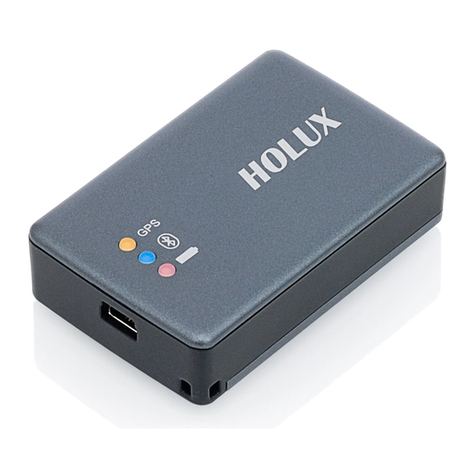
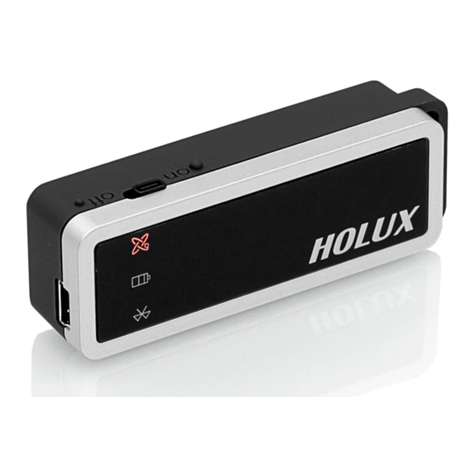
(Fig.1)
The HOLUX M-1200E Wireless GPS Logger allows users to store of up to 200 000
GPS coordinates of latitude longitude time and elevation. The data can be analyzed by
uploading to a computer through its USB/Bluetooth connection. Once the coordinates and
the digital images are integrated the tracking history and the location the images were
taken can be shared through ezTour or Google Earth.
The HOLUX M-1200E Bluetooth GPS Logger (Fig. 1) is a total solution GPS Logger
with Bluetooth USB interface and built-in rechargeable battery for high sensitivity to
tracking signal. M-1200E
design is based on Media Tek Inc.(MTK) GPS solution-MT3329

low power Architecture.
M-1200E meets the requirement of field application such as car navigation mapping
agriculture surveying and security use under clear view of sky.
With the advanced technology M-1200E can search up to 66 satellites simultaneously
re-acquires satellite signals in 0.1 microsecond and updates position data per second.
HOLUX M-1200E Bluetooth GPS Logger Manual
3
Main eatures

Built in MTK MT3329 Low power consumption GPS chipset

66 parallel satellite-search channels for fast acquisition and reacquisition

Superior sensitivity up to -165 dBm

Built-in WAAS/EGNOS Demodulator without any additional hardware

Compatible with Bluetooth Serial Port Profile (SPP) completely

Low power consumption

Rechargeable and changeable Lithium-ion battery

Provide expand terminal contact to other system without Bluetooth device

Support NMEA0183 V 3.01 data protocol

4 color-LEDs indicate to show the status of device

FLASH based program memory. New software revisions upgradeable through
serial interface

Small sleek and lightweight design easily fits in your hand

Over-heat protection – auto-power off when operation temperature reaches 45°C.

Enhanced algorithms -SnapLock and SnapStart provide superior navigation
performance in urban canyon and foliage environments.

For Car navigation Marine navigation Fleet management AVL Personal
navigation Tracking System and Mapping device application.
HOLUX M-1200E Bluetooth GPS Logger Manual
4
Technical Speci ication
Basic Speci ication
 Chipset: MTK MT3329
chipset
.
 Channels: 66 parallel satellite-search channels.
 Frequency: 1575.42 MHz
 Receiver: L1 C/A code.
 Built-in 4M Bytes flash memory capable of recording 200 000 points of GPS data
Acquisition Time (re er to MTK chip speci ication)
 Reacquisition: 0.1 second
 Cold start: < 36 seconds
 Warm start:< 33 seconds
 Hot start: < 1 second
Receiver Accuracy
 Normal: < 3 meters CEP without SA
 Enable EGNOS or WAAS:
Position: < 2.2 meters horizontal 95% of time
< 5 meters Vertical 95% of time
 Velocity: within 0.1 meters / second
 Time: 0.1 microsecond synchronized GPS time
Use Limitation
 Altitude: < 18 000 meters (60 000 feet)
 Velocity: < 515 meters/ second (1000Knots)
 Acceleration: 4 G
 Jerk: 20 meters / second
3
max
Power Supply
 External Voltage: 5V DC +/-5%
 Batteries:
Main Power: Built-in rechargeable Li-ion battery for system power.
 Working voltage: 30~40mA@ 3.7V (Normal mode).
28mA (Power Saving).
 Auto Power saving mode.
 Circuit protection on M-1200E when over-temperature 45°C occurs.
HOLUX M-1200E Bluetooth GPS Logger Manual
5
Output and Inter ace
 Output
I. Output protocol
Baud Rate: 38400 bps
Data bit: 8
Parity: No
Stop bit: 1
II. Format. NMEA0183 V3.01: GPGGA (1time/1 sec) GPGSA (1 time/5 sec.)
GPGSV (1time /5 sec.) GPRMC (1time /1 sec.) GPVTG (1 time/1 sec) (GLL
or MTK NMEA Command for optional).
III. Datum: WGS84.
 Input/ Output Inter ace:
I. Compatible Bluetooth Serial Port Profile (SPP) Version1.2 and class 2(up to 10
meter range).
II. In/Out Port. GPS signal (Out)/Command(In) with USB Level Mini USB Type B
Connector
Physical
 Size
:
68.3 × 22.8 × 15.5 (mm) (+/-0.5mm)
 Weight
:
32 (g) (+/- 0.5g)
 Operating Temperature
:
-10°C to + 60°C (under the un-charging condition);
Charging Temperature
:
0°C to + 45°C
 Storage Temperature
:
-20°C to + 60°C
 Operating humidity
:
5% to 85% No condensing
Other Functions
 Bluetooth frequency: 2.4 ~2.48GHz
 Bluetooth Input Sensitivity: -85dBm
 Low sensitivity of receiving satellite signal
:
-165 dBm
 LED Functions: Indicate Bluetooth status GPS status Battery Status Battery
charging status and POI record status.
HOLUX M-1200E Bluetooth GPS Logger Manual
6
Getting Started
1. Charge Battery
Please charge battery till LED off for the first time.
Power cable plug in Power cable connect to power socket
↓
Charge Battery
Battery indicator light:
Power too low -------- Red LED on
Charging -------------- Green LED on
Full or Not in charging -- LED off
2. Turn on the power
Bluetooth Status –
Note:
Some PDAs have to re-open
Bluetooth manager for Bluetooth
device re-connection.
Turn on
M-1200E
power
Blue LED blinking
(1time / 1sec)
Transferring…
Blue LED blinking
(1time / 3 sec)
Waiting for
reconnection…
Blue LED blinking
(1time / 1sec)
No
Searching
Bluetooth device
Stop data
transferring?
Data
is
transferring?
Reconnect
Bluetooth device?
No
No
No
Yes
Yes
Yes
Yes
Mini USB socket
Power switch
Bluetooth Status
HOLUX M-1200E Bluetooth GPS Logger Manual
7
GPS Status -
Put
M-1200E
in clear view of the sky without any obstruction for better
satellite acquiring.
↓ ↓
Search GPS -- Power Off --
↓
Position Fixed --
3. POI Status
Press the POI button once the POI yellow LED is on. Release the button
the yellow LED is off. It means the POI record is completed.
↓ ↓
Hardware Description
1). M-1200E Body description see Fig. 2:
(Fig.2)
Turn on
M-1200E
power Turn off
M-1200E
power
Steady orange
LED on
Orange
LED blinking
Orange
LED off
LED of Battery
(Red / Green)
Bluetooth LED (Blue)
POI LED (Yellow)
LED of GPS (Orange)
Power switch
GPS
Status
Press M-1200E POI Button
Yellow LED on POI button
Release M-1200E POI Button
Yellow LED off
POI status
HOLUX M-1200E Bluetooth GPS Logger Manual
8
2). LED status:
SYMBOL
COLOR
STATUS DESCRIPTION
1 time / 1 sec
Search Bluetooth Device
1 time / 1 sec
Standby Mode
Blue Blinking
1 time / 3 sec
Transferring Data
Press POI
button
Light on Record the POI data
Bluetooth/
POI Yellow
Release
POI button
Light off POI record is completed.
Red Light on Power too low
Green
Light on In charging
Battery N/A Light off Battery full or Not in charging
Light on Acquiring Satellites
GPS Orange
Blinking 1 time / 1 sec
Position Fixed
3). Power Switch:
a. Power on Orange light is on.
b. Power off Orange light is off.
4). Optional accessories and connector description see Fig. 4
(Fig.4)
USB to Mini USB Cable
PC/ Notebook
USB port
HOLUX M-1200E Bluetooth GPS Logger Manual
9
M-1200E Logger Track Logging and Mode Setting
5.2.1 Data Logging
1. When the power is turned on the device will automatically search for satellite
positioning (orange LED on) and then logging will begin. When the power is switched
off the logging will stop. When the power is turned on again it will once again conduct
satellite positioning and start logging.
5.2.2 GPS Data Logging Mode Setting
1. Install ezTour onto a PC or notebook (see ezTour instructions manual for installation)
2. When the application runs the following main screen can be seen: