manuals.online logo
Brands
  1. Home
  2. •
  3. Brands
  4. •
  5. MSE Audio
  6. •
  7. Amplifier
  8. •
  9. MSE Audio SoundTube IPD-HUB 2 User manual

MSE Audio SoundTube IPD-HUB 2 User manual

Popular Amplifier manuals by other brands

Magnat Audio EDITION FOUR Owner's manual/warranty document

Magnat Audio

Magnat Audio EDITION FOUR Owner's manual/warranty document

Inter-m PA-2000A Operation manual

Inter-m

Inter-m PA-2000A Operation manual

Yamaha TX6n owner's manual

Yamaha

Yamaha TX6n owner's manual

Peavey TNT 150 user guide

Peavey

Peavey TNT 150 user guide

Bosch LBB 1903/10 Installation and user instructions

Bosch

Bosch LBB 1903/10 Installation and user instructions

Avocent Emerge DA1200D Installer/user guide

Avocent

Avocent Emerge DA1200D Installer/user guide

Redgum RGi35 operating instructions

Redgum

Redgum RGi35 operating instructions

Cambridge Audio AXA25 user manual

Cambridge Audio

Cambridge Audio AXA25 user manual

Alpine MRP-M200 owner's manual

Alpine

Alpine MRP-M200 owner's manual

Technical Pro H1502UrBT user manual

Technical Pro

Technical Pro H1502UrBT user manual

FMS EMGZ307 operating manual

FMS

FMS EMGZ307 operating manual

Racal Instruments 5601 user manual

Racal Instruments

Racal Instruments 5601 user manual

Valcom V-1094A Technical specifications

Valcom

Valcom V-1094A Technical specifications

Cambridge Audio 851D user manual

Cambridge Audio

Cambridge Audio 851D user manual

QSC 3800 Specifications

QSC

QSC 3800 Specifications

NAD C300 owner's manual

NAD

NAD C300 owner's manual

Rotel RMB-1077 owner's manual

Rotel

Rotel RMB-1077 owner's manual

Peavey Monitor 300 Series operating guide

Peavey

Peavey Monitor 300 Series operating guide

manuals.online logo
manuals.online logoBrands
  • About & Mission
  • Contact us
  • Privacy Policy
  • Terms and Conditions

Copyright 2025 Manuals.Online. All Rights Reserved.

IPD-HUB 2 |OWNER’S MANUAL
R e v 07. 07. 2 0 2 0
by
IPD-HUB 2 |OWNER’S MANUAL
Please read the following instructions carefully before installing your SoundTube® amplier. If you have any
questions regarding installation that are not answered in the following directions, please contact your local
sound contractor or the SoundTube®/MSE Audio® technical support team. Contact information can be
found on the back of the manual.
Important Safety Instructions
1) Read these instructions.
2) Keep these instructions.
3) Heed all warnings.
4) Follow all instructions.
5) Do not use this apparatus near water.
6) Clean only with dry cloth.
7) Do not block any ventilation openings. Install in accordance with the manufacturer’s instructions.
8) Do not install near any heat sources such as radiators, heat registers, stoves, or other apparatus (including
ampliers) that produce heat.
9) Only use the attachments/accessories specied by the manufacturer.
10) Unplug this apparatus during lightning storms or when unused for long periods of time.
11) Refer all servicing to qualied service personnel. Servicing is required when the apparatus has been
damaged in any way, such as power-supply cord or plug is damaged, the apparatus has been exposed to
rain or moisture, does not operate normally, or has been dropped.
Consignes de Sécurité Importantes
1) Lisez ces instructions.
2) Conservez ces instructions.
3) Respectez tous les avertissements.
4) Suivez toutes les instructions.
5) Ne pas utiliser cet appareil près de l’eau.
6) Nettoyer seulement avec un chiffon sec.
7) Ne pas bloquer les ouvertures de ventilation. Installer conformément aux instructions du fabricant.
8) Ne pas installer près de sources de chaleur telles que des radiateurs, registres de chaleur, poêles ou
autres appareils (incluant les amplicateurs) qui produisent de la chaleur.
9) Utiliser uniquement les xations / accessoires spéciés par le fabricant.
10) Débranchez cet appareil pendant les orages ou si inutilisé pendant de longues périodes de temps.
11) Conez toute réparation à un personnel qualié. Une réparation est nécessaire lorsque l’appareil a été
endommagé de quelque façon que ce cordon d’alimentation ou la che est endommagé, l’appareil a été
exposé à la pluie ou à l’humidité, s’il ne fonctionne pas normalement ou s’il est tombé.
Included in the Box
1 - IPD-Hub 2 Amplier
1 - 4-pin Euroblock jack connector
1 - 2-pin Euroblock connector
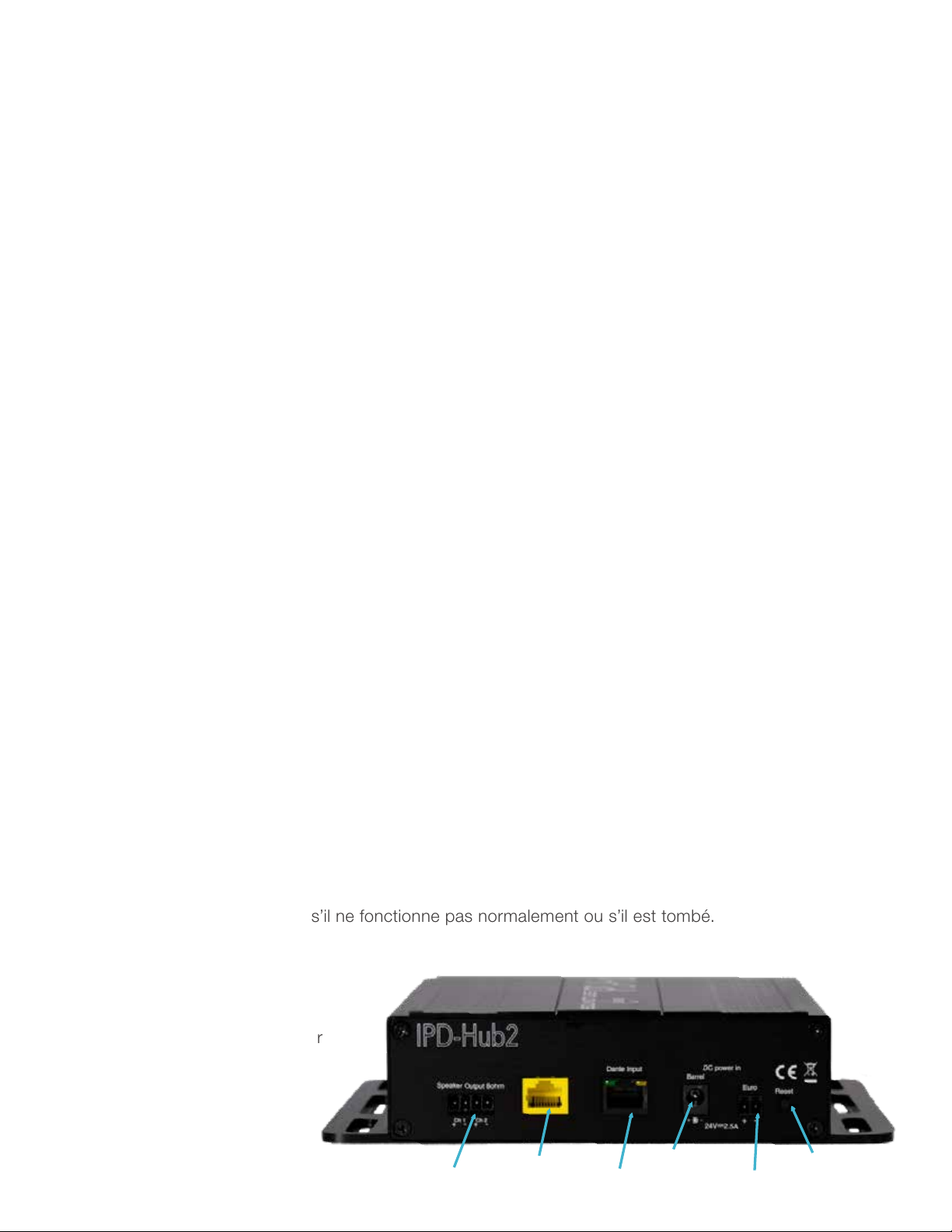
Speaker Outputs Axiom Port
Dante Ethernet Port
Barrel DC Power
Euro Jack Power
Reset Button

Installation Instructions: IPD-Hub 2 Amplifier
5C. Power Amp: Option C
Option C: With an optional
24V 2A power supply
connected to the 2-pin
Euroblock.
5B. Power Amp: Option B
Option B: With an optional
24V 2A power supply with
5.5mm x 2.1mm center + male
Barrel connector.
5A. Power Amp: Option A
Decide how the amp will be
powered. There are 3 options.
Choose only one.
Option A: With STNet 40W
PoE, PoE+ or PoE through the
Ethernet cable.
6. Done
Enjoy your newly installed IPD-
Hub 2 amplier!
2. Mount Amp
Mount the amp in the desired
location using the side
mounting rails.
1. Unpack
Unpack the amplier.
3. Connect Wires
Connect the speaker wires to
the 4-pin Euroblock. Connect
either 1 - 8 ohm speaker or
2 - 16 ohm speakers to each
channel.
4. Connect Port
Connect an RVC and Axiom
device to the yellow Axiom
Port.
7. Reset
To bring the Hub 2 back to
factory default settings, hold
the reset button for 5 seconds
and release.
by
Additional Instructions
SoundTube®by MSE Audio®| 13720 W 109th St. Lenexa, KS 66215
913-663-5600 | 855-663-5600 | www.soundtube.com
For more Dante®products, view the SoundTube®STNet®series
online, or through an authorized dealer or distributor.
®













