manuals.online logo
Brands
  1. Home
  2. •
  3. Brands
  4. •
  5. Munro
  6. •
  7. Water Pump
  8. •
  9. Munro Complete PRO II User manual

Munro Complete PRO II User manual

Other Munro Water Pump manuals
Munro SIMPLICITY User manual

Munro

Munro SIMPLICITY User manual

Munro LP Series User manual

Munro

Munro LP Series User manual

Munro MU Series User manual

Munro

Munro MU Series User manual

Popular Water Pump manuals by other brands
Watershed Innovations HYDRAPUMP SMART FLEX Instructional manual
Watershed Innovations

Watershed Innovations HYDRAPUMP SMART FLEX Instructional manual

Graco Modu-Flo AL-5M instructions

Graco

Graco Modu-Flo AL-5M instructions
Messner MultiSystem MPF 3000 operating instructions
Messner

Messner MultiSystem MPF 3000 operating instructions

Xylem Bell & Gossett WEHT0311M Installation, operation and maintenance instructions

Xylem

Xylem Bell & Gossett WEHT0311M Installation, operation and maintenance instructions

WilTec 50739 Operation manual

WilTec

WilTec 50739 Operation manual

Franklin Electric Little Giant 555702 HRK-360S instruction sheet
Franklin Electric

Franklin Electric Little Giant 555702 HRK-360S instruction sheet

Ingersoll-Rand PD02P Series Operator's manual
Ingersoll-Rand

Ingersoll-Rand PD02P Series Operator's manual

VS ZJ Series Operating	 instruction

VS

VS ZJ Series Operating instruction
Flotec FPZS50RP owner's manual

Flotec

Flotec FPZS50RP owner's manual

SKF Lincoln FlowMaster II User and maintenance instructions
SKF

SKF Lincoln FlowMaster II User and maintenance instructions

Xylem Lowara LSB Series Installation, operation and maintenance instructions

Xylem

Xylem Lowara LSB Series Installation, operation and maintenance instructions

Water Duro Pumps DCJ500 Operating & installation instructions
Water

Water Duro Pumps DCJ500 Operating & installation instructions

Action P490 Operating instructions & parts manual

Action

Action P490 Operating instructions & parts manual

Flo King Permacore Reusable Carbon Bag Disassembly. & Cleaning Instructions
Flo King

Flo King Permacore Reusable Carbon Bag Disassembly. & Cleaning Instructions

ARO ARO PD15P-X Operator's manual

ARO

ARO ARO PD15P-X Operator's manual

Pumptec 112V Series Operating instructions and parts manual
Pumptec

Pumptec 112V Series Operating instructions and parts manual

Virax 262070 user manual

Virax

Virax 262070 user manual
Neptun NPHW 5500 operating instructions

Neptun

Neptun NPHW 5500 operating instructions

manuals.online logo
manuals.online logoBrands
  • About & Mission
  • Contact us
  • Privacy Policy
  • Terms and Conditions

Copyright 2025 Manuals.Online. All Rights Reserved.

CP01R8 0421 © 2021 MUNRO COMPANIES INC., ALL RIGHTS RESERVED
OWNER’S MANUAL
Self-Cleaning Basket Strainers
PARTS - DRAWINGS - DIMENSIONS - SPECIFICATIONS
1
3Complete PRO II Assembly Guide
10 Munro LP Series Pump Operation & Maintenance
18 Munro SmartBox Reduced Incoming Amperage
21 Warranty Statement
22 Enclosure Dimensions
TABLE OF CONTENTS
3
UNIVERSAL PRO ENCLOSURE
Pressure Gauge & Sensor
Assembly Discharge Assembly
Suction Assembly
1 1/2” DISCHARGE HOSE ASSEMBLY
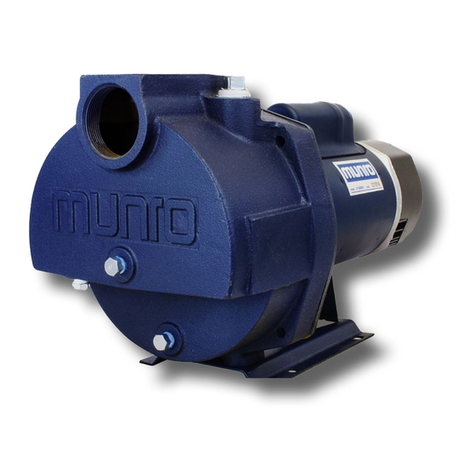
LP PUMP
PARTS
PRE-INSTALLED PARTS
TOOLS RECOMMENDED FOR ASSEMBLY
Phillips Head
Screwdriver
Teon Tape or Pipe Dope
Hammer Pliers Pipe Wrench
CONSIDERATIONS BEFORE BEGINNING ASSEMBLY
Before beginning assembly, consider how you will want to congure your pump station. The pump station comes congured for a
right-facing pump installation. If you need to change the direction of the pump, be sure to begin with the “changing the direction of
the pump” instructions (p.4).
Socket Wrench
with 7/16” Socket
(used for changing
conguration)
1” Box Wrench
(used for changing
conguration)
electrical outlet assembly
PSR control box
sensor wire and boot
(stored inside outlet
housing)
1 1/2” aluminum male cam and
PVC female cam x slip tting
discharge assembly
pressure gauge &
sensor assembly
side discharge
knockouts (2)
bottom discharge
knockouts (2)
temp sensor
Temp Sensor Sensor Wire & Boot
suction assembly
1 1/2” aluminum female cam
Munro Complete PRO ll ASSEMBLY GUIDE
4
Step 1 – Preparing the enclosure for irrigation system access knockouts
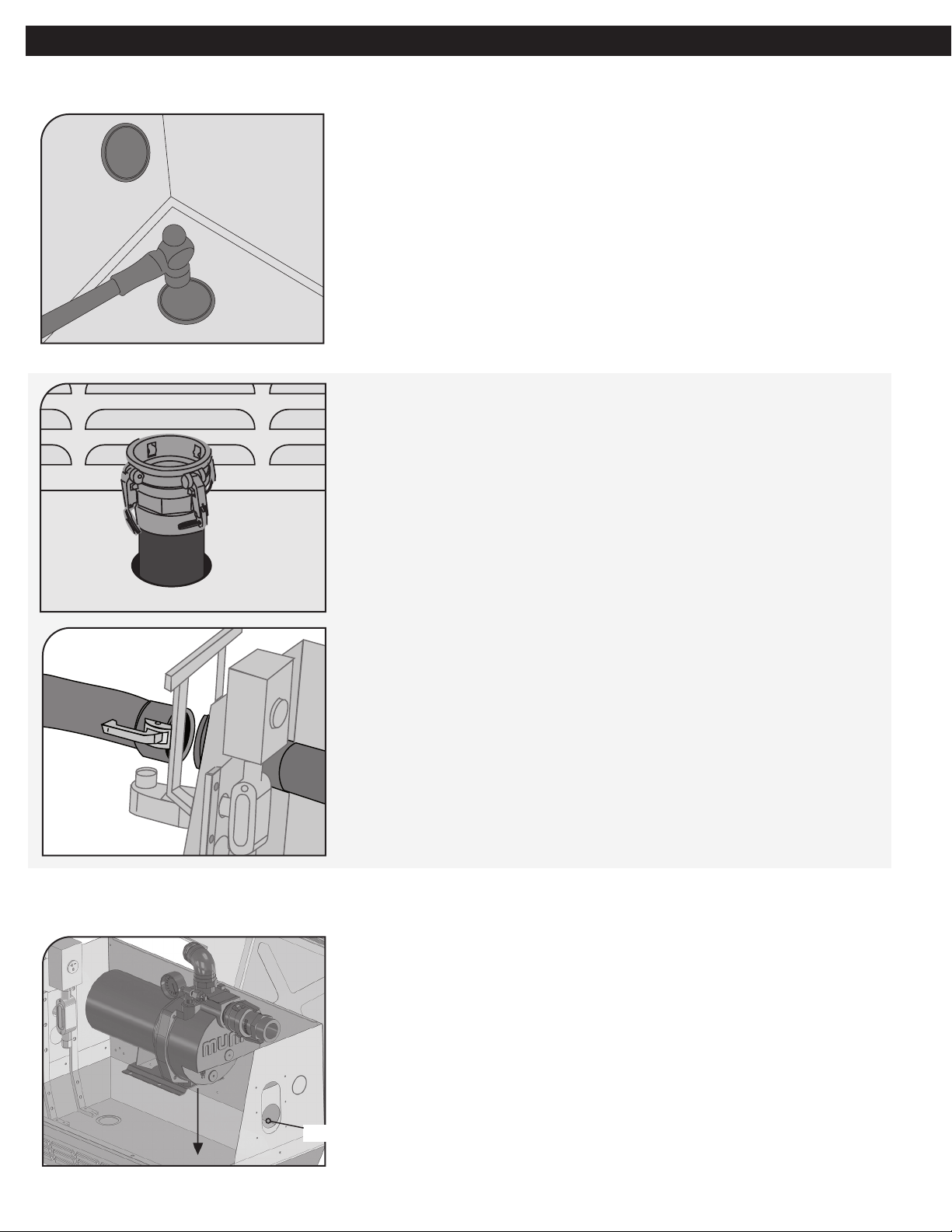
1. Using a hammer and pliers, remove the appropriate discharge
knockout from the CP unit – concentrating on the two
metal tabs.
2. Orient the enclosure to match to the irrigation inlet.
Bottom Knockout
Side Knockout
Step 2 – Setting and finalizing the pump
b). If using a side knockout – place Universal Pro Enclosure
so irrigation inlet pipe aligns with side knockout. Remove the
PVC female cam x slip tting from the hose assembly and
glue the slip tting to inlet pipe. Hose will feed through the
sidewall to pair with irrigation inlet pipe.
3. a) If using a bottom knockout – place Universal Pro
Enclosure so irrigation inlet pipe enters the enclosure
through bottom knockout hole. Remove the PVC female
cam x slip tting from the hose assembly and glue the slip
tting to inlet pipe. Hose will pair to irrigation inlet inside
the enclosure.
1. Remove the packing board from bottom of the pump.
2. Set the pump into the pump enclosure with the suction
ttings facing the suction pass-through panel
3. Push the threaded end of the suction tting through the
suction pass-through panel to connect to water source. We
recommend threading this tting to a valve for
isolation purposes.
Suction pass-through panel
Munro Complete PRO ll ASSEMBLY GUIDE
5
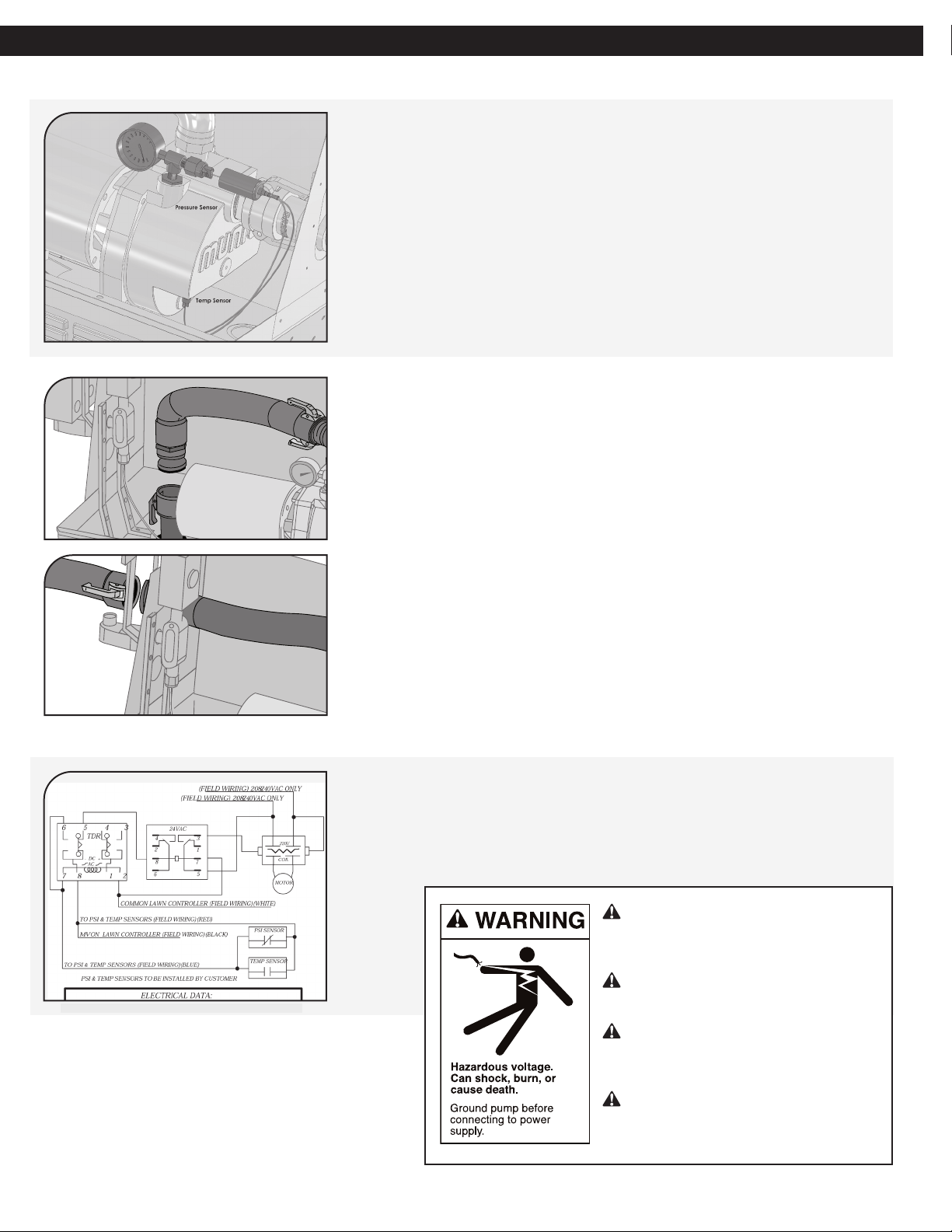
4. Locate the sensor wire and boot inside the electrical outlet
assembly.
5. Connect the quick disconnect ttings, closest to the rubber
boot, to the pressure sensor. Cover this connection with the
boot by sliding it into place.
6. Connect the remaining quick disconnect ttings over the
spade terminals of the temperature sensor.
7. Attach the female end of the discharge hose assembly to the
90˚ elbow of the discharge assembly and the male end to the
irrigation inlet tting.
8. Plug the electrical cord into the electrical outlet.
1. The pump control is prewired to the electrical outlet assembly.
2. To wire the pump control to your irrigation controller, refer to
the wiring diagram inside the control panel.
Wire motor for correct voltage. See
“Motor & Electrical” section of this
manual and motor nameplate.
Ground motor before connecting to
power supply.
Meet National Electrical Code,
Canadian Electrical Code, and local
codes for all wiring.
Follow wiring instructions in this
manual when connecting motor to
power.
Step 2 – Setting and finalizing the pump (Continued)
Step 3 – Wiring the pump control to the irrigation controller
Munro Complete PRO ll ASSEMBLY GUIDE
6
Changing the direction of the pump
To meet your installation requirements, you can change the side through which the electrical and
suction enter the enclosure.
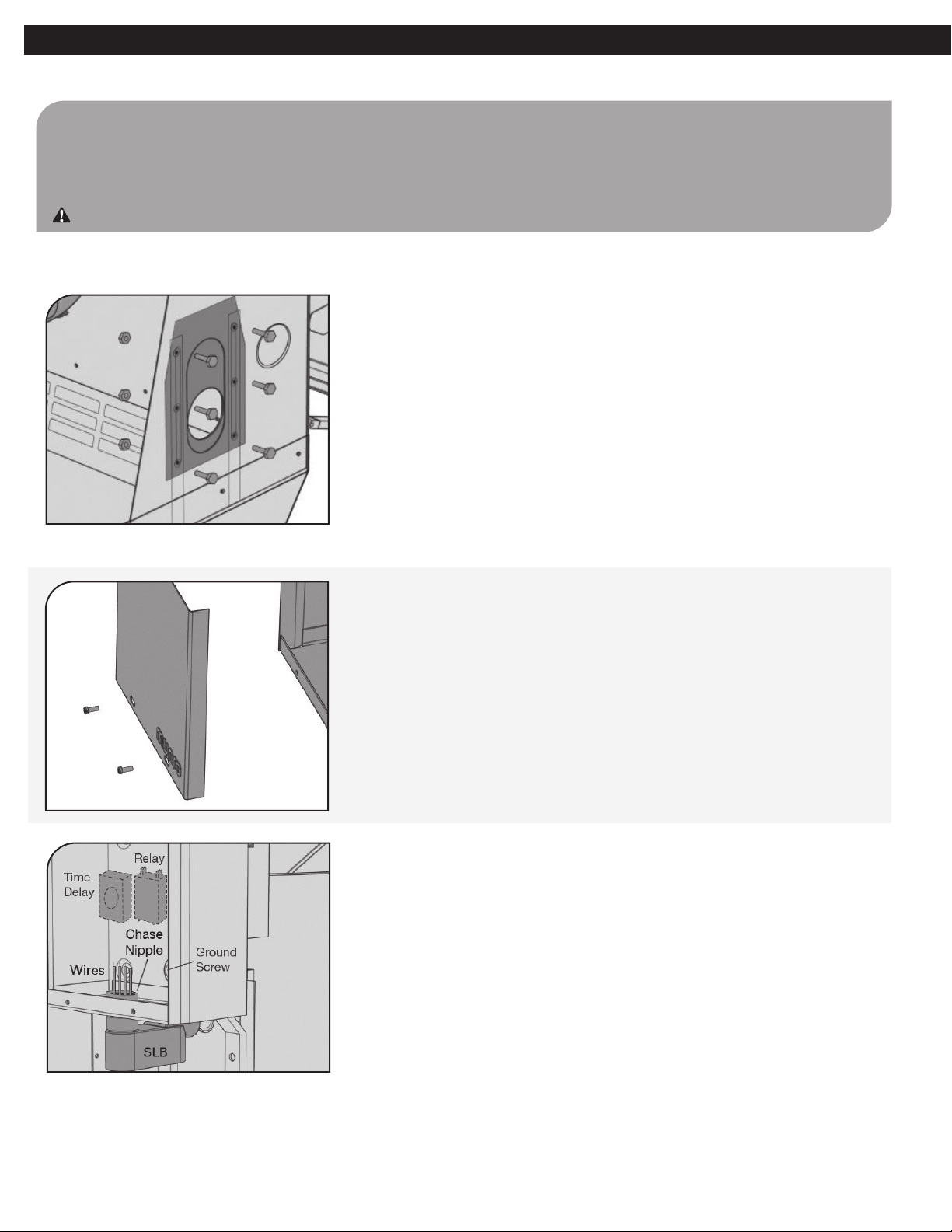
Step 1 – Remove the suction pass-through panel
1. Remove the nuts and bolts holding the suction pass-through
panel in place and slide the suction pass-through panel up
and out of the enclosure. Set the panel aside.
Use caution. Some edges may be sharp!
Step 2 – Remove the electrical assembly
1. Remove the screws on the front of the pump control box to
remove the front cover.
2. Remove the time delay device (if supplied) by gently rocking
and pulling from the socket.
3. Loosen all connected wires from the relay, ground screw and
time delay socket.
4. Unscrew the chase nipple on the inside bottom of the pump
control box and SLB to disconnect the SLB from the box. Use
1” box wrench to loosen the chase nipple.
Munro Complete PRO ll ASSEMBLY GUIDE
7
Munro Complete PRO ll ASSEMBLY GUIDE
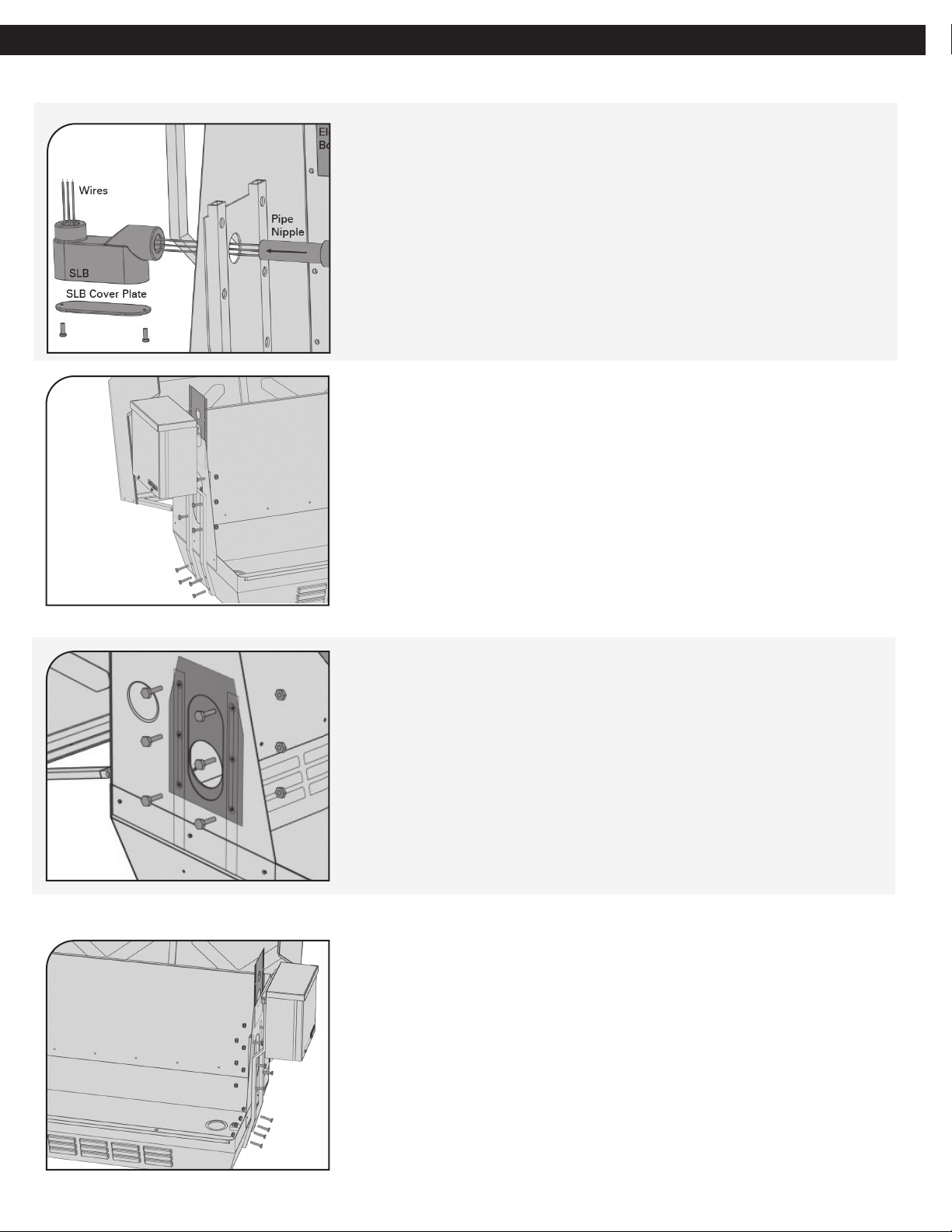
9. On the bottom of the enclosure, remove the 4 nuts and bolts
holding the control box brace in place.
10. Remove the 6 bolts that hold the electrical pass-through panel
in place, 4 are shared with the control box brace.
11. With the control box still attached, remove the outside braces.
Slide the electrical pass-through up and out of the enclosure.
5. Using a screwdriver, remove the cover plate from the SLB.
6. Out of the bottom, pull the wires from the pump control box
through the chase nipple and SLB.
7. On the outside of the pump enclosure, unscrew the SLB from
the pipe nipple on the electrical outlet assembly. Pliers may be
needed.
8. Feed the outlet assembly, wires and pipe nipple through the
round hole on the electrical pass-through panel, to the inside
of the enclosure.
Step 2 – Remove the electrical assembly (Continued)
Step 3 – Replacing the suction pass-through panel
Step 4 – Reconnecting the electrical assembly on the opposite side
1. Slide the suction pass-through panel into place on the
opposite side of the enclosure, ensuring that the suction hole
is aligned to the pump suction height. Replace the nuts and
bolts to secure the suction pass-through panel.
1. Holding the pump control box brace, with pump control
attached, place on the outside of the enclosure and secure the
nuts and bolts into place.
8
Step 4 – Reconnecting the electrical assembly on the opposite side (Continued)
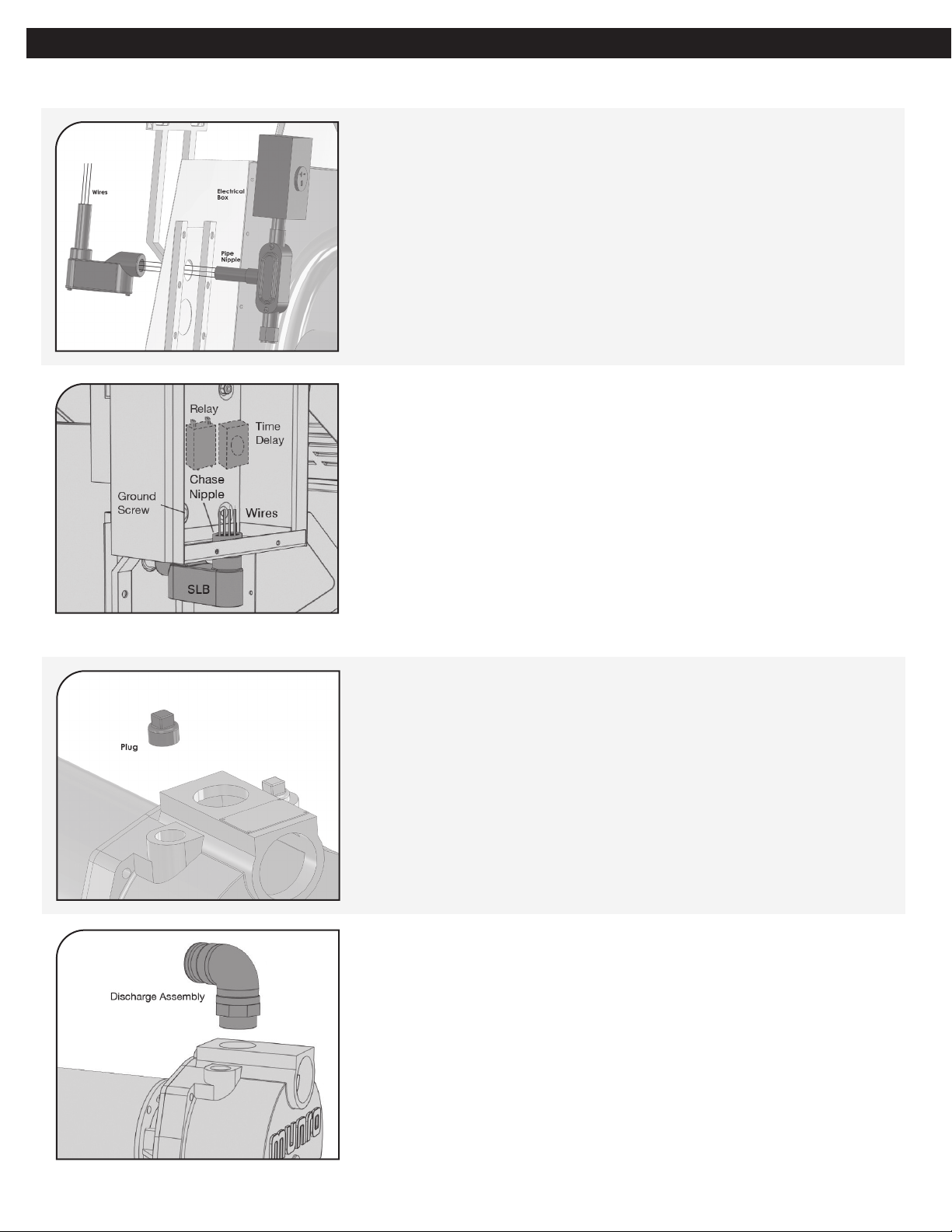
2. With the electrical outlet assembly on the inside, feed the
outlet assembly wires and pipe nipple through the round hole
on the electrical pass-through panel of the enclosure.
3. On the outside of the pump enclosure, thread the wiring
through the round opening on the end of the SLB. Screw
the SLB to the pipe nipple on the electrical outlet assembly.
Ensure that the other round opening is facing up, toward the
control box, and the uncovered access is facing down.
4. Screw the chase nipple through the knockout hole on the
bottom of the pump control box and into the SLB to secure
the SLB to the bottom of the pump control box. Use 1” box
wrench to tighten the chase nipple on the SLB.
5. Thread the wiring from the SLB into the pump control box,
passing through top SLB hole and chase nipple. Replace SLB
cover plate.
6. Rewire the control panel using the instructions found on the
inside of the box lid. Replace time delay device (if supplied).
Step 5 – Changing the pump direction
Remove Forward Plug
1. Remove front plug at the top of the pump.
2. Using a pipe wrench, remove top discharge assembly from top
of pump.
Munro Complete PRO ll ASSEMBLY GUIDE