manuals.online logo
Brands
  1. Home
  2. •
  3. Brands
  4. •
  5. Pyle
  6. •
  7. Fitness Electronic
  8. •
  9. Pyle PSWHRP58 User manual

Pyle PSWHRP58 User manual

Other Pyle Fitness Electronic manuals

Pyle PLCD5MRBTS User manual

Pyle

Pyle PLCD5MRBTS User manual

Pyle PHRM36 User manual

Pyle

Pyle PHRM36 User manual

Pyle PSWP26BK User manual

Pyle

Pyle PSWP26BK User manual

Popular Fitness Electronic manuals by other brands

Reebok B300e manual

Reebok

Reebok B300e manual

Tunturi Platinum Pro user manual

Tunturi

Tunturi Platinum Pro user manual

ergoline ergoselect 150 Operator's manual

ergoline

ergoline ergoselect 150 Operator's manual

Kettler SM3635-68 Training and operating instructions

Kettler

Kettler SM3635-68 Training and operating instructions

BodyMedia DD100 manual 

BodyMedia

BodyMedia DD100 manual 

New Balance EX2 900 user manual

New Balance

New Balance EX2 900 user manual

Sami WS-2301 wearable instruction manual

Sami

Sami WS-2301 wearable instruction manual

Polar Electro FT80 Getting started guide

Polar Electro

Polar Electro FT80 Getting started guide

Kettler SF1B Training and operating instructions

Kettler

Kettler SF1B Training and operating instructions

Kettler ST 2610-9 Training and operating instructions

Kettler

Kettler ST 2610-9 Training and operating instructions

Polar Electro Team2 Quick guides

Polar Electro

Polar Electro Team2 Quick guides

Kettler ELYX 5 Training and operating instructions

Kettler

Kettler ELYX 5 Training and operating instructions

Precor P10 Operating and maintaining

Precor

Precor P10 Operating and maintaining

BingoFit 907HR user manual

BingoFit

BingoFit 907HR user manual

LeMond Fitness Wireless Cadence Meter Pilot II instruction manual

LeMond Fitness

LeMond Fitness Wireless Cadence Meter Pilot II instruction manual

Slendertone Fitness Electronics instruction manual

Slendertone

Slendertone Fitness Electronics instruction manual

Hama 00177740 operating instructions

Hama

Hama 00177740 operating instructions

Technaxx TX-37 user manual

Technaxx

Technaxx TX-37 user manual

manuals.online logo
manuals.online logoBrands
  • About & Mission
  • Contact us
  • Privacy Policy
  • Terms and Conditions

Copyright 2025 Manuals.Online. All Rights Reserved.

I
MI'O~IAN
I
:
1'.>Ck
Cd,.,rully
in
orig;",,1
f"'d;ogo>
if
""";ble
.
We
...,
...,. responsible
lor
doln
...ge
in<;urrW
in
returning .ems
for
""",ir.
"
1eI1~'"
<taling
)'OUr
e>O>CI
11"'<'1
addres. dlyIime
phone
n"'''I''-
....
dnd II", prol..lern
)'OU
.'"
"'l""icn<i'>g should be in<;ludcd.
You
.......
~I'"
"""Ioso!
~
copy
of
lhe original
"",e
i
l~
~
.,.."",
of
dale
of !>,fCh.lsc
Brooklyn.
NY
11lQ4
1
80(1
·444 ,671
Mc.KI.ly Through
",unday.
'lAM
'"
5PM
f<idoy'lAM
'"
lPM
bll_.
1.0
Introduction
Thank yeu for purchasing
of
this Watch.
Your Watch provides the essential information
about your body
or
exercise during your
exercise, like
heart
rate, walking steps.
traveling speed, distance, etc.
To
liIet the most
of
your purchase,
it
is
adVisable
to
use
this
stopwatch
in
conformity
with
the
below notes:
•
Be
sure to carefully read this manual and
keep
it
on
hand
for later reference when
necessary.
These
data
can be
further
logged into B
logbook
for
later
review. Your Watch also
includes
current
time,
daily
alarm,
chronograph, timer, pacer and dual time
function.
• Avoid exposing your Watch to extreme
conditions
for
an unreasonable time.
• Avoid rough
usages
or
severe impacts to
your
Watch.
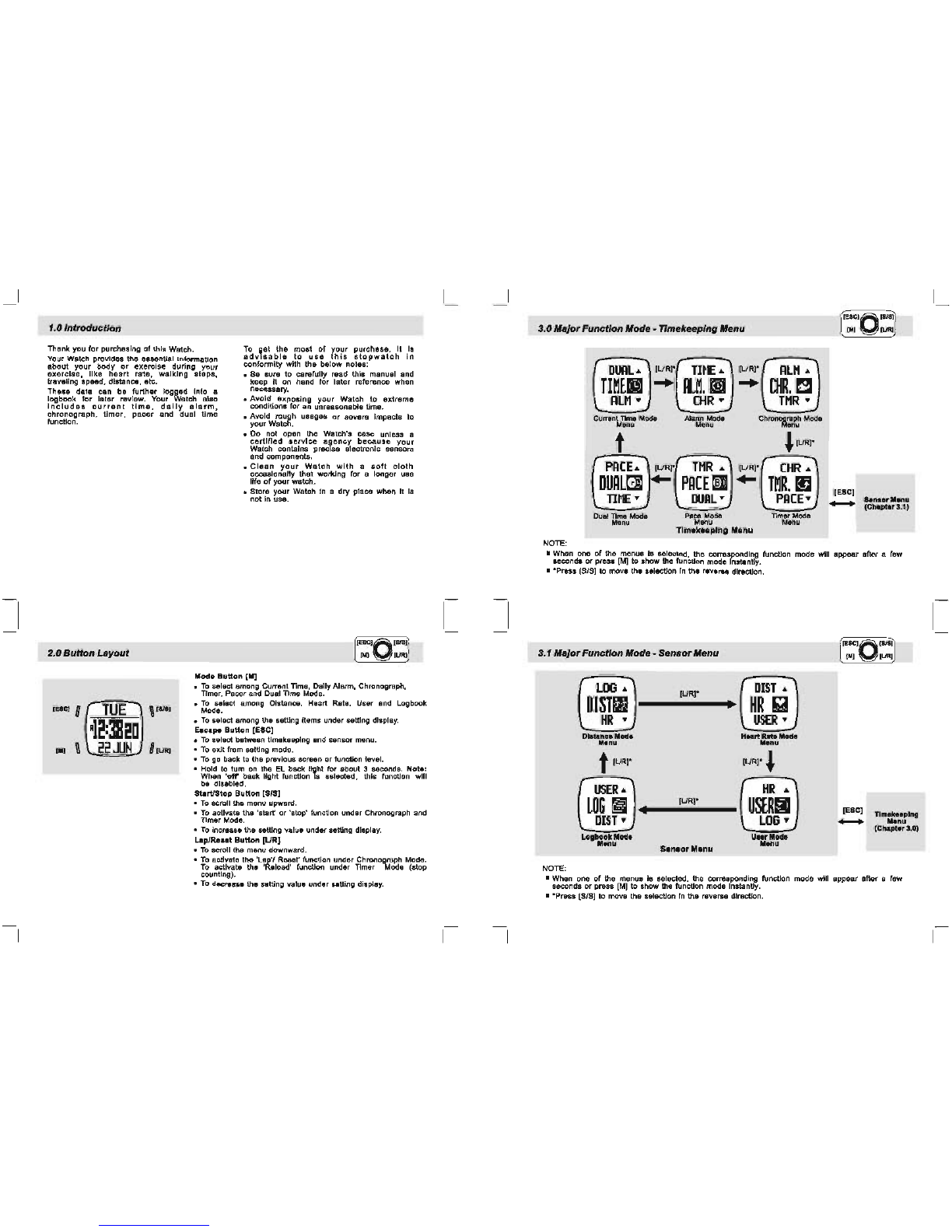
2.0
Button
Layout
[E'C]
0
TUE
,
[III)
R12:3820
[.]
22JUN
•
Do
not open the Watch's case unless a
certified
service
aljlency
because
your
Watch contains precise electronic sensors
and components.
•
Clean
your
Watch
with
a
soft
cloth
occasionally that working for a longer use
life
of
your watch.
• Store your Watch
In
a
dry
place when It Is
not in use.
Mode
Button
[M]
•
To
select among Current Time, Daily Alarm, Chronograph,
Timer, Pacer and Dual Time Mode.
•
To
select among Distance, Heart Rate, User and Logbook
Mode.
•
To
select among the setting items under setting display.
Escape
Button
[ESC]
•
To
select between timekeeping and sensor menu.
•
To
exit from setting mode.
•
To
go back to the previous screen
or
function level.
• Hold to tum
on
the
EL
back
Ii~ht
for about 3 seconds.
Note:
When
'off'
back light function IS selected, this function will
be disabled.
Start/Stop
Button
[SIS]
•
To
scroll the menu upward.
•
To
activate the 'start'
or
'stop' function under Chronograph and
Timer Mode.
•
To
increase the setting value under setting display.
Lap/Reset
Button
[LIR]
•
To
scroll the menu downward.
•
To
activate the 'Lap" Reset' function under Chronograph Mode.
To
activate the 'Reload' function under Timer Mode (stop
counting).
•
To
decrease the setting value under setting display.
3.0
Major
FunctionMode -Timekeeping Menu
NOTE:
DUAL..
(URI'
mUg
...
AlM
y
Current
Time
Mode
Menu
t
PA[E
..
DUAl~
TIME
y
Dual
TIme
Mode
Menu
(L/R]*
I+-
TIME
..
nL~,1I
[HR y
A1ann
Mod.
Menu
TMR
..
PACE
[§Ill
DUAL
y
Pace
Mode
(L/RI'
AlM
..
...
[HR,~
TMR
y
chronoa~rf~
Mode
,(UR]*
(L/R]*
....
Menu
Tlmek.eplng Menu
Timer
Moda
Menu
• When one
of
the menus is selected, the corresponding function mode will appear after a few
seconds
or
press [M] to show the function mode Instantly.
• *Press [SIS]
to
move the selecUon
In
the reverse direction.

3.1
Major
FunctionMode -
Sensor
Menu
lOG
..
(UR]*
DIST
..
DI81m
•
HR
iii
HR
y
USER
y
Distanc.
Mod.
M.nu
t[LlRI-
(URI·
~
USER
..
HR
..
LOG
m (UR]*
U8ERII
•
DIST
y
lOG
y
Logbook
Mod.
M.nu
NOTE:
[ESC]
-Timekeeping
M.nu
(Chapter3.0)
• When one
of
the menus is selected, the corresponding function mode will appear after a few
seconds
or
press [M] to show the function mode Instantly.
• *Press [SIS]
to
move the selecUon
In
the reverse direction.
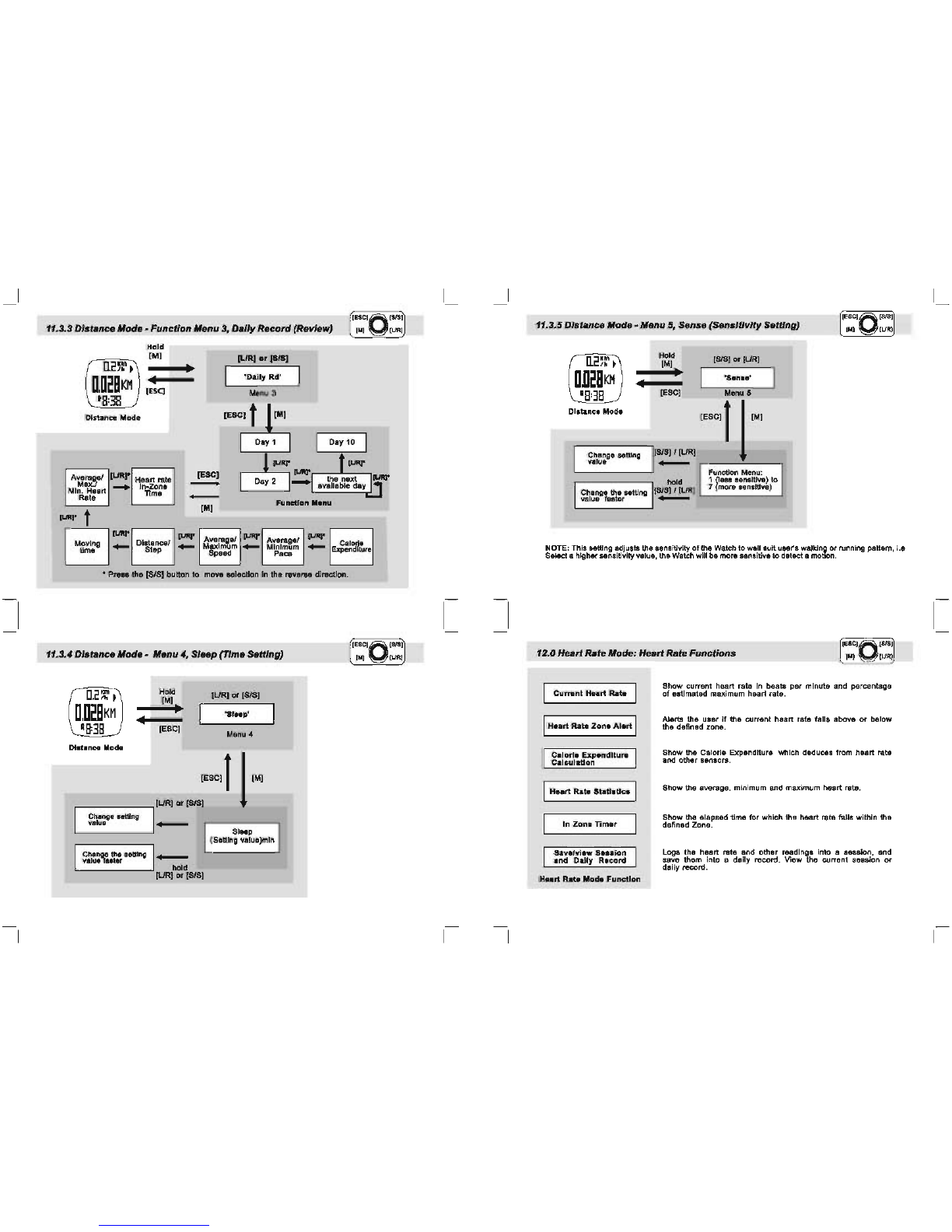
4.0
Cu".nt
Time Made-
Settlnll
the Watch
TIlE
i2:]leo
22.ll1
....
11
1.
TIm.
:I.
o..t.
!.
S
ystem
,.
"'"
!i
.
lIn
li
NOTE:
~
confttm
1M
.
,llcti
onl
Htting
• Go
10
nut
Mttlng
lew!
[SIll
• S
c;
ro
l
thl
menu
•
Chin".
thl
..
ttlng
ILIRI
• 8emll
thl
menu
• ChlnClIl
thl
.Ittlng
"i
. Preas [M) to salact among the settings.
......
,
"2. Hold
[ESCI
will
turn
ON
the backlight
if
'Norm." is selected.
PI1!I8S
any button will tum
ON
the
backlfgnt f
'Nlght'ls
selected. Backlight
will
always
off
If
'off
"
I,
selected.
"3
. The Heart Rate C
helt
Strap MUST be worn on the chest (I.e heart rate signal
II
sampling)
"4. If 'Chime' Is
ON
( the '
..
' is appeared), the Watch will beep once at t
he
hour 1.8 1:00, 2:00,
3:00, etc.
6.0A
l
~S
CI
O
'
~
0
larm
Made-
Settlnll
the
Alarm
ON
and
OFF [MI
[1.IRJ
I
OFF
I
IRLHh I
....
0'"
tIU"]
l '
"'-
RLMh
[SIS] ,
B:JB
s
la
nn
((C.
I
DRILY
I
- ti
me
I
RLH2~
I
OFF
-
DoI~""
or
""'om'
Alenn
lIode
((C.
~
--
"'-""ON
NOTE:
• If
Dll
ily
or
Weekly Alarm is
ON
(the
'lie-
'is
appeared). the Watch will beep at the predefined
alarm ti
me
dally
or
weekly.
• Tha Watch will sound
for
3D
seconds
at
the alarm time. While alarm sounds, press
any
kay to
stop the sound Instantly.
• Alarm 1 and Alarm 2 can be
set
to alarm Daily
or
Weekly. see
5.1
for
the details
of
the setting.
5.1
Alarm
Made-
Settlnll
the
Alarm
OO
U1h
7:
•
8:]1
....
CfF
'''"''
[SIS] o
r[LlR]
j
Ir
"':""
__
.J
[SIS~[
LJR
l
,--....!....
-
-,
change &eltlng change
the
uttIng
valua value faater
NOTE:
IDAl
LY
I
Do"
.......
,
I
SI1IT>
SU
N'2
AlarlftON
"i
.
If
the
'OAILr
Is
selected, the alarm Is turned
ON
and the Watch will alarm
at
the predenned
ti
me
everyday.
"
2.
If a Weekday (i.e ''''ON', "fUE' and
etc)
Is selected, the alarm Is tumed
ON
and the Watch
will alarm
at
the predefined time t
hat
weekday every wee
k.
"3. Press
(lJR
] to move the aelection in the reverse order.
8.0 Chronograph Made -
U.lnll
the
Chronollraph
[
[ESC,
"
[
S/S
~
[
"I
~
[
URI
J
1.
Elapeed
,.".
2.
Total
e
lt.
pudtime
3.
lecI
TIme
NOTE:
"1
. The Watch can record up to 50 lap times
I.
e
L1
to L
SD
.
·2. Hold down
[LJR]
for
2 seconds (when the
chronograph
is
stopped)
to
reset
the
chronograph.
If
the Chronograph Is
re.et.
the
r.corded
Lap Tlme(s) will be erased too.
[HR
lap time
\freeze for
oseconds) -
lap
no.
'0
[UR]
"1
~
R
[
S/S
]'·CO"'CHR
0:01100
-
D~DD1
:
In U
38
'
.....
Toial
elapsed
'
me
!\ol
d
[UR
] "2
Chronograph
Mode
"""_
[SIS]
CHR
0:0001
U
68
Stop Counting
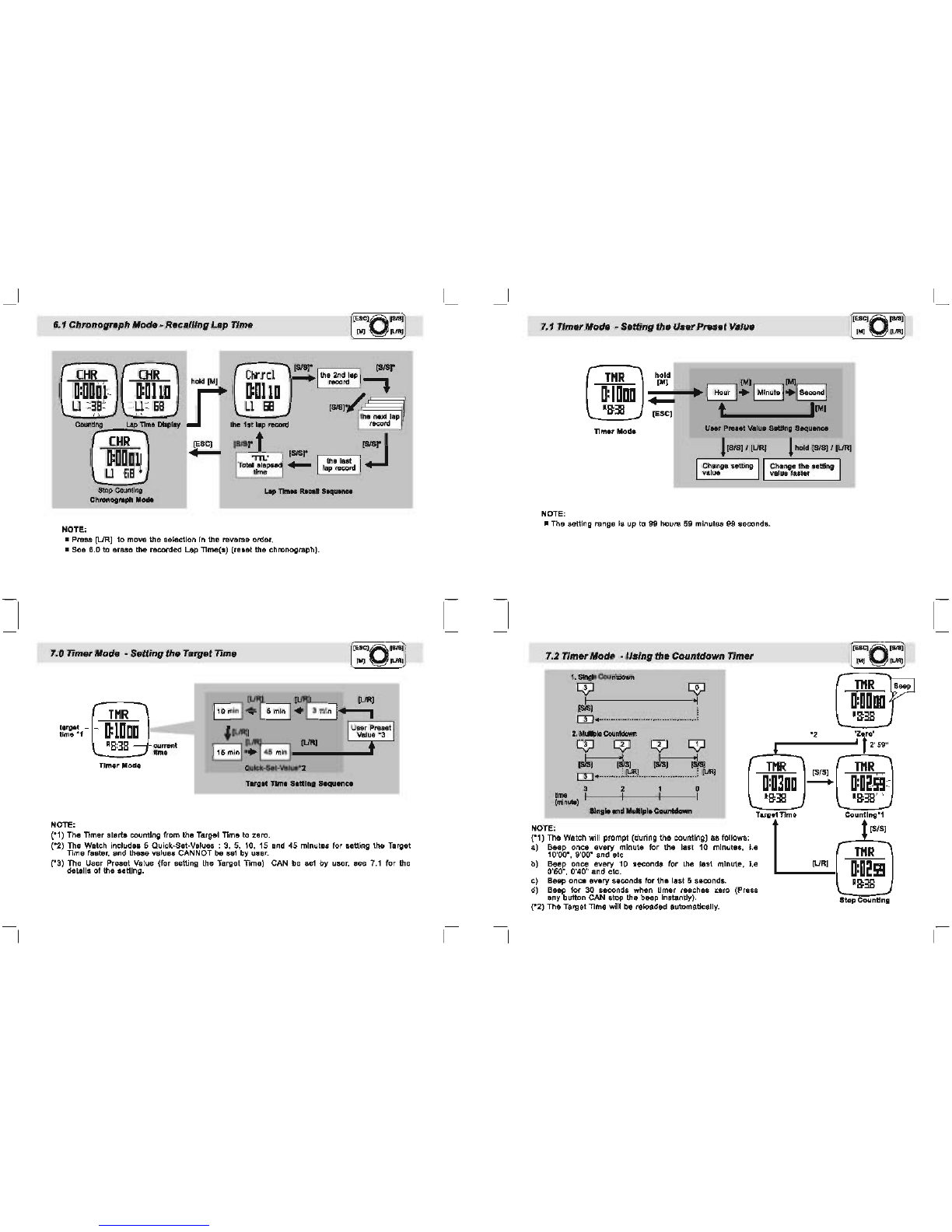
6.1 ChronogrlJph Mode -
Recalling
Lap
Time
CHR CHR
0:000
'1=
0:0110
U=
38
= =U=
68
Counting Lap
TIme
DIsplay
Chr.rci
lfi
hOld
IMI
O:Ol10
U
68
the 1st
lap
re<:ord
CHR
O:OOOIJ
[ESC]
~
r
.,,--:-,-,
17fI
ISISr
-
U
68
Stop
Counting
Chronograph lIoct.
NOTE:
• Press
[URj
to move the selection in the reverse order.
• See 6.0 to erase the recorded Lap TIme{s) (reset the chronograph).
7.0 TimerMode -
Setting
the TargetTime
TI1R
I
[lJ
B
'lJR
B [lJR1
110minl.
5min
•
3mln
.......,
target
time *
NOTE:
,-
'--
O:lDoo
-
'8:38
---j
current
time
Timer Mode
~
[lJR[
1User Preset 1
Value
*3
115
min
1~145
min
1 [lJR1 t
Qulck-5et-Yalue-.!
Target TIrnti SlIding Sequence
(*1) The Timer starts counting from the Target Time to zero.
(*2) The Watch includes 5 Quick-Set-Values :
3,
5,
10, 15 and 45 minutes for setting the Target
Time faster, and these values CANNOT be set by user.
(*3) The User Preset Value (for setting the Target Time) CAN be set by user, see
7.1
for the
detailS
of
the setting.
7.1
TimerMode -
Setting
the
User
Preset
Value
TI1R
Timer Mode
hold
1M]
[M] [M]
~-+-ot.~
~.
1Minute
1.1
Second
1
~
[ESC] t
11M]
U
..
Pruet
VIIlue
SettIng
Sequence
1
[S/SII
IURI 1
hold
ISISI
I IURI
I
Change
setting
II
I
Change
the setting I
value
II value faster
NOTE:
• The setting range is up to 99 hours 59 minutes 99 seconds.
7.2 TimerMode -Using the
Countdown
Timer
1.
SIngle
Cola"ltdcMn
~
~I
rn
..
·························
2.
MLJIpIe
CoutiloNn
~ ~
~
'*1
I~
JsI
rn
•.........
c!""!...
....
~
I
~
I
l";'t.l
3 2 0
~~)
I~---+I----~----I
..!.
TI1R
"2
[SIS]
-
....
10
....
""_.....-
T
otTi
NOTE:
arg~m.
(*1) The Watch will prompt (during the counting) as follows:
a) Beep once every minute for the last 10 minutes, i.e
10'00·,9'00·
and etc.
b) Beep once every 10 seconds for the last minute, I.e [URI
0'50·, 0'40" and etc.
c) Beep once every seconds for the last 5 seconds.
d) Beep for 30 seconds when timer reaches zero (Press
any button CAN stop the beep instantly).
(*2) The Target
lime
will be reloaded automatically.
TI1R
0:0000
'8:38
'zr'
• 2'59"
TI1R
O:oasg
=
'8:38
' ,
Countlng-1
[SIS]
TI1R
0:025g
'8:38
StopCounting
Beep
8.0
Pacer
TIme Mode -
To
Use The
Pacer
[SIS]
PACE
-1
lDDBIM
Beep Pacer
Mod.
St.p
Pacer Mode
...
t.
Stop
Beeping
Counter
Beeping
t[SIS[
Hold
[URI
PACE
2
lDDBIM
Pac.r
Mode
Stop a
••
ping
8.1
Pacer
Mode -
To
Set
Pacer
PACE
o
lDDBIM
PllCIIfMo.
Hold
IMII
t [ESC]
~------
------~
t
G
..
G
·······EJ+8
[SIS] I
[URI
! l Hold
IS/5]
I
[L/R]
Pecer
SeUlng Sequence
Stop
Counting
Note: The Pacer rate
is
setting
in
a
step
of 5 beeps
per
minute i.e 30,35,40,45,50, etc.
8.2
Pacer
Mode -
To
Use
Pacer
with
Chronograph
CHR
0:0000
DD
Stop Counting
Note:
[M[
....
~
[M[
[SlS[
-
Chronour.ph
Mode
PACE
1
lDDBIM
Pacef
Mode
Activated
bee
CHR
O:OODl
Ll
38
Counting
(1)
In
Chronograph Mode, press [S/8] to atarUslop the counting with pacer (beeping) If the
Pacer Is activated.
9.0
Dual
Time Mode -
Setting
Dua'
Time
DUAL
g~~
---j
'
2:3820
~urrent
~
8:38
[ESC]
time
NOTE:
[M[
hour
I
.....
1 minute
Dual Time SeWng Sequence
l[S/S]
I [URI 1hold [S/S] I [LIRI
CtNlnge
utung
I Change
It..
..
tting
value . value faster
• The 'second' digits of Dual Time and the 'second' digits
of
Current Time are the same.
Not.:
fu:::\
V
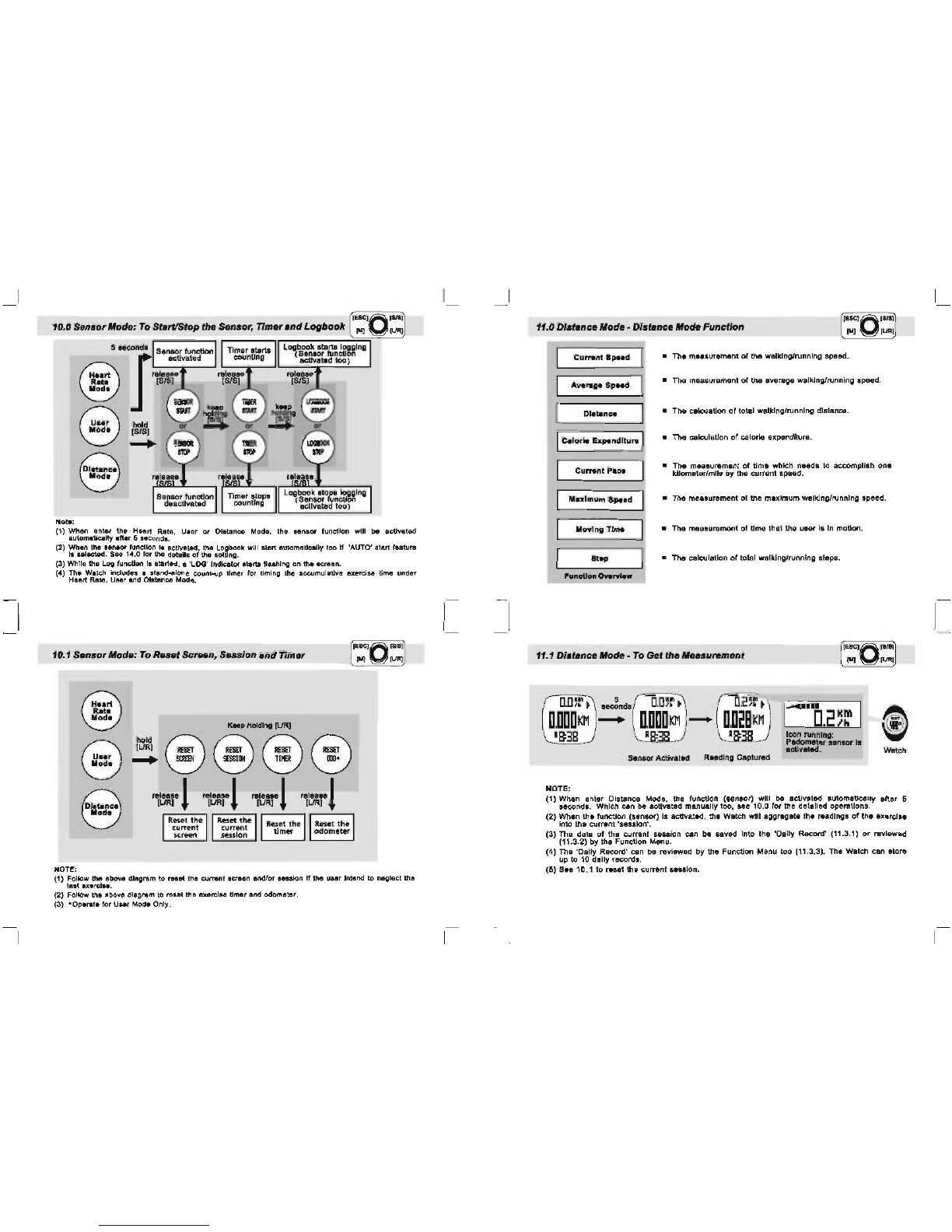
(1) When enter the Heart Rate, User
or
Distance Mode, the
.enlOf
function will be activated
automatically after 5 .econds.
(2) When the
••
nsor function
Is
activated, the Logbook will start automatically too If 'AUTO' start feature
Is
••
Iected.
Sa.
1
-4
.0 for the details of the setti
ng
.
(3) While the l
og
fu
nction 18 started, a 'LOG' Indicator
.tartli
fl
ashing on the . craan.
(
")
Th
e Watch
In
clude. a stand-alone count-up
ti
mer for
ti
mi
ng
the accu
mu
lative exercise
ti
me
under
Heart
Ra
te. Usar and DIstance Mode.
10.1
Sensor
Mode:
To
R
...
t ScnHtn,
Session
and
Timer
NOT!!;
fu:::\
V
KHP
Holding [UR]
ILiRI
~
RESET RESET RESET
hold @
@@
.....
~
!!O
SS
ION
lIla
1IIl-
"l~r!
~~,.
!
'"I~m"
!
"l~r
!
(1) Follow
the
above di
agram
to raset
the
current screen and/
or
session If
th
e user
Intend
to
neg
lect the
lest exercise.
(2) Follow
tha
above
diagram
to
rasat
the
exercise timer
and
odometer.
(3)
-OPl
l1l
tl
for
Unr
ModI
Only
.
11.0 DistanceMode -Distance
"ode
Function
I
Current
Speed I • The measurement
of
the walking/running speed.
I Average Speed I •
The
measurement
of
the average walking/running speed.
I Dlatance I •
The
calcuation
of
t
otaJ
walking/running distance.
IICalorie
Ellpendlture
• The cslculstion of
ca
lorie expenditure.
Current
Pac.
• The measurement
of
time which needs to accomplish one
kilometer/mils by the current speed.
Maximum Speed • The measurement
of
the maximum walking/running speed.
Moving
Time • The measurement
of
tlma that the user is in motion.
Step
• The calculation of total walki
ng
/running steps.
'uneUon
Owervlew
11.1 Dlatanee Mode -
To
GettheMeasurement
Dm~~
5
Dm~~
,2'
1:'
~
seconds
--
....
i
D,DDDKM
-
D,DDDKM
-
D,D~BKM
D.2~~
18:38
R : 1 :3 Icon running:
Padometer
lensor
II
aellvawel. Watch
Sensor Activated Reading Captured
NOTE:
(1) When enter
Di"8tance
Mode, the
func:
Uon
(8enaor) will be activated automaticalty after 5
secondI . Which can be activated manualty
100
, see 10.0 for the detail
ed
operations.
(2)
Whln
tha func:tIon (sansor) Is acttvated,
thl
Wa
t
ch
will alXlregate the readings
of
the axarcl
••
into the current
'St!lS8ion'
.
(3) Tha
data
of tha
CUrT8nt
sassion can be saved Into the 'Oaily Record'
(11
.3.1) or review9d
(
11
.3.2)
by
tha Function
M&f1u.
(4) The '
Oa
ily Record' can be reviewed by the F
un
ction Menu too
(11
.3.3
).
The Watch can store
up
to 10 dally records.
(5)
S.e
10.1 to raset the currant sasslon.
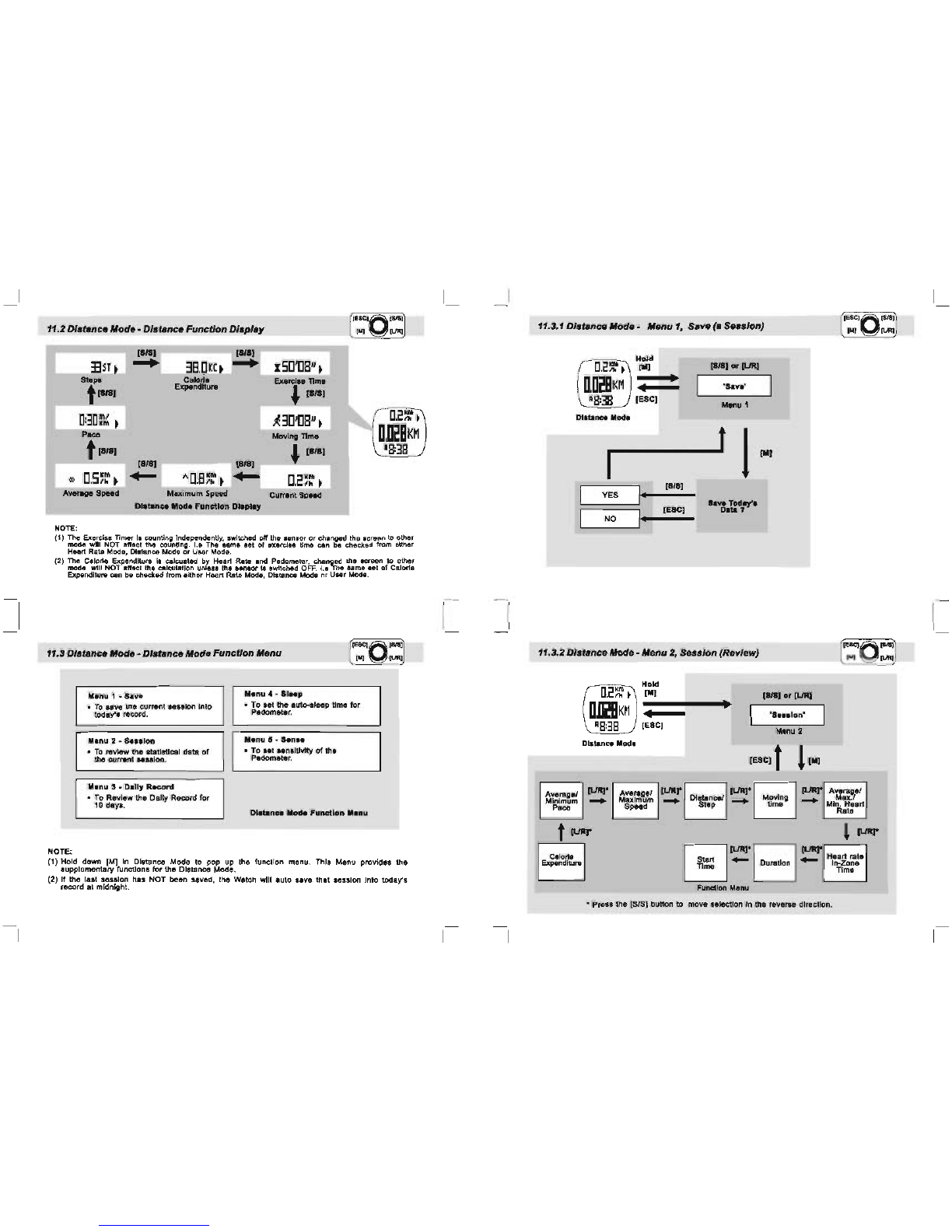
11.2 DistanceMode -Distance
Function
Display
[SIS] [SIS]
335r.
-+
38.Il[c.
-+
ISIl,[]8"
•
so.
..
Calorie
&ercl
..
nme
t-
Expanditul'8
J.
[SIS]
D:3D~~
•
~31l'll8·
•
D.2~
•
--
Moving
nme
D,~BK~
t-
18:38
[818]
*
Il.S~~
•
.....
"II
8'M
,
Ih
~
Averlge
Speed Maximum Speed Current Speed
Dletence Mode
Function
Dleplay
NOTE:
(1) The exercise TImer
i.
counting independently, switched off the
senior
or
changed the screen
to
other
mode will NOT alfact the counting.
1.8
The same set
ofaxercls.
time can
be
checked from althar
Heart
R.ate
Mode, Dlatanc8 Mode
or
Usar Mode.
(2) The Calorie E!ponditure
ia
calcuated by Heart Rate and Pedometer, changed the
Icteen
to other
mode will NOT enact the cillallatlon unless the sensor
III
switched OFF. I•• The
Ame
set
of
Calor1a
Expenditure can ba chltCked from either Heart Rata Mode, Distance Mode or
UHr
Mode.
11.3
DI.tance
"ode
-
DI.tance
Mode
Function
Menu
Manu
1 •
Save
Menu 4 - Sleep
•
To
eavo the current session into
today'. record. • To
set
the 8uto-.sleep time for
Pedometer.
Manu 2 - a
...
lon
Menu 5 - San
••
•
To
review the statistical data
of
the current .8ssion. • To
set
••
nsIUvlty
of
the
Pedomet.r.
lIanu
S • Dally
Record
•
To
Review the Dai
ly
Record for
10 days. Di8tanae Mode
Function
Menu
NOTE:
(1)
Hold down
(M]
In
Distance Mode to pop up the function menu. This Menu provides the
supplementary functions for the Distance Mode.
(2)
If the last
sellion
h.s
NOT
been saved, the Watch will auto
lave
th.t
lelslon
Into today's
record at midnight.
11.3.1 DI.tenCIJ Mode -Menu
1,
Sne
(e Se
..
/on)
(].2~
f
Hold
[II]
_
..
(IJRJ
nlillKH
•
•
'Sav"
A
8:38
[ESC] Menu 1
Distance
Mode
t 1
[II]
I·
[818]
YES
.eve
Tode,'.
I·
[ESC]
Data
?
NO
11.3.2 DistanceMode
-Menu
2,
Session
(Review)
Hold
D.2~~
•
[II]
D,D~BKM
•
A8:38
[ESC]
Distance
Mod.
Av.rage!
[lJRJ.
Minimum
~
P.""
calorie
expenditure
AverageJ
Maximum
Speed
•
Distance!
Step
'---'
[818]
or
(IJRJ
'Sa
••
lon'
Ma
nu
2
[ESC] t
l[ll]
[UR].
~
JURr
Av.ra~eI
~
~~~g
~
Mi~'1t88rt
Rate
~
[URI"
EJ
[l..IRr Heart
rat.
Tl~~
~
Duration
....
In-Zone
Tlme
Function
Menu
'----'
,.
Press the [SIS] button to move selection
In
the reverse direction.
11.3.3 DistanceMode -
Function
Menu 3,
Daily
Record
(Review)
D.2~~
~
D,D~BKM
'8:38
Distance Mode
Hold
[M[
•
IESC] • [UR]
or
[SIS]
'Daily Rd'
Menu 3
[ESC] t
lIM]
~
Day 10
Averagel
IURr
Mi~a~~art
.....
Heart
rate
In-Zone
Time
I
Dl~
~
,-~~~,
[ESC]
-
Rat.
Moving
time
-
....
Distancel
....
Stop
[M]
Averagel
Maximum
Speed
.,.,.
-
Function
...
nu
Average'
[L.IIQ*
Calorie
Mi~~~~m
.....
Expenditure
* Press
the
[SIS] button
to
move selection in the reverse direction.
11.3.4
D/atancelllode
-lIIenu4, Sleep (TIme Setting)
D.2~~
~
Hold IUR]
'"
ISIS]
1M]
D,D~BKM
•
'Sleep'
•
R8:38
[ESC] Manu
04
Distance
Mode
[ESCll
l~
(UR]
••
ISIS]
Change seHing
value -Sleep
(SeHlng value)mln
~~~~1\~~r:..
seHlng
-hotd
[UR]
or
[SIS]
11.3.5
Dlstancelllode
-lIIenu
5,
Sense
(SensitivIty
Setting)
D.2~~
~
Hold [SIS]
or
ILlRJ
[M]
D,D~BKM
• 'San
••
'
•
'8:38
[ESC] Menu 5
Distance
Mod.
[ESC]1
1"'
Change setting
[8/8]1
[L/R]
value -Function Menu:
hold 1
~leS8
sensitive) to
Change
the
setting
[8/8]1
[L/R] 7 more sensitive)
value faster -
NOTE:
This
setting adjusts
the
sensitivity
of
the
Watch to well
suit
user's walkinE!
or
running pattern, i.e
Select a
higher
sensitivity value,
the
Watch will be
more
sensitive to
detect
a mobon.
12.0
Heart
Rate lIIode: HeartRate
Functions
Currant
He.rt
Rate
I
Heart
Rate
Zone
Alert
I
Calorie
Expenditure
Calculation
Heart
Rate
Statistic.
In
Zona
Timer
Save/view
Se
••
ion
and
Daily
Record
H.art
Rate
Mod.
Function
Show current heart rate
In
beats
per
minute and percentage
of
estimated maximum heart rate.
Alerts
the
user
If
the
current heart rate
falls
above
or
below
the
defined zone.
Show
the
Calorie Expenditure which deduces from heart rate
and
other
sensors.
Show
the
average, minimum and maximum heart rate.
Show the elapsed
time
for
which the heart rate falls within the
defined Zone.
Logs the heart rate and
other
readings into a session, and
save them into a daily record.
View
the
current session
or
daily record.
12.1
Heart
Rate Mode: Wear HeartRate
Chest
Strap
on
the Chest
a .
Connect one connector
with the
chest
strap.
Ensure
the
connector is
completely
lodged into
the
chest
strap.
II
•Fasten
the
elastic band
until
it
is fitted on
your
chest
comfortably.
Q
EI
• Extend the elastic band
for
allowing a loose
fitting
the
chest strap on
the cnsst.
II
-Connect
the
remain
connector with the
chast
strap.
D •Turn
the
chest strap back to the
front
until
the
two
contacts
are
firmly
contacted with
the
skin
of
your
chest comfortably.
o
~
Q
IMPORTANT: DO NOT wearing the chest strap on
your
cloth, otherwise
the
chest
strap CANNOT
get
the heart rate signal.
NOTE: In
dry
seasons,
wet
the contacts with
water
to
make the signal transmission nonnal.
12.2
Heart
Rate Mode:
To
get
theMeasurement
NOTE:
•
.econd.
-• to • .[][]'[][]»r
.econd.
-
,.
-
't140&9~
'8:38
frequency
signal
~
radio
~
'-----
~
.
heart
beat
signal
Watch
•
Heart
rate
measurement
activated
(1) When
enter
Heart
Rate Mode,
the
function (sensor) will be activated automatically
after
5
seconds. Which can be activated
manually
too, see 10.0
for
the detailed operations.
(2) When
the
function (sensor) is activated,
the
Watch will aggregate the readings
of
the
exercise Into
the
current 'session'.
(3) The data
of
the
current session can be saved into the
'Daily
Record' (12.8.1)
or
reviewed
(12.8.2)
by
the Function Menu.
(4) The
'Daily
Record' can be reviewed by the Function Menu too (12.8.3). The Watch can store
up
to
10 daily records.
12.3
Hurt
Rate Mode:
Heart
Rate
Function
Displays
Note:
Average Heart rate
t [SIS]
Minimum Heart rate
t [SIS]
[SIS]
.....
[SIS]
....
Calorie Expenditure
,[SIS]
EX"l"
TIme
[SIS]
't
20'30'
~
Maximum
L--;
H
~
..
-
rt:-;;
R~
.
~
t.
-
Heart
rat.
In-Zone Time
Hurt
Rat. Mode
Function
Display
IS[]'[]8"~
't
140&9~
'8:38
Exercise Time
(1) The Exercise TImer
Is
counting Independently, switched orr the sensor or changed the screen to other
mode will NOT affect the counting. I.e The same set
of
exercise time can
be
checked from either
Heart Rate Mode, Distance Mode
or
User Mode.
(2)
The Calorie Expenditure
Is
calculated by Heart Rate and Pedometer, changed the screen to other
mode will NOT affect the calculation unless the sensor is switched
OFF.
i.e The same set
of
calorie
Expenditure can
be
checked from either Heart Rate Mode, Distance Mode or User Mode.
12.4
Hurt
Rate Mode:EMHR
and
"EMHR
NOTE:
Beats per
minute
(bpm)
IS[]'[]8"f
----+..-
140
&9~
'8:38
Estimated
Maximum
H.art
Rate (EMHR)
• EMHR '" 220 -age
of
the user
Percentage
of
Estimaled
Maximum
Haart Rate
(%EMHR)
Percentage
ot
Estimated
Maximum
Heart
Rate
(%EMHR)
• %EMHR =Acquired heart rate 1EMHR X100%
An
Example
about
EMHR
and
%EMHR
for
a
u.er
aged
l'
• EMHR = 220 -18 (user's
age)
=202
• Acquired heart rate = 140 (by measurement).
• %EMHR =
140/202
X100% =69%
(1) For general purpose, percentage
of
Estimated Maximum
Heart
Rate (%EMHR) can be used
for
Setting
Zone
Alert.
For
example,
the
lower
or
upper
limit
of
the
target
Zone can be
set
as
50%
or
85% EMHR respectively.
WARNINGI
Zone
Alert
must be
set
according to application and
one's
own health conditions. Check
your
doctor
or
trainer
before using
this
Zone
Alert
function.
12.5
Heart
Rate Mode:
Lower/Upper
Limits
of
Zone
Alert
Genel1lt
Lowe.
Upper R.marks
Applic.tion
Limit Limit
CANNOT
Fitness 65%EMHR
85%EMHR
be
changed
by
user
CAN
be
Custom
40-239
bpm
41-240
bpm
changed
by
user
I
bpm
or
% EUHR
UPI"'..-c
limit
The
Above
Zone
The
In
Zone
lower
(Thetarget heart
rate
zone for
limit.
one particularapplication)
The Below Zone
~
NOTE:
(1) The lower and upper limit
of
the Zone Alert can be
set
at
12.8.4.
12.6
Heart
Rate Mode: To Turn ON/OFF
the
Zone
Alert
%EMHRlbpm
...
8W'
Bee~
sounds and an icon
disp
ays
if
the acquired
The
Above
Zone • heart rate is above the
~Wtr
upperlimit
The In Zone
(The
target heartrate
zone
for
one
particular application)
lower
~
Beep sounds and an icon
limit
displays
if
the
acquired
The
Below
Zone
heart
rate
is
below
the
lowerlimit
H.art
Rat.
Zon.
ISD'D8'r
[URI
ISD'D8'r
Z
·14D&9x
·14D&9~
zone alert
function
ON
18:38 18:38
Zone
Alert
OFF
Zan.
Alert
ON
12.7
Heart
Rate
Mode:
Causes forNO Heart Rate Reading
or
Long Response Time
1) Cause:
Dry
Skin.
Solution: Apply conductive gel thoroughly to chest area. (Even
water
will help
if
conductive gel
is not available).
2)
Cau.e:
Ch
••
t
Strap
I.
not
placed
firmly
over
the
che.t.
Solution: Make sure the Chest Strap is firmly over the chest and the Watch is placed securely
on wrist.
3)
Cause:
Muscle
tremors
caused
by
holding
the
Chest
Strap
too
hard
on
your
chest.
Solution: The contacts must make firm contact with the user"s skin during measurement. This
will ensure good and consistent readings even while walking
or
Jogging with arms swung
naturally.
4) Cause: Dead
skin
on
wrist.
Solution: Usually rubbing
your
skin with a towel will help.
5) Cause: A
thin
layer
of
body
grease
can
Insulate
the
ECG
signal
which
prevents
the
contact.
on
the
back
of
the
Chest
Strap
from
picking
up
on.'s
ECG.
Solution: Wipe chest and the back
of
Chest Strap with a tissue
or
soft towel.
6) Cau
••
:
Hairy
chest.
Solution: Apply conductive gel to chest area.
7)
Cause:
Irregular
heartbeats.
Solution: N/A It is difficult to conSistently pick up a reading
for
those with irregular heart
beats. Inconsistent response times are expected
for
those with arrhythmia.
8)
Cau.e:
Battery
Low.
Solution: It might
be
due to the battery level
of
the Chest Strap is low. Replace the battery
of
the Chest Strap.
12.8
Heart
Rate
Mode:
HeartRate Mode Function
Menu
1 - Save
Menu
3 -
Dally
Record
•
To
save
the
current
session
into
• To Review
the
Daily record
for
today's record.
10
days.
Menu
2 - Session
Menu
4 •
Zone
•
To
review
the
statistical
data
of
• To set
upper
and
lower
limits
the
current
session.
for
the
Zone Alert.
Note:
(1) Hold down [M]
In
Heart Rate Mode to pop up the Function menu. This Menu provides the
supplementary functions
for
the Heart Rate Mode.
(2)
If
the last session has NOT been saved, the Watch will
auto
save that session into today's
record
at
midnight.