oCM3 IO board exports a dedicated serial console for CPU, which can access the low
level debug message.
•Micro USB cable
oIf you want write image to CM3 eMMC from USB OTG port or use fastboot/adb
commands you need a micro USB cable to connect CM3 IO board and PC.
Power on
Plug in the 12V DC, the CM3 should automatically boot. If the CM3 doesn't have eMMC or the eMMC
is empty, plug in the micro USB to host PC, host PC should detect the CM3 in maskrom mode.
Install image to CM3
•Install image to SD card, refer microSD card installation
•Install image to eMMC, refer Install to eMMC from USB port (Radxa CM3 IO)
USB 3.0
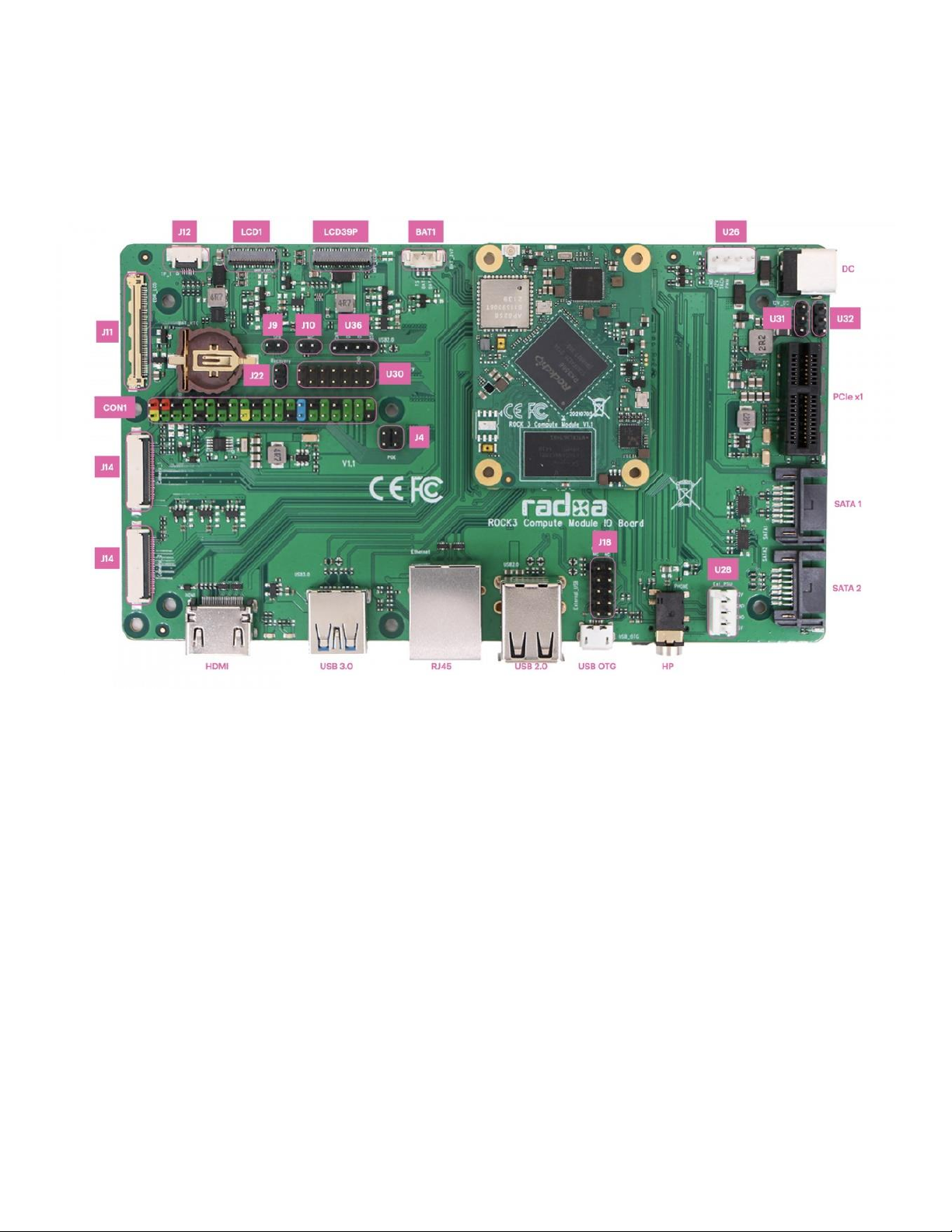
There is one USB 3.0 A port on the IO board, supporting 5.0Gbps. The USB 3.0 function is shared
with SATA2, a 1in->2out mux CH482D is used for function switching to USB 3.0 or SATA2. GPIO3_C7
is used for the route select, When GPIO3_C7 is low, signal route to USB3.0, when GPIO3_C7 is high,
signal route to SATA2.
Current output limit for the USB 3.0 is 2A.
PCIe Slot
There is one PCIe x1 slot on the IO board, supporting 5.0Gbps. The PCIe function is shared with
SATA1, a 1in->2out mux CH482D is used for function switching to PCIe or SATA1. GPIO3_C6 is used
for the route select, When GPIO3_C6 is low, signal route to PCIe, when GPIO3_C7 is high, signal
route to SATA1.
The PCIe on the CM3 meets PCIe 2.1 specification and support one lane and Root Complex mode
only. PCIe slot power is directly from +12V DC, make sure the power supply can provide enough
current for the PCIe card.
SATA1&2
IO board has two SATA ports compatible with Serial ATA 3.3 and AHCI Revision 1.3.1, SATA 1 is
shared with USB 3.0 and SATA 2 is shared with PCIe, set the corresponding signal route to use it.
Connector U28 can be used for SATA power, the +12V of U28 is directly from the +12V DC, make
sure the power supply can provide enough current for the HDD.
Micro USB
The Micro USB port on the IO board supports host and device mode, it's used for firmware installing
to eMMC from host PC or using ADB debugging. Note: When in maskrom mode, the USB OTG is
forced in device mode.
Other Pinout
LCD1 & LCD2
•LCD1: MIPI DSI0 or LVDS