manuals.online logo
Brands
  1. Home
  2. •
  3. Brands
  4. •
  5. Seneca
  6. •
  7. I/O System
  8. •
  9. Seneca Z-4AI User manual

Seneca Z-4AI User manual

Other Seneca I/O System manuals

Seneca Z-DAQ-PID User manual

Seneca

Seneca Z-DAQ-PID User manual

Seneca ZE-4DI-2AI-2DO User manual

Seneca

Seneca ZE-4DI-2AI-2DO User manual

Seneca Z-D-IN User manual

Seneca

Seneca Z-D-IN User manual

Seneca Z-D-IN User manual

Seneca

Seneca Z-D-IN User manual

Seneca Z-8TC-1 User manual

Seneca

Seneca Z-8TC-1 User manual

Seneca ZE-4DI-2AI-2DO User manual

Seneca

Seneca ZE-4DI-2AI-2DO User manual

Seneca Z-8TC-SI User manual

Seneca

Seneca Z-8TC-SI User manual

Seneca Z-SG User manual

Seneca

Seneca Z-SG User manual

Seneca Z-3AO User manual

Seneca

Seneca Z-3AO User manual

Seneca Z-4RTD2-SI User manual

Seneca

Seneca Z-4RTD2-SI User manual

Seneca Z-4TC-1 User manual

Seneca

Seneca Z-4TC-1 User manual

Seneca Z-5DI-2DO User manual

Seneca

Seneca Z-5DI-2DO User manual

Seneca ZC-24DI User manual

Seneca

Seneca ZC-24DI User manual

Seneca Z-4RTD2 User manual

Seneca

Seneca Z-4RTD2 User manual

Seneca Z-4AI User manual

Seneca

Seneca Z-4AI User manual

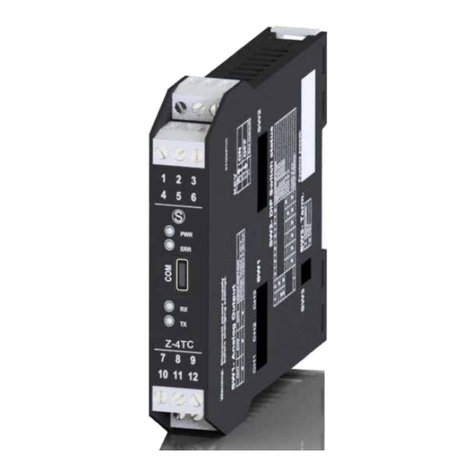
Seneca Z-4TC User manual

Seneca

Seneca Z-4TC User manual

Seneca ZE-4DI-2AI-2DO User manual

Seneca

Seneca ZE-4DI-2AI-2DO User manual

Seneca ZC-24DO User manual

Seneca

Seneca ZC-24DO User manual

Seneca R-32DIDO-P User manual

Seneca

Seneca R-32DIDO-P User manual

Seneca R-32DIDO User manual

Seneca

Seneca R-32DIDO User manual

Seneca R-P Series User manual

Seneca

Seneca R-P Series User manual

Seneca Z-8TC User manual

Seneca

Seneca Z-8TC User manual

Popular I/O System manuals by other brands

SMC Networks EX600-AXA Installation & maintenance manual

SMC Networks

SMC Networks EX600-AXA Installation & maintenance manual

Siemens SIMATIC ET 200SP HA Equipment manual

Siemens

Siemens SIMATIC ET 200SP HA Equipment manual

Advantech PCM-27J3AU Startup manual

Advantech

Advantech PCM-27J3AU Startup manual

Hitachi HX-RIO3 Series user manual

Hitachi

Hitachi HX-RIO3 Series user manual

ICP DAS USA tM-AD2 quick start

ICP DAS USA

ICP DAS USA tM-AD2 quick start

IFM AL1200 operating instructions

IFM

IFM AL1200 operating instructions

Allen-Bradley D Series installation instructions

Allen-Bradley

Allen-Bradley D Series installation instructions

Allen-Bradley 1794-OF8IH installation instructions

Allen-Bradley

Allen-Bradley 1794-OF8IH installation instructions

Allen-Bradley SLC 500 1746-FIO4I user manual

Allen-Bradley

Allen-Bradley SLC 500 1746-FIO4I user manual

WAGO I/O-SYSTEM 750 manual

WAGO

WAGO I/O-SYSTEM 750 manual

System Sensor M201E installation instructions

System Sensor

System Sensor M201E installation instructions

M-system R7D-YV2A instruction manual

M-system

M-system R7D-YV2A instruction manual

NTP Technology Penta 721 digital I/O installation guide

NTP Technology

NTP Technology Penta 721 digital I/O installation guide

Bosch B208 user manual

Bosch

Bosch B208 user manual

Acces I/O products MPCIE-ISODIO-16 Hardware manual

Acces I/O products

Acces I/O products MPCIE-ISODIO-16 Hardware manual

ExpertDAQ EX-9017F Operation manual

ExpertDAQ

ExpertDAQ EX-9017F Operation manual

SeaLevel SeaI/O-580E user manual

SeaLevel

SeaLevel SeaI/O-580E user manual

Technosoft iPOS360x MX Technical reference

Technosoft

Technosoft iPOS360x MX Technical reference

manuals.online logo
manuals.online logoBrands
  • About & Mission
  • Contact us
  • Privacy Policy
  • Terms and Conditions

Copyright 2025 Manuals.Online. All Rights Reserved.

MI00360-2-EN INSTALLATION MANUAL 1/4
INSTALLATION MANUAL
SENECA s.r.l.; Via Austria, 26 – 35127 – PADOVA – ITALY; Tel. +39.049.8705359 - Fax +39.049.8706287
WARNING: The full content of this manual must be read before any operation. The module must only be used by
qualied electricians. Specic documentation is available via QR-CODE shown on page 1.
Electrical and electronic waste disposal (applicable in the European Union and other countries with recycling).
The symbol on the product or its packaging shows the product must be surrendered to a collection centre
authorized to recycle electrical and electronic waste.
The module must be repaired and damaged parts replaced by the Manufacturer. The product is sensitive to
electrostatic discharges. Take appropriate measures during any operation.
PRELIMINARY WARNINGS
The word WARNING preceded by the symbol indicates conditions or actions that put the user's safety at risk.
The word ATTENTION preceded by the symbol indicates conditions or actions that might damage the
instrument or the connected equipment. The warranty shall become null and void in the event of improper use or
tampering with the module or devices supplied by the manufacturer as necessary for its correct operation, and if
the instructions contained in this manual are not followed.
CONTACT INFORMATION
Technical support [email protected] Product information [email protected]
This document is the property of SENECA srl. Copies and reproduction are prohibited unless authorised.
The content of this document corresponds to the described products and technologies.
Stated data may be modied or supplemented for technical and/or sales purposes.
DOCUMENTATION
Z-4AI
Z-4AI
MI00360-2-EN INSTALLATION MANUAL 2/4
CERTIFICATIONS
https://www.seneca.it/products/z-4ai/doc/CE_declaration
INSULATION
ENVIRONMENTAL
CONDITIONS
Temperature: -10 ÷ + 65°C
Humidity: 30% ÷ 90% non condensing.
Altitude: Up to 2000 m above sea level
Storage temperature: -20 ÷ + 85°
Protection rating: IP20.
ASSEMBLY IEC EN60715, 35mm DIN rail in vertical position.
CONNECTIONS
3-way removable screw terminals, pitch 5 mm
Rear connector IDC10 for DIN bar 46277
front micro USB
POWER SUPPLY Voltage: 10 ÷ 40Vdc; 19 ÷ 28Vac 50 ÷ 60Hz
Absorption: Typical: 0.5W @ 24Vdc, Max: 3.5W
MODULE LAYOUT
Dimensions LxHxD: 17.5 x 102.5 x 111 mm; Weight: 110 g; Enclosure: PA6, black
17.5 mm
111 mm
102.5 mm
LED STATUS LED meaning
PWR Green ON The device is powered correctly
FAIL yellow Flashing Anomaly or fault
RX Red Flashing Receipt of packet completed
RX Red ON Anomaly / Check connection
TX Red Flashing Transmission of packet completed
SIGNALS VIA LED ON FRONT PANEL
TECHNICAL SPECIFICATIONS
Power
Supply
Analog
Input
Comm.
1500 V~
mA / V
mA / V
mA / V
mA / V
RS485
WARNING
the maximum working voltage between any
terminal and ground must be less
than 50Vac / 75Vdc
MI00360-2-EN INSTALLATION MANUAL 3/4
INPUTS
Voltage input: Bipolar with F.S. programmable at +2Vdc and +10Vdc
Input impedance >100kOhm
Current input: Bipolar with F.S. Programmable at +20mA with 50Ohm internal shunt selectable via DIP-switch.
Available power supply: 90 + 90mA at 13Vdc.
Number of channels: 4
Input resolution: 15 bit + sign.
Input protection: ± 30Vdc or 25mA
Voltage
and current
precision:
Starting: 0.1 % of full scale
Linearity: 0.03% of scale.
Zero: 0.05% of scale.
TC: 100 ppm, EMI: <1 %
Sampling
time 120ms/channel or 60ms/channel
Measurement
update times
- 250ms for 4 channels with ADC speed 1 sample every 60ms
- 500ms for 4 channels with ADC speed 1 sample every 120ms
Filter congurable from 0 to 6
CONFIGURATION OF FACTORY SETTINGS
All DIP-switches in OFF
Communication parameters of ModBUS protocol: 38400 8, N, 1 Address 1
Communication parameters of micro USB front port 2400 8, N, 1 Address 1
Channel input from 1 to 4 VOLTAGE ± 10 Vdc
Numerical representation of the input measurement: ± 10000 mV
Sampling time: 120 ms
1200 m 2 m
21
4
5
Ld
Diagram 1
Bus length Derivation
length
Module Module
Module
Module
Module 3
Bus length
Ld= derivation length
ModBUS CONNECTION RULES
1) Install the modules in the DIN rail (120 max)
2) Connect the remote modules using cables of an appropriate length. The following table shows cable length data:
- Bus length: maximum length of the Modbus network according to the Baud Rate. This is the length of the cables
that connect the two farthest modules (see Diagram 1).
- Derivation length: maximum length of a derivation 2 m (see Diagram 1).
For maximum performance, it is recommended to use special shielded cables, such as BELDEN 9841.
IDC10 CONNECTOR
Power supply and Modbus interface are available using the Seneca DIN rail bus, via the IDC10 rear connector, or the
Z-PC-DINAL2-17.5 accessory.
RS485GND
RS485A
RS485B
Power Supply AC / +
Power Supply AC / -
IDC 10
1
Rear Connector (IDC 10)
The meaning of the various pins on the IDC10 connector
is shown in the gure if you wish to supply signals directly
via it.
MI00360-2-EN INSTALLATION MANUAL 4/4
SETTING THE DIP-SWITCHES
The position of the DIP-switches denes the Modbus communication parameters of the module: Address and Baud Rate
The following table shows the values of the Baud Rate and the Address according to the setting of the DIP-switches:
Note:
When DIP switches 3 to 8 are OFF, the communication settings are taken from programming (EEPROM).
Note 2:
The RS485 line must be terminated only at the ends of the communication line.
DIP-Switch status
SW1 POSITION BAUD
RATE
SW1 POSITION
ADDRESS
POSITION
TERMINATOR
1 2 3 4 5 6 7 8 3 4 5 6 7 8 10
9600 #1 Disabled
19200 #2 Enabled
38400 #...
57600 #63
From
EEPROM
From
EEPROM
The settings of the dip-switches must be compatible with the settings on the registers.
The description of the registers is available in the USER MANUAL.
ANALOGUE INPUT SETTING VIA DIP-SWITCH:
DIP-Switch SW2 denes the type of input for each individual channel.
Channels 1 to 4 can be set in current or voltage.
For the settings, refer to the SW2 table on the side.
ELECTRICAL CONNECTIONS
2
3
-Vac/Vdc
+ Vac/Vdc
1
Power supply
The upper limits must not be exceeded as this can seriously damage the module.
If the power supply source is not protected against overload, a safety fuse with a 2.5A
max permissible value must be installed in the power supply line.
GND
B
A
4
5
6
ModBus RS485
Connection for RS485 communication using the MODBUS master system as an alternative
to the Z-PC-DINx bus.
N.B. The indication of the RS485 connection polarity is not standardised and in some
devices may be inverted.
INPUTS
A) Voltage input with sensor supply from the
MODULE (13 Vdc)
B) Voltage input with sensor supply NOT coming
from the MODULE
C) Current input with sensor supply NOT coming
from the MODULE
D) Current input with sensor supply from the
MODULE (13 Vdc)
E) Current input with EXTERNAL sensor supply
#I 2n
#I 4n
#I 3n
#I 1n
gn d
++++
TX
TX
TX
TX
ve xt
TX
TX
TX
TX
+
S
S
S
S
va ux*
vauxvaux
va ux *(
g en erat a da l m odu lo
) = 13 Vd c
AB C D A
SW2 ANALOGUE INPUTS
ON CURRENT INPUT
OFF VOLTAGE INPUT
vaux* (generated by the module) = 13 Vdc
ATTENTION
The upper power supply limits must not be exceeded, as this might cause serious damage to the module. Switch the mod-
ule off before connecting inputs and outputs.
To meet the electromagnetic immunity requirements:
• use shielded signal cables;
• connect the shield to a preferential instrumentation earth system;
• separate shielded cables from other cables used for power installations (inverters, motors, induction ovens, etc...).
• make sure that the module is not supplied with a supply voltage higher than that indicated in the technical specications
in order not to damage it.