SUPERMICR R
ContaCt InformatIon
MNL-1484-QRG
• Manuals:http://www.supermicro.com/support/manuals
• Drivers&Utilities:ftp://ftp.supermicro.com
• Safety:http://www.supermicro.com/about/policies/safety_information.cfm
© 2012 Supermicro Computer Inc. All rights reserved. Reproduction of this document whether in part or in whole is strictly prohibited without Supermicro's written
consent. All Trademarks are property of their respective entities. All information provided is deemed accurate at the time of printing; however, it is not guaranteed.
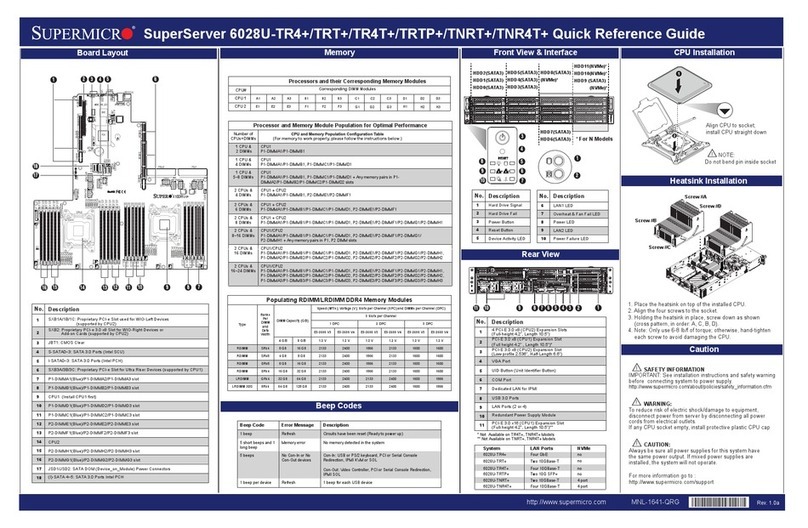
PaCkage Contents (aPPlIes toanIdIvIdual PaCk only)
X10sla-f
QuICk referenCe guIde
• One(1)SupermicroMotherboard
• Six(6)SATACables
• One(1)I/OShield
Connector Description
Battery Onboard Battery
COM1/COM2 COM1/COM2 Port Headers
Fan1 - Fan4, FanA System/CPU Fan Headers (Fan1: CPU Fan)
JF1 Front Panel Control Header
JL1 Chassis Intrusion Header
JLED1 Power LED Indicator Header
JP12C1 Power SMB (System Management Bus)
JPW1 24-pin ATX Main Power Connector (Required)
JPW2 +12V 8-pin CPU power Connector (Required)
JSD1 SATA DOM (Device_On_Module) Power Connector
JSTBY1 Standby Power Header
JTPM1 Trusted Platform Module/Port 80 Connector
LAN1/LAN2 Gigabit (RJ45) Ports (LAN1/2)
IPMI_LAN IPMI_Dedicated LAN
SPKR1 Internal Speaker/Buzzer
I-SATA0/I-SATA1 (Intel PCH) Serial ATA (SATA 3.0) Ports 0/1 (6Gb/sec)
I-SATA 2 - I-SATA5 (Intel PCH) Serial ATA (SATA 2.0) Ports 2~5 (3Gb/sec)
(PCH) Slot 7 PCI-Express 2.0 x4 in x8 Slot
(CPU) Slot 6 PCI-Express 3.0 x16 Slot
Slot 1 - Slot 5 PCI 33MH Slots (5V)
SW1 UID (Unit Identier) Switch
T-SGPIO 1/2 Serial_Link General Purpose I/O Connection Headers 1/2
USB 2, 3, 4, 5 Backpanel USB 2.0 Ports 2, 3, 4, 5
USB 0 (3.0), USB 1 (3.0) Front Accessible USB 3.0 Ports 1, 2
USB 8/9 Front Panel Accessible USB 2.0 Headers 8/9
VGA Backpanel VGA Port
LED Description Color/State Status
LE3 Onboard Standby Power LED Green: Solid on Power On
LE4 UID LED Blue: On Unit Identied
LE5 (X10SLA-F Only) BMC Heartbeat LED Green: Blinking BMC Normal
Jumper Description Default
JBT1 CMOS Clear (See Chpt. 2)
JI2C1/JI2C2 Disable SMB to PCI Slots Pins 2-3 (Disabled)
JPG1 VGA Enable Pins 1-2 (Enabled)
JPL1/JPL2 LAN1/LAN2 Enable Pins 1-2 (Enabled)
JPME1 ME Recovery Pins 1-2 (Normal)
JPME2 Manufacture Mode Select Pins 1-2 (Normal))
JPUSB1 USB Wake Up Enable Pins 1-2 (Enabled)
JWD1 Watch Dog Enable Pins 1-2 (Reset)
LED Indicators
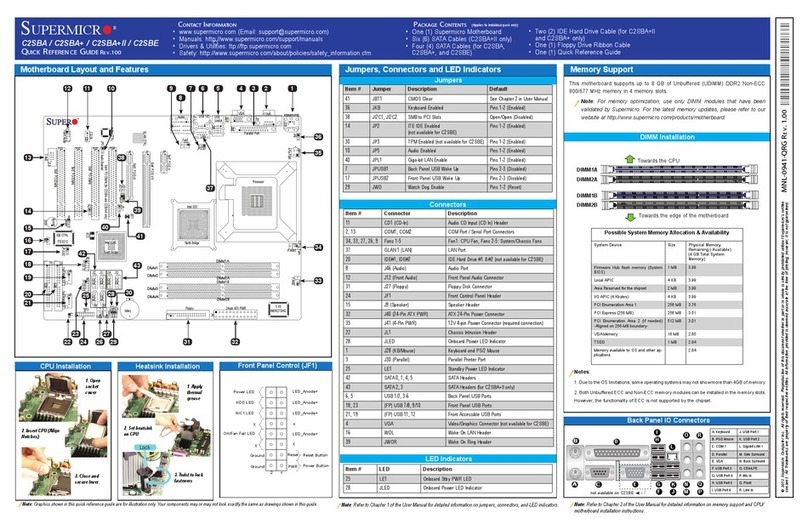
Connectors
DIMM Memory Installation
Jumpers, Connectors and LED Indicators
Back Panel I/O Connectors
Memory Support
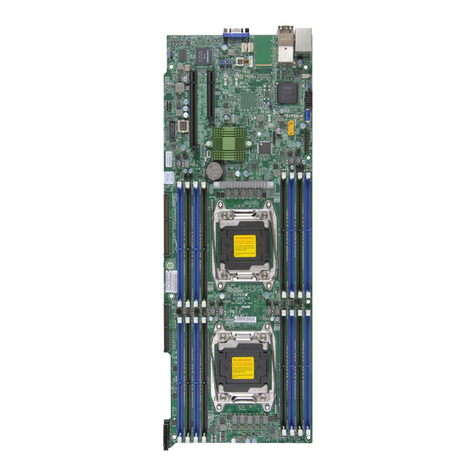
Motherboard Layout and Features
Jumpers
Note: Graphics shown in this quick reference guide are for illustration only. Your components may or may not look exactly the same as drawings shown in this guide. Note: Refer to Chapter 1 of the User Manual for detailed information on jumpers, connectors,
and LED indicators.
Note: Refer to Chapter 2 of the User Manual for detailed information on memory support and CPU/
motherboard installation instructions.
= mounting hole
Front Panel Control (JF1)
IPMI CODE
BIOS
LICENSE
BAR CODE
MAC CODE
FAN2
FAN4
FAN1
FANA
JLED1
JWD1
JPG1
JPME1
JPME2
JPL2
JPL1
JPUSB1
J19
J18
LE3
LE5
LE4
JPW1
JPW2
J21
JI2C1
JI2C2
JL1
JPI2C1
JTPM1
T-SGPIO1
JSD1
JSTBY1
SPKR1
USB4/5
JF1
SW1
SLOT5 PCI 33MHZ
SLOT4 PCI 33MHZ
SLOT3 PCI 33MHZ
SLOT2 PCI 33MHZ
USB1(3.0) USB0(3.0)
COM2
USB8/9
_LAN
IPMI
VGA COM1
LAN2 LAN1
DIMMB2
DIMMA2
CPU SLOT6 PCI-E 3.0 X16
CPU
X10SLA(-F)
USB2/3
I-SATA3
I-SATA4
I-SATA2
I-SATA1
I-SATA0
I-SATA5
SLOT1 PCI 33MHZ
PCH SLOT7 PCI-E 2.0 X4(IN X8)
DIMMB1
DIMMA1
T-SGPIO2
BIOS
Rev. 1.01
Battery
PCH
BMC
FAN3
JBT1
D
CPU Installation
CPU Properly
Installed
Load Lever Locked
into Place
Turn Clockwise
to Lock
Heatsink Installation
Thermal Paste
P
ush Down
Turn Counter-
clockwise to
Unlock Connect the Heatsink Wire to
the CPU Fan Connector
The X10SLA(-F) supports up to 32GB of Unbuffered (UDIMM) DDR3 ECC/Non-
ECC 1600/1333 MHz in 4 memory slots.
Memory Population Guidelines
Please follow the table below when populating the X10SLA(-F).
DDR3 Unbuffered ECC/Non-ECC (UDIMM) Memory
DIMM Slots per
Channel
DIMMs Populat-
ed per Channel
DIMM Type POR Speeds Ranks per DIMM (any
combination)
2 1 Unbuffered
DDR3
1333, 1600 Single Rank, Dual Rank
2 2 Unbuffered
DDR3
1333, 1600 Single Rank, Dual Rank
Insert the desired number of DIMMs into the memory slots, starting with DIMMA1
(Channel A, Slot 1). For the system to work properly, please use the memory
modules of the same type and speed in the same motherboard.
Channel A Slot 1
Channel A Slot 2
(Blue Slot)
Channel B Slot 1
Channel B Slot 2
(Blue Slot)
Towards the CPU
Notches
Release Tabs
Press both notches
straight down into
the memory slot.
Load Lever
Load Plate
Pin 1
Tools Needed:
Screwdriver Phillips Screws (9) Standoffs (9)
North Center Edge