manuals.online logo
Brands
  1. Home
  2. •
  3. Brands
  4. •
  5. Tapco
  6. •
  7. Amplifier
  8. •
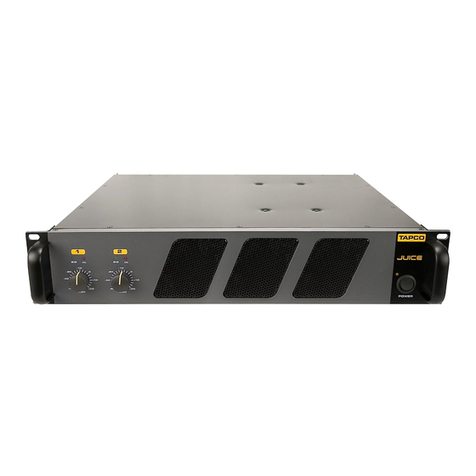
  9. Tapco Juice J-800 User manual

Tapco Juice J-800 User manual

This manual suits for next models

2

Other Tapco Amplifier manuals

Tapco PA-700 User manual

Tapco

Tapco PA-700 User manual

Tapco CP500 User manual

Tapco

Tapco CP500 User manual

Tapco pmn User manual

Tapco

Tapco pmn User manual

Tapco Juice J-2500 User manual

Tapco

Tapco Juice J-2500 User manual

Popular Amplifier manuals by other brands

Magnat Audio EDITION FOUR Owner's manual/warranty document

Magnat Audio

Magnat Audio EDITION FOUR Owner's manual/warranty document

Inter-m PA-2000A Operation manual

Inter-m

Inter-m PA-2000A Operation manual

Yamaha TX6n owner's manual

Yamaha

Yamaha TX6n owner's manual

Peavey TNT 150 user guide

Peavey

Peavey TNT 150 user guide

Bosch LBB 1903/10 Installation and user instructions

Bosch

Bosch LBB 1903/10 Installation and user instructions

Avocent Emerge DA1200D Installer/user guide

Avocent

Avocent Emerge DA1200D Installer/user guide

Redgum RGi35 operating instructions

Redgum

Redgum RGi35 operating instructions

Cambridge Audio AXA25 user manual

Cambridge Audio

Cambridge Audio AXA25 user manual

Alpine MRP-M200 owner's manual

Alpine

Alpine MRP-M200 owner's manual

Technical Pro H1502UrBT user manual

Technical Pro

Technical Pro H1502UrBT user manual

FMS EMGZ307 operating manual

FMS

FMS EMGZ307 operating manual

Racal Instruments 5601 user manual

Racal Instruments

Racal Instruments 5601 user manual

Valcom V-1094A Technical specifications

Valcom

Valcom V-1094A Technical specifications

Cambridge Audio 851D user manual

Cambridge Audio

Cambridge Audio 851D user manual

QSC 3800 Specifications

QSC

QSC 3800 Specifications

NAD C300 owner's manual

NAD

NAD C300 owner's manual

Rotel RMB-1077 owner's manual

Rotel

Rotel RMB-1077 owner's manual

Peavey Monitor 300 Series operating guide

Peavey

Peavey Monitor 300 Series operating guide

manuals.online logo
manuals.online logoBrands
  • About & Mission
  • Contact us
  • Privacy Policy
  • Terms and Conditions

Copyright 2025 Manuals.Online. All Rights Reserved.

J•800
J•1400
J•2500
owner’s manual
J•800
J•1400
J•2500
SIGOLSIGOL
30
-
AB
00
30
-
00
ON
OFF
POWER
BY
J•2500
dB dB
BREAKER
CLIPLIMIT
ON
OFF
SUBSONIC
FILTER AT30Hz
ON
OFF
STEREO
AMP MODE
MONO
BRIDGE
CHANNEL B BRIDGED CHANNEL A
CAUTION
TO REDUCE THE RISK OF FIRE OR ELECTRIC SHOCK,
DO NOT EXPOSE THIS APPARATUS TO RAIN OR
MOISTURE. SEE INSTRUCTIONS BEFORE USING.
INPUT B
LINE
(BALANCED)
INPUT A
LINE
(BALANCED)
SERIAL /DATE CODE
INPUT
CONNECTION
BROUGHTTOYOU BYTHEGROOVYFOLKSIN
WOODINVILLE, WA, USA. MANUFACTUREDIN
CHINA. "TAPCO" AND "MACKIE" AREREGISTERED
TRADEMARKSOF MACKIE DESIGNS INC.
WWW.TAPCOGEAR.COM
STEREO/MONO BRIDGED
SPEAKER CONNECTION
T59052
T59052
by
2
SAFETY INSTRUCTIONS
1. Read Instructions — All the safety and operation instructions
should be read before this product is operated.
2. Retain Instructions — The safety and operating instructions
should be kept for future reference.
3. Heed Warnings — All warnings on this product and in these
operating instructions should be followed.
4. Follow Instructions — All operating and other instructions
should be followed.
5. Water and Moisture — This product should not be used near
water for example, near a bathtub, washbowl, kitchen sink,
laundry tub, in a wet basement, near a swimming pool, etc.
6. Cleaning — Clean only with a dry cloth.
7. Ventilation — This product should be situated so that its location
or position does not interfere with its proper ventilation. For
example, the Component should not be situated on a bed,
sofa, rug, or similar surface that may block any ventilation
openings, or placed in a built-in installation such as a bookcase
or cabinet that may impede the fl ow of air through ventilation
openings.
8. Heat — This product should be situated away from heat
sources such as radiators, or other devices which produce
heat.
9. Power Sources — This product should be connected to a
power supply only of the type described in these operation
instructions or as marked on this product.
10. Power Cord Protection — Power supply cords should be routed
so that they are not likely to be walked upon or pinched
by items placed upon or against them, paying particular
attention to cords at plugs, convenience receptacles, and
the point where they exit this product.
11. Object and Liquid Entry — Care should be taken so that
objects do not fall on, and liquids are not spilled into, this
product.
12. Damage Requiring Service — This product should be serviced
only by qualifi ed service personnel when:
A. The power-supply cord or the plug has been damaged; or
B. Objects have fallen, or liquid has spilled into this product; or
C. This product has been exposed to rain; or
D. This product does not appear to operate normally or
exhibits a marked change in performance; or
E. This product has been dropped, or its chassis damaged.
13. Servicing — The user should not attempt to service this
product beyond those means described in this operating
manual. All other servicing should be referred to the Tapco
Service Department.
14. To prevent electric shock, do not use this polarized plug with
an extension cord, receptacle or other outlet unless the
blades can be fully inserted to prevent blade exposure.
Pour préevenir les chocs électriques ne pas utiliser cette fi che polariseé avec
un prolongateur, un prise de courant ou une autre sortie de courant, sauf si les
lames peuvent être insérées à fond sans laisser aucune pariie à découvert.
15. Grounding or Polarization — Precautions should be taken so
that the grounding or polarization means of this product is not
defeated.
16. Power Precaution — Unplug this product during lightning
storms or when unused for long periods of time.
17. This apparatus does not exceed the Class A/Class B
(whichever is applicable) limits for radio noise emissions
from digital apparatus as set out in the radio interference
regulations of the Canadian Department of Communications.
ATTENT ON —Le présent appareil numérique n’émet pas de bruits radioélectriques
dépassant las limites applicables aux appareils numériques de class A/de class B
(selon le cas) prescrites dans le règlement sur le brouillage radioélectrique édicté
par les ministere des communications du Canada.
WARNING — To r duc
th risk of fi r or l ctric
shock, do not xpos
this applianc to rain or
moistur .
PORTABLE CART WARNING
Carts and stands - The
Component should be used
only with a cart or stand
that is recommended by
the manufacturer.
A Component and cart
combination should be
moved with care. Quick
stops, excessive force, and
uneven surfaces may cause
the Component and cart
combination to overturn.
CAUTION AVIS
RISK OF ELECTRIC SHOCK
DO NOT OPEN
R SQUE DE CHOC ELECTR QUE
NE PAS OUVR R
CAUTION: TO REDUCE THE RISK OF ELECTRIC SHOCK
DO NOT REMOVE COVER (OR BACK)
NO USER-SERVICEABLE PARTS INSIDE
REFER SERVICING TO QUALIFIED PERSONNEL
ATTENT ON: POUR EV TER LES R SQUES DE CHOC
ELECTR QUE, NE PAS ENLEVER LE COUVERCLE. AUCUN
ENTRET EN DE P ECES NTER EURES PAR L'USAGER. CONF ER
L'ENTRET EN AU PERSONNEL QUAL F E.
AV S: POUR EV TER LES R SQUES D' NCEND E OU
D'ELECTROCUT ON, N'EXPOSEZ PAS CET ART CLE
A LA PLU E OU A L'HUM D TE
The lightning flash with arrowhead symbol within an equilateral
triangle is intended to alert the user to the presence of uninsulated
“dangerous voltage” within the product’s enclosure that may be
of sufficient magnitude to constitute a risk of electric shock to persons.
Le symbole éclair avec point de flèche à l'intérieur d'un triangle
équilatéral est utilisé pour alerter l'utilisateur de la présence à
l'intérieur du coffret de “voltage dangereux” non isolé d'ampleur
suffisante pour constituer un risque d'éléctrocution.
The exclamation point within an equilateral triangle is intended to
alert the user of the presence of important operating and maintenance
(servicing) instructions in the literature accompanying the appliance.
Le point d'exclamation à l'intérieur d'un triangle équilatéral est
employé pour alerter les utilisateurs de la présence d'instructions
importantes pour le fonctionnement et l'entretien (service) dans le
livret d'instruction accom
p
a
g
nant l'a
pp
areil.
Part No. 0007787 Rev. A 08/03
©2003 Mackie Designs Inc. All Rights Reserved.
3
What m , r ad a manual?
Before you begin, please make sure you read the Safety Instructions on page 2 and
Getting Started on page 4.
Your new TAPCO® amplifi er is designed to set up quickly and operate easily. We know it’s
often seen as a sign of weakness to read a manual, along with asking for directions when
lost, but maybe you can read the rest when nobody is looking.
It is important to keep your receipt in a safe place, and not a bad idea to write your
product information here for future reference (i.e., insurance claims, tech support, return
authorization, etc.).
Duration Per Day Sound Level dBA, Typical
n Hours Slow Response Example
8 90 Packed garage concert
6 92
4 95 VW Bus Peace Train
3 97
2 100 Cranked psychedelic tunes
1.5 102
1 105 High speed chase on C.H. .P.s
0.5 110
0.25 or less 115 Loudest parts at a Heavy Metal concert
Product S rial #:
Purchas d at:
Dat of purchas :
18. Exposure to extremely high noise levels may cause permanent
hearing loss. Individuals vary considerably in susceptibility to
noise-induced hearing loss, but nearly everyone will lose some
hearing if exposed to suffi ciently intense noise for a period of
time. The U.S. Government’s Occupational Safety and Health
Administration (OSHA) has specifi ed the permissible noise
level exposures shown in the following chart.
According to OSHA, any exposure in excess of these permissible limits
could result in some hearing loss. To ensure against potentially dangerous
exposure to high sound pressure levels, it is recommended that all persons
exposed to equipment capable of producing high sound pressure levels
use hearing protectors while the equipment is in operation. Ear plugs or
protectors in the ear canals or over the ears must be worn when operating
the equipment in order to prevent permanent hearing loss if exposure is in
excess of the limits set forth here.
4
Getting Started
The following steps will help you set up your amplifi er, and get the
levels just right.
SETTINGS:
1. Be sure the amplifi er’s POWER switch is off.
2. Turn down both Level controls.
3. On the rear panel, set the SUBSONIC FILTER switch
OFF and the CLIP LIMIT switch ON.
4. Determine which AMP MODE is best for your
application:
STEREO mode is the typical setup for amplifying
stereo signals. INPUT A is routed to CHANNEL
A output, and INPUT B is routed to CHANNEL B
output.
MONO mode is used for sending a mono signal
to both outputs, with separately adjustable level
controls. INPUT A is used in MONO mode (leave
INPUT B disconnected).
BRIDGE mode uses both outputs to double the
power to one speaker (or set of speakers). INPUT A is
used in BRIDGE mode (leave INPUT B disconnected
and the B Level control turned down).
NOTE: 4 ohms is the minimum speaker impedance
you should connect to the amplifi er
in BRIDGE
mode. See “Do the Math” in Appendix B for
information on calculating speaker impedances.
5. Set the AMP MODE switch according to your
application.
CONNECTIONS:
1. Using balanced cables, make connections from
your mixer (or other signal source) MAIN OUT to
your amplifi er’s INPUTs.
2. In STEREO mode, connect the cables from your
signal source to the amplifi er’s INPUT jacks, either
XLR or 1/4” TRS.
• The XLR and TRS inputs for each channel are
wired in parallel.
• The balanced XLR inputs are wired as follows:
Pin 1 = shield (ground)
Pin 2 = hot (+)
Pin 3 = cold ( )
• The 1/4” TRS inputs are wired as follows:
Tip = hot (+)
Ring = cold ( )
Sleeve = shield (ground)
3. In MONO mode and BRIDGE mode, connect
one cable from the input source to INPUT A, and
connect nothing to INPUT B.
4. In STEREO and MONO modes, connect Speakon®
connectors to the CHANNEL A and CHANNEL B
speaker outputs.
• The Speakon connectors are wired as follows:
1+ = hot (+ speaker terminal)
1 = cold ( speaker terminal).
5. In BRIDGE mode, use the center Speakon
connector.
• The BRIDGED Speakon connector is wired as
follows:
1+ = hot (+ speaker terminal)
2+ = cold ( speaker terminal).
6. Plug all the sound system components into suitable
AC outlets, properly grounded and capable of
delivering adequate current.
7. Make sure your signal source is powered up and
delivering signal to the amp.
8. Turn the power amplifi er’s switch on. Verify that the
POWER LED lights.
9. Slowly turn up both Level controls on the amplifi er.
You should hear music and see the SIG LEDs
fl ashing. If the OL (Overload) LEDs are fl ashing, turn
down either the Level controls on the amp or the
source signal’s output level controls (i.e., master
faders), until the OL LEDs either blink occasionally
or not at all.
10.
For quieter listening, it is preferable to adjust the
amp’s Level controls rather than the source signal’s
output level (unless you have the source’s control
all the way up!).
Things To R m mb r:
• Never plug amplifi er outputs
into anything except speakers
(unless you have an outboard box
specifi cally designed to handle
speaker-level signals).
• Before making connections to an amp or
reconfi guring an amp’s routing, turn the amp’s
level controls down, turn the power off, make the
changes, turn the power back on, and then turn
the level controls back up.
• If you shut down your equipment, turn off the
amplifi ers fi rst. When powering up, turn on the
amplifi ers last.
• Save the shipping box and packing material! You
may need it someday. If not, it makes a great end
table or hiding place for your cat.
5
BREAKER
CLIP LIMIT
ON
OFF
STEREO
SUBSONIC
FILTERAT30Hz
ON
OFF
AMP MODE
MONO
BRIDGE
CHANNEL B BRIDGED CHANNEL A
CAUTION
TO REDUCE THE RISK OF FIRE OR ELECTRIC SHOCK,
DO NOT EXPOSE THIS APPARATUS TO RAIN OR
MOISTURE. SEE INSTRUCTIONS BEFORE USING.
STEREO/MONO BRIDGED
SPEAKER CONNECTION
INPUT B
LINE
(BALANCED)
INPUT A
LINE
(BALANCED)
SERIAL /DATE CODE
INPUT
CONNECTION
BROUGHTTOYOUBYTHEGROOVYFOLKSIN
WOODINVILLE,WA,USA.MANUFACTUREDIN
ITAL
Y
."TAPCO"AND"MACKIE"AREREGISTERED
TRADEMARKSOFMACKIEDESIGNSINC.
WWW.TAPCOGEAR.COM
BY
BY
ON
OFF
POWER
30
-
00
30
-
00
SIGOL SIGOL
B
J•2500
A
dBdB
Contents
Safety Instructions.....................................................2
Getting Started .........................................................4
Introduction...............................................................6
Hookup Diagrams.....................................................7
TAPCO Juice Features..............................................8
Front Panel Features ...........................................8
LEVEL ...............................................................8
SIG ...................................................................8
OL ....................................................................8
POWER ............................................................8
Rear Panel Features............................................8
POWER CORD SOCKET..................................8
BREAKER ..........................................................9
SPEAKER OUTPUTS ..........................................9
INPUTS..............................................................9
SUBSONIC FILTER.............................................9
CLIP LIMIT ........................................................9
AMP MODE.....................................................9
General Precautions ................................................9
Rack Mounting ....................................................9
Thermal Considerations....................................10
AC Power Considerations ................................10
Input Wiring ........................................................10
Output Wiring.....................................................11
Appendix A: Service Information..........................13
Warranty Service ...............................................13
Troubleshooting .................................................13
Repair .................................................................14
Appendix B: Technical Info....................................15
Do The Math: Ohms, Loads, and Such ...........15
Juice Series Specifi cations ...............................16
Juice Series Block Diagram ..............................17
TAPCO Limited Warranty........................................19
Don’t forget to visit our website at www.tapcogear.com
for more information about this and other TAPCO products.
6
Introduction
Thank you for choosing a TAPCO® Juice™ power amplifi er by Mackie
Designs. The TAPCO product line hails back to the days of TAPCO
Corporation, Greg Mackie’s fi rst company. TAPCO revolutionized
the audio industry back in 1969 with the very fi rst 6-channel mixer
specifi cally designed for keyboards and rock ‘N’ roll PA.
In essence, TAPCO re-defi ned the price performance ratio and
made high-quality professional audio mixers accessible to virtually
anyone. Today, TAPCO is reborn with the same ideals and is backed by
the world-class engineering and manufacturing horsepower of Mackie
Designs. The TAPCO J•800, J•1400, and J•2500 are the fi rst power
amplifi ers in the TAPCO by Mackie® family.
The Juice Series™ of amplifi ers are powerful and tough. They are designed to withstand
the punishing rigors of the road and continue to crank out amplifi ed sound day after day,
year after year.
Here’s a quick glance at the features packed into these juicy amplifi ers:
• J•800: 800 watts continuous @ 4 ohms bridged
J•1400: 1400 watts continuous @ 4 ohms bridged
J•2500: 2500 watts continuous @ 4 ohms bridged
• Ultra-low noise/low-distortion design
• Switchable low-cut fi lter @ 30 Hz on both channels
• Switchable limiter on both channels
• Balanced/unbalanced 1/4" TRS and XLR line input jacks
• Speakon® output connectors
• Detented rotary gain controls calibrated in dB
• Signal present and OL (overload) LEDs
• Variable speed fans for superior cooling
TAPCO version of Greg
TAPCO van (a.k.a. micro bus)
7
Hookup Diagrams
St r o Hookup
Mono Hookup
BREAKER
CLIPLIMIT
ON
OFF
STEREO
SUBSONIC
FILTERAT30Hz
ON
OFF
AMP MODE
MONO
BRIDGE
CHANNEL B BRIDGED CHANNEL A
CAUTION
TO REDUCE THE RISK OF FIRE OR ELECTRIC SHOCK,
DO NOT EXPOSE THIS APPARATUS TO RAIN OR
MOISTURE. SEE INSTRUCTIONS BEFORE USING.
STEREO/MONO BRIDGED
SPEAKER CONNECTION
INPUT B
LINE
(BALANCED)
INPUT A
LINE
(BALANCED)
SERIAL /DATE CODE
INPUT
CONNECTION
BROUGHT TO YOU BY THE GROOVY FOLKS IN
WOODINVILLE, WA, USA. MANUFACTURED IN
ITALY
. "TAPCO" AND "MACKIE" ARE REGISTERED
TRADEMARKS OF MACKIE DESIGNS INC.
WWW.TAPCOGEAR.COM
FROM MIXING CONSOLE
LEFT AND RIGHT MAIN OUT
AMP MODE SWITCH
STEREO
Passive Speakers (Mackie C300s)
BREAKER
CLIPLIMIT
ON
OFF
STEREO
SUBSONIC
FILTERAT30Hz
ON
OFF
AMP MODE
MONO
BRIDGE
CHANNEL B BRIDGED CHANNEL A
CAUTION
TO REDUCE THE RISK OF FIRE OR ELECTRIC SHOCK,
DO NOT EXPOSE THIS APPARATUS TO RAIN OR
MOISTURE. SEE INSTRUCTIONS BEFORE USING.
STEREO/MONO BRIDGED
SPEAKER CONNECTION
INPUT B
LINE
(BALANCED)
INPUT A
LINE
(BALANCED)
SERIAL /DATE CODE
INPUT
CONNECTION
BROUGHT TO YOU BY THE GROOVY FOLKS IN
WOODINVILLE, WA, USA. MANUFACTURED IN
ITALY. "TAPCO" AND "MACKIE" ARE REGISTERED
TRADEMARKS OF MACKIE DESIGNS INC.
WWW.TAPCOGEAR.COM
FROM MIXING CONSOLE
MAIN OUT
AMP MODE SWITCH
MONO
Passive Speakers (Mackie C300s)
Bridg Hookup
BREAKER
CLIPLIMIT
ON
OFF
STEREO
SUBSONIC
FILTERAT30Hz
ON
OFF
AMP MODE
MONO
BRIDGE
CHANNEL B BRIDGED CHANNEL A
CAUTION
TO REDUCE THE RISK OF FIRE OR ELECTRIC SHOCK,
DO NOT EXPOSE THIS APPARATUS TO RAIN OR
MOISTURE. SEE INSTRUCTIONS BEFORE USING.
STEREO/MONO BRIDGED
SPEAKER CONNECTION
INPUT B
LINE
(BALANCED)
INPUT A
LINE
(BALANCED)
SERIAL /DATE CODE
INPUT
CONNECTION
BROUGHT TO YOU BY THE GROOVY FOLKS IN
WOODINVILLE, WA, USA. MANUFACTURED IN
ITALY. "TAPCO" AND "MACKIE" ARE REGISTERED
TRADEMARKS OF MACKIE DESIGNS INC.
WWW.TAPCOGEAR.COM
FROM MIXING CONSOLE
MAIN OUT
AMP MODE SWITCH
BRIDGE
Passive Speaker (Mackie C300)
8
FRONT PANEL FEATURES
1. L v l
These two knobs control the levels of Channels A
and B. The knobs are detented to make it easy to set
both controls to the same level. Usually, these controls
are set all the way up.
The amplifi ers are designed so that a +3.4 dBu
(1.15V rms) input signal drives the amplifi er to full
power into 4 ohms:
J•800 = 300 watts per channel into 4 ohms
J•1400 = 450 watts per channel into 4 ohms
J•2500 = 750 watts per channel into 4 ohms
This equates to a gain of about 30 dB (30 dB, 32 dB,
and 34 dB respectively). The graphics around the
knob indicate full gain of (about) 30 dB when the
knob is all the way up (fully clockwise).
After you have set the levels for the mixer (or
other signal source), adjust the Level controls on the
amplifi er as the fi nal adjustment to set the overall
volume for the system.
2. SIG
This is short for “signal present.” These green LEDs
indicate when a signal is present after the Level
controls, at the output stage of the power amplifi er. If
the Level controls are turned all the way down (fully
counterclockwise), these indicators will not light.
3. OL
This is short for “overload.” These red LEDs indicate
when the output of the amplifi er has reached the
maximum, and is right on the hairy edge of clipping.
Clipping is bad for speakers and should be avoided.
It is okay if the OL LED blinks occasionally. It means
that the transient peaks of the music are just hitting
the full output of the amplifi er.
However, if the OL (overload) LED is
blinking frequently or continuously,
turn down the source signal (i.e.,
the mixer’s master faders) or the
amplifi er’s Level controls.
4. POWER
This handy switch turns the power amplifi er on and
off. When the amplifi er is on, the POWER LED lights to
let you know Juice is ready and rarin’ to go!
REAR PANEL FEATURES
5. Pow r Cord Sock t
Here is where you connect the detachable power
cord that came in the box with your amplifi er. Plug
the other end of the power cord into an AC outlet
properly confi gured with the voltage required for your
particular model.
TAPCO Juice Features
BREAKER
CLIP LIMIT
ON
OFF
STEREO
SUBSONIC
FILTERAT30Hz
ON
OFF
AMP MODE
MONO
BRIDGE
CHANNEL B BRIDGED CHANNEL A
CAUTION
TO REDUCE THE RISK OF FIRE OR ELECTRIC SHOCK,
DO NOT EXPOSE THIS APPARATUS TO RAIN OR
MOISTURE. SEE INSTRUCTIONS BEFORE USING.
STEREO/MONO BRIDGED
SPEAKER CONNECTION
INPUT B
LINE
(BALANCED)
INPUT A
LINE
(BALANCED)
SERIAL /DATE CODE
INPUT
CONNECTION
BROUGHTTOYOUBYTHEGROOVYFOLKSIN
WOODINVILLE,WA,USA.MANUFACTUREDIN
ITAL
Y
."TAPCO"AND"MACKIE"AREREGISTERED
TRADEMARKSOFMACKIEDESIGNSINC.
WWW.TAPCOGEAR.COM
BY
BY
ON
OFF
POWER
30
-
00
30
-
00
SIGOL SIGOL
B
J•2500
A
dBdB
6
7
89
10 11
1
4
5
3
1
22
3
9
6. BREAKER
This is a resettable circuit breaker that monitors
the amount of current being drawn by the amplifi er.
Under normal operating conditions, this should never
pop. An unusual condition may cause the breaker to
pop, such as a mains voltage surge occurring at the
same time as a peak amplifi er output.
Turn the POWER switch off, and push the BREAKER
button in to reset the circuit breaker. Turn the POWER
switch back on and the amplifi er should resume
normal operation. If the circuit breaker pops again,
something probably isn’t right.
• Make sure that the total impedance of the
speakers connected to the outputs is 2 ohms or
greater (per channel) in stereo mode, or 4 ohms or
greater in bridged mode.
• If the breaker pops right away, even with the
Level controls turned down and the speakers
disconnected, there may be something wrong
inside the amplifi er. Refer to “Appendix A: Service
Info.”
7. SPEAKER OUTPUTS
Connect your speakers to these Speakon output
jacks. There are three Speakon connectors on the
back of the Juice amplifi ers. Use the two outer
connectors (CHANNEL A and CHANNEL B) when using
stereo or mono modes. Use the center connector
(BRIDGED) when using bridge mode. See “Output
Wiring” on page 11 for information on output
connection wiring.
8. INPUTS
The Juice amplifi ers give you two options for
connecting the input signal — XLR input connectors
and 1/4” TRS (Tip-Ring-Sleeve) connectors. These
inputs are in parallel, and are identical, electrically
speaking. You can connect either a balanced or an
unbalanced signal here.
Since these two inputs are in parallel, you shouldn’t
connect more than one source to the INPUT A or
INPUT B jacks. However, you can use the unused input
jack as a “Thru” connector, to daisy-chain the signal
to another amplifi er. See “Input Wiring” on page 10 for
information on input connection wiring.
9. SUBSONIC FILTER
Turn this switch on to engage a low-frequency
cutoff (high-pass) fi lter at 30 Hz. The Juice amplifi ers
can amplify signals below 20 Hz, but most speakers
can’t reproduce frequencies that low. By engaging
the SUBSONIC FILTER, you allow the amplifi er to power
only the frequencies that you can hear. In addition,
this fi lter can remove low-frequency stage noise
(footsteps) and accidental microphone pops that
could damage a loudspeaker.
10. CLIP LIMIT
The CLIP LIMIT switch is there to protect your
loudspeakers from the effects of clipping. It is
designed to be virtually transparent, meaning you
probably won’t even notice any audible difference
when the switch is turned on.
We recommend that you leave this switch on at all
times. However, if you are working at quiet levels, or
you have already placed a compressor/limiter in the
signal path, you can leave the CLIP LIMIT switch off.
11. AMP MODE
This switch determines the input signal routing within
the amplifi er. For most applications, you will use the
STEREO setting. However, some applications might be
better suited for using either the MONO or the BRIDGE
setting.
STEREO: This mode accepts separate left and right
inputs (A and B), and routes them to the CHANNEL A
and CHANNEL B outputs. Each channel’s Level control
adjusts the gain for its own channel.
MONO: This mode accepts a single input (INPUT A),
and routes it to both the CHANNEL A and CHANNEL B
outputs. Each channel’s Level control adjusts the gain
for its own channel.
BRIDGE: This mode accepts a single input (INPUT A),
and uses both amplifi er outputs to double the power
to one speaker (or set of speakers). Use the Channel A
Level control to adjust the gain (turn the Channel B
Level control all the way down). See “Output Wiring”
on page 11 for information on how to connect a
speaker in Bridge mode.
GENERAL PRECAUTIONS AND
CONSIDERATIONS
Rack Mounting
The Juice amplifi ers are designed to be mounted
in a standard rack. They require two rack spaces
(2U = 3.5”).
They also require 15.75” depth inside
the rack, including the rear support brackets. When
designing your rack, put the heavier items at the
bottom and the lighter items toward the top.
Secure the front panel of the amplifi er to the front
of the rack using four screws with soft washers to
prevent scratching the panel. In addition, because
of the weight of the amplifi er, you must secure the
rear support brackets of the amplifi er to the back of
the rack. You could use a support rail or shelf across
the back of the rack, or angle brackets attached
between the rear support rails and the rear rails of
the rack. This is recommended for all components
mounted in a rack that is going to be moved
frequently (or thrown in the back of a pickup truck
and transported down a bumpy gravel road to that
outdoor festival!).
10
Th rmal Consid rations
The Juice amplifi ers are fan-cooled with two
separate fans. One fan brings cool air in from the
back and the other fan blows the warm air out the
front of the chassis. Make sure that cool air is available
at the back of the amplifi er, and that there is room in
the front for the warm air to exit from the amplifi er and
dissipate. If rack-mounted, make sure the air being
drawn from the rack is cool. Some rack-mounted
equipment expel warm air into the rack.
When the amplifi er is fi rst turned on, the fans run at
low speed. As the power output increases and the
amp warms up, the fans gradually increase in speed
to provide additional cooling.
AC Pow r Consid rations
Be sure the amplifi er is plugged into an AC outlet
that is able to supply the specifi ed voltage. Be sure
the AC outlet can supply enough current to allow
full power operation of all the amplifi ers plugged into
it. The outlet should be a three-prong socket that
matches the power cord.
WARNING: Bypassing the plug’s
safety ground pin can be dangerous.
Don’t do it!
The AC current demand of an amplifi er varies
depending on several factors, including the load
impedance, the crest factor, and the duty cycle
of the program material. Under typical conditions
reproducing rock music where musical peaks are
just below clipping, the Juice amplifi ers require the
following average currents.
J•800 = 5 A
J•1400 = 7 A
J•2500 =10 A
It is recommended that a stiff supply of AC power
be used because the amplifi er places high current
demands on the AC line. The more power that is
available on the line, the louder the amplifi er will play
and the more peak output power will be available for
cleaner, punchier bass.
If you have more than one amplifi er sharing an
AC outlet, you should avoid turning them all on at
the same time. Rather, sequence them on, one at a
time, to prevent popping the circuit breaker (due to
in-rush current).
Input Wiring
Use a high-quality 3-conductor shielded cable to
connect the signal between the signal source (mixing
console, equalizer, etc.) and the balanced inputs
to the amplifi er. If you are using unbalanced inputs,
use a high-quality 2-conductor shielded cable. Your
TAPCO Dealer can recommend a suitable cable for
your application.
When connecting a balanced signal, the
connectors are wired thusly, according to the AES
(Audio Engineering Society) standards:
XLR TRS
Hot (+) Pin 2 Tip
Cold ( ) Pin 3 Ring
Shield (Gnd)
Pin 1 Shield
2
31
SHIELD
COLD
HOT
SHIELD
COLD
HOT
3
2
1
Balanced XLR Connector
SLEEVE
TIP
SLEEVE
TIP
RING
RING
TIP
SLEEVERING
Balanced 1/4" TRS Plug
Unbalanced TS (Tip-Sleeve) lines can be
accommodated via the TRS jack. Make sure the cord
terminates with a TS plug (like a guitar plug), or if it is a
TRS plug (like a headphone plug), make sure the ring
is tied to the shield, preferably at the source.
SLEEVE
TIP
TIP
SLEEVE
TIP
SLEEVE
Unbalanced 1/4" TS Plug
If you set the AMP MODE switch to
MONO or BRIDGE, use the INPUT A
input only.