Turning on the Appliance
Starting a wash cycle
After having completed all of the installation steps in the pre-
ceding paragraphs, turn on the water all the way and press the
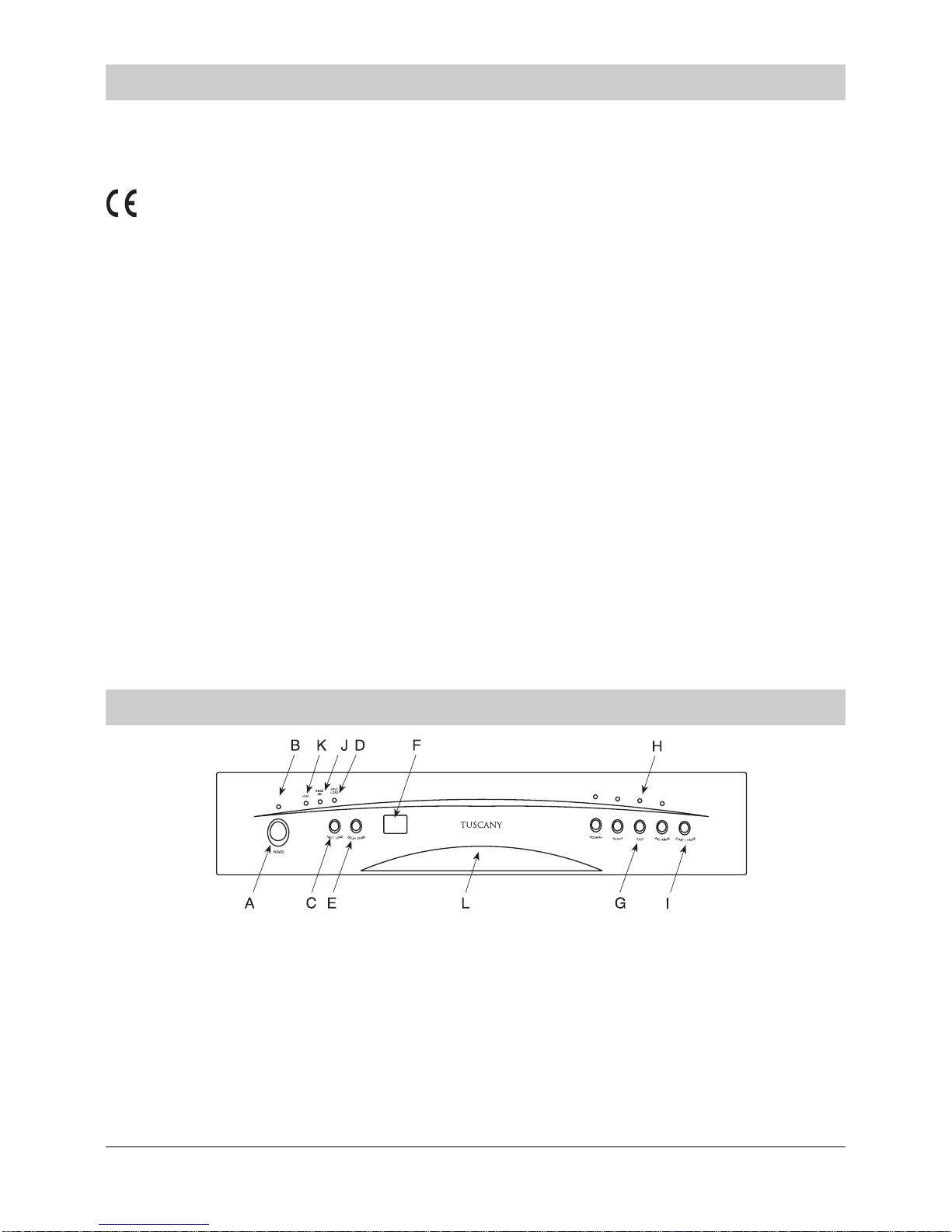
ON-OFF button (A) located on the control panel. The "B" indi-
cator light will come on. At this point, the appliance is on but
you must wait a few seconds before programming the setting
for the cycle.
Cancelling or modifying a cycle while underway
Premise : A cycle that is underway can only be modified if it
has only been running for a short time. Otherwise, the deter-
gent may have already been used, and the appliance mayhave
already drained the wash water. If this is the case, the deter-
gent dispenser must be refilled (see the paragraph entitled,
"Loading the Detergent").
To modify a cycle that is already underway, press the ON-OFF
button (A), then all of the settings will be cancelled.
If you forget to load some of the dishes
The wash cycle can be interrupted by pressing the Start/Pause
button. You can then load additional dishes and turn the appli-
ance back on. The cycle will start where it left off.
Premise: After selecting the wash cycle as indicated in the
paragraph entitled, "Setting and Starting a Wash Cycle..." the
delay time can be set.
1/2 load Button
This button (see "close-up View - Control Panel", letter "C")
makes it possible to wash dishes using only the upper rack if
there are not enough dishes for a full load. This will allow you to
save on water and eletrical energy. It can be used before set-
ting any of the wash cycles, except for the intensive cycle (if
included in the wash cycle table). Please keep in mind that the
amount of detergent should also be cut in half.
a) During the delay period, it is preferable not to change any of
the settings. If it is necessary, all of the settings must be can-
celled by pressing the ON-OFF button (A) to indicate that all of
the settings have been cancelled.
At this point, all of the steps for "Setting the Wash Cycle with a
delayed Start Time" and "setting and Starting a Wash Cycle"
must be repeated, following the instructions contained in the
corresponding sections.
b) If the door is opened during the delay period, the indicator
will blink and acoustic signal will sound, and the countdown will
stop.It will begin again when the door is closed .
At the end of the wash cycle
Six acoustic signals will indicate that the wash cycle has fin-
ished and the cycle indicator light (H) for the cycle will begin to
die out. Turn off the appliance using the ON-OFF button. Turn
off the water supply to the appliance and open the door. Wait a
few minutes before unloading the dishwasher to avoid handling
the dishes and utensils while they are still hot and more sus-
ceptible to breakage. They will also dry better.
Setting and Starting a wash Cycle
Select the desired cycle by pressing the selector button (G).
Each time the button is pressed, one of the "H" cycle indicator
lights will come on in succession. Choose the wash cycle you
feel is most appropriate for the type of dishes that need wash-
ing (consult the wash cycle table contained in this manual, es-
pecially when first using the appliance).
Press the Start/Pause button (I), and after a few seconds a
short acoustic sound will indicate that the wash cycle has be-
gun and can no longer be changed. If necessary, read the para-
graph entitled"Cancelling or modifying a cycle while underway..."
Wash cycle Programme Light
The wash cycle is running and the cycle indicator light (H) for
the cycle will begin to blink.
By pressing the "E" button (see close-up view-'Control panel")
the start of wash cycle can be delayed for between 1 to 9 hours.
Each time the button is pressed, the display (F) will show the
number of hours for the delay period. Choose the amount of
time desired. When the appliance is started with "I" button, a
short acoustic signal will sound and the delay time on the dis-
play will blink, indicating that the countdown has begun.
After the time has lapsed, the cycle will start.
NOTE:
Wash Cycle adjustment Buttons
Setting the Wash Cycle with a Delayed Start Time
.5.