PPRREEFFAACCEE––SSmmaarrttFFllooww
Grading live fish is a fairly hard and complicated process. The system normally
consists of three to four grades where the operator can dynamically adjust the grades
on the fly. The system falls under the category of a multi input, multi output system
(MIMO). The system is operated by two to four persons at a time and it is sensitive to
any changes, a small change to the input can cause a dramatic change in the output
and it’s not uncommon that 100 of thousands of fish are graded in one session and the
size range varies from few grams to a few hundred grams.
All these factors contribute in making the system fairly complicated and hard to tune
and more often than not results in an unsatisfactory output. It requires a lot of
knowledge about the system and a lot of practice to obtain a reasonable result.
SmartFlow connects all the devices used for grading fish in a hatchery to allow for an
automatic grading. SmartFlow is a control system that optimizes the grading process
by controlling the entire process. With SmartFlow you only need one person to
operate the whole system with fundamental knowledge of grading. You can control all
aspects of the grading fromwithin SmartFlow. Enter in your desired output and the
system takes care of the rest.
Set up
When setting up SmartFlow the following
system configuration is required:
● A VAKI counter (Micro/Macro/EXEL).
● A VAKI Smart Grader
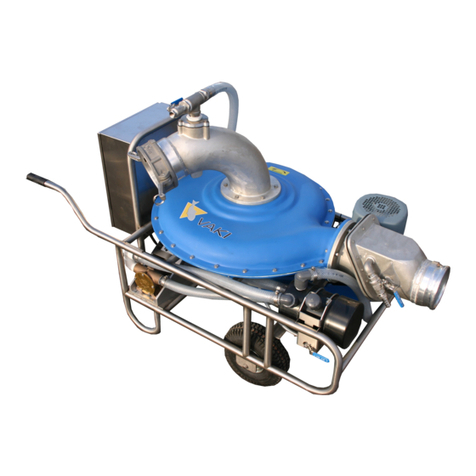
● A VAKI pump
● A VAKI density controller
● SmartFlow configured and running on
the counter.
VAKI Fish Pump Manual
VAKI Smart Grader
The Smart Grader delivers accurate fish grading while minimizing the impact on your
fish as they pass through the outlets. The dewatering unit distributes the fish evenly
over the width of the grader, so all 10 tracks are used effectively.
Further the inclination of the main sorting unit can be adjusted from 5-14° with an
electric actuator. The opening of the grader is controlled with electric linear actuators
that can be manually operated from a control panel on the grader or automatically
from the VAKI Counter which counts, size measures and calculates the split between
the grades. The opening for each grade is displayed on a digital display. The grader is
built in high grade stainless steel 316L and selected plastic materials that are corrosion
and water resistant.
The rollers are machined with high precision laser welding tools and balanced out with
specialized equipment. It delivers an accurate grading of the fish. The outlets are
designed to minimize the impact on the fish and can be mounted to deliver the fish on
either side of the grader. These outlets can easily be removed for cleaning. The
rotation speed of the rollers can be adjusted with a frequency controller.
The grader functions by sliding the fish between two rolls, where the distance
between them gradually widens. Where two pairs of rollers rotate away from each
other to make sure that the fish doesn’t get squeezed between the rollers, but instead
lifted up and pushed forward so they fall through in the correct place. The expansion
of the slits on both ends can be adjusted. When operating the grader you have to
keep in mind that the grades are all related to one another. One single grader gap
VAKI Fish Pump Manual
Page 6 www.vaki.is Page 7
www.vaki.is
Primingtank
The Priming tank must be filled with water before using
the pump. The water in this tank is used to create suction
in the pumping system.
Only after running the priming pump and when water
starts flowing out the priming system outlet can the main
motor/pump can be started. There are two valves to
empty the priming tank and the other to empty the main
pump housing. In freezing temperatures, the pump may
be damaged if not drained fully after use.
Primingpump
The priming the pump is connected to the priming motor
by a shaft. On this shaft there is a coupling that is easy to
replace if necessary (see photo below). The motor is
marked with an arrow showing which direction it should
turn. It is important to empty the priming pump of water
if there is a danger of frost.
Controlcabinet
The Control unit has seven buttons, switches and lights. The
large red switch at the bottom of the cabinet is the main
power switch and can only be turned on when the cabinet
door is closed. The display tells you the speed of the pump.
There are an on and off button for priming the pump and
on the main pump.
If required, it is possible to use the priming pump while
running the main pump. The black button controls the
speed of the main pump and the red light shows if there is
power to the pump or not. The sensitivity of the speed
button can be adjusted as follows:
1 Turn off the power at the main switch and open the door of the control cabinet. The door cannot
be opened unless the main switch is turned off.
2 Turn on the power in the cabinet by turning the white shaft of the main switch clockwise. There
will now be electric current in components of the cabinet, so avoid contact with any live
components.
3 The Altivar 31 has four buttons and a screen. It should now be rdY the screen. There is an up and a
down button on the left side and esc and ent touch button on the screen.
4 Press (Ent) once and "Set" appears on the screen.
5 Press (Ent) again and "ACC"(acceleration) will appear on the screen.
6 Press (Ent) again and a value will be displayed on the screen. The ACC value is set to 3.0 at the
factory. This value indicates the time in seconds for the main the drive to go from 0 to full speed. A
higher ACC value (longer time period to go from 0 to full speed) will make it easier to have fine
speed adjustments.
7 Use the up / down arrows to adjust to the desired ACC setting. The Factory setting @ 3.0
corresponds to 2.4 Hz per press of the remote control.
Increasing to 6.0s reduces every remote button press to1.2Hz steps.
The Altivar 31 can go from 0 to full speed of 50 Hz
8 Press (Ent) to save the new value.
9 Press (Esc) to return to the "ACC"
10th Press down arrow to scroll to "dEC" (deccelerate) this time setting the time to go from full
speed to stop.
11th Press enter and the value of dEC will appear on the screen.
12th Adjust to the desired value. The value of ACC and dEC need not be equal. If desired, one can
have fine adjustment on the ACC to allow a slower rate of acceparation speed up while a coarse
adjustment on reducing speed.
13th Press (Ent) to save.
14th Press (Esc) button repeatedly until 'rdY "on screen
15th Test the new setting and adjust if necessary (Section 4-14)
16th When the adjustment is complete the power is turned off by turning the white shaft of the main
switch counterclockwise.
17th The door of the cabinet is closed.
RemoteControl
Wireless remote control is optional and highly recommended. With
this you can start and stop the priming pump and the main pump
and control the speed of the main pump. (see page 10 of the
manual)
Inside the control cabinet there is an antenna for wireless
connection to the handheld remote unit.
The remote must be recharged with the battery charger supplied.