manuals.online logo
Brands
  1. Home
  2. •
  3. Brands
  4. •
  5. Whirlpool
  6. •
  7. Dishwasher
  8. •
  9. Whirlpool ADG 3550 User manual

Whirlpool ADG 3550 User manual

Other Whirlpool Dishwasher manuals

Whirlpool WFO 3P31 PL X Installation and operation manual

Whirlpool

Whirlpool WFO 3P31 PL X Installation and operation manual

Whirlpool Undercounter Dishwasher User manual

Whirlpool

Whirlpool Undercounter Dishwasher User manual

Whirlpool 24-Inch - Built-In Dishwasher (Color: Silver)... User manual

Whirlpool

Whirlpool 24-Inch - Built-In Dishwasher (Color: Silver)... User manual

Whirlpool ADP 6730 User manual

Whirlpool

Whirlpool ADP 6730 User manual

Whirlpool 8900 Series User manual

Whirlpool

Whirlpool 8900 Series User manual

Whirlpool WFC 3C26 P User manual

Whirlpool

Whirlpool WFC 3C26 P User manual

Whirlpool 801 Series User manual

Whirlpool

Whirlpool 801 Series User manual

Whirlpool 3369091 User manual

Whirlpool

Whirlpool 3369091 User manual

Whirlpool DU930PWSB - on 24 Inch Full Console... User manual

Whirlpool

Whirlpool DU930PWSB - on 24 Inch Full Console... User manual

Whirlpool ADP 242 S WH User manual

Whirlpool

Whirlpool ADP 242 S WH User manual

Whirlpool Inglis 586 Series User manual

Whirlpool

Whirlpool Inglis 586 Series User manual

Whirlpool W10836808B User manual

Whirlpool

Whirlpool W10836808B User manual

Whirlpool DU9500XR Series User manual

Whirlpool

Whirlpool DU9500XR Series User manual

Whirlpool ADG 9527 User manual

Whirlpool

Whirlpool ADG 9527 User manual

Whirlpool WDT920SADM User manual

Whirlpool

Whirlpool WDT920SADM User manual

Whirlpool Estate DU4040XP User manual

Whirlpool

Whirlpool Estate DU4040XP User manual

Whirlpool WP 76 User manual

Whirlpool

Whirlpool WP 76 User manual

Whirlpool DP4800XM User manual

Whirlpool

Whirlpool DP4800XM User manual

Whirlpool ESTATE TUD5700EQ2 User manual

Whirlpool

Whirlpool ESTATE TUD5700EQ2 User manual

Whirlpool DU2900XM User manual

Whirlpool

Whirlpool DU2900XM User manual

Whirlpool WDF510PAYW User manual

Whirlpool

Whirlpool WDF510PAYW User manual

Whirlpool DU1100XTPS User instructions

Whirlpool

Whirlpool DU1100XTPS User instructions

Whirlpool ADG 7560 User manual

Whirlpool

Whirlpool ADG 7560 User manual

Whirlpool WDF550SAAB User manual

Whirlpool

Whirlpool WDF550SAAB User manual

Popular Dishwasher manuals by other brands

Samsung DW-FN320T user manual

Samsung

Samsung DW-FN320T user manual

LG LDS 5811WW Service manual

LG

LG LDS 5811WW Service manual

Elba EDW-B1462D owner's manual

Elba

Elba EDW-B1462D owner's manual

VESTEL NOVUS Series Service manual

VESTEL

VESTEL NOVUS Series Service manual

Bosch SMS4EMW00E Instructions for use

Bosch

Bosch SMS4EMW00E Instructions for use

Global-Tek GT-CR 2 manual

Global-Tek

Global-Tek GT-CR 2 manual

Smeg Dishwasher 85028 Instructions for installation and use

Smeg

Smeg Dishwasher 85028 Instructions for installation and use

LG LD-4080W Service manual

LG

LG LD-4080W Service manual

Bauknecht GCF 625 operating instructions

Bauknecht

Bauknecht GCF 625 operating instructions

Sharp QW-HX13F47EI-EU user manual

Sharp

Sharp QW-HX13F47EI-EU user manual

Asko D5536XLFI operating instructions

Asko

Asko D5536XLFI operating instructions

Modena WP 7134 WVM User manual book

Modena

Modena WP 7134 WVM User manual book

Beko DFN39340X instruction manual

Beko

Beko DFN39340X instruction manual

AEG FAVORIT 65050 VI1P user manual

AEG

AEG FAVORIT 65050 VI1P user manual

Siemens SN23HI37VE user manual

Siemens

Siemens SN23HI37VE user manual

Maytag MDB4651AWB - Tall Tub Dishwasher User instructions

Maytag

Maytag MDB4651AWB - Tall Tub Dishwasher User instructions

Hotpoint Ariston LL 42 Instruction book

Hotpoint Ariston

Hotpoint Ariston LL 42 Instruction book

Siemens SN45ZW56CS user manual

Siemens

Siemens SN45ZW56CS user manual

manuals.online logo
manuals.online logoBrands
  • About & Mission
  • Contact us
  • Privacy Policy
  • Terms and Conditions

Copyright 2025 Manuals.Online. All Rights Reserved.

Whirlpool is a registered trademark of Whirlpool USA 5019 396 96039
GB
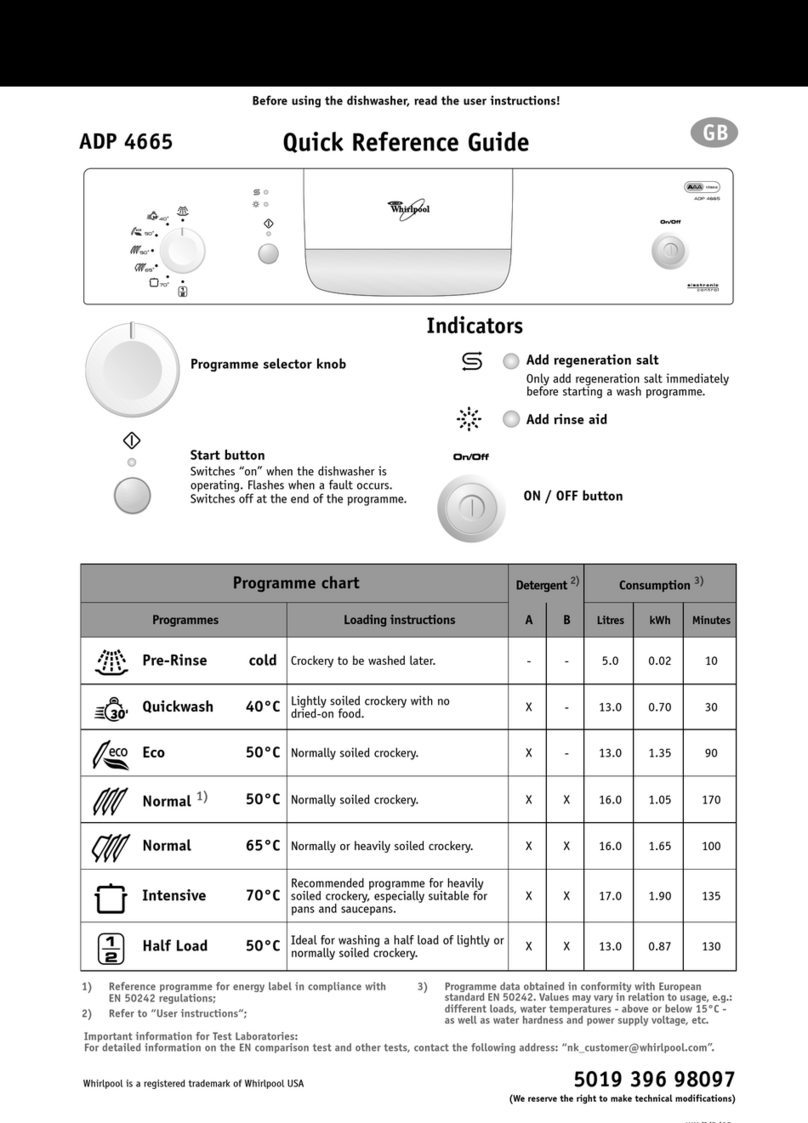
ADG 3550 Quick Reference Guide
Before using the dishwasher, read the user instructions!
(We reserve the right to make technical modifications)
Add regeneration salt
Only add regeneration salt immediately before
starting a wash programme.
Add rinse aid
Half-load wash (top basket)
selection key
Press the button to select the option; the
corresponding indicator lights up. Press the
button again to deactivate the option; the
corresponding indicator goes off.
“Delayed start” button
The wash cycle can be programmed to
start after 3-6-9 hours. Press the button in
order to select the delayed start; the
corresponding warning light will turn on.
After a bried pre-washing of the
kitchenware, the washing with the
previously set up setting can be started. In
order to exit from the selection mode and
start the wash without a delayed start,
press the button until warning lights 3-6-9
are turned off.
Water stop device activated
Switch off the dishwasher and contact the
After-sales Service.
The dishwasher over fills with water
Reset and start the programme again from the
beginning. If the problem persists, contact the
After-Sales Service.
The water heating system is not working
Reset and start the programme again from the
beginning. If the problem persists, contact the
After-Sales Service.
Water heating anomaly
Reset and start the programme again from the
beginning. If the problem persists, contact the
After-Sales Service.
The dishwasher does not fill with water
Check the water supply and filters, and make sure
that there are no kinks in the water inlet hose.
Open and close the door in order to continue.
The dishwasher does not drain
Make sure that the filter unit and drain hose are not
clogged and if necessary clean them.
Flow meter anomaly (if provided)
Reset and start the programme again from the
beginning. If the problem persists, contact the
After-Sales Service.
Alternate washing system anomaly
(if provided)
Reset and start the programme again from the
beginning. If the problem persists, contact the
After-Sales Service.
Fault in water load system
Switch off the dishwasher and contact the After-
sales Service.
(*) Extra functions available in all programmes, except prewash.
(**) The program is characterized by a final anti-bacterial rinse in
order to guarantee an additional reduction in bacteria. If the
temperature does not remain constant during the anti-
bacterial rinse (for e.g. due to opening of the machine's door
or energy loss), the program warning lights will flash,
specifying that the anti-bacterial action is not guaranteed.
1) Reference programme for energy label in compliance with
EN 50242 regulations;
2) Refer to “User instructions”;
3) Program data obtained in conformity with European standard
EN 50242. Values may vary in relation to usage, e.g.: different
loads, water temperatures - above or below 15° C - as well as
water hardness and power supply voltage, etc.
On/Off button
Press the ON button to switch on the dishwasher.
The indicator lamp of the last programme selected
lights up; at the end of the cycle an acoustic signal
sounds.
Programme selection button
Press the button to select a programme.
The corresponding indicator lamp lights up.
Indicators
Extra functions (*)
Additional options in case of failure
Indicators
Off
Blinking
On
Programme chart Detergent 2) Consumption 3)
Programmes Loading instructions A B Litres kWh Minutes
Pre-rinse cold Crockery to be washed later. - - 6.0 0.03 16
Rapid 30 min 45°C Lightly soiled crockery, with no dried-on food. X - 13.0 1.15 45
Eco 1) 55°C Normally soiled crockery. X - 15.0 1.08 180
Sanirinse (**) 65°C Normally or very dirty, with additional anti-bacterial
action. X - 17.0 1.37 100
Intensive 70°C Recommended programme for heavily soiled
crockery, especially suitable for pans and saucepans. X X 20.0 1.75 110
39696039GB.fm Page 1 Tuesday, February 28, 2006 2:54 PM
Black process 45.0° 150.0 LPI

How to use the appliance
Further indications are given in the single chapters and in the user instructions.
Press the On/Off button .
Large compartment A.
Small compartment B.
Mechanical indicator lamp C.
Electric indicator on control panel (if provided).
On models with water softener system
only.
Mechanical indicator lamp D.
Electric indicator on control panel
(if provided).
Refer to the dishwasher loading instructions.
Press the button until the desired programme lights up.
If necessary (and if provided).
The corresponding indicator lamp lights up.
“Cancel”
Open the door, press until the
indicators4+5(marked by“end”on
the control panel) lightup.
Close the door, after about 1 min.
the dishwasher cycle ends.
“Change the programme in
progress”
Open the door.
Select another programme and close
the door in order to start the new
cycle.
- Only open the dishwasher if
necessary (Warning: beware of
hot steam).
- If the appliance is switched off
during a wash cycle, when
switched on again it will resume
the cycle from where it was
interrupted.
At the end of the programme an acoustic signal will sound.
The indicator lamps 4 + 5 (marked by “end” on the control panel) light up.
Open the door and press the On/Off button .
All the indicator lamps go off.
Attention: When the door is opened steam comes out!
Unload the appliance, starting from the lower rack.
Open the door
How to fill the
detergent dispenser BA C
Check the rinse aid level
Check the
regeneration salt level
D
Load the racks
Select a programme
Select
additional options
Open the water tap,
then close the door
in order to start
the program
Wash cycle
Switch off the appliance
Turn off the water
tap, unload the racks
39696039GB.fm Page 2 Tuesday, February 28, 2006 2:54 PM
Black process 45.0° 150.0 LPI
Dishwasher loading instructions and racks provided
Upper basket:
Cup holders (A):
Depending on the position, stand up
or bend down.
Place the glasses in the middle and to
the right, dishes to the left, under the
cup holder grids.
Place long and narrow utensils
(carving forks, knives) on the
bottom of the rack, not crosswise,
with the sharp ends towards the
appliance.
Cutlery basket supports (B):
Depending on the position, stand up
or bend down.
Vertical adjustment of
basket (also with basket
loaded):
Pull upwards to the first or second
catch to raise the basket.
Pullthe sidereleaselevertolower the
basket.
The rack must be level on both
sides.
Lower basket:
With tilting plate holders.
Cutlery Basket:
The cutlery basket is fitted with a grid
(C) to keep items separated. It splits
into two parts for half-loads or when
there is only a small amount of cutlery
to wash.
Sharp knives and forks that might
cause injury must be placed in the
cutlery basket with the sharp end
facing downwards.
Only use dishwasher-proof crockery and dishes. Do not use the appliance for items not suitable for washing in a
dishwasher, for example wooden items, aluminium, plastic utensils, tin, hand-decorated crockery (unglazed),
silver cutlery.
ABAB
Release lever
CC
CC
39696039GB.fm Page 3 Tuesday, February 28, 2006 2:54 PM
Black process 45.0° 150.0 LPI
What to do if...
If a fault occurs, before contacting our After-Sales Service, make the following checks to try and remedy the problem (* see
also the corresponding chapter in the user instructions).
Problem Cause Remedy
The appliance is not
working • No water supply. • Open the water tap.
• The appliance does not load sufficient
water. • Clean the water supply tap filter.
• Ensure there are no kinks in the water hose.
• There is a power failure. • Insert the plug into the mains socket.
•Openthedoor.
•Closethedoor.
• Check the domestic circuit fuse.
If crockery is not
perfectly dry • Insufficient rinse aid. •Increasedosage*.
• Residual water in cavities. • Load crockery at an angle.
If crockery is not
perfectly clean • The water jet does not reach the
crockery. • Arrange crockery so that items do not touch each other.
Load crockery upside down.
• Insufficient detergent. • Follow recommended detergent dosage.
• Unsuitable programme. • Select a more intense wash cycle.
• Spray arms blocked. • The spray arms must be able to turn freely.
• Spray arm nozzles clogged. • Remove any impurities obstructing the water flow *.
• Incorrect detergent/detergent too old. • Use a good quality detergent.
Sandy or grainy
residues • Clogged filters. • Check filters regularly/if necessary clean them *.
• Filters incorrectly assembled. • Refit and lock the filters in place, making sure they
have been inserted correctly *.
Colour of plastic parts
faded • Tomato/carrot juice,... • Depending on the material, if necessary use a
detergent with a greater whitening power.
Deposits on crockery
•removable • Streaks on the crockery/glasses. • Decrease the rinse aid setting *.
• Layer of salt on crockery/glasses. • Close the salt container lid properly *.
• not removable • Insufficient water softening, calcium
deposits. • Change water hardness setting, if necessary add salt *.
Opaque glasses/
glasses not sparkling • Cannot be washed in the dishwasher. • Use suitable glasses.
Rust on cutlery • Not made of stainless steel. •Usesuitablecutlery.
If, after carrying out the above checks the malfunction persists or appears again, turn the appliance off and turn off the water
supply tap, then call our After-Sales Service (see guarantee).
Before contacting our After-Sales Service, take note of the following:
• The nature of the fault.
• The appliance type and model.
• The service code (the number indicated on the adhesive rating plate)
inside the door on the right-hand side.
39696039GB.fm Page 4 Tuesday, February 28, 2006 2:54 PM
Black process 45.0° 150.0 LPI