manuals.online logo
Brands
  1. Home
  2. •
  3. Brands
  4. •
  5. Whirlpool
  6. •
  7. Oven
  8. •
  9. Whirlpool AKZ 390 IX User manual

Whirlpool AKZ 390 IX User manual

This manual suits for next models

3

Other Whirlpool Oven manuals

Whirlpool ACE 102 IX User manual

Whirlpool

Whirlpool ACE 102 IX User manual

Whirlpool AKZM 655 User manual

Whirlpool

Whirlpool AKZM 655 User manual

Whirlpool AKZM 6610 Operating instructions

Whirlpool

Whirlpool AKZM 6610 Operating instructions

Whirlpool SB160PEE User manual

Whirlpool

Whirlpool SB160PEE User manual

Whirlpool AKZM 8790 Operating instructions

Whirlpool

Whirlpool AKZM 8790 Operating instructions

Whirlpool RBS275PRS User manual

Whirlpool

Whirlpool RBS275PRS User manual

Whirlpool AMW 439/WH User manual

Whirlpool

Whirlpool AMW 439/WH User manual

Whirlpool GBS307PRSS User manual

Whirlpool

Whirlpool GBS307PRSS User manual

Whirlpool AKZ9 6230 IX User manual

Whirlpool

Whirlpool AKZ9 6230 IX User manual

Whirlpool R82200XK User manual

Whirlpool

Whirlpool R82200XK User manual

Whirlpool GW395LEPB03 User manual

Whirlpool

Whirlpool GW395LEPB03 User manual

Whirlpool ACMT 5131/IX/2 User manual

Whirlpool

Whirlpool ACMT 5131/IX/2 User manual

Whirlpool ACE3411KD0 Instruction Manual

Whirlpool

Whirlpool ACE3411KD0 Instruction Manual

Whirlpool WOD93EC0AS User manual

Whirlpool

Whirlpool WOD93EC0AS User manual

Whirlpool BUILT-IN MICROWAVE OVEN User manual

Whirlpool

Whirlpool BUILT-IN MICROWAVE OVEN User manual

Whirlpool AMW 582 Operating and maintenance manual

Whirlpool

Whirlpool AMW 582 Operating and maintenance manual

Whirlpool W7 OS4 4S2 H BL User manual

Whirlpool

Whirlpool W7 OS4 4S2 H BL User manual

Whirlpool BES430W User manual

Whirlpool

Whirlpool BES430W User manual

Whirlpool GMC275PRQ00 User manual

Whirlpool

Whirlpool GMC275PRQ00 User manual

Whirlpool GY396LXPB00 User manual

Whirlpool

Whirlpool GY396LXPB00 User manual

Whirlpool W6 MW461 BSS User manual

Whirlpool

Whirlpool W6 MW461 BSS User manual

Whirlpool WOS92E User manual

Whirlpool

Whirlpool WOS92E User manual

Whirlpool AKZ 244 Series Operating instructions

Whirlpool

Whirlpool AKZ 244 Series Operating instructions

Whirlpool RJM-2840P User manual

Whirlpool

Whirlpool RJM-2840P User manual

Popular Oven manuals by other brands

Brandt FC 222 user manual

Brandt

Brandt FC 222 user manual

aumate TOA20M04N-1E instruction manual

aumate

aumate TOA20M04N-1E instruction manual

Maytag CWE4100AC - 24" Single Electric Wall Oven Dimension Guide

Maytag

Maytag CWE4100AC - 24" Single Electric Wall Oven Dimension Guide

Kernau KBO 1076 S PT B instruction manual

Kernau

Kernau KBO 1076 S PT B instruction manual

Bosch HB 37 N Series User manual and installation instructions

Bosch

Bosch HB 37 N Series User manual and installation instructions

Electrolux EOD5420AA user manual

Electrolux

Electrolux EOD5420AA user manual

Mx Onda MX-HC2183 instruction manual

Mx Onda

Mx Onda MX-HC2183 instruction manual

Daewoo F6EV19SM2 Service manual

Daewoo

Daewoo F6EV19SM2 Service manual

Blodgett MT3870 Specifications

Blodgett

Blodgett MT3870 Specifications

GE ZET2F owner's manual

GE

GE ZET2F owner's manual

GE JK3000DF3WW owner's manual

GE

GE JK3000DF3WW owner's manual

eka EKF 523 NT Operating and instruction manual

eka

eka EKF 523 NT Operating and instruction manual

AEG Electrolux E3191-5 user manual

AEG Electrolux

AEG Electrolux E3191-5 user manual

Pratica Rocket Express quick start guide

Pratica

Pratica Rocket Express quick start guide

Viking Professional VGSO260T user guide

Viking

Viking Professional VGSO260T user guide

FM RX203 instruction manual

FM

FM RX203 instruction manual

Bosch HBN331 9B Series instruction manual

Bosch

Bosch HBN331 9B Series instruction manual

NEFF B95M42N0MK Instructions for use

NEFF

NEFF B95M42N0MK Instructions for use

manuals.online logo
manuals.online logoBrands
  • About & Mission
  • Contact us
  • Privacy Policy
  • Terms and Conditions

Copyright 2025 Manuals.Online. All Rights Reserved.

1
INSTRUCTION FOR USE
INSTALLATION
ELECTRICAL CONNECTION
BEFORE USING THE OVEN
HINTS FOR PROTECTING THE ENVIRONMENT
PRECAUTIONS AND GENERAL SUGGESTIONS
OVEN ACCESSORIES
CLEANING THE OVEN AND ITS ACCESSORIES
TROUBLESHOOTING GUIDE
AFTER SALES SERVICE
DECLARATION OF CONFORMITY CE
3gb66016.fm5 Page 1 Tuesday, April 16, 2002 3:27 PM
2
INSTALLATION
Technical information for the installer
Unpack the oven to make the connections.
Rest the oven on the polystyrene base to avoid damaging it.
Do not lift the oven by the door handle, but hold it at the sides.
Make sure that the appliance has not been damaged during transport.
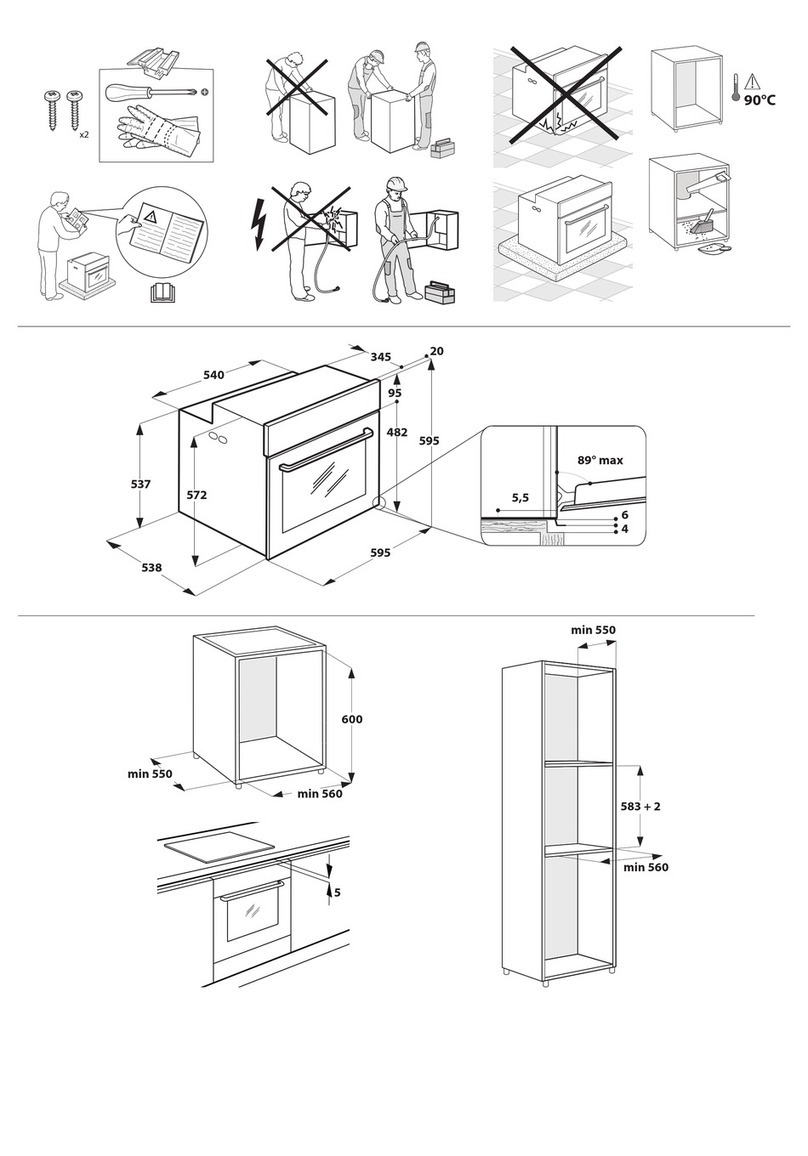
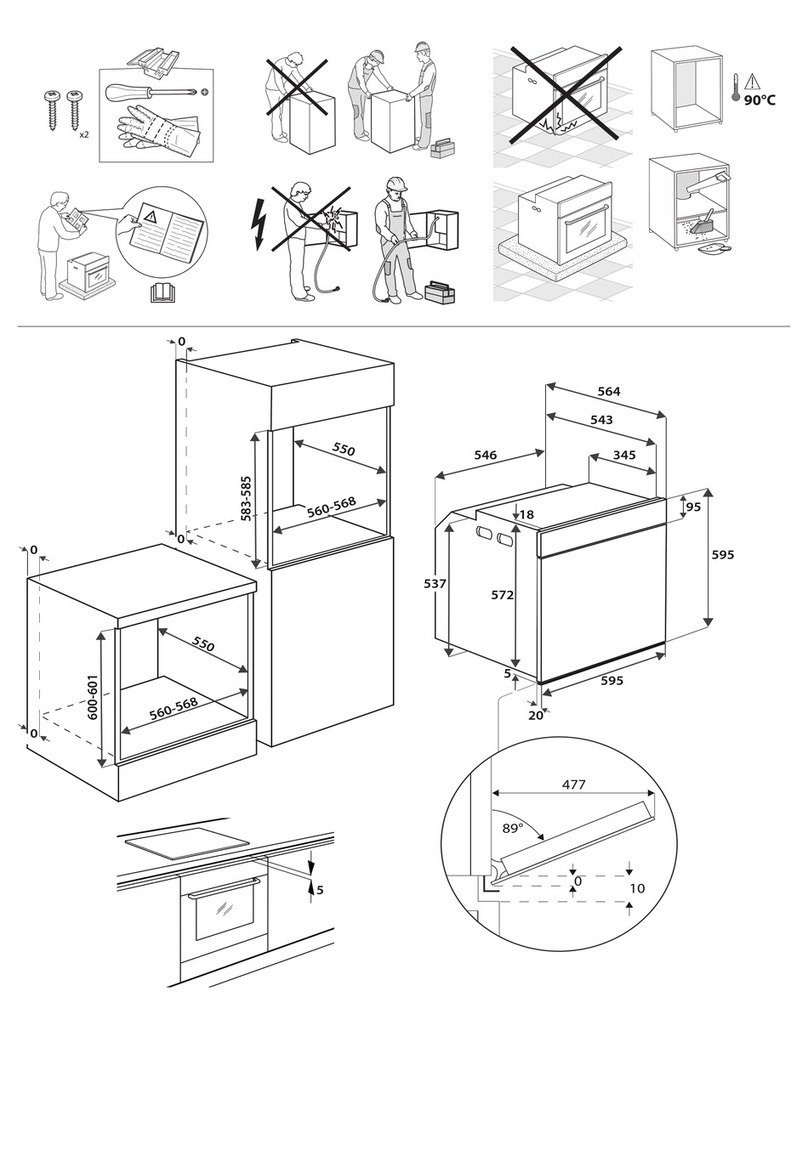
The dimensions of the oven and the unit are given in the picture below.
Units in contact with the oven must be heat resistant (90°C).
If plastic laminates or the sealing material are not sufficiently heat resistant, bubbles may
form, the surface may be deformed or the coating may detach.
House the oven in the unit cavity, lifting it at the sides and making sure that the supply
cable is not trapped.
To ensure correct ventilation, respect the ventilation openings indicated in the picture
(200 mm2minimum).
Fasten the oven to the unit with the screws (A) as shown.
The oven can also be fitted under a cooktop.
A
A
A
A
*: 590 For D+CH only
*
There must be a gap of at least 5 mm between the upper edge of the oven and the lower
edge of the working surface. This gap must never be closed by strips or unit reinforcing
pieces. When the oven is installed, make sure that the sides do not touch the front edges
of the unit or the adjacent drawers and door (see below picture).
No Contacts
3gb66016.fm5 Page 2 Tuesday, April 16, 2002 3:27 PM
3
ELECTRICAL CONNECTION
BEFORE USING THE OVEN
For best use of the oven please read the
instructions for use carefully and keep
them in a safe place.
Remove the cardboard protection and the
protective plastic film.
Take the accessories out of the oven and
heat it to 200°C for about an hour to
remove the smells and fumes of insulating
material and protective greases. Keep the
window open during this operation.
HINTS FOR PROTECTING THE ENVIRONMENT
1. Packing
The packaging material is 100% recyclable
and it is marked with the recycle symbol
().
2. Electrical appliances
The electrical appliances are manufactured
with recyclable or reusable material.
Dispose of them following the local
regulations for the disposal of waste.
Before disposing of them make them
unusable by cutting off the supply cable.
Do not switch on the oven before connection is
complete.
Make sure that the installation and the electrical
connection are made by a qualified engineer
according to the manufacturer's instructions and the
local rules in force.
The installer is responsible for the correct electrical
connection and for observance of the safety rules.
The appliance must be connected to the main outlet
by means of an omnipolar switching device with a
contact opening distance of at least 3 mm.
Grounding appliances is mandatory by law.
Do not use multiple sockets or extensions.
After the installation, the electrical parts must be
inaccessible.
Make sure that the voltage stated on the appliance
rating plate is the same as the voltage in your home.
The rating plate is on the front edge of the oven
(visible when the door is open).
3gb66016.fm5 Page 3 Tuesday, April 16, 2002 3:27 PM
4
PRECAUTIONS AND GENERAL SUGGESTIONS
Before any operation, switch off the electricity to the
oven.
Keep children away from the oven when it is in use
and when its has just been switched off.
Any repair or operation on the oven must only be
performed by a qualified engineer.
Make sure that the electrical cables of other
appliances used near the oven do not touch hot parts
and are not trapped in the oven door.
Do not lean or sit on the open oven door. Do not hang
anything heavy on the handle of the open oven door.
Use oven gloves to remove pans and accessories, when
the oven is hot.
 Do not cover the bottom of the oven with
aluminium foil.
Do not leave any flammable material in the oven. If the
appliance is switched on by mistake, it could catch fire.
During the cooking process water evaporates as steam
from the food. All ovens require this steam, and other
fumes, to be vented from the oven cavity. For reasons
of safety and appearance, it was determined that the
bottom of the door is the optimum position.
Consequently vapour may be seen coming from this
area on occasion (see picture). This is a normal
occurrence and the bottom trim can be cleaned.
Do not rest heavy weights on the door because these
could damage the oven cavity and the hinges.
Maximum weight: 7 Kg.
FumesExhaust
3gb66016.fm5 Page 4 Tuesday, April 16, 2002 3:27 PM
5
OVEN ACCESSORIES
 Accessories supplied depend on the model
(refer to the Product Description Sheet supplied
separately).
Bar rack
The bar rack can be used in the same way as a flat rack.
The number of shelf positions can be doubled, depending
on whether the rack is inserted in the (A) or (B) position.
Multi-purpose drip tray
This tray can also be used as a baking tray, and has a
sloping edge for this purpose.
Use as a baking tray for cream puff, meringues,
madeleines, puff pastry, etc.
When placed under a rack, it acts as a drip tray to collect
dripping juices and fat from grilling dishes.
Turnspit
The turnspit comes supplied with a stand for the spit.
To use the turnspit:
Fit the spit stand in position in the oven.
Slide one of the forks on to the spit, followed by the
food to be spit-roasted, then the second fork. Centre
the food and secure in position by screw-tightening
the two forks.
Place the spit on the stand.
Brush the food with oil or softened butter.
Insert the tip of the spit in the turning square at the
back of the oven.
Set the selector to the GRILL + TURNSPIT position.
Before closing the door, remove the heat-insulated
handle from the spit by unscrewing.
3gb66016.fm5 Page 5 Tuesday, April 16, 2002 3:27 PM
6
CLEANING THE OVEN AND ITS ACCESSORIES
After each use leave the oven to cool and clean it to
avoid the encrustations being repeatedly heated.
If the dirt is tough, use a specific oven cleaning
product following the instructions on the packaging.
Clean the outside with a sponge dampened with
lukewarm water.
 Do not use abrasives or metal pads.
Clean the oven door glass with a liquid detergent.
Wash the accessories in the dishwasher or by hand
using an oven cleaning product.
If cooking lasts for a long time, or when cooking
simultaneously on several levels, food containing a
large amount of water (pizza, stuffed vegetables, etc.)
may create condensation on the inside of the door and
on the gasket; when the oven has cooled, dry with a
cloth or a sponge.
Additional information for appliances which
have an aluminium front:
The material has a sensitive surface. In order to avoid
scratches, only use a soft sponge and liquid cleaner to
clean the front of the appliance.
Removing the oven door
To remove the oven door, guide the lever (A) into the
hinge notch (B): close the door to its stop position and
pull out towards you.
Refit in the reverse order.
Changing the oven light bulb
Disconnect the oven from electrical supply.
To remove and replace the bulb, remove the cover (H).
Proceed as shown in the diagram opposite.
Use only E14 -25W - 300 °C bulbs.
Remember to replace the seal (J).
Self-cleaning system
This oven burns off splashes and deposits at high
temperature.
The smoke produced is cleaned by being passed through
a catalyser.
The self-cleaning system works more efficiently if operated
before the oven becomes too soiled, with a low energy
consumption.
However, it is not necessary to operate the self-cleaning
function each time the oven is used, but only if the oven is
splashed. For safety reasons, the self-cleaning function will
only operate following automatic locking of the oven door.
Once the internal temperature of the oven exceeds the
maximum cooking temperature, the door can no longer
be opened.
3gb66016.fm5 Page 6 Tuesday, April 16, 2002 3:27 PM
7
CLEANING THE OVEN AND ITS ACCESSORIES
Notes
The self-cleaning function can be operated at any
time using the programmer, even overnight
(to take advantage of lower tariffs). Before
operating, take the following essential
precautions:
 remove all accessories from the oven,
including the oven fittings (racks, multifunction
drip trays, etc.).
 remove larger deposits, since these can
ignite or produce a large amount of smoke.
When the self-cleaning operation is complete and
the door can be re-opened, there may be white
deposits on the inside of the oven: allow the oven
to cool and remove any residues with a damp
sponge.
The cooling fan will continue to operate after
the oven has switched off. This is normal, and
it will switch off automatically once the oven
has cooled down to normal temperature.
USING THE SELF-CLEANING FUNCTION
- Turn the mode selector to the economic self-
cleaning position (if provided) or to the
normal self cleaning position .
In the position a time of 1h. 30 min. is
selected automatically and cannot be modified. A
delayed self- cleaning cycle can be programmed;
please refer to the instructions in the separate
Programmer Sheet, section: Selecting the End of
Cooking time.
In ovens with electronic control: a time of
1h. 30 min. is selected automatically.
To change this time or select delayed self-
cleaning, please refer to the separate Programmer
sheet, section: Selecting the Cooking Time or
Selecting the end of Cooking Time.
In ovens without electronic control, the self-
cleaning time must be programmed. Please refer
to the separate Product Description Sheet.
The self-cleaning function can be extended to 120
minutes or more if the oven is particularly heavily
soiled.
The pilot light indicates that the oven door is
locked and remains on after the end of selected
self-cleaning time. The door cannot be re-opened
until the oven has cooled down to a normal
temperature (maximum temperature of the
cooking thermostat).
Do not attempt to unlock the oven door by force.
If the pilot light is on, wait until it switches off.
TROUBLESHOOTING GUIDE
The oven does not work
Switch on the appliance again to see whether
the problem has disappeared.
Check that there is power to the appliance.
Check that the oven selector switch is not on
the O position.
Check that the temperature and function have
been selected.
Excessive smoke during operation
- Select a temperature lower than the
recommended temperature given in the
cooking chart.
- Do not use the multi-purpose drip tray as a
roasting tin.
- Clean the oven.
Steam
- When cooking food which contains a large
amount of liquid (e.g. stuffed tomatoes,
courgettes), the oven should be pre-heated
to the cooking temperature to prevent
condensation forming on the glass panels of
the oven door.
The cooling fan continues to operate after
the oven has switched off
- The Cooling Fan is an active safety device
which may continue to operate after the oven
has been switched off. This is normal and
ensures proper cooling down of the oven.
The cooling fan fails to operate
Call After Sales Service.
The oven door fails to open
- While the self-cleaning function is in operation,
the door remains locked and the pilot light
remains on. The door cannot be re-opened until
the oven has cooled down to below a normal
operating temperature (maximum temperature
of the cooking thermostat).
If the display shows the message F+ numeric
code (e.g.: F01), contact the After Sales
Service, quoting the error code displayed.
If the appliance still fails to function properly,
please call After Sales Service.
3gb66016.fm5 Page 7 Tuesday, April 16, 2002 3:27 PM

8
AFTER SALES SERVICE
 Before contacting AFTER SALES SERVICE:
1. See whether you can solve the problem
yourself (see Trouble-shooting guide).
2. Switch the appliance off and on again to
see whether the problem has disappeared.
If after these checks the oven is not working
correctly, contact the nearest After-Sales
Service.
Always give:
the type of fault
the type and exact number of the
appliance
the Service number (this is the number
after the word SERVICE on the serial
number plate) on the inner left edge of the
cavity. The After-Sales Service number is
also given on the guarantee leaflet.
your complete address including Post Code
and telephone number.
If any repairs are required, please contact an
authorised AFTER SALES SERVICE as
indicated in the warranty.
In the unlikely event that an operation or
repair is carried out by an unauthorised
technician, always request a certification of
the job carried out and insist on the use of
original spare parts.
Failure to comply with these instructions
may compromise the safety and quality of
the product.
DECLARATION OF CONFORMITY CE
These electrical appliances are intended to
come into contact with food products and
conform with European Directive 89/109/
EEC.
They have been designed for use only as
cooking appliances. Any other use (e.g.
room heating) is to be considered incorrect
and consequently dangerous.
They have been designed, manufactured
and put on the market in conformity with:
- the safety requirements of Low Voltage
Directive 73/23/EEC;
- the protection requirements of EMC
Directive 89/336/EEC;
- the requirements of Directive 93/68/EEC.
Printed in Italy
Ecological Paper
1/0302
5019 310 66016 GB
3gb66016.fm5 Page 8 Tuesday, April 16, 2002 3:27 PM