Specification
Model
Camera Type
Lens Mount
Equivalent Focal Length
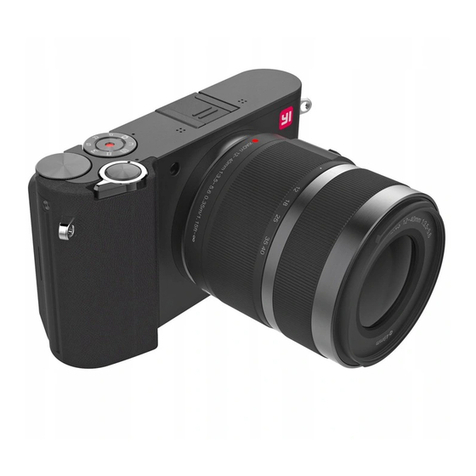
YI-M1
Interchangeable-lens digital camera
Micro four thirds
Approximately 2x focal length
Number of Pixels
(effective)/ aspect ratio
17.3mm×1 3mm
Sensor Size
Product Type
Image Quality
20M: 5184×3888 pixel
50M, 20M,16M, 8M, 3M, VGA
1/4000s-60s
Auto, Program, Aperture-Priority,
Shutter-Priority, Manual Shutter
(B mode, T mode) Scanning
Panorama, Scenery Mode,
Master Guide
Multi-segment Metering Mode,
Spot Metering Mode, Center-weighted
Metering Mode
ISO Auto,100, 200, 400, 800, 1600, 3200,
6400, 12800, 25600
Scene Modes
sRGB,AdobeRGB
Number of pixels(effective): 20.16 megapiexls
Number of pixels(total): 21.77 megapixels
Image sensor aspect ratio: 1.33 (4:3)
Maximal Resolution:
Image Quality:
File Format RAW, JPEG (compression: Super Fine
1/2.7, Fine1/4, Normal 1/8, Exif v2.3)
Focus
Focus System Contrast detect
Autofocus
Face detection
Single-AF
Continuous AF
LCD touch and shoot AF
Manual Focus
Focus Brightness Range
Number of Focus Points
Yes (Peak MF and Magnifier MF)
-4EV-20EV
81 points
LCD Screen
Screen size
Resolution
Touch Screen
Brightness Adjustment
3" 1.04 MP (approx.)
720RGB×480
Yes
Yes
Exposure
Mechanical Shutter
Speed
Exposure Modes
Metering Modes
Portrait, Landscape, Sport, Night scene,
Candle, Sunset, Fireworks, Beach & Snow
Exposure Compensation
Exposure Brackating
HDR
±5EV
Yes
Yes
Flash
External Flash
Flash Modes
Flash Sync Speed
Yes
Auto, On, Off,
1/125s
Driver modes
Driver Modes
Continuous Speed
Single, Continuous, Timer (2s, 10s)
5fps
Color
Color Modes
White Balance
WB Bracketing
Color Space
Standard, Portrait, Vivid, B&W, High-contrast B&W
Auto, Sunny, Shadow, Cloudy,
Incandescent, CWB (2000-11500)
Yes
Contents
1
2
4
7
8
9
10
1. Contents of Package
1). Insert the battery
2). Insert the memory card
3). Place/remove the lens
4). Charge the battery
5). Attach the strap
15
17
18
1). View/edit still pictures
2). Detailed info/index display
3). Enlarged view
4). Delete pictures
5). Watch videos
12
2. Parts of the Camera
3. Getting Started
4. Powering the camera on and off
5. Setting the Date and Time
6. Select shooting mode
7. Shoot Pictures / Record Videos
1). Shoot pictures
2). Record videos
8. Image/Video Playback
9. Connect YI Mirrorless App to YI-M1 Mirrorless Digital Camera
10.Safety precautions
11. Wireless functions
Video
Video Resolutions
4K 3840×2160 30fps,2K 2048
×1536 30fps,FULL HD 1920×
1080 60fps,30fps,24fps,HD
1280×720 60fps,30fps,24fps,
VGA 640×480 240fps
USB
HDMI
Wireless
BLE
Remote Control
Video Format
Video Format
Audio Format
Microphone
Speaker
MPEG-4/H.264
AAC
Stereo
Mono
Record/Delete
Storage Type
Memory Card Settings
SD/SDHC/SDXC (max 512G)
Erase all, Format
Connectivity
USB 2.0
Yes (Micro HDMI)
Yes (2.4G)
Yes (4.1)
Remote Control: currently not supported
(coming soon via App update)
14-104℉, 30-90% RH
-4-140 ℉, 10-90% RH
Playback Modes
Playback Modes
Mode:
Still Image: Single, Single with Detail Info,
Index Display, Magnification
Video: Play, FW, BK, Pause
Playback modes:
Picture - Single, Single with Detail Info,
Index, Enlarged
Video - Play, Forward, Backward,
Pause
Picture Edit RAW->JPEG, Color->B&W, Resize,
Protection, Erase
Others
Battery Lithium, up to 380 shoots
(based on CIPA standard)
Dimensions 113.5mm(W)×64.3mm(H)×33.6mm
(D) (Protrusions excluded)
Timelapse Recording
Aspect Ratios
Panorama Mode
Yes (automatically create timelapse video)
4:3, 3:2, 16:9, 1:1
Yes
Firmware Update
Firmware Update Camera: via smartphone or PC;
Lens: along with camera upgrade
Working Condition
Operating
Storage