Advent MP5 User manual

- 1 -
MP5/MP8
Digital Camera
Instruction Book

- 2 -
FCC Compliance and Advisory
This device complies with Part 15 of the FCC Rules. Operation is subject to the following two conditions: 1.) this device
may not cause harmful interference, and 2.) this device must accept any interference received, including interference
that may cause unsatisfactory operation.
This equipment has been tested and found to comply with the limits for a Class B peripheral, pursuant to Part 15 of the
FCC Rules. These limits are designed to provide reasonable protection against harmful interference in a residential
installation. This equipment generates, uses, and can radiate radio frequency energy and, if not installed and used in
accordance with the instructions, may cause harmful interference to radio communication. However, there is no
guarantee that interference will not occur in a particular installation. If this equipment does cause harmful interference
to radio or television reception, which can be determined by turning the equipment off and on, the user is encouraged
to try to correct the interference by one or more of the following measures.
yReorient or relocate the receiving antenna.
yIncrease the separation between the equipment and receiver.
yConnect the equipment to an outlet on a circuit different from that to which the receiver is connected.
yConsult the dealer or an experienced radio/TV technician for help.
Any changes or modifications not expressly approved by the party responsible for compliance could void the user’s
authority to operate the equipment. When shielded interface cables have been provided with the product or when
specified additional components or accessories have elsewhere been designated to be used with the installation of the
product, they must be used in order to ensure compliance with FCC regulations.

- 3 -
Safety Information
Before using the camera, please ensure that you read and understand the safety precautions described
below.
yAlways ensure that the camera is operated correctly.
yDo not aim the camera directly into the sun or other intense light sources which could damage your
eyesight.
yDo not try to open the case of the camera or attempt to modify this camera in any way. High-voltage
internal components create the risk of electric shock when exposed. Maintenance and repairs
should be carried out only by authorized service providers.
yDo not fire the flash too close to the eyes of animals or people, especially for young children. Eye
damage may result. In particular, remain at least one meter away from infants when using flash.
yKeep the camera away from water and other liquids. Do not use the camera with wet hands. Never
use the camera in the rain or snow. Moisture creates the danger of fire and electric shock.
yKeep the camera and its accessories out of the reach of children and animals to prevent accidents
or damage to the camera.
yIf you notice smoke or a strange odor coming from the camera, turn the power off immediately. Take
the camera to the nearest authorized service center for repair. Never attempt to repair the camera
on your own.
yUse only the recommended power accessories. Use of power sources not expressly recommended
for this equipment may lead to overheating, distortion of the equipment, fire, electrical shock or
other hazards.

- 4 -
Table of Contents
FCC COMPLIANCE AND ADVISORY ..............................................................................................................................................1
SAFETY INFORMATION .................................................................................................................................................................3
GETTING STARTED....................................................................................................................................................................6
STANDARD ACCESSORIES.............................................................................................................................................................6
Attaching the Wrist Strap .....................................................................................................................................................6
Using the Soft Case ..............................................................................................................................................................7
NAMES OF PARTS .........................................................................................................................................................................7
INSERTING THE BATTERIES ...........................................................................................................................................................9
Low Battery Indicator ........................................................................................................................................................10
INSERTING A MEMORY CARD .....................................................................................................................................................10
About Camera Memory...................................................................................................................................................... 11
DCF Protocol..................................................................................................................................................................... 11
SETTING THE DATE AND TIME ....................................................................................................................................................11
BASIC OPERATIONS ................................................................................................................................................................12
TURNING THE POWER ON AND OFF ............................................................................................................................................12
Power Saving Function......................................................................................................................................................13
SWITCHING BETWEEN RECORD AND PLAYBACK.........................................................................................................................13
In Record mode ..................................................................................................................................................................13
In Playback mode...............................................................................................................................................................13
USING THE MENUS .....................................................................................................................................................................14
Recording Menu / Playback Menu .....................................................................................................................................14
ADJ. Menu .........................................................................................................................................................................15
Setup Menu.........................................................................................................................................................................16
USING THE LCD MONITOR .........................................................................................................................................................17
LCD Screen Indicator ........................................................................................................................................................17
Switching the Screen Display .............................................................................................................................................18
RECORDING...............................................................................................................................................................................19
RECORDING STILL IMAGES.........................................................................................................................................................19
Using the Zoom Function...................................................................................................................................................19
Using the Flash ..................................................................................................................................................................20
Using the Self-timer & Burst..............................................................................................................................................21
Using the Macro mode .......................................................................................................................................................22
RECORDING MOVIE CLIPS..........................................................................................................................................................23
VOICES RECORDING...................................................................................................................................................................23
SETTING THE RECORDING FUNCTIONS .......................................................................................................................................24
Using the Scene Mode........................................................................................................................................................24
Setting the Resolution and Quality.....................................................................................................................................24
Setting the Movie Size ........................................................................................................................................................25
Setting the White Balance ..................................................................................................................................................25
Setting the ISO ...................................................................................................................................................................26
Setting the Exposure...........................................................................................................................................................26
Setting the Metering ...........................................................................................................................................................26
Setting the Sharpness .........................................................................................................................................................27
Setting the Photo Effect......................................................................................................................................................27
Setting Date Stamp.............................................................................................................................................................27
PLAYBACK .................................................................................................................................................................................28
PLAYING BACK IMAGES .............................................................................................................................................................28
Using the Thumbnail ..........................................................................................................................................................28
Magnifying Still Images .....................................................................................................................................................28
Playing Back Movie Clips..................................................................................................................................................28
PLAYING BACK SOUNDS ............................................................................................................................................................29
Recording a Voice Memo....................................................................................................................................................29
Playing Back a Voice Memo...............................................................................................................................................29
DELETING FILES.........................................................................................................................................................................30

- 5 -
Deleting a Single File ........................................................................................................................................................30
Deleting All Files ...............................................................................................................................................................30
Protecting Files..................................................................................................................................................................31
EDITING IMAGES ........................................................................................................................................................................32
Rotating Still Images ..........................................................................................................................................................32
Changing the Image Size....................................................................................................................................................32
Adding Stickers to a Still Image .........................................................................................................................................32
SETTING THE DPOF ...................................................................................................................................................................33
PLAYING A SLIDE SHOW .............................................................................................................................................................34
COPYING THE FILES ...................................................................................................................................................................34
SETUP SETTINGS ......................................................................................................................................................................35
ADJUSTING SOUNDS...................................................................................................................................................................35
SETTING AUTO REVIEW .............................................................................................................................................................35
SETTING THE POWER SAV E .........................................................................................................................................................35
SETTING THE LANGUAGE ...........................................................................................................................................................35
RESETTING THE FILE NUMBERS .................................................................................................................................................36
About the Folder & File Name...........................................................................................................................................36
Folder Structure .................................................................................................................................................................36
File Naming .......................................................................................................................................................................36
SETTING THE TV OUT ................................................................................................................................................................37
SETTING USB PORT ...................................................................................................................................................................37
CHOOSING A STARTUP IMAGE.....................................................................................................................................................37
FORMATTING THE MEMORY .......................................................................................................................................................38
RESETTING TO DEFAULT SETTINGS ............................................................................................................................................39
MAKING CONNECTIONS........................................................................................................................................................39
CONNECTING THE CAMERA TO A TV ..........................................................................................................................................39
CONNECTING THE CAMERA TO A PC ..........................................................................................................................................39
Using the Card Reader.......................................................................................................................................................40
Connecting the Camera to a Computer with a USB Cable ................................................................................................40
SOFTWARE INSTALLATION ..................................................................................................................................................41
SYSTEM REQUIREMENTS ............................................................................................................................................................41
INSTALLING THE SOFTWARE.......................................................................................................................................................41
INSTALLING THE SOFTWARE DRIVER..........................................................................................................................................43
INSTALLING ULEAD PHOTO EXPLORER 8SE BASIC ...................................................................................................................43
INSTALLING VIDEOSTUDIO 7SE VCD .......................................................................................................................................43
USING THE SOFTWARE ...............................................................................................................................................................43
APPENDIX...................................................................................................................................................................................44
TROUBLESHOOTING ...................................................................................................................................................................44
SPECIFICATIONS .........................................................................................................................................................................45

- 6 -
Getting Started
Standard Accessories
Camera USB Cable Video out Cable
Soft Case Strap 2 x AA Batteries
Software Installation CD-
ROM User’s Manual
Attaching the Wrist Strap

- 7 -
Attach the wrist strap to your camera as shown.
Using the Soft Case
When not using the digital camera, keep it in the soft case for
protection.
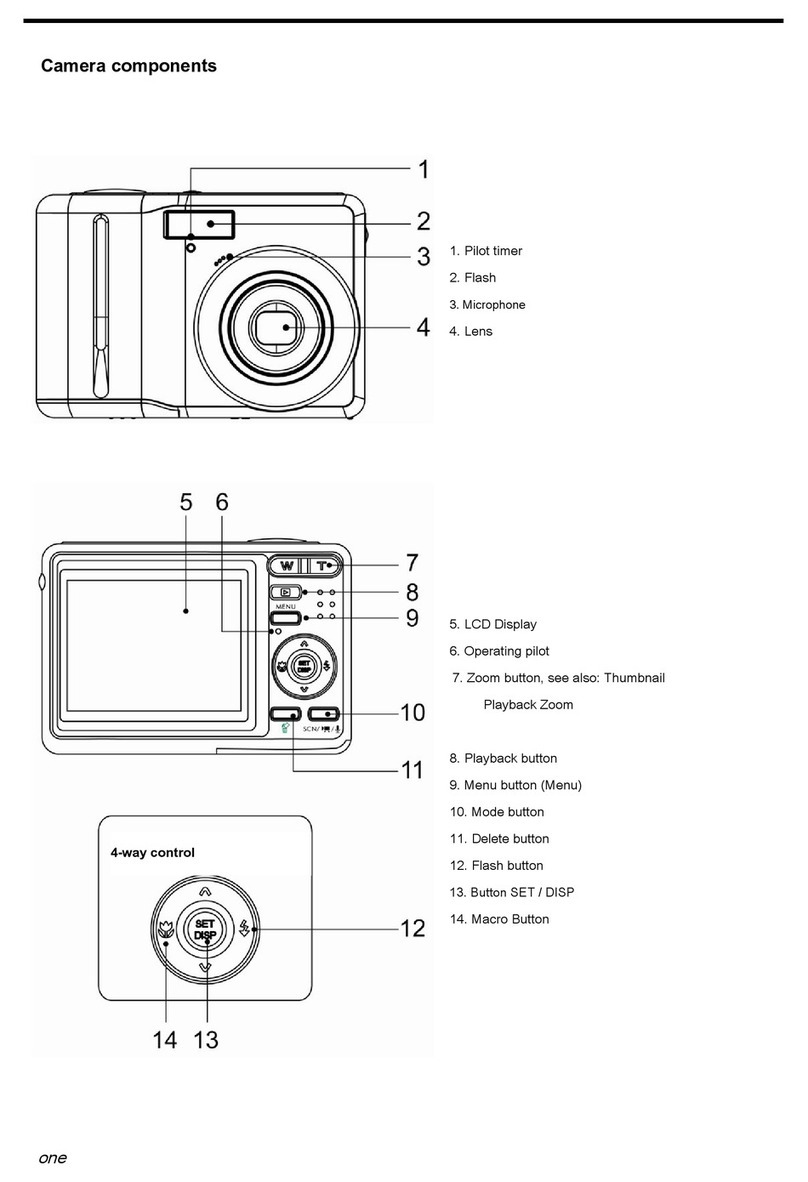
Names of Parts
Top
NOTE:
yDo not swing the camera when
carrying by the wrist strap.

- 8 -
Front
Bottom
Back

- 9 -
Side
5-function button
Inserting the Batteries
The camera is powered by two AA-size alkaline batteries or rechargeable Ni-MH (min. 1600 mAh /
1.2V) batteries.

- 10 -
1. Slide the battery cover open.
2. Insert two AA-size alkaline batteries with the positive (+)
and negative (-) poles matching the directions indicated
inside the battery room.
3. Slide the battery cover closed.
Low Battery Indicator
A low battery indicator appears on the LCD screen
when the batteries are nearly exhausted. Batteries should
be replaced promptly when the low batteries indicator
appears.
Inserting a Memory Card
You can use SD Card or MMC Card with this digital camera. The memory card slot is located
beneath the battery cover, adjacent to the battery compartment.
1. Be sure that the camera is turned off.
2. Slide the battery cover and open it.
3. Insert the card with the label facing up and the arrow
pointing in.
4. Close the battery cover.
NOTE:
yDo not use manganese batteries. Manganese batteries cannot supply sufficient power to
support camera operation.
yReplace all batteries at the same time. Never mix old and new batteries.
yRemove batteries from the camera if you do not plan on using it for more than two
weeks.
This manual suits for next models
1
Table of contents
Other Advent Digital Camera manuals