Operating Instructions
4
SELECTING TRACK / PEAK MODE
The DTW can measure torque in TRACK or PEAK mode. When in track
mode the wrench will display real-time torque. When in peak mode the
wrench will hold the highest measured reading on the display until the C
(zero) key is pressed.
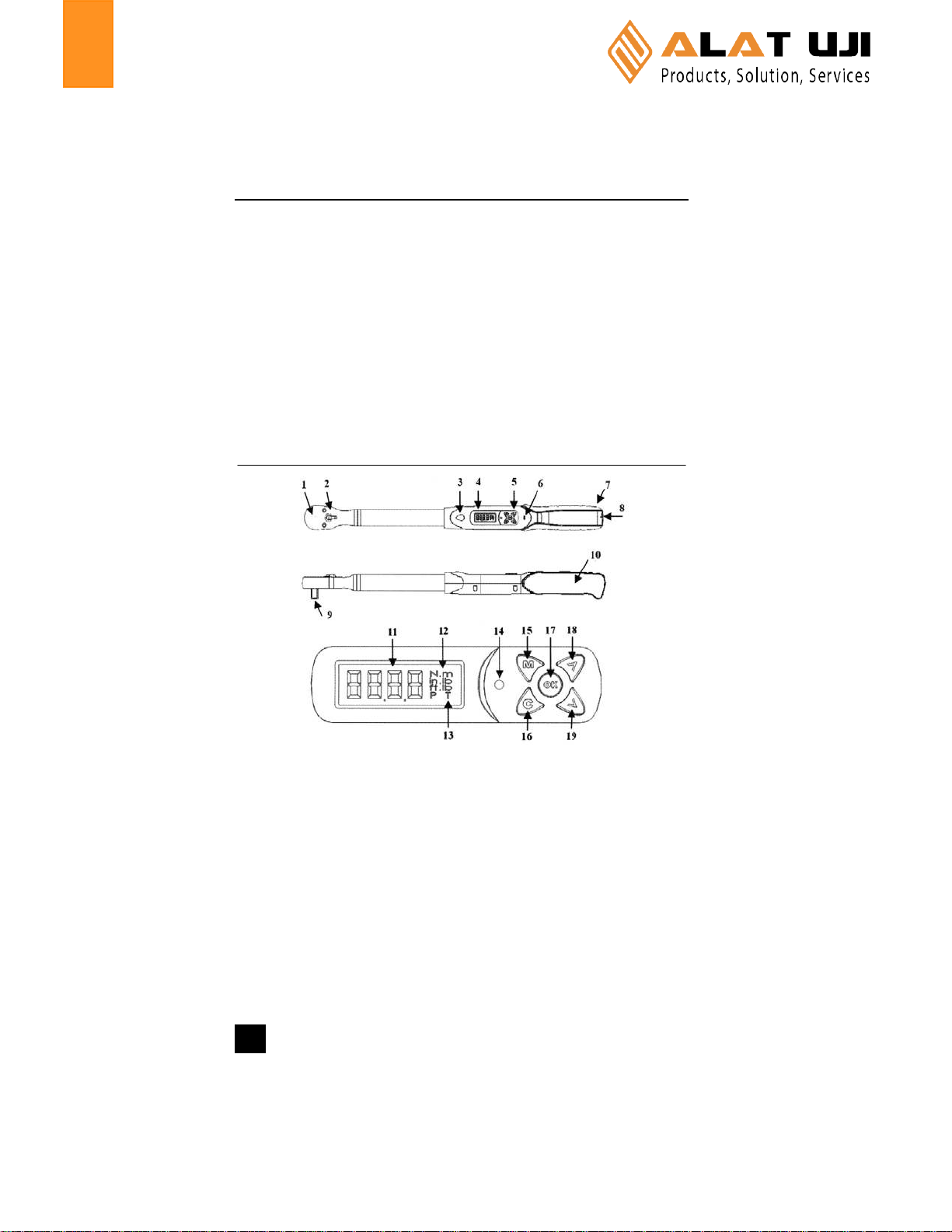
To select TRACK or PEAK mode on your DTW wrench Press the Mkey
twice and you will see the word MODE and the letter Tor Pflashing in
the bottom right corner of the display. Press the up / down arrows to
toggle between T(track) and P(peak). When the letter corresponding
to your desired mode is displayed, press the M key three times to con-
firm your selection and return to measurement mode.
SELECTING UNITS OF MEASURE
The DTW wrench can display measurements in Newton Meters (N-m),
Inch Pounds (in-lb) or Foot Pounds (ft-lbs). The selected measuring
unit is displayed in the upper right corner of the display.
To select the desired measuring unit press the M key three times and
you will see the word UNIT and the measuring unit flashing on right side
of the display. Press the up / down arrows to select the desired measur-
ing unit. When the desired measuring unit is displayed press the Mkey
two times to confirm your selection and return to measurement mode.
SETTING TORQUE ALARM VALUE
The DTW wrench can display a visual signal light and sound an audible
alarm when a desired torque value is reached. The alarm value can be
set between 10% - 100% of the wrenches capacity.
To set the desired torque alarm value press the M key once and you will
see the a number on the display. Use the up / down arrows to input the
desired value that should trigger the alarm. When desired alarm value is
displayed, press the Mkey four times to confirm your selection and re-
turn to measurement mode.