manuals.online logo
Brands
  1. Home
  2. •
  3. Brands
  4. •
  5. APG Exhibits
  6. •
  7. Monitor
  8. •
  9. APG Exhibits CSNR-33FS Manual

APG Exhibits CSNR-33FS Manual

Other APG Exhibits Monitor manuals

APG Exhibits CSNR-43FS Manual

APG Exhibits

APG Exhibits CSNR-43FS Manual

APG Exhibits CSNR-13FS Manual

APG Exhibits

APG Exhibits CSNR-13FS Manual

APG Exhibits CSNR-23FS Manual

APG Exhibits

APG Exhibits CSNR-23FS Manual

APG Exhibits CSNR-73FS Manual

APG Exhibits

APG Exhibits CSNR-73FS Manual

Popular Monitor manuals by other brands

Samsung ME32C user manual

Samsung

Samsung ME32C user manual

ViewSonic VA926-LED user guide

ViewSonic

ViewSonic VA926-LED user guide

Furuno Mu 120c Operator's manual

Furuno

Furuno Mu 120c Operator's manual

Asus VB171D - 17" LCD Monitor Service manual

Asus

Asus VB171D - 17" LCD Monitor Service manual

AOC 9GLR Technical specifications

AOC

AOC 9GLR Technical specifications

DMG RAFFAELLO manual

DMG

DMG RAFFAELLO manual

AOC LM720 - 17" Technical specifications

AOC

AOC LM720 - 17" Technical specifications

Sony Trinitron GDM-F500 Service manual

Sony

Sony Trinitron GDM-F500 Service manual

Memorex MT1701 user guide

Memorex

Memorex MT1701 user guide

ViewSonic VE510s-4 Service manual

ViewSonic

ViewSonic VE510s-4 Service manual

Farenheit T-1503CM instruction manual

Farenheit

Farenheit T-1503CM instruction manual

Ditel DINOS DN129/AT Quick installation guide

Ditel

Ditel DINOS DN129/AT Quick installation guide

Sony SDM-S51 Specifications

Sony

Sony SDM-S51 Specifications

Kenwood DMX1025BT quick start guide

Kenwood

Kenwood DMX1025BT quick start guide

Dell S2409WFP user guide

Dell

Dell S2409WFP user guide

EverFocus EN-7517E instruction manual

EverFocus

EverFocus EN-7517E instruction manual

Dell P3222QE user guide

Dell

Dell P3222QE user guide

Panasonic TH152UX1 - 152" PLASMA TV Service manual

Panasonic

Panasonic TH152UX1 - 152" PLASMA TV Service manual

manuals.online logo
manuals.online logoBrands
  • About & Mission
  • Contact us
  • Privacy Policy
  • Terms and Conditions

Copyright 2025 Manuals.Online. All Rights Reserved.

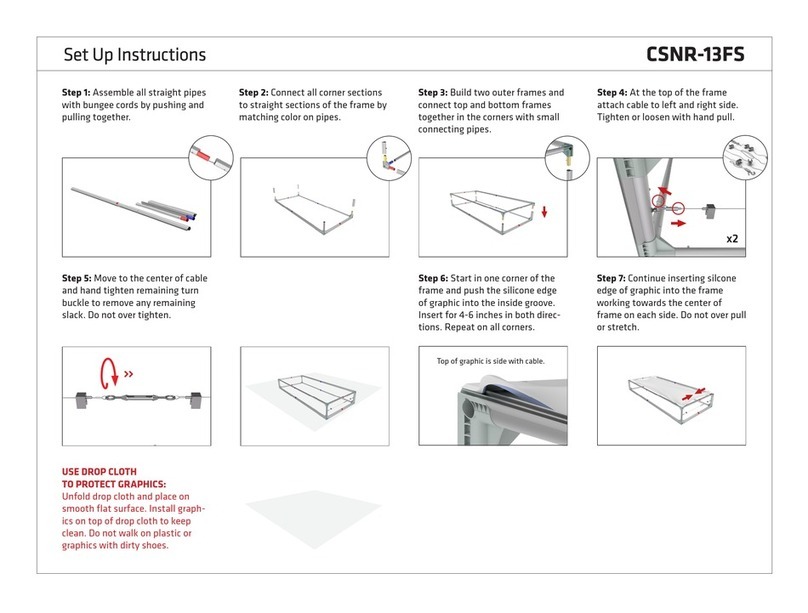
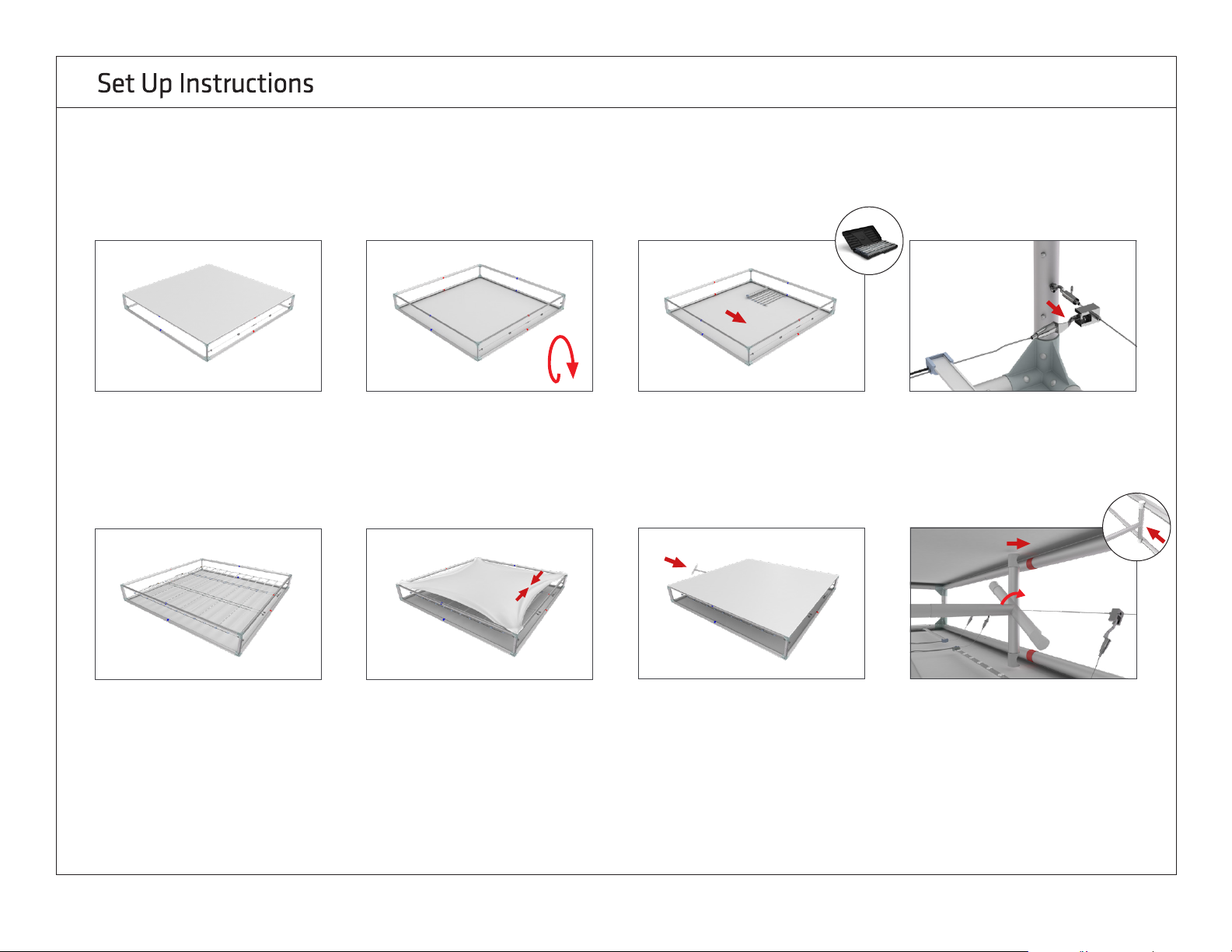
Step 5: Move to the center of cable
and hand tighten remaining turn
buckle to remove any remaining
slack. Do not over tighten.
Step 6: Start in one corner of the
frame and push the silicone edge
of graphic into the inside groove.
Insert for 4-6 inches in both direc-
tions. Repeat on all corners.
Step 7: Continue inserting silcone
edge of graphic into the frame
working towards the center of
frame on each side. Do not over pull
or stretch.
Step 2: Connect all corner sections
to straight sections of the frame by
matching color on pipes.
Step 3: Build two outer frames and
connect top and bottom frames
together in the corners with small
connecting pipes.
Step 4: At the top of the frame
attach cable to left and right side.
Tighten or loosen with hand pull.
x2
Step 1: Assemble all straight pipes
with bungee cords by pushing and
pulling together.
CSNR-33FS
USE DROP CLOTH
TO PROTECT GRAPHICS:
Unfold drop cloth and place on
smooth flat surface. Install graph-
ics on top of drop cloth to keep
clean. Do not walk on plastic or
graphics with dirty shoes.
Top of graphic is side with cable.
Step 12: Repeat step 11 until all
Light Arrays are attached. Lights
Arrays do not attach to bottom of
frame, but hang under their own
weight in final upright position.
Step 13: Repeat Steps 6 and 7 to
attch printed graphic for double
-sided display or light block panel
for single-sided display.
Step 14: Turn. Position. Lock. Insert
tensioning pole into the bottom of
display. Keep the pole flat until the
entire pole fits inside the frame.
Turn the pole 45º. Position and
push pole onto the red indicators at
top of frame. Lock the bottom of
the pole by firmly sliding or knock-
ing the the pole into place over red
indicators.
Step 9: Flip frame and graphic over.
Note: make sure you are using
the drop cloth and working on a
smooth surface to prevent damage
to your graphic.
Step 10: Take out the LED Lights
and gently unroll on the graphic
with lights face down. WARNING!
Do not drag lights across ground or
it could break the LED lights.
Step 11: Attach Light Array(s) at top
of frame onto wire harness clips.
x8
Step 8: Completed graphic frame
for front side.
CSNR-33FS
TOP
BOTTOM »

x4
Step 17: Attach two LED Light
Arrays to one power supply. Stand
display into upright poition over
top of power supply with power
cord showing.
Step 18: With display in upright
position, insert silicone edge of
graphic into groove of frame. Start
at opposite corners first, then work
your way around entire edge.
Step 19: Move display into position
and plug power cords into outlet to
illuminate display.
Step 16: Insert feet into 4 corners
of the frame base.
x2
CSNR-33FS