manuals.online logo
Brands
  1. Home
  2. •
  3. Brands
  4. •
  5. ARX
  6. •
  7. Music Mixer
  8. •
  9. ARX MaxiMIX User manual

ARX MaxiMIX User manual

This manual suits for next models

1

Other ARX Music Mixer manuals

ARX MIXXMaster User manual

ARX

ARX MIXXMaster User manual

ARX MIXX User manual

ARX

ARX MIXX User manual

ARX MIXX User manual

ARX

ARX MIXX User manual

ARX Uni MIX User manual

ARX

ARX Uni MIX User manual

ARX MIXXMaster User manual

ARX

ARX MIXXMaster User manual

ARX MIX 8 User manual

ARX

ARX MIX 8 User manual

ARX MIXX User manual

ARX

ARX MIXX User manual

ARX AV stream User manual

ARX

ARX AV stream User manual

Popular Music Mixer manuals by other brands

Denon DN-HC5000 - Serato ITCH Hardware/Software... Service manual

Denon

Denon DN-HC5000 - Serato ITCH Hardware/Software... Service manual

Yamaha WC42260 owner's manual

Yamaha

Yamaha WC42260 owner's manual

Vertiv KMMLED156 Quick installation guide

Vertiv

Vertiv KMMLED156 Quick installation guide

Yamaha EMX3000 user manual

Yamaha

Yamaha EMX3000 user manual

Mackie Onyx Analogue Mixer brochure

Mackie

Mackie Onyx Analogue Mixer brochure

Peavey S-32 Sanctuary Series Operation guide

Peavey

Peavey S-32 Sanctuary Series Operation guide

Rane MP 4 Operator's manual

Rane

Rane MP 4 Operator's manual

True T9 Touchscreen Console owner's manual

True

True T9 Touchscreen Console owner's manual

Studiomaster Air Pro 24 instruction manual

Studiomaster

Studiomaster Air Pro 24 instruction manual

Yamaha MV802 owner's manual

Yamaha

Yamaha MV802 owner's manual

Roland SoundCanvas SC-8820 owner's manual

Roland

Roland SoundCanvas SC-8820 owner's manual

Roland M-160 owner's manual

Roland

Roland M-160 owner's manual

Yamaha MR1642 Operation manual

Yamaha

Yamaha MR1642 Operation manual

Pioneer DJM 909 - Battle Mixer W/Effects operating instructions

Pioneer

Pioneer DJM 909 - Battle Mixer W/Effects operating instructions

Veeder-Root TLS-350 Series System setup manual

Veeder-Root

Veeder-Root TLS-350 Series System setup manual

Alto APM80.QUAD user manual

Alto

Alto APM80.QUAD user manual

Omnitronic PM-211 user manual

Omnitronic

Omnitronic PM-211 user manual

SoundCraft B400 user guide

SoundCraft

SoundCraft B400 user guide

manuals.online logo
manuals.online logoBrands
  • About & Mission
  • Contact us
  • Privacy Policy
  • Terms and Conditions

Copyright 2025 Manuals.Online. All Rights Reserved.

MaxiMIX Owner's Manual v 3.0 CE ©2010 ARX® MaxiMIX Owner's Manual v 3.0 CE ©2010 ARX®
InstallerTMSeries
MaxiMIX
OWNER’S
MANUAL
ARX Systems Pty Ltd, PO Box 15,
Moorabbin, Victoria 3189, Australia
Phone: (03) 9555 7859 Fax: (03) 9555 6747
International Fax: +61-3 -9555 6747
On the Web: www.arx.com.au
Email: [email protected]
8
Warranty Service Procedure
Should it become necessary to have your equipment serviced under the terms of the
warranty, please follow these steps:
1. Call your ARX distributor for a Return Authorization (RA) number;
2. Carefully repack the unit, in its original packaging where possible, including a note
with a description of the problem, and a copy of the receipt showing date of
purchase. Attach these to the actual unit itself. Don’t forget to write your name and
address clearly, and include a phone number where you can be contacted during
normal business hours. Make it easy for our service technicians to contact you if
they have a question. Also, use plenty of packing material - better to be safe than
sorry.
3. Send the unit freight prepaid to ARX Systems, at the address given you with your
RA number. We will pay the return freight when the serviced unit is returned to you.
4. We strongly recommend you insure the package. We can’t fix it if it gets lost! Send it
by UPS, Fedex, DHL or any similar service that can track the package. Parcel Post
is not recommended
If Warranty Registration Card is missing, please write to ARX in the country of pur-
chase, stating model and where purchased, or to ARX, PO Box 15, Moorabbin, Victoria
3189, Australia.
Or you can Email us at: [email protected]
INTERNATIONAL LIMITED WARRANTY
ARX Systems (ARX) warrants to the first purchaser of any ARX equipment that it is free
from defects in materials and workmanship under normal use and service. ARX’s sole
obligation under this warranty shall be to provide, without charge, parts and labour
necessary to remedy defects, if any, which appear within twelve (12) months from
date of purchase, and for a further twelve (12) months supply parts only.
This is our only warranty. It does not cover finish or appearance items, burned voice
coils, or if the equipment has been, in ARX’s sole judgement:
•Subjected to misuse, abuse, negligence or accident;
•Repaired, worked on, or altered by persons not authorized by ARX;
•Connected, installed, adjusted or used for a purpose other than that for which it
was designed. This includes running a speaker system with the ISC leads disconnect-
ed, or with a non-ARX crossover, or with the wrong processor.
This warranty gives you and us specific legal rights and you may also have other rights
which may apply.

MaxiMIX Owner's Manual v 3.0 CE ©2010 ARX® MaxiMIX Owner's Manual v 3.0 CE ©2010 ARX®
27
MaxiMix Specifications
Mode of operation 2 channel 4:1 Line Mixer
Input Impedance 44K Ohms Balanced
22K Ohms Unbalanced
Input Headroom +21dB
Output Level +26dB
Output Signal/Noise
(@ unity gain) -95dB unweighted
-101dB A weighted
Output Impedance 300 Ohms Balanced
150 Ohms Unbalanced
Dynamic Range 120dB
Frequency Response 20Hz-20 KHz -1dB
Distortion
(@ unity gain) 100Hz .0035%
1KHz .0033%
10KHz .0037%
Power Requirements 100/120 V AC 50 - 60 Hz
220/240 V AC 50 - 60 Hz
8 Watts (8 VA)
Input Connector Type Female XLR
Output Connector Type Male XLR
This symbol indicates that a Slow Blow
fuse is used in this equipment. Replace
with same type and value only
This symbol is intended to alert you to
the presence of uninsulated dangerous
voltage within the product's enclosure
that may be of sufficient magnitude to
constitute a risk of electric shock.
This symbol is intended to alert you to
the presence of important operating
instructions contained in this owner's
manual
WARNING SYMBOLS USED
ON THIS EQUIPMENT
IMPORTANT - PLEASE READ THIS FIRST
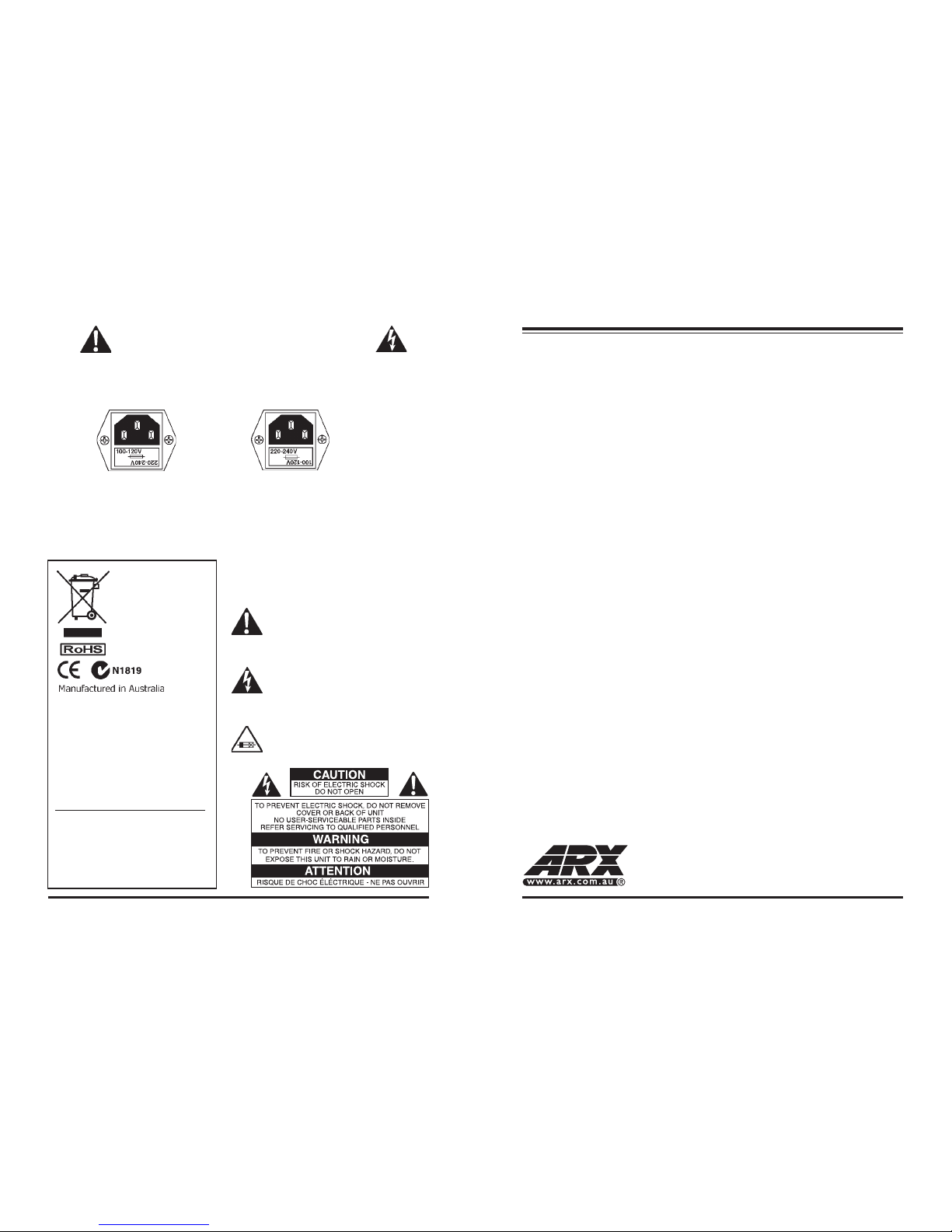
THIS IS A DUAL VOLTAGE UNIT. IT IS ESSENTIAL THAT YOU CHECK THAT THE VOLTAGE ON
THE FUSEHOLDER COVER BELOW THE AC CONNECTOR ON THE REAR OF THE CHASSIS IS
SET CORRECTLY BEFORE CONNECTING IT TO AC POWER.
To change, pull fuseholder out and rotate 180o, then push in again. Do not insert power
cable into unit until voltage has been correctly set. Do not connect power cable to AC
power until voltage has been correctly set
THIS IS SET FOR 100 V
AC TO 120 V AC
OPERATION
THIS IS SET FOR 220 V
AC TO 240 V AC
OPERATION
Complies with 89/336/EEC EMC Di-
rective, amended by 92/31/EEC and
93/68/EEC; meets the following
standards:EN 55013 : 1990, Sections
3.2 and 3.5, EN 55020 : 1988, Sections
4.3, 5.4, 6.2, 7.0, 8.0., and EN 60950 :
1994 Low Voltage Directive
Complies with Australian Standard AS/
N25 1053
Our policy is one of continuous im-
provement, and therefore designs may
change without notice. However, un-
less otherwise stated, specifications
will always equal or exceed those pre-
viously given.
Complete online documentation is available on the ARX website:
www.arx.com.au/MaxiMIX.htm
Specific queries can be emailed to the factory at [email protected]
ARX® is a Registered Trade Mark of ARX Systems Pty Ltd. MIXXMas-
ter™ is a trade mark or ARX Systems Pty Ltd. Any other names and
trademarks are used for information purposes only, and no other intent is
expressed or implied
MaxiMIX Owner's Manual v 3.0 CE ©2010 ARX® MaxiMIX Owner's Manual v 3.0 CE ©2010 ARX®
45
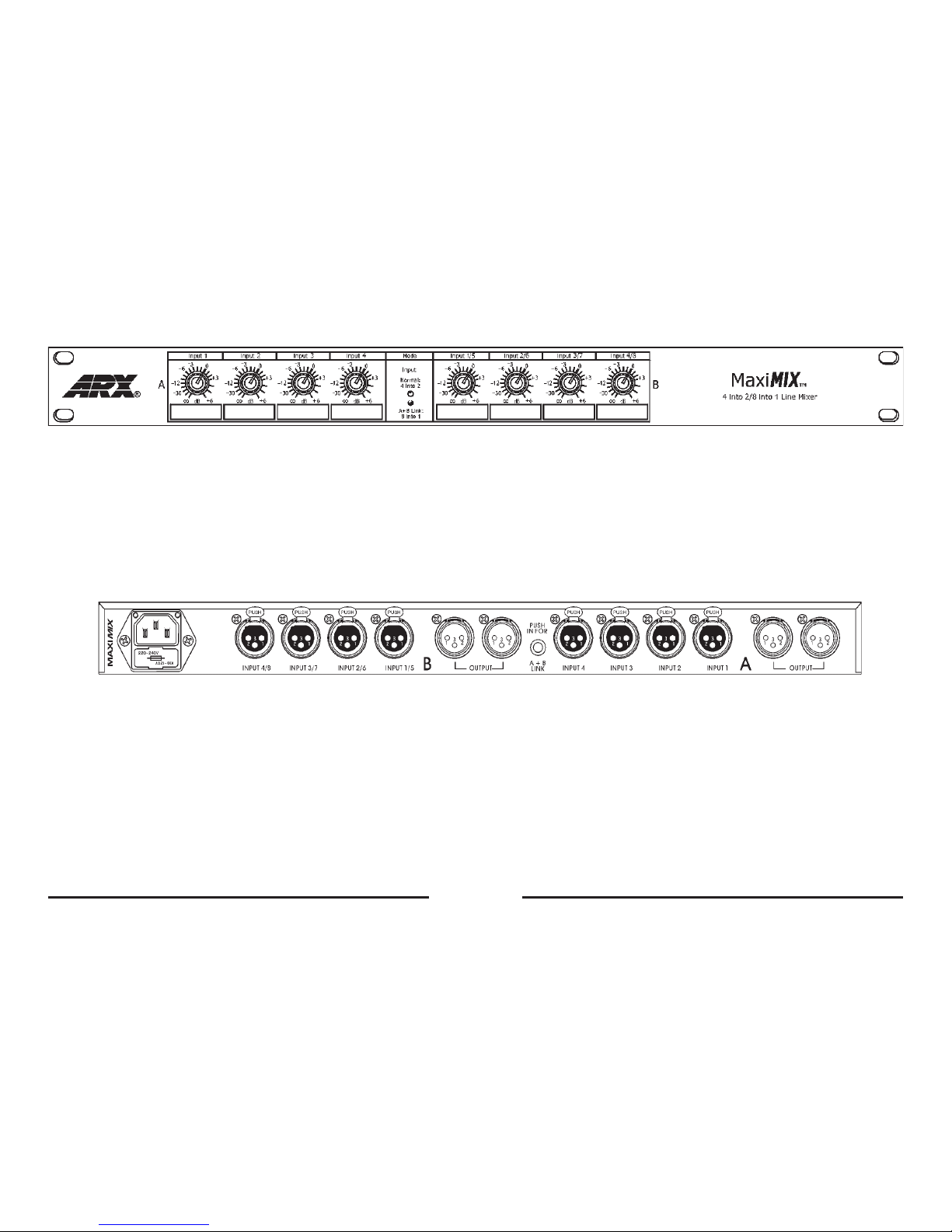
Front panel controls
• Input level controls for channels A and B
• AC power connected indicator LED
• Numbered marker panels for labelling input assigns
Rear Panel Connectors
• Balanced XLR Input sockets, four per channel.
Pin 2 HOT +, Pin 3 Cold -, Pin 1 GROUND
• Balanced XLR Output sockets, 2 per channel (same wiring as Input)
• IEC 3 pin AC connector and integral fuseholder. Replace fuse with
correct value only: 100 - 120 V AC 1 amp, 220-240 V AC 0.5 amp.
Please also refer to voltage details on Page 2
MaxiMIX Owner's Manual v 3.0 CE ©2010 ARX® MaxiMIX Owner's Manual v 3.0 CE ©2010 ARX®
63
For the Installation Contractor, accurately mixing line level audio signals has never been easy.
Using the wrong product can lead to lack of headroom, vastly differing input levels, uneven
output levels, RF breakthrough - the problems have been seemingly endless.
Until now, that is!
Introducing the MaxiMix from ARX: Two independent mixdown groups, each consisting of 4
line inputs with individual level controls and RF filters.
Each input has up to +6dB of gain available, and full attenuation to allow matching of any line
level signals.
Each of the 4 electronically balanced inputs combine into fully balanced Master outputs, each
of which has 2 male XLR sockets.
Internally, careful attention to signal path design has resulted in a unit with wide dynamic
range, enough headroom to cope with the hottest line signal, and better than digital noise
specifications
AC power range is a universal 100 to 120V or 220 to 240V AC, and is connected to the unit
via a standard IEC connector, with built-in fuse and voltage change switch.
Accurate and compact, the MaxiMix's unique combination of ultra low distortion, low noise and
high headroom makes it the ideal installation line mixer.
Introduction
Thank you for choosing this ARX MaxiMIX Dual Channel Line Mixer. We hope you enjoy using
it as much as we enjoyed creating it. As with all ARX equipment, it has undergone extensive
factory calibration and ‘burn in’ before shipping. To ensure continued trouble free use, please
familiarise yourself with the contents of this manual before using the MaxiMIX.
About the MaxiMIX
Applications
A typical MaxiMix application would be as an Installation Master Mixer, combining Live Band
Mix, Disco, KTV and Audio-for-Video signals to run independently of each other through the
one speaker system.
Other applications include line sub-mixer for external effects units, and Keyboard, Drum
machines or other Electronic Instruments sub-mixer.
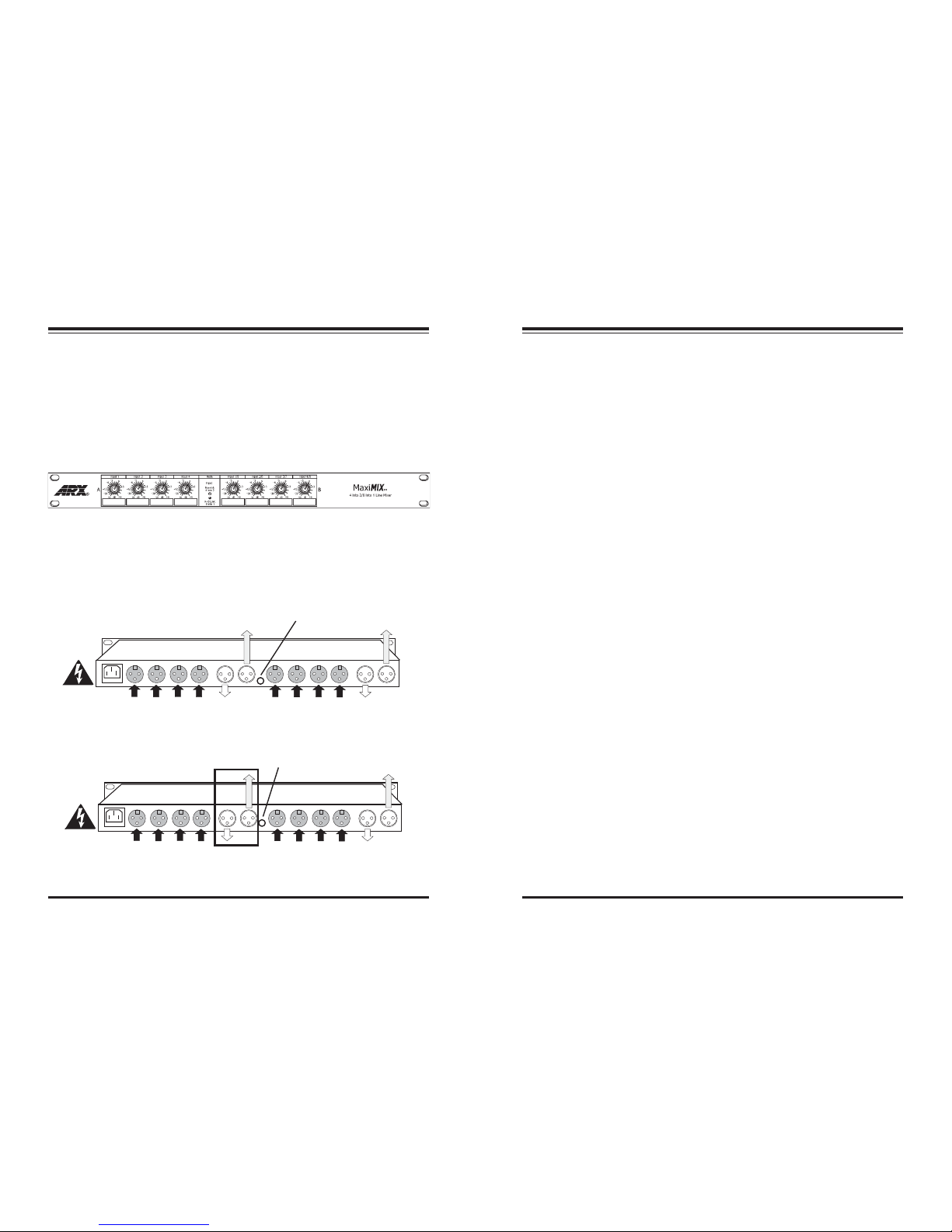
The controls on the front panel correspond to the input connectors on the back, and adjust
the mix output levels as required
EXTRA MIX B
OUTPUT
EXTRA MIX A
OUTPUT
INPUTS A 1 TO 4
MIX B
OUTPUT
INPUTS B 1 TO 4
AC POWER
INLET AND
FUSE
EXTRA MIX A
OUTPUT
MIX A
OUTPUT
INPUTS A 1 TO 4
NOT
USED
INPUTS A 5 TO 8
AC POWER
INLET AND
FUSE
Single Channel mode
Dual Channel mode
SWITCH
IN
SWITCH
OUT
MIX A
OUTPUT