128-7032A
10 of 28
Controls:
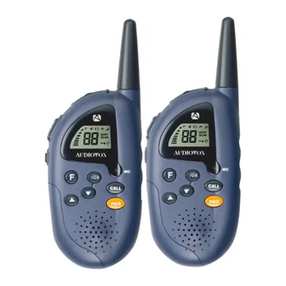
LEDFlashlightButton (16)
Press this button on the right side of the Transceiver to light the white LED
(15) on top of the unit, thereby activating the built-in flashlight function.
Power On/Off/Keylock (13) Button
To turn unit on, press the power on/off button ( ) momentarily (less
than 1 second). A confirming melody will play to indicate the unit has
turned on. A momentary pressof the ON/OFF button again will turn the
unit off. When the unit is on and the button is pressed for more than 1
second, the keylock icon ( ) will appear to confirm the functions
MODE, SCAN and channel up/down buttons have been disabled.
Adjusting the Volume (10, 11)
With the unit powered on, press the Up Channel/Volume button ( ) to
increase volume and the Down Channel/Volume button ( ) to decrease
volume. The display will indicate the current volume level between 1 and 7
by the small number in the icon ( UL5 ).
Monitor/Display Backlight Button (2)
This button is used to check activity on the current frequency before
transmitting. Check activity by pressing the Monitor (M) Button longer
than 2 seconds; the icon will apppear on the display and you will
hearstatic if frequency is clear.
Do not transmit if you hear conversation.
Hold down the Monitor Button again longer than 2 seconds and the
icon will disapppear from the display.
The monitor function will temporarily bypass the squelch setting and play
all signals on a given channel. This feature is useful when communicating
with other parties at extreme range.
By pressing the monitor button momentarily, the LCD backlight is turned
on accompanied by a beep tone (if enabled); the LCD backlight will turn off
automatically in about 5 seconds, or when the monitor button is pressed
momentarily once again.
10