manuals.online logo
Brands
  1. Home
  2. •
  3. Brands
  4. •
  5. Cafe
  6. •
  7. Microwave Oven
  8. •
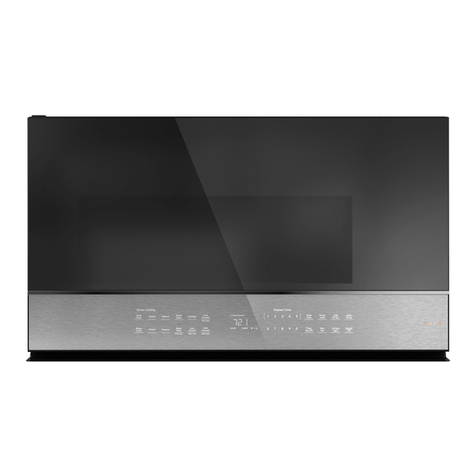
  9. Cafe Q1722NAB User manual

Cafe Q1722NAB User manual

This manual suits for next models

1

Other Cafe Microwave Oven manuals

Cafe CVM721 User manual

Cafe

Cafe CVM721 User manual

Cafe CVM517P4M5W2 User manual

Cafe

Cafe CVM517P4M5W2 User manual

Cafe CVM721M2NS5 User manual

Cafe

Cafe CVM721M2NS5 User manual

Cafe CWL112P3RD5 User manual

Cafe

Cafe CWL112P3RD5 User manual

Cafe CVM517P User manual

Cafe

Cafe CVM517P User manual

Cafe CVM517P User manual

Cafe

Cafe CVM517P User manual

Cafe CEB515 User manual

Cafe

Cafe CEB515 User manual

Cafe CWB713 User manual

Cafe

Cafe CWB713 User manual

Cafe CVM721M2N8S5 User manual

Cafe

Cafe CVM721M2N8S5 User manual

Cafe CVM517P User manual

Cafe

Cafe CVM517P User manual

Cafe CWL112P2RS1 User manual

Cafe

Cafe CWL112P2RS1 User manual

Cafe CVM517P4R1W2 User manual

Cafe

Cafe CVM517P4R1W2 User manual

Cafe CVM721M2NS5-CL User manual

Cafe

Cafe CVM721M2NS5-CL User manual

Cafe CVM721M User manual

Cafe

Cafe CVM721M User manual

Cafe XC042AYYGEW User manual

Cafe

Cafe XC042AYYGEW User manual

Cafe CVM521P User manual

Cafe

Cafe CVM521P User manual

Cafe CEB515P2NSS User manual

Cafe

Cafe CEB515P2NSS User manual

Cafe CVM919 User manual

Cafe

Cafe CVM919 User manual

Cafe CVM517P User manual

Cafe

Cafe CVM517P User manual

Cafe DISTINCT CWL112 User manual

Cafe

Cafe DISTINCT CWL112 User manual

Cafe CVM517P4MW2 Manual

Cafe

Cafe CVM517P4MW2 Manual

Cafe TC051K6CA-S GE User manual

Cafe

Cafe TC051K6CA-S GE User manual

Cafe CVM521P2MS1 User manual

Cafe

Cafe CVM521P2MS1 User manual

Popular Microwave Oven manuals by other brands

Sharp R-390D manual

Sharp

Sharp R-390D manual

PROFILO MD1000 instruction manual

PROFILO

PROFILO MD1000 instruction manual

Candy MIC 201 EX User instructions

Candy

Candy MIC 201 EX User instructions

PITSOS GMW3101B user manual

PITSOS

PITSOS GMW3101B user manual

Sears 5648744780 Use & care manual

Sears

Sears 5648744780 Use & care manual

BOMANN CB 1272 Instruction manual & guarantee

BOMANN

BOMANN CB 1272 Instruction manual & guarantee

Conrad Electronic 2372935 operating instructions

Conrad Electronic

Conrad Electronic 2372935 operating instructions

GE Spacemaker JVM1440BH datasheet

GE

GE Spacemaker JVM1440BH datasheet

DAEWOO ELECTRONICS KOR-6L8K5S83 Operating instructions & cook book

DAEWOO ELECTRONICS

DAEWOO ELECTRONICS KOR-6L8K5S83 Operating instructions & cook book

DAEWOO ELECTRONICS KOR-1N5A9S Operating instructions & cook book

DAEWOO ELECTRONICS

DAEWOO ELECTRONICS KOR-1N5A9S Operating instructions & cook book

Daewoo KQG-6617G Operating instructions & cook book

Daewoo

Daewoo KQG-6617G Operating instructions & cook book

Samsung M1779 Owner's instructions

Samsung

Samsung M1779 Owner's instructions

GE JES1143 Use and care & cooking guide

GE

GE JES1143 Use and care & cooking guide

Miele H6200BM(TB) Operating and installation instructions

Miele

Miele H6200BM(TB) Operating and installation instructions

Jocel JMO011480 instruction manual

Jocel

Jocel JMO011480 instruction manual

Sharp R-752M Operation manual with cookbook

Sharp

Sharp R-752M Operation manual with cookbook

Electrolux EVL8E00X user manual

Electrolux

Electrolux EVL8E00X user manual

STOVES Q900GRF DO User, installation & servicing instructions

STOVES

STOVES Q900GRF DO User, installation & servicing instructions

manuals.online logo
manuals.online logoBrands
  • About & Mission
  • Contact us
  • Privacy Policy
  • Terms and Conditions

Copyright 2025 Manuals.Online. All Rights Reserved.

49-7000085 Rev. 0 10-19 GEA
Convection / Microwave Oven
Model: CVM517P
Contents
Safety Information...............................3
Using the Oven
Features ......................................7
Controls ......................................8
Cooking Options................................9
Microwave Time and Auto Features ...............11
Power Level ..................................13
Microwave terms ..............................14
Microwave Sensor Features .....................14
Baking and Roasting Features....................18
Fast Cook Feature .............................19
Cookware Tips ................................20
Best Method of Cooking Chart....................21
Other Features................................22
Care and Cleaning
Inside .......................................25
Outside......................................25
Replacing the LED Lamp........................26
Exhaust Feature ...............................27
Troubleshooting ...............................28
Optional Kits ..................................30
Limited Warranty ...............................31
Consumer Support .............................32
Write the model and serial numbers here:
Model # _______________________________
Serial # _______________________________
You can fine them on a label when the door is open
Español
Para consultar una version en español de este manual de
instrucciones, visite nuestro sitio de internet cafeappliances.com.
Owner's Manual
TM
249-7000085 Rev. 0
THANK YOU FOR MAKING CAFÉ A PART OF YOUR HOME.
We take pride in the craftsmanship, innovation and design that goes into every Café product, and
we think you will too. Among other things, registration of your appliance ensures that we can deliver
important product information and warranty details when you need them.
Register your Café appliance now online. Helpful websites are available in the Consumer Support
section of this Owner’s Manual. You may also mail in the pre-printed registration card included in the
packing material.
TM
49-7000085 Rev. 0 3
READ AND SAVE THESE INSTRUCTIONS
IMPORTANT SAFETY INFORMATION
READ ALL INSTRUCTIONS BEFORE USING THE APPLIANCE
SAFETY INFORMATION
WARNING To reduce the risk of burns, electric shock, fire, injury to persons, or exposure to
excessive microwave energy:
When using electrical appliances, basic safety precautions should be followed, including the following:
■ Readallinstructionsbeforeusingthisappliance.
■ Readandfollowthespecificprecautionsinthe
PRECAUTIONS TO AVOID POSSIBLE EXPOSURE
TO EXCESSIVE MICROWAVE ENERGY section on
page 6.
■ Usethisapplianceonlyforitsintendeduseas
described in this manual. Do not use corrosive
chemicals or vapors in this appliance. This oven is
specifically designed to heat, dry or cook food, and is
not intended for laboratory or industrial use.
■ Thisappliancemustonlybeservicedbyqualified
service personnel. Contact nearest authorized
service facility for examination, repair or adjustment.
INSTALLATION
■ Installorlocatethisapplianceonlyinaccordance
with the provided installation instructions.
■This appliance must be grounded. Connect only
to properly grounded outlet. See “GROUNDING
INSTRUCTIONS” found on page 6.
■ ThismicrowaveovenisULlistedforinstallationover
both gas and electric ranges.
■ Thisunitissuitableforuseabovegasorelectric
cookingequipment,36”orlesswide.
■Do not operate this appliance if it has a damaged
power cord or plug, if it is not working properly, or if it
has been damaged or dropped.
■ Keepcordawayfromheatedsurfaces.
■Do not let cord hang over the edge of the table or
counter
■ Donotimmersecordorpluginwater.
■ Donotcoverorblockanyopeningsonthe
appliance.
■ Donotstorethisapplianceoutdoors.Donotusethis
product near water—for example, in a wet basement,
near a swimming pool, near a sink or in similar
locations.
■ Donotmountthisapplianceoverasink.
TO REDUCE THE RISK OF FIRE IN THE CAVITY:
■ Do not overcook food. Carefully attend appliance
when paper, plastic or other combustible materials
are placed inside the oven to facilitate cooking.
■ Removewiretwist-tiesandmetalhandlesfrom
paper or plastic containers before placing them in
the oven.
■ Donotstoreanymaterialsinthisovenwhennotin
use. Do not leave paper products, cooking utensils
or food in the cavity when not in use. All racks
should be removed from oven when not in use.
■ Ifmaterialsinsidetheovenignite,keeptheoven
door closed, turn the oven off and disconnect the
power cord or shut off power at the fuse or circuit
breaker panel.
■ Donotoperatethemicrowavefeaturewithoutfoodin
the oven.
TO REDUCE THE RISK OF BURNS:
■ Becarefulwhenopeningcontainersofhotfood.Use
pot holders and direct steam away from face and
hands.
■ Vent,pierce,orslitcontainers,pouches,orplastic
bags to prevent build-up of pressure.
■ Becarefulwhentouchingtheturntable,door,racks,
or walls of the oven which may become hot during
use.
■ HOT CONTENTS CAN CAUSE SEVERE BURNS.
DO NOT ALLOW CHILDREN TO USE THE
MICROWAVE. Use caution when removing hot items.

449-7000085 Rev. 0
SAFETY INFORMATION
READ AND SAVE THESE INSTRUCTIONS
IMPORTANT SAFETY INFORMATION
READ ALL INSTRUCTIONS BEFORE USING THE APPLIANCE
WARNING Continued
OPERATING AND CLEANING
■ Donotstoreanythingdirectlyontopofthe
microwave oven surface when the microwave oven
is in operation.
■ Oversizedfoodsoroversizedmetalutensilsshould
not be inserted in a microwave/convection oven as
they may create a fire or risk of electric shock.
■ Donotcleanwithmetalscouringpads.Piecescan
burn off the pad and touch electrical parts involving a
risk of electric shock.
■ Do not use paper products in oven when appliance
is operating in any cooking mode except microwave.
■ Someproductssuchaswholeeggsandsealed
containers—for example, closed jars—are able to
explode and should not be heated in this oven.
■ Donotcoverracksoranyotherpartoftheoven
with meal foil. This will cause overheating of the
microwave/convection oven.
■ Cookmeatandpoultrythoroughly—
meat to at least an INTERNAL temperature of 160°F,
and poultry to at least an INTERNAL temperature
of 180°F. Cooking to these temperatures usually
protects against foodborne illness.
■ Makesureallcookwareusedinyourmicrowave
oven is suitable for microwaving. Most glass

casseroles, cooking dishes, measuring cups, custard
cups, pottery or china dinnerware which does not
have metallic trim or glaze with a metallic sheen can
be used.in compliance with cookware manufacturers’
recommendations.
■ Itisimportanttokeeptheareacleanwherethe
door seals against the microwave. Use only mild,
nonabrasive detergents applied with a clean sponge
or soft cloth. Rinse well.
SUPER HEATED WATER
■ Liquids,suchaswater,coffee,ortea,areableto
be overheated beyond the boiling point without
appearing to be boiling. Visible bubbling or boiling
when the container is removed from the microwave
oven is not always present. THIS COULD RESULT
IN VERY HOT LIQUIDS SUDDENLY BOILING
OVER WHEN THE CONTAINER IS DISTURBED
OR A SPOON OR OTHER UTENSIL IS INSERTED
INTO THE LIQUID.
■ Toreducetheriskofinjurytopersons:
- Donotoverheattheliquid.
- Stirtheliquidbothbeforeandhalfwaythrough
heating it.
- Do not use straight-sided containers with narrow
necks.
- After heating, allow the container to stand in the
microwave oven for a short time before removing
the container.
- Use extreme care when inserting a spoon or other
utensil into the container.
USE OF THE MICROWAVE RACK ACCESSORY
■ Removethemicrowaverackfromtheovenwhennot
in use.
■ Usepotholderswhenhandlingthemicrowaverack
and cookware. They may be hot.
■ Donotuserackshelfandcircularrackatthesame
time.
■ Besurethatthemicrowaverackispositioned
properly inside the oven to prevent product damage.
Rack should not touch microwave walls.
49-7000085 Rev. 0 5
READ AND SAVE THESE INSTRUCTIONS
IMPORTANT SAFETY INFORMATION
READ ALL INSTRUCTIONS BEFORE USING THE APPLIANCE
SAFETY INFORMATION
PACEMAKERS
Most pacemakers are shielded from interference from electronic products, including microwaves. However,
patients with pacemakers may wish to consult their physicians if they have concerns.
VENT FAN
The fan will operate automatically under certain conditions. Take care to prevent the starting and spreading of
accidental cooking fires while the vent fan is in use.
■ Cleantheundersideofthemicrowaveoften.Donot
allow grease to build up on the microwave or the
fan filters.
■ Intheeventofagreasefireonthesurfaceunits
below the microwave oven, smother a flaming pan
on the surface unit by covering the pan completely
with a lid, a cookie sheet or a flat tray.
■ Usecarewhencleaningtheventfanfilters.
Corrosive cleaning agents, such as lye-based oven
cleaners, may damage the filters.
■ Whenpreparingflamingfoodsunderthemicrowave,
turn the fan on.
■ Neverleavesurfaceunitsbeneathyourmicrowave
oven unattended at high heat settings. Boilovers
cause smoking and greasy spillovers that may ignite
and spread if the microwave vent fan is operating.
Tominimizeautomaticfanoperation,useadequate
sized cookware and use high heat on surface units
only when necessary.
649-7000085 Rev. 0
READ AND SAVE THESE INSTRUCTIONS
SAFETY INFORMATION
IMPORTANT SAFETY INFORMATION
READ ALL INSTRUCTIONS BEFORE USING THE APPLIANCE
PRECAUTIONS TO AVOID POSSIBLE EXPOSURE
TO EXCESSIVEMICROWAVE ENERGY
■ Do Not Attempt to operate this oven with the
door open since open-door operation can result
in harmful exposure to microwave energy. It is
important not to defeat or tamper with the safety
interlocks.
■ Do Not Place any object between the oven front
face and the door or allow soil or cleaner residue to
accumulate on sealing surfaces.
■ Do Not Operate the oven if it is damaged. It is
particularly important that the oven door close
properly and that there is no damage to the:
(1) door (bent)
(2) hinges and latches (broken or loosened)
(3) door seals and sealing surfaces
■ The Oven Should Not be adjusted or repaired by
anyoneexceptproperlyqualifiedservicepersonnel.
Contact nearest authorized service facility for
examination, repair or adjustment.birth defects or
other reproductive harm.
GROUNDING INSTRUCTIONS
To prevent risk of electric shock, follow these instructions:
■ Plug microwave into a grounded 3-prong outlet.
■ Do not remove the ground prong or use an
adapter.
■ Do not use an extension cord.
WARNING Improper use of the grounding
plug can result in a risk of electric shock.
This appliance must be grounded. In the event of
an electrical short circuit, grounding reduces the
risk of electric shock by providing an escape wire
for the electric current.
Thisapplianceisequippedwithapowercord
having a grounding wire with a grounding plug.
The plug must be plugged into an outlet that is
properly installed and grounded.
Consultaqualifiedelectricianorservice
technician if the grounding instructions are not
completely understood, or if doubt exists as to
whether the appliance is properly grounded.
A short power-supply is provided to reduce
the risks resulting from becoming entangled
or tripping over a longer cord. Do not use an
extension cord with this appliance. If the power
cordistooshort,haveaqualifiedelectrician
or service technician install an outlet near the
appliance.
49-7000085 Rev. 0 7
Features
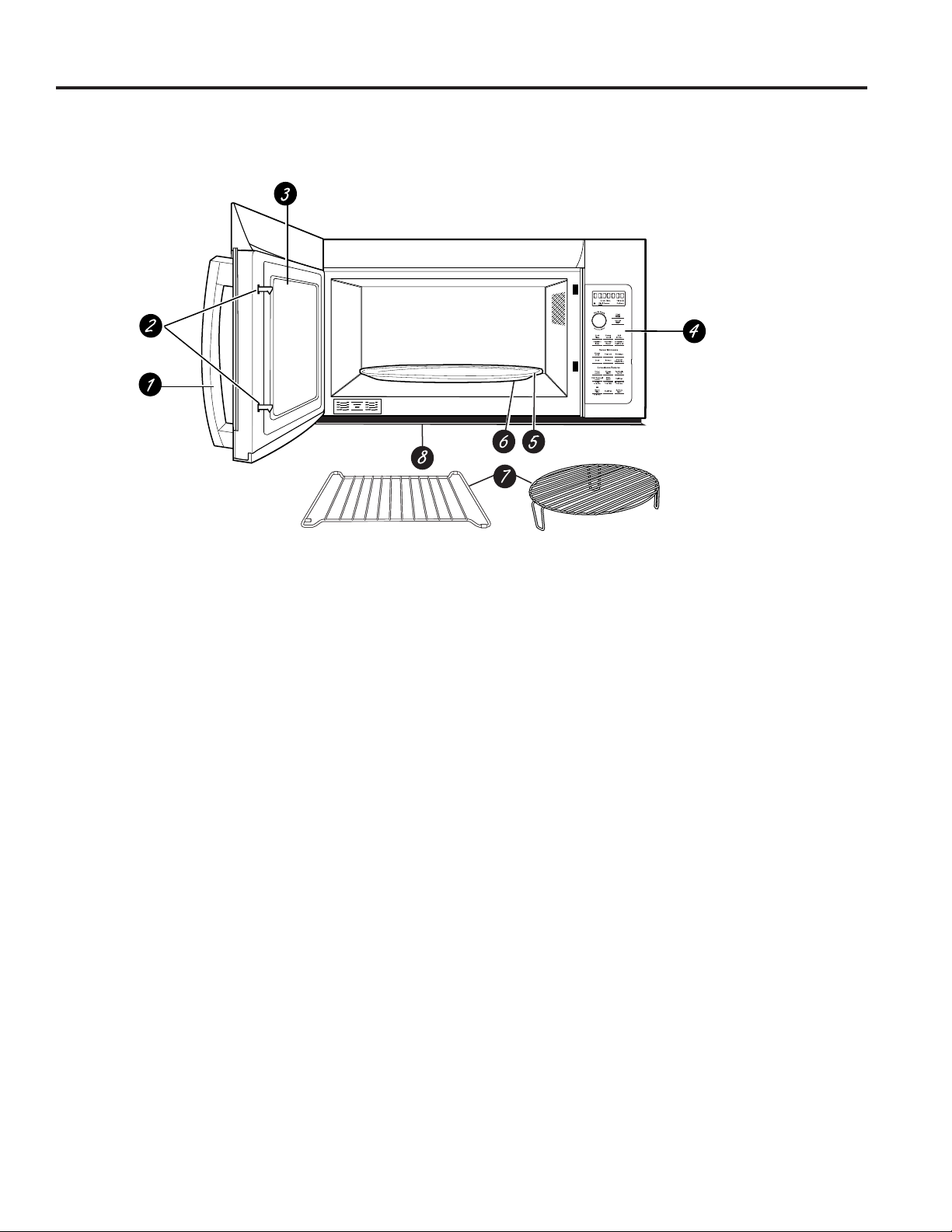
USING YOUR OVEN: Features
1. Door Handle.
2. Door Latches.
3. Window with Metal Shield. Screen allows cooking
to be viewed while keeping microwaves confined in
the oven.
4. Control Panel and Selector Dial.
5. Removable Turntable. Do not operate the oven
in the microwave mode without the turntable and
turntable support seated and in place.
6. Removable Turntable Support. Do not operate
the oven in the microwave mode without the
turntable and turntable support seated and in place.
7. Shelves. Use with Convection Bake, Convection
Roast or Combination Fast Bake. (Do not use
when microwave cooking.)
For best results, use one shelf in the lower
position and leave at least a 1-inch gap between
the cooking dish and the sides of the oven. For
two-level Baking or Fast Baking use both shelves.
8 Deflector. Provides robustness from cooktop heat.
Do not remove.
Throughout this manual, features and appearance may vary from your model.
849-7000085 Rev. 0
Controls
USING THE OVEN: Controls
My Cycle
Mute
Microwave Cooking Time and Auto Features
Press Turn and push dial to enter
Cook Time Amount of cooking time
Press once (Cook Time I) to
microwave any time between
15 seconds and 99 minutes.
Press twice (Cook Time II) to
add a 2nd microwave cooking
stage.
Mircrowave Express cook/
Add 30 sec. Starts immediately!
Defrost
Press once (Weight Defrost) Food weight up to six pound
Press twice (Timer Defrost) Amount of defrosting time
Power Level Power level 1–10
Sensor Features
Press Turn and push
dial to enter Option
Steam Cook Food type
Popcorn Starts immediately!
Beverage Starts immediately!
Reheat Food type
Cook Food type
Convection Baking or Convection Roasting
Press Turn and push dial to enter
Convection Bake or Oven temperature and cook time
Convection Roast
Combination Fast Cooking
Press Turn and push dial to enter
Combination Fast Cook Oven temperature and cook time
YoucancookbyMicrowave,ConvectionBake,ConvectionRoastorCombinationFastBake.Keephot,cooked
foods at serving temperature with the Warm feature.
49-7000085 Rev. 0 9
Combination Fast Cooking
Your oven also offers the option of Combination Fast Cook, using microwave energy along with convection cooking.
You cook with speed and accuracy, while browning and crisping to perfection. .
Cooking Method
Microwave energy and convection
heat combine to cook foods up
to 25% faster than regular ovens,
while browning and sealing in
juices.
Heat Source
Microwave energy and circulating
heated air.
Heat Conduction
Food heats from instant energy from penetration and
heat conducted from outside
of food.
Benefits
Shortened
cooking time from
microwave energy, plus
browning and crisping from
convection heat.
Options
USING THE OVEN: Options
Microwave Cooking
Your oven uses microwave energy to cook by a set time or weight, or automatically by sensor.
Sensor microwave works by detecting the increasing humidity released during cooking. The oven automatically
adjusts the cooking time to various types and amounts of food.
Cooking Method
Microwave energy is distributed evenly
throughout the oven for thorough, fast
cooking of food.
Heat Source
Microwave energy.
Heat Conduction
Heat produced within food by
instant energy penetration.
Benefits
Fast, high efficiency cooking.
Oven and surroundings do not get hot. Easy clean-up.
Always use the shelf with Fast
Bake. For best results, use one
shelf in the lower position.
or
Do not use the
shelves when
microwave cooking.
Convection Baking and Convection Roasting
During baking or roasting, a heating element is used to raise the temperature of the air inside the oven. Any oven
temperature from 225°F. to 425°F. may be programmed. A fan gently circulates this heated air throughout the oven,
over and around the food, producing golden brown exteriors and rich moist interiors. This circulation of heated air is
called convection.
Because the heated air is kept constantly moving, not permitting a layer of cooler air to develop around the food,
some foods cook faster than in regular oven cooking.
Cooking Method
Hot air circulates around food to
produce browned exteriors and
seal in juices.
Heat Source
Circulating heated air
(Convection).
Heat Conduction
Heat conducted from
outside of food to inside.
Benefits
Aids in browning and seals
in flavor. Cooks some foods
faster than regular ovens. Always use the shelf when
baking. For best results, use
one shelf in the lower position.
or
10 49-7000085 Rev. 0
Time and Auto Microwave Features
USING THE OVEN: Time and Auto Microwave Features
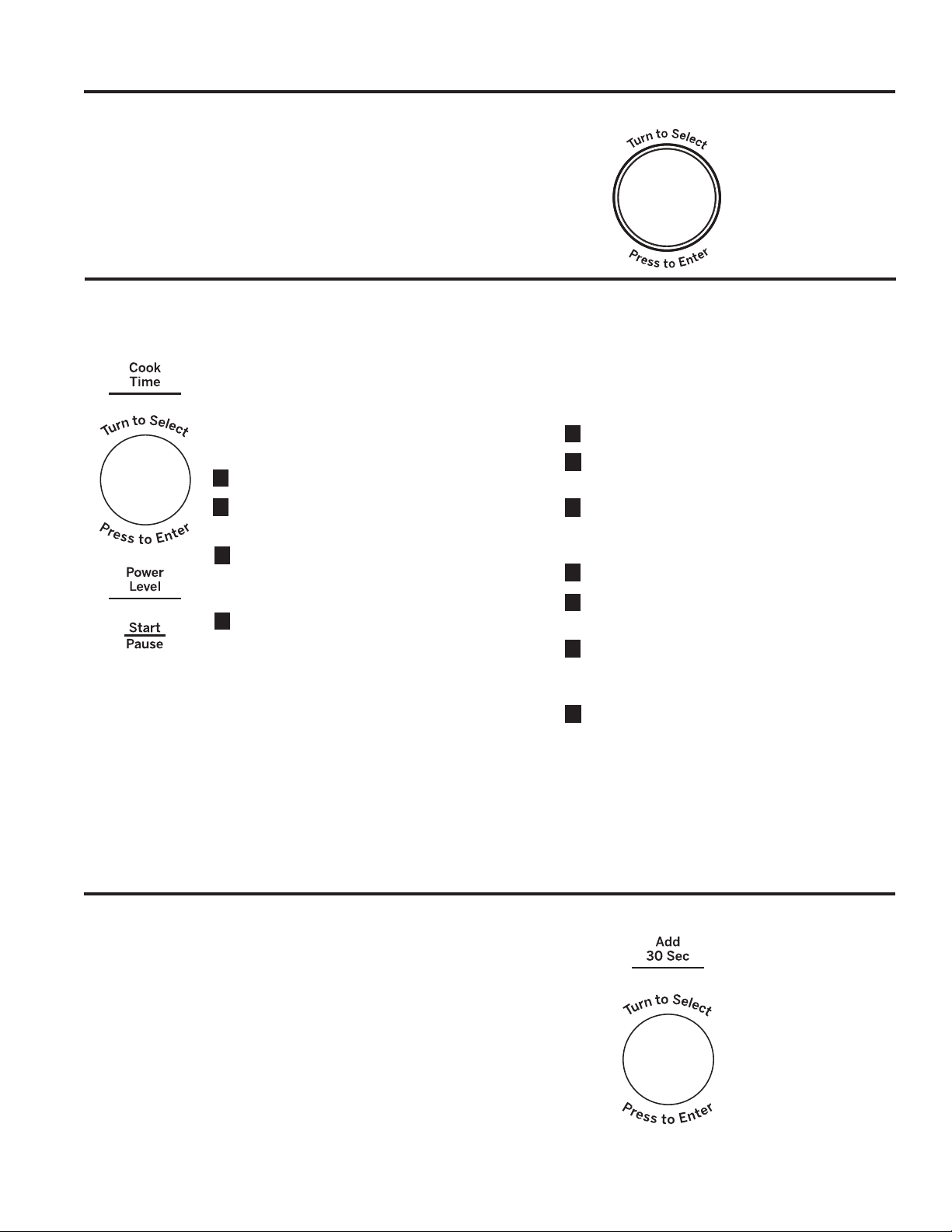
Using the Dial
You can make selections on the oven by turning the dial
and pressing it to enter the selection.
Pressing the dial can also be used in place of the Start/
Pausebuttonforquickerprogrammingoftheoven.
Cook Time
(Do not use the shelves when microwave cooking.)
Cook Time I
Allows you to microwave for any time between
15 seconds and 99 minutes.
Power level 10 (High) is automatically set, but
you may change it for more flexibility.
1Press the Cook Time button.
2Turn the dial to set the cook time and press
the dial to enter.
3Change power level if you don’t want full
power. (Press Power Level. Turn the dial to
select. Press the dial to enter.)
4Press the dial or the Start/Pause button to
start cooking.
You may open the door during Cook Time to
check the food. Close the door and press the
dial or Start/Pause to resume cooking.
NOTE: You may change the cook time at any
time during cooking by turning the dial. You
may also change the power level by pressing
the Power Level button.
Cook Time II
Lets you change power levels automatically
during cooking. Here’s how to do it:
1Press the Cook Time button.
2Turn the dial to set the first cook time and
press the dial to enter.
3Change the power level if you don’t want full
power. (Press Power Level. Turn the dial to
select. Press the dial to enter.)
4Press the Cook Time button again.
5Turn the dial to set the second cook time
and press the dial to enter.
6Change the power level if you don’t want full
power. (Press Power Level. Turn the dial to
select. Press the dial to enter.)
7Press the dial or the Start/Pause button to
start cooking.
At the end of Cook Time I, Cook Time II
counts down.
NOTE: You may change the cook time at any
time during cooking by turning the dial. You
may also change the power level by pressing
the Power Level button.
Add 30 Sec
Thisisaquickwaytosetandstartcookingin30second
blocks each time the Add 30 Second button is pressed.
The cook time may be changed by turning the dial at any
time during cooking.
The power level will automatically be set at 10 and the
oven will start immediately.
The power level can be changed as time is counting
down. Press the Power Level button, turn the dial and
press to enter.